Ọrọ Iṣaaju
This instruction manual provides essential information for the proper use and maintenance of your AULCMEET RAV435 WW51070 replacement remote control. This remote is designed to be compatible with various Yamaha Home Theater Audio/Video Receiver models, including HTR-2064, YHT-196, HTR2064SZ, NS-B20, NS-C20, and NS-SWP20. Please read this manual thoroughly before operating the remote control.
Ọja Pariview
The AULCMEET RAV435 WW51070 is a direct replacement remote control, offering full functionality for compatible Yamaha home theater systems. It requires no programming or setup, allowing for immediate use upon battery installation.
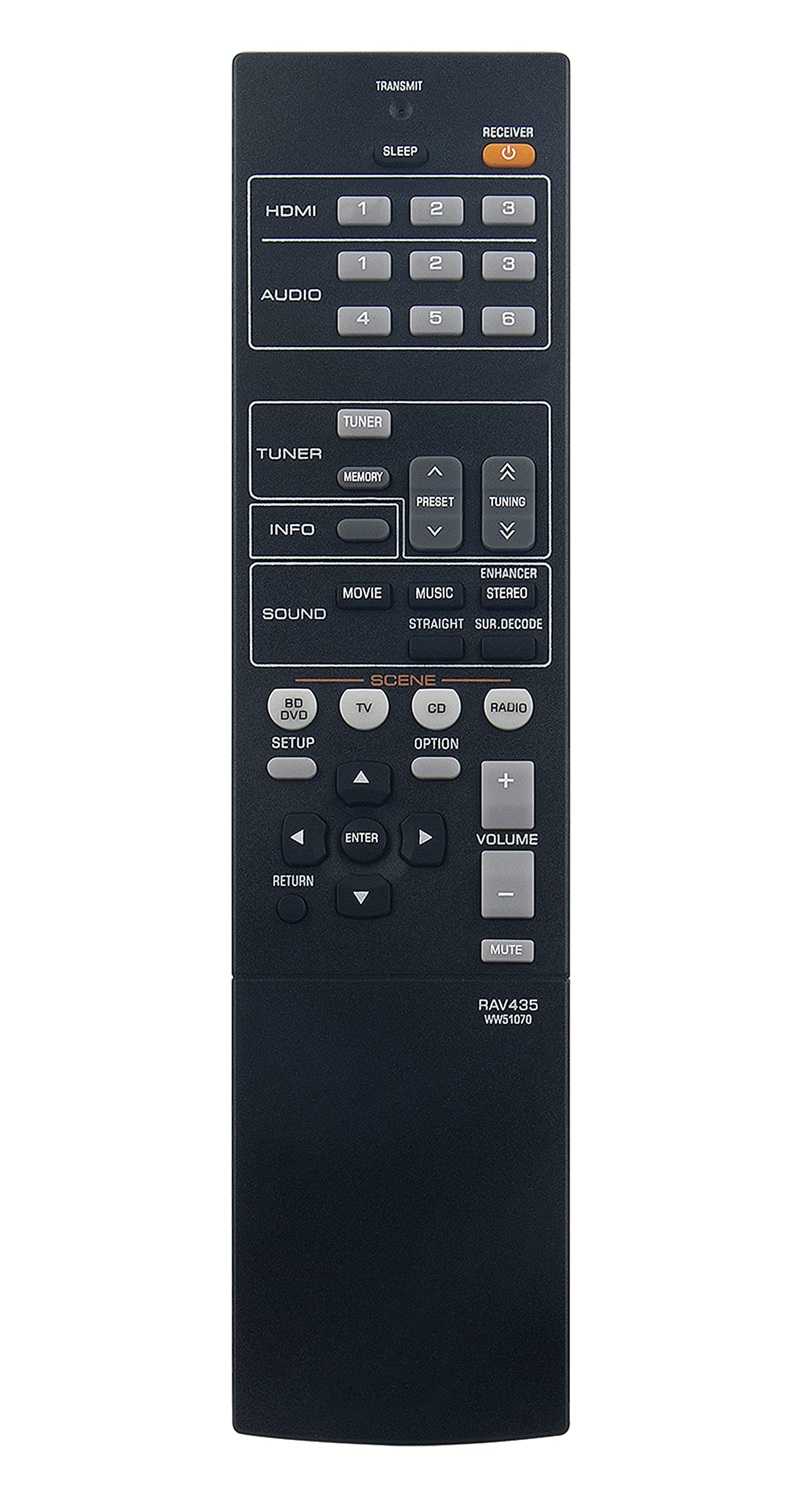
Image: The AULCMEET RAV435 WW51070 replacement remote control, featuring a standard layout with various function buttons for audio/video receiver control.
Ṣeto
Fifi sori batiri
- Wa yara batiri ni ẹhin isakoṣo latọna jijin.
- Gbe ideri batiri naa pada si isalẹ tabi ita lati ṣii.
- Insert two (2) 1.5V AAA batteries, ensuring the positive (+) and negative (-) terminals match the diagrams inside the compartment.
- Pa ideri iyẹwu batiri naa nipa gbigbe pada si aaye titi yoo fi tẹ ni aabo.
Akiyesi: This remote control requires no additional setup or programming. It is ready for use with compatible Yamaha receivers immediately after battery installation.
Awọn ilana Iṣiṣẹ
The RAV435 WW51070 remote control provides access to all standard functions of your compatible Yamaha Home Theater Audio/Video Receiver. Point the remote control directly at the receiver's infrared sensor for optimal performance.
Awọn iṣẹ ti o wọpọ
- Bọtini agbara: Tan olugba naa tan tabi pa.
- Àwọn bọ́tìnì yíyàn tí a fi ń wọlé: Switches between different audio/video input sources (e.g., CD, DVD, TV, HDMI).
- Iwọn didun Soke/Isalẹ: Ṣe atunṣe ipele iwọn didun titunto si.
- Bọtini Mute: Temporarily silences the audio output.
- Navigation Buttons (Arrow Keys, Enter): Used to navigate menus and confirm selections on your receiver's display.
- Awọn bọtini Ipo Ohun: Selects various audio processing modes (e.g., Stereo, Surround, DSP programs).
- Awọn iṣakoso Tuner: For receivers with built-in radio tuners (e.g., AM/FM, preset stations).
Refer to your Yamaha receiver's original manual for specific functions and menu navigation details, as the remote mirrors these controls.
Itoju
Ninu
Lati nu isakoṣo latọna jijin, rọra nu rẹ pẹlu asọ ti o gbẹ. Fun idoti alagidi, die-die dampen the cloth with water or a mild, non-abrasive cleaner. Avoid using harsh chemicals, solvents, or abrasive materials, as these can damage the remote's surface or internal components.
Batiri Rirọpo
Replace batteries when the remote's range decreases significantly or if it stops responding. Always replace both batteries at the same time with new 1.5V AAA batteries. Do not mix old and new batteries, or different types of batteries. Remove batteries if the remote will not be used for an extended period to prevent leakage.
Laasigbotitusita
| Isoro | Owun to le Fa | Ojutu |
|---|---|---|
| Latọna jijin ko dahun. | Awọn batiri ti o ku tabi ti ko tọ fi sii. | Rọpo awọn batiri pẹlu awọn batiri AAA 1.5V tuntun, ki o rii daju pe o peye polarity. |
| Latọna jijin ni ibiti kukuru tabi idahun lainidii. | Weak batteries; Obstruction between remote and receiver; Remote not pointed correctly. | Replace batteries. Ensure a clear line of sight to the receiver's IR sensor. Point the remote directly at the receiver. |
| Àwọn iṣẹ́ kan kò ṣiṣẹ́. | Receiver is not compatible with that specific function; Remote is faulty. | Verify the function exists on your Yamaha receiver model. If other functions work, the remote may be faulty and require replacement. |
Awọn pato
- Nọmba awoṣe: RAV435 WW51070
- Brand: AULCMEET
- Awọn ẹrọ ibaramu: Yamaha Home Theater Audio/Video Receivers (HTR-2064, YHT-196, HTR2064SZ, NS-B20, NS-C20, NS-SWP20)
- Orisun Agbara: Batiri AAA 2 x 1.5V (kò sí nínú rẹ̀)
- Awọn iwọn ọja: 8.1 x 2 x 0.7 inches (isunmọ)
- Ìwọ̀n Nkan: 2.92 ounces (approximately)
- Àwọ̀: Dudu
- Ẹya Pataki: Apẹrẹ ergonomic
Atilẹyin ọja ati Support
For information regarding warranty coverage or technical support, please refer to the retailer or the AULCMEET manufacturer's official webojula. Tọju iwe-ẹri rira rẹ bi ẹri rira fun eyikeyi awọn ibeere atilẹyin ọja.