Ọrọ Iṣaaju
This user manual provides comprehensive instructions for the setup, operation, maintenance, and troubleshooting of your UNITED LED24HS82A11 24-inch HD Ready Smart Android TV. Please read this manual thoroughly before using your television to ensure proper and safe operation.
The UNITED LED24HS82A11 is a versatile 24-inch HD Ready Smart TV powered by Android 11, offering a wide range of entertainment options. It features pre-installed applications, built-in Chromecast and Airplay for seamless content streaming, and full internet connectivity via Wi-Fi and Ethernet. It also supports DVB/T2/S2/C, MPEG-4, and HEVC Main 10 for various broadcasting standards.
Alaye Aabo
Nigbagbogbo ṣe akiyesi awọn iṣọra ailewu atẹle lati ṣe idiwọ ina, mọnamọna, tabi ipalara:
- Ma ṣe fi TV han si ojo tabi ọrinrin.
- Maṣe ṣe idiwọ awọn ṣiṣi eefin.
- Rii daju pe okun agbara ko pin tabi rin lori.
- Yọ TV kuro lakoko iji manamana tabi nigbati a ko lo fun igba pipẹ.
- Tọkasi gbogbo iṣẹ si awọn oṣiṣẹ iṣẹ ti o peye.
Ṣeto
1. Ṣíṣí àwọn ẹrù àti fífi sí ipò ìdúró
Carefully remove the TV and all accessories from the packaging. Place the TV face down on a soft, clean surface to prevent screen damage.
Attach the two stand feet to the bottom of the TV using the provided screws. Ensure they are securely fastened.

olusin 1: Apa view of the UNITED LED24HS82A11 TV, illustrating its slim profile and potential port locations.
2. Nsopọ Cables
- Agbara: So okun agbara pọ si titẹ agbara TV ati lẹhinna si iṣan ogiri.
- Antenna/Cable: Connect your antenna or cable TV coaxial cable to the "RF In" port.
- Awọn ẹrọ HDMI: Connect external devices like Blu-ray players, game consoles, or set-top boxes to the HDMI ports.
- Ethernet (Àṣàyàn): For a wired internet connection, connect an Ethernet cable from your router to the TV's LAN port.
3. Oṣo oluṣeto akọkọ
Once powered on, the TV will guide you through the initial setup process. Follow the on-screen prompts to:
- Yan ede ti o fẹ.
- Sopọ̀ mọ́ nẹ́tíwọ́ọ̀kì Wi-Fi rẹ (tí kìí bá ṣe pé o ń lo Ethernet).
- Sign in with your Google account (optional, but recommended for full Smart TV features).
- Ṣe ìwòran àwọn ikanni TV tó wà (Antenna/Kábùlù).
Ṣiṣẹ
Iṣakoso latọna jijinview
Familiarize yourself with the buttons on the remote control for easy navigation and control of your TV's functions.
Awọn iṣẹ TV ipilẹ
- Titan/Apapa: Tẹ bọtini agbara lori isakoṣo latọna jijin tabi TV.
- Iṣakoso iwọn didun: Lo awọn bọtini iwọn didun Up / Isalẹ.
- Aṣayan ikanni: Lo awọn bọtini ikanni soke/isalẹ tabi paadi nọmba.
- Orisun igbewọle: Press the "Source" or "Input" button to switch between HDMI, TV, and other inputs.
Smart TV Features (Android 11)
Your TV runs on Android 11, providing access to a vast ecosystem of apps and services.

Figure 2: The UNITED LED24HS82A11 TV showcasing its Android TV home screen, featuring popular streaming applications like YouTube, Prime Video, and Netflix.
- Iboju ile: Navigate the home screen to access pre-installed apps (Netflix, YouTube, Prime Video), recommended content, and settings.
- Google Play itaja: Ṣe igbasilẹ awọn ohun elo afikun, awọn ere, ati akoonu lati Ile itaja Google Play.
- Chromecast ti a ṣe sinu: Cast content directly from your compatible smartphone, tablet, or computer to the TV. Look for the Cast icon in supported apps.
- Ofurufu: For Apple devices, use Airplay to stream videos, photos, and music from your iPhone, iPad, or Mac to the TV.
- Asopọmọra Intanẹẹti:
- Wi-Fi: Go to Settings > Network & Internet to connect to your wireless network.
- Àjọlò: If an Ethernet cable is connected, the TV will automatically use the wired connection.
Itoju
Ninu TV
- Yọọ TV nigba gbogbo ṣaaju ṣiṣe mimọ.
- Use a soft, lint-free cloth to gently wipe the screen. For stubborn marks, dampen awọn asọ die-die pẹlu omi tabi a iboju regede pataki apẹrẹ fun Electronics.
- Pa TV nu casing pẹlu asọ ti o gbẹ. Yago fun lilo abrasive ose tabi epo.
Awọn imudojuiwọn Software
Your TV may receive software updates to improve performance and add new features. You can check for updates via Settings > Device Preferences > About > System update.
Laasigbotitusita
Ti o ba pade awọn ọran pẹlu TV rẹ, tọka si awọn iṣoro ti o wọpọ ati awọn ojutu wọnyi:
| Isoro | Owun to le Fa / Solusan |
|---|---|
| Ko si Agbara | Ṣayẹwo boya okun agbara ti wa ni edidi ni aabo sinu TV ati iṣan ogiri. Gbiyanju iṣan ti o yatọ. |
| Ko si Aworan / Ko si Ohun | Ensure the correct input source is selected (e.g., HDMI 1, TV). Check cable connections. For TV channels, perform a channel scan. |
| Ko le Sopọ si Wi-Fi | Jẹrisi ọrọ igbaniwọle Wi-Fi rẹ. Tun olulana rẹ ati TV bẹrẹ. Rii daju pe TV wa laarin ibiti ifihan Wi-Fi rẹ wa. |
| Isakoṣo latọna jijin Ko Ṣiṣẹ | Ṣayẹwo ki o si ropo awọn batiri. Rii daju pe ko si awọn idena laarin isakoṣo latọna jijin ati sensọ IR ti TV. |
| Awọn ohun elo kii ṣe ikojọpọ / Iṣẹ ṣiṣe ti o lọra | Check your internet connection speed. Clear app cache (Settings > Apps > [App Name] > Clear cache). Restart the TV. |
Awọn pato
Below are the technical specifications for the UNITED LED24HS82A11 TV:
| Ẹya ara ẹrọ | Sipesifikesonu |
|---|---|
| Brand | United |
| Nọmba awoṣe | LED24HS82A11 |
| Iwon iboju | 24 inches |
| Ifihan ọna ẹrọ | LED |
| Ipinnu | 768p (1366 x 768 awọn piksẹli) |
| Oṣuwọn sọtun | 60 Hz |
| Eto isesise | Android 11 |
| Asopọmọra | Wi-Fi, Ethernet, HDMI, RF, USB |
| Pataki Awọn ẹya ara ẹrọ | Flat Screen, Chromecast Built-in, Airplay, Pre-installed Apps (Netflix, YouTube, Prime Video) |
| Apakan Ipin | 16:9 |
| Awọn iwọn Ọja (L x W x H) | 12D x 60.5W x 43.2H |
| Awọn irinše to wa | 1 mini AV adapter cable, 1 remote control with 2 AAA 1.5V batteries |
| Agbara Agbara Kilasi | F |
| Lilo Agbara (SDR) | 21.0 W |
| Lilo Agbara (HDR) | 21.0 W |
| Lilo Agbara (Iduro-ṣinṣin) | 0.3 W |

Figure 3: The energy efficiency label for the UNITED LED24HS82A11 TV, indicating an 'F' energy class rating and 21 kWh per 1000 hours of operation.
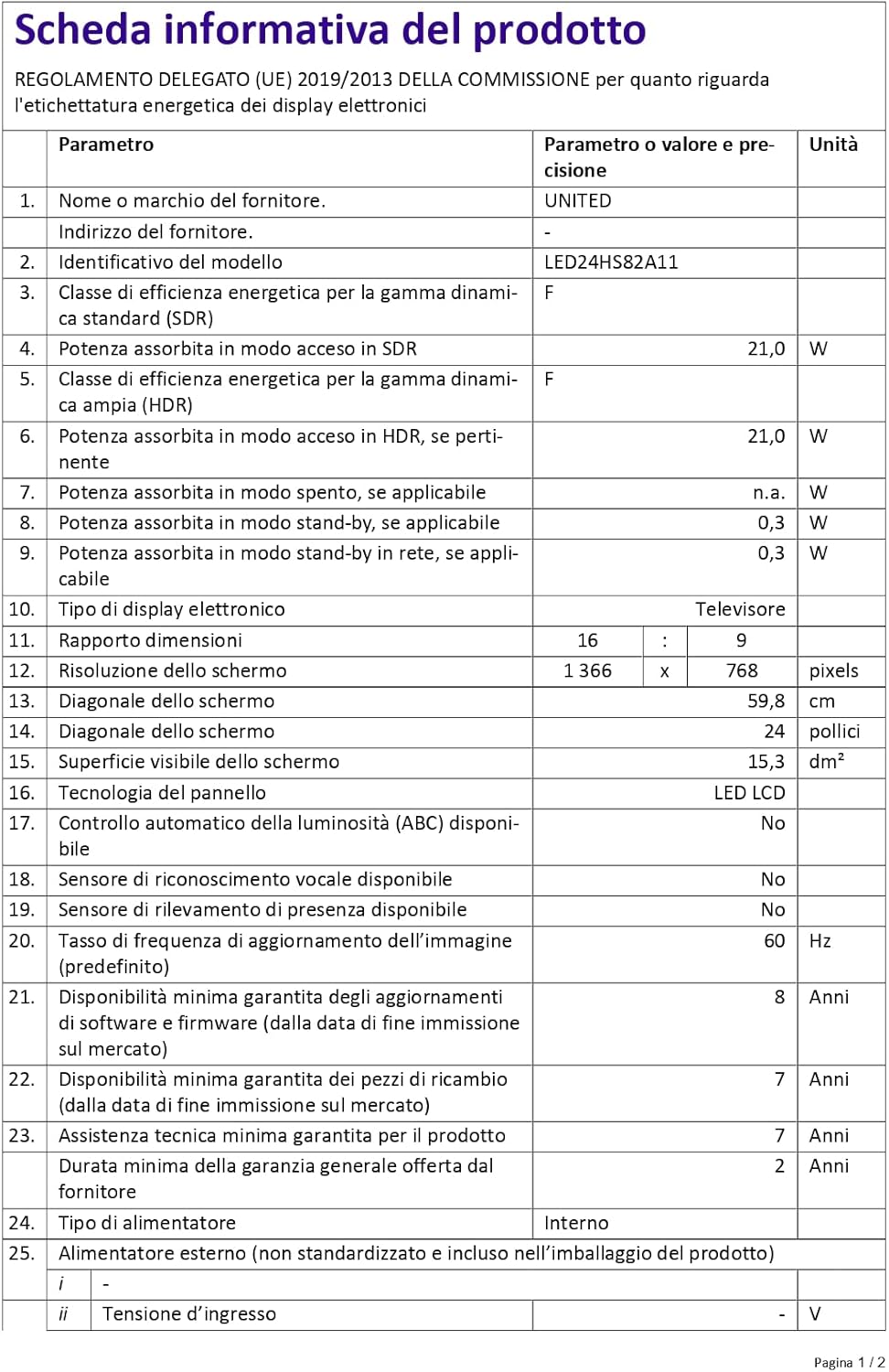
Figure 4: A detailed product information sheet for the UNITED LED24HS82A11 TV, providing comprehensive technical specifications and compliance details.
For more detailed information, please refer to the official EPREL database: https://eprel.ec.europa.eu/qr/1087921
Atilẹyin ọja ati Support
Your UNITED LED24HS82A11 TV comes with the following support and warranty provisions:
- Minimum General Warranty: ọdun meji 2
- Technical Assistance Availability: ọdun meji 7
- Awọn imudojuiwọn sọfitiwia Ṣe iṣeduro Titi: 8 Years from market placement date
- Wiwa Awọn apakan apoju: 7 Years from market placement date
For technical support or warranty claims, please contact your retailer or the manufacturer's authorized service center. Keep your proof of purchase for warranty validation.


