1. Ifihan
This manual provides instructions for the safe and effective use of your NEXTORCH P84 Rechargeable Multi-Light Source LED Flashlight. The P84 is a high-performance, compact, and durable flashlight designed for various applications, including law enforcement, outdoor activities, and general utility. It features multiple light sources, including a powerful white LED and integrated red and blue warning lights, along with a Type-C USB rechargeable battery.
Jọwọ ka iwe afọwọkọ yii daradara ṣaaju ṣiṣiṣẹ ẹrọ naa ki o da duro fun itọkasi ọjọ iwaju.

2. Alaye Aabo
Ṣe akiyesi awọn iṣọra ailewu wọnyi lati yago fun ipalara tabi ibajẹ si ẹrọ naa:
- Do not shine the flashlight directly into eyes. The high intensity light can cause temporary vision impairment or permanent eye damage.
- Jeki kuro ni arọwọto awọn ọmọde.
- Do not disassemble the flashlight head or body. This may damage the device and void the warranty.
- Yago fun ṣiṣafihan ina filaṣi si awọn iwọn otutu to gaju tabi imọlẹ orun taara fun awọn akoko pipẹ.
- Use only the specified battery type and charging method. Incorrect battery usage or charging can lead to fire, explosion, or leakage.
- The flashlight may become warm during extended use, especially on high output modes. This is normal.
- The red and blue warning lights are typically for law enforcement use. Exercise caution and adhere to local regulations when using these features in public areas.
3. Package Awọn akoonu
Daju pe gbogbo awọn nkan wa ninu apo rẹ:
- NEXTORCH P84 Flashlight
- Iru-C USB Ngba agbara USB
- Okun Ọwọ
- Afowoyi Olumulo (iwe-ipamọ yii)
- 1 x 21700 Lithium-Ion Battery (included inside the flashlight)
4. Eto
4.1 Gbigba agbara akọkọ
Kí o tó lo ó fún ìgbà àkọ́kọ́, gba agbára bátírì iná mànàmáná náà pátápátá.
- Locate the Type-C USB charging port. It is hidden under the head of the flashlight.
- To access the charging port, gently twist the head of the flashlight counter-clockwise until the port is revealed.
- Insert the Type-C USB cable into the flashlight's charging port and connect the other end to a compatible USB power source (e.g., computer, wall adapter).
- The LED power indicator lights will show the charging status. Charging is complete when all indicator lights are solid.
- Once charging is complete, twist the flashlight head clockwise to cover and protect the charging port.

4.2 Attaching the Hand Strap
Attach the included hand strap to the designated loop on the tail cap of the flashlight for secure carrying.
5. Awọn ilana Iṣiṣẹ
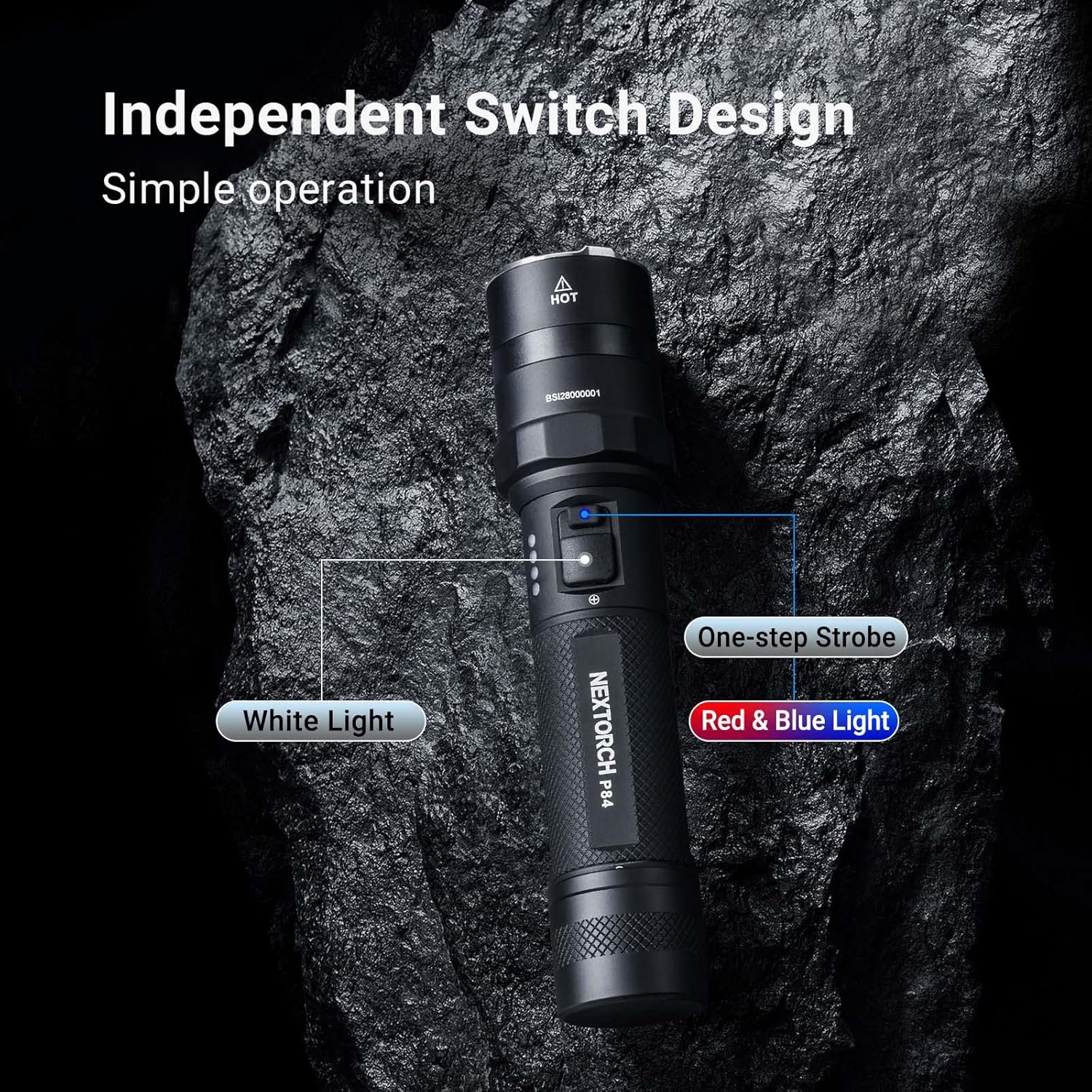
The NEXTORCH P84 features an independent dual-switch design for intuitive control of white light and warning light functions.
5.1 White Light Operation
The main switch controls the white light output:
- Ni akoko kukuru: Lightly press and hold the main switch for momentary high output. Release to turn off.
- Títàn/Pípa nígbà gbogbo: Fully press the main switch until it clicks to turn the flashlight on. Press again to turn off.
- Gígun kẹ̀kẹ́ ní ipò: With the light on, lightly press the main switch to cycle through modes: High (3000 lm) → Medium (600 lm) → Low (36 lm). The flashlight has a preset 600 lumens for the first bright mode when turned on for duty applications.
- Ẹ̀ka: Double-click the main switch rapidly to activate strobe mode. Lightly press to return to the previous mode.
5.2 Red & Blue Warning Light Operation
The secondary switch controls the red and blue warning lights:
- Activate Warning Lights: Press the secondary switch to activate the warning light module.
- Gígun kẹ̀kẹ́ ní ipò: With the warning lights on, press the secondary switch to cycle through the five available modes:
- Red & Blue Strobe (360° omnidirectional)
- Red Flash (fixed frequency for signaling)
- Blue Flash (fixed frequency for signaling)
- Constant Red Light (comfortable night vision, anti-mosquito, S.O.S. warning)
- Constant Blue Light (short wavelength, high intensity for patrol, tracking, marker signals)
- Turn Off Warning Lights: Press and hold the secondary switch for approximately 1 second to turn off the warning lights.


5.3 Atọka Ipele Batiri
The LED indicators on the side of the flashlight display the remaining battery power. Monitor these indicators to know when recharging is necessary.
6. Itọju
- Ninu: Nu ara filaṣi mọ pẹlu asọ, damp asọ. Ma ṣe lo abrasive ose tabi epo.
- O-Oruka: Periodically inspect the O-rings for wear and tear. Lubricate them with silicone grease to maintain the IPX7 waterproof rating. Replace damaged O-rings promptly.
- Awọn ila: Keep the threads clean and lightly lubricated to ensure smooth operation when accessing the charging port.
- Ibi ipamọ: If storing the flashlight for an extended period, remove the battery or ensure it is partially charged (around 50%) to prolong battery life. Store in a cool, dry place.
7. Laasigbotitusita
| Isoro | Owun to le Fa | Ojutu |
|---|---|---|
| Ina filaṣi ko tan. | Batiri kekere. Loose batiri asopọ. Yipada aṣiṣe. |
Gba agbara si batiri. Ensure the battery is correctly inserted and the tail cap is tightened. Contact customer support if the switch is faulty. |
| Ijade ina jẹ baibai tabi flickers. | Batiri kekere. Ìbáṣepọ̀ tí kò dára láàárín bátìrì àti àwọn ẹ̀rọ ìbánisọ̀rọ̀. |
Gba agbara si batiri. Clean battery contacts and ensure secure connection. |
| Ina ina maa n gbona ju. | Lilo gbooro lori ipo giga. Afẹfẹ ti ko to. |
Reduce output mode. Allow the flashlight to cool down. This is normal for high-lumen flashlights. |
| Gbigba agbara ko ṣiṣẹ. | Charging cable not properly connected. Ibudo gbigba agbara ti dina. Aṣiṣe USB tabi orisun agbara. |
Ensure cable is fully inserted. Ṣayẹwo fun idoti ni ibudo gbigba agbara. Gbiyanju okun USB ti o yatọ tabi orisun agbara. |
If the problem persists, please contact NEXTORCH customer support.
8. Awọn pato
| Ẹya ara ẹrọ | Ẹ̀kúnrẹ́rẹ́ |
|---|---|
| Awoṣe | P84 |
| Ijade Imọlẹ (funfun) | High: 3000 lm, Medium: 600 lm, Low: 36 lm, Momentary On, Strobe |
| Light Output (Warning) | Red & Blue Flash, Red Flash, Blue Flash, Red Light, Blue Light (all 2 lm) |
| Ijinna tan ina | High: 260 m, Medium: 110 m, Low: 28 m |
| Ṣiṣe Aago | High: 2 h 45 min, Medium: 4 h 30 min, Low: 60 h Red & Blue Flash: 180 h, Red Flash: 105 h, Blue Flash: 105 h, Red Light: 50 h, Blue Light: 50 h |
| Atako Ipa | 2 mita |
| Mabomire Rating | IPX7 (1 meter submersible) |
| Agbara | 30 W |
| Awọn iwọn | Length: 160 mm (6.3 inches), Head Diameter: 35 mm (1.38 inches), Body Diameter: 28.5 mm (1.12 inches) |
| Iwọn | 164 g (5.78 oz) (without battery) |
| Ohun elo | Aircraft-grade Aluminum Alloy with Hard Anodized Finish |
| Orisun Imọlẹ | White / Red / Blue Light LEDs |
| Batiri | One 21700 Lithium-Ion Battery (4800mAh) |
| Gbigba agbara Port | Type-C USB (hidden) |

9. Atilẹyin ọja & Atilẹyin
NEXTORCH offers a five-year warranty on all flashlights. This warranty covers manufacturing defects and workmanship under normal use.
For warranty claims, technical support, or any questions regarding your P84 flashlight, please contact NEXTORCH customer service. Refer to the official NEXTORCH webojula fun awọn julọ lọwọlọwọ alaye olubasọrọ.
Online resources and additional information may be available on the NEXTORCH Store on Amazon.


