1. Ifihan
This manual provides essential information for the safe and efficient use of your KERDOM Office Chair Model 931-C. Please read these instructions carefully before assembly and operation. Keep this manual for future reference.

Image 1.1: The KERDOM Office Chair Model 931-C, featuring an orange mesh back and seat with white frame and base, shown in an office setting.
2. Alaye Aabo
- Rii daju pe gbogbo awọn paati ti wa ni ṣinṣin ni aabo ṣaaju lilo.
- Maṣe duro lori alaga.
- Maṣe kọja agbara iwuwo ti o pọju ti 250 poun (113 kg).
- Pa ọwọ ati ika mọ kuro ninu awọn ẹya gbigbe lakoko atunṣe.
- Lo alaga lori ipele ipele kan lati ṣe idiwọ tipping.
3. Package Awọn akoonu
Before assembly, verify that all parts are present. Refer to the included installation manual for a detailed list of components. Typically, the package includes:
- Atẹhin sẹhin
- Timutimu ijoko
- Awọn ihamọra (2)
- Gaasi Gbe Silinda
- Mimọ Star
- Awọn oṣere (5)
- Mechanism Awo
- Hardware (skru, washers, Allen wrench)
4. Apejọ Awọn ilana
For detailed, step-by-step assembly instructions, please refer to the official Installation Manual PDF provided with your purchase. A digital version can be accessed via this link: KERDOM Office Chair Installation Manual (PDF).
General assembly steps typically involve:
- Attach the casters to the star base.
- Fi silinda gbe gaasi sinu aarin ti ipilẹ irawọ.
- Secure the mechanism plate to the underside of the seat cushion.
- So awọn apa mọ́ irọri ijoko naa.
- Connect the backrest to the seat cushion and armrests.
- Gbe ijoko ti o pejọ sori silinda gbigbe gaasi.
Ensure all screws are tightened firmly, but do not overtighten.
5. Awọn ilana Iṣiṣẹ
5.1. Giga tolesese
To adjust the seat height, locate the lever on the right side beneath the seat. While seated, pull the lever up to lower the seat. To raise the seat, stand up and pull the lever up. Release the lever at the desired height to lock it in place.

Image 5.1: The chair features adjustable height, 360-degree rotation, and flexible casters for various floor types.
5.2. Armrest Adjustment (Flip-up Function)
The armrests are designed to flip up 90 degrees. To raise an armrest, simply lift it upwards until it locks into the vertical position. To lower it, pull it down. This feature allows the chair to be stored under a desk, saving space.
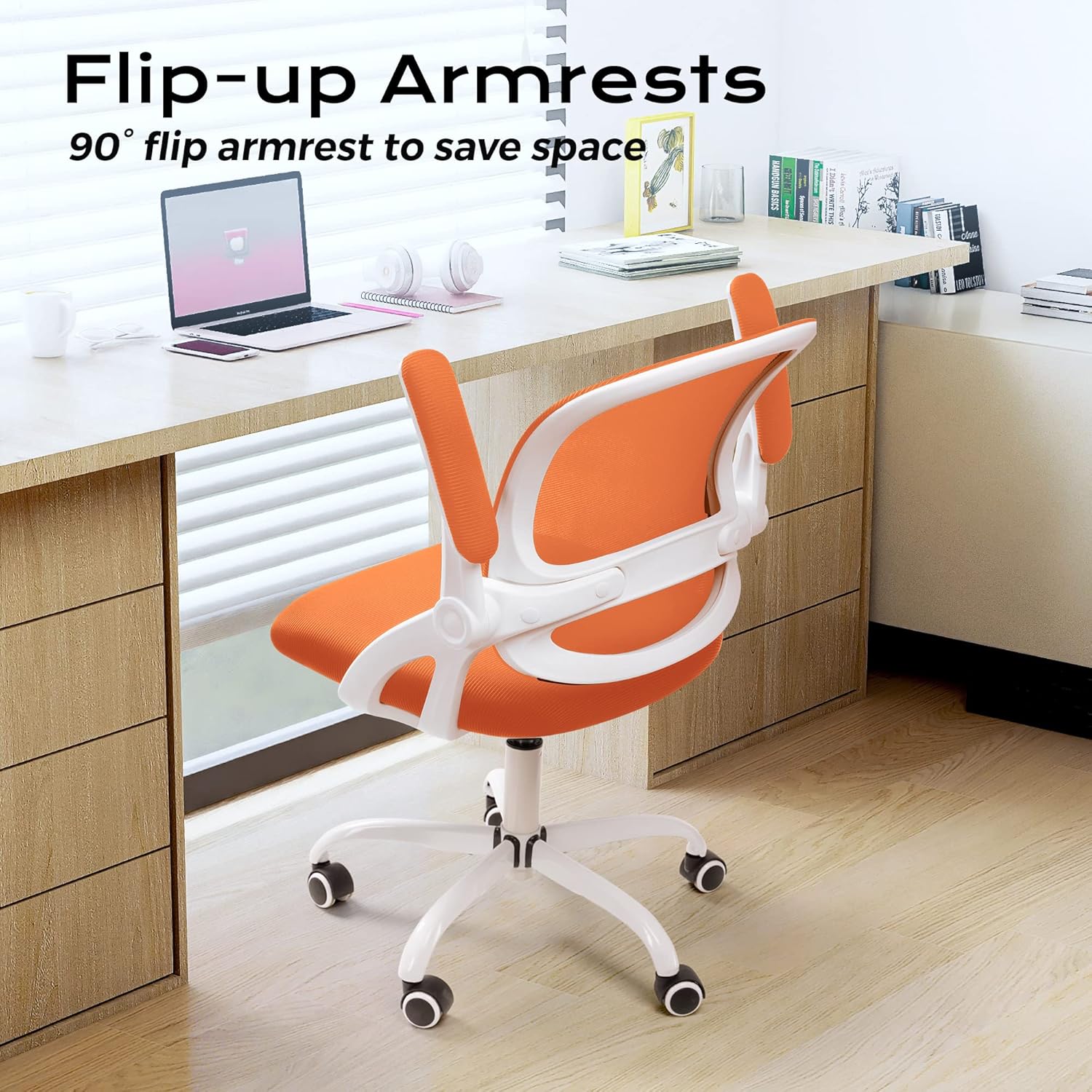
Image 5.2: The flip-up armrests allow the chair to be neatly stored under a desk, optimizing space.
5.3. Tilt/Rocking Function
The chair features a 120-degree tilt tension and rocking function. Locate the lever on the left side beneath the seat.
- Engage/Disengage Rocking: Pull the lever outwards to enable the rocking function. Push it inwards to lock the backrest in an upright position.
- Adjust Tilt Tension: The round knob located at the front center beneath the seat controls the tilt tension. Turn clockwise to tighten the tension (making it harder to recline) and counter-clockwise to loosen it (making it easier to recline).

Image 5.3: Controls for the rocking function and tilt tension adjustment.
5.4. Swivel and Casters
The chair offers a full 360-degree swivel for ease of movement. The flexible casters are designed for smooth rolling on various floor surfaces, including marble, wood, and carpet.

Image 5.4: The S-shaped backrest provides ergonomic support, complemented by a 30-degree back tilt for comfort.
6. Itọju
6.1. Ninu
- Pa nu pẹlu ipolowoamp asọ. Yẹra fun awọn kẹmika lile tabi awọn olutọpa abrasive.
- For the mesh backrest and fabric seat, use a vacuum cleaner with a brush attachment to remove dust and debris.
- Periodically check and clean the casters to ensure smooth movement and prevent floor damage.
6.2. Gbogbogbo Itọju
- Regularly inspect all screws and connections to ensure they remain tight. Retighten as necessary.
- Avoid prolonged exposure to direct sunlight to prevent fading of materials.
- Do not place hot items directly on the chair's surfaces.
7. Laasigbotitusita
- Alaga Squeaks: Check all bolted connections and tighten if loose. A small amount of silicone lubricant can be applied to moving parts if the squeaking persists.
- Iṣoro Iṣatunṣe Giga: Rii daju pe lefa gbigbe gaasi ti ṣiṣẹ ni kikun. Ti ọrọ naa ba tẹsiwaju, silinda gbe gaasi le nilo rirọpo.
- Awọn Casters Ko Yiyi Lara: Remove any hair or debris wrapped around the caster wheels. Clean the wheels and their housings.
- Alaga Rilara Aiduro: Verify that the chair is on a flat surface and all components, especially the base and backrest, are securely attached.
- Seat Cushion Flattening: Over time, seat cushions may compress. While this is normal wear, if it significantly impacts comfort, consider adding a supplementary cushion or contacting customer support for options.
8. Awọn pato

Image 8.1: Detailed product parameters including dimensions and weight capacity.
| Ẹya ara ẹrọ | Sipesifikesonu |
|---|---|
| Brand | KERDOM |
| Orukọ awoṣe | 931-C |
| Awọn iwọn Ọja (D x W x H) | 21"D x 9"W x 20"H (Lapapọ) |
| Chair Height Range | 36.2" - 38.6" (91.9 - 98 cm) |
| Ifẹ Alaga | 23.6" (59.9 cm) |
| Ifẹhinti Backrest | 18.5" (47 cm) |
| Backrest Giga | 18.9" (48 cm) |
| Cushion Width | 19.3" (49 cm) |
| Cushion Length | 19.7" (50 cm) |
| Sisanra timutimu | 2.6" (6.6 cm) |
| Armrest Ipari | 10" (25.4 cm) |
| Iga Armrest | 10.2" (25.9 cm) |
| Ipilẹ Opin | 23.6" (59.9 cm) |
| Iṣeduro iwuwo ti o pọju | 250 iwon (113 kg) |
| Iwọn Nkan | 25 poun (11.3 kg) |
| Ohun elo | Mesh, Sponge |
| Pataki Awọn ẹya ara ẹrọ | Adjustable Height, Flip-up Armrests, Tilting Function, Swivel, Flexible Casters |
| Pada Style | Cross Back (Ergonomic S-shape) |
| Niyanju Lilo | Ọfiisi, Ọfiisi Ile, Yara Ikẹkọ |
9. Atilẹyin ọja ati Onibara Support
For warranty information and any product-related inquiries or issues, please contact KERDOM customer service. Our after-sales team is available to assist you.
Please refer to your purchase documentation or the KERDOM official webAaye fun alaye olubasọrọ tuntun ati awọn alaye atilẹyin ọja.


