Ọrọ Iṣaaju
This manual provides comprehensive instructions for the installation, operation, and maintenance of your Honeywell Keyless Entry Door Lock, Model 8635000. Please read these instructions carefully before installation and use to ensure proper function and security.
Package Awọn akoonu
Daju pe gbogbo awọn paati ti a ṣe akojọ si isalẹ wa ninu package rẹ:
- Ita Apejọ
- Inu Apejọ
- 2 Awọn bọtini titẹ sii
- Kọlu Awo
- Latch (Adjustable)
- Iṣagbesori Awo
- 1" (25mm) Screws - 1 ea
- 3/4" (19mm) Screws - 5 ea
- 7/8" (22mm) Screws - 2 ea
- 5/16" (8mm) Screws - 2 ea

This image displays all components included in the Honeywell Keyless Entry Door Lock package, such as the exterior and interior assemblies, keys, strike plate, latch, mounting plate, and various screws.
Fifi sori ẹrọ ati Eto
The Honeywell Keyless Entry Door Lock is designed for easy installation. A Phillips screwdriver is typically the only tool required. Ensure your door is prepared according to standard deadbolt installation requirements.
- Ṣetan ilẹkun: Ensure the door bore hole and backset are compatible with the lock.
- Fi sori ẹrọ Latch: Fi ìdábùú náà sínú etí ilẹ̀kùn kí o sì fi àwọn skru dè é.
- Fi sori ẹrọ Apejọ Ita: Fi ohun èlò ìkọ̀wé òde sí ẹnu ọ̀nà, kí o sì rí i dájú pé spindle náà kọjá latch náà.
- Fi sori ẹrọ Awo Igbesoke inu inu: So awo fifi sori inu mọ apa ode nipa lilo awọn skru ti a pese.
- So awọn okun waya pọ ki o si fi sori ẹrọ akojọpọ inu: So okùn náà pọ̀ láti inú àkójọpọ̀ òde sí àkójọpọ̀ inú. So àkójọpọ̀ inú mọ́ àwo ìfìsí náà kí o sì so ó mọ́.
- Fi awọn batiri sii: Open the battery cover on the interior assembly and insert 4 AA batteries (not included).
- Ṣe Ilana Gbigbe ilẹkun: The lock features an auto-handing sensor. Follow the instructions in the full manual to ensure the lock correctly identifies if your door is right or left-handed.
A person is shown installing the Honeywell Keyless Entry Door Lock on a white door using a Phillips screwdriver, demonstrating the ease of installation.
This video demonstrates the installation process of the Honeywell Keyless Entry Door Lock, including battery insertion, securing the lock to the door, and highlighting features like the backlit keypad and one-touch locking.
Isẹ
Your Honeywell Keyless Entry Door Lock offers convenient and secure access.
Keyless titẹsi
To unlock the door using a personalized code:
- Touch the keypad to activate the backlit display.
- Enter your personalized 4-8 digit user code.
- Bọ́tìnì náà yóò fà sẹ́yìn, èyí tí yóò jẹ́ kí o ṣí ìlẹ̀kùn náà.

A finger is shown pressing a number on the backlit touchscreen keypad of the Honeywell Keyless Entry Door Lock, illustrating keyless access.
Ọkan-Fọwọkan Tilekun
To lock the door from the exterior:
- Press the lock symbol button on the keypad.
- The deadbolt will extend, securing the door.

A hand is shown pressing the lock button on the Honeywell Keyless Entry Door Lock keypad, demonstrating the one-touch locking feature.
Ipo Isinmi
Activate Vacation Mode to disable all lock functions, conserving battery life and enhancing security when you are away. Refer to the full manual for specific steps to enable and disable this mode.
Awọn koodu olumulo siseto
The lock supports up to 50 unique user codes, allowing multiple individuals to access your property. Each code can be 4 to 8 digits long.
Fifi koodu olumulo kan kun
- Enter the Master Programming Code (default is usually 12345678, but verify in the full manual).
- Press the 'Program' button (often indicated by a gear icon or similar).
- Enter the new 4-8 digit user code you wish to add.
- Press the 'Lock' button to confirm.
Npaarẹ Koodu Olumulo kan
To delete a specific user code, you will typically need to enter the Master Programming Code, followed by a sequence to delete a user code, and then the specific user code to be removed. Consult the full manual for the exact sequence.

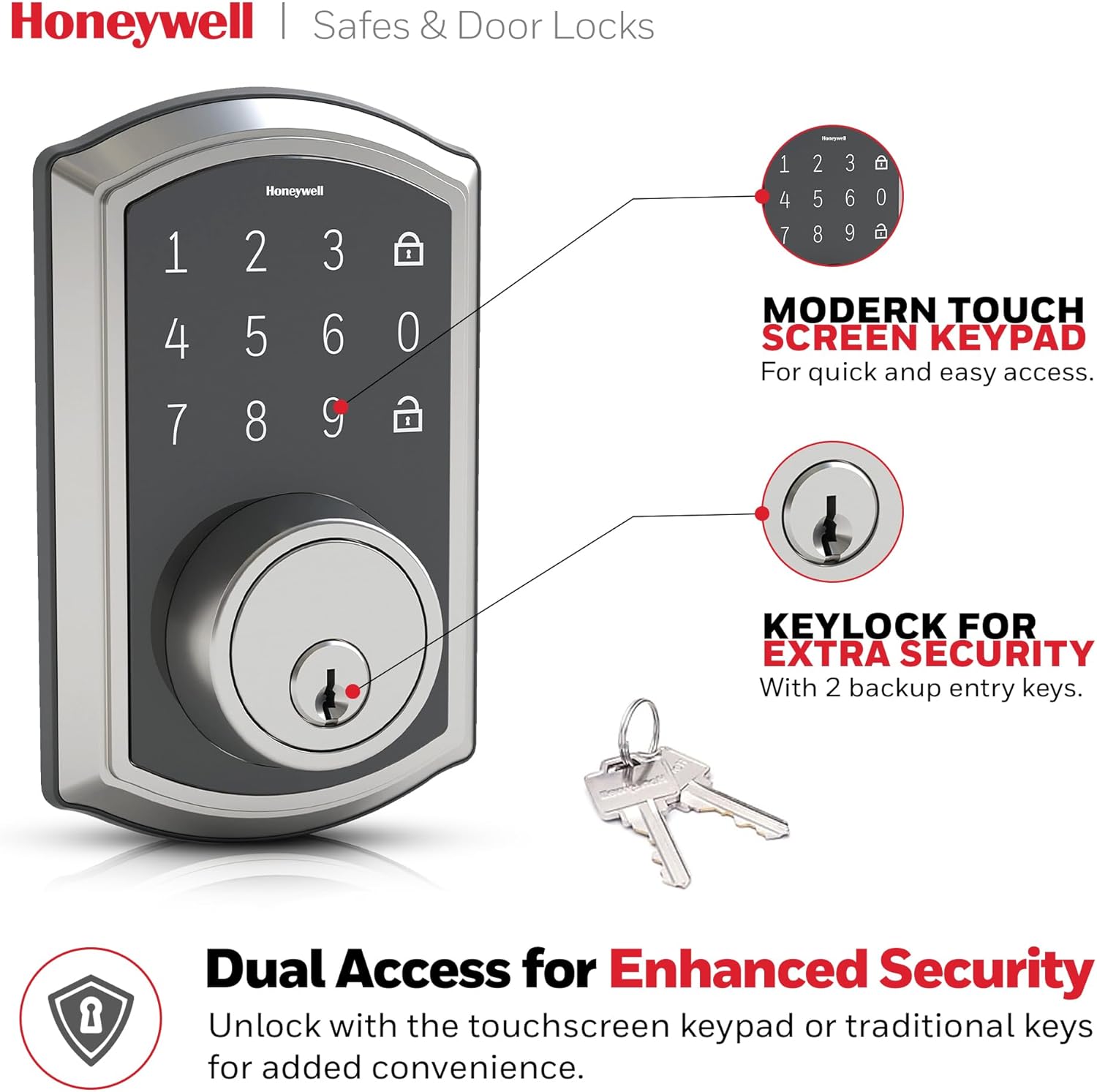
This image shows the Honeywell Keyless Entry Door Lock keypad alongside two physical keys, with text emphasizing the ability to program and delete up to 50 different user codes.
Itoju
Regular maintenance ensures the longevity and optimal performance of your lock.
Batiri Rirọpo
The lock features a low battery indicator. When the batteries are low, the indicator light will flash, or the lock may emit an audible alert. Replace all four AA batteries promptly to avoid loss of function. Use only new, high-quality alkaline batteries.
Ninu
Fọ ìta titiipa naa pẹlu asọ rirọ, damp Aṣọ. Yẹra fún lílo àwọn ohun ìfọṣọ, àwọn ohun olómi, tàbí àwọn ohun ìfọṣọ kẹ́míkà, nítorí pé wọ́n lè ba àwọn ohun èlò ìfọṣọ àti àwọn ẹ̀rọ itanna jẹ́.
Laasigbotitusita
If you encounter issues with your lock, refer to the following common solutions:
- Bọtini foonu Ko Dahun: Check the batteries. If the batteries are dead, the keypad will not illuminate or respond. Replace them.
- Lockout Protection: After multiple incorrect code entries, the lock will enter a lockout mode for a short period to prevent unauthorized access. Wait for the lockout period to expire before trying again.
- Deadbolt Not Extending/Retracting: Ensure the door is properly aligned and not binding. Check for any obstructions in the door frame or strike plate.
- Physical Key Not Working: Ensure you are using the correct backup entry key. If the key still does not work, the cylinder may need inspection by a qualified locksmith.
For more detailed troubleshooting steps, consult the complete user manual or contact customer support.
Awọn pato
| Brand | Honeywell |
| Orukọ awoṣe | 8635000 |
| Pataki Ẹya | Afi ika te |
| Titiipa Iru | Bọtini foonu |
| Awọn Iwọn Nkan (L x W x H) | 9 x 5 x 8 inches |
| Ohun elo | Nickel |
| Àwọ̀ | Didan yinrin Nickel |
| Orisun agbara | Awọn batiri AA 4 (kii ṣe pẹlu) |
| Awọn koodu olumulo | Titi di awọn koodu siseto 50 |
| Ọna Iṣakoso | Touch, Mechanical knob |
Alaye atilẹyin ọja
Honeywell provides the following warranty for this product:
- Limited Lifetime Mechanical and Finish Warranty: Covers defects in material and workmanship of the lock's mechanical components and finish for the lifetime of the product.
- 1-Year Limited Electronic Warranty: Covers defects in the electronic components for one year from the date of purchase.
For full warranty terms and conditions, please refer to the documentation included with your product or visit the official Honeywell webojula.
Onibara Support
If you require further assistance, have questions, or need to report an issue, please contact Honeywell customer support. Contact information can typically be found on the product packaging or the official Honeywell webojula.
Nigbati o ba kan si atilẹyin, jọwọ ni nọmba awoṣe ọja rẹ (8635000) ati ẹri rira ni imurasilẹ wa.