Ọrọ Iṣaaju
This manual provides essential information for the installation, operation, and maintenance of your Swann 1080p HD Security Camera System. This system includes an 8-channel DVR with a 1TB HDD and eight indoor/outdoor wired dome cameras, designed for comprehensive 24/7 home surveillance. Key features include Color Night Vision, True Detect heat and motion sensing, and integrated flashing lights and spotlights for active deterrence. All data and video files are encrypted and securely stored using Amazon Web Services (AWS), ensuring your security and privacy.
Ohun ti o wa ninu Apoti
Ṣọra awọn akoonu inu rẹ ki o rii daju pe gbogbo awọn nkan wa:
- 8 x 1080p SwannForce Dome Cameras
- 1 x 8 Channel DVR with 1TB Hard Drive
- 1 x Okun Ethernet
- 8 x Extension Cables (18m each)
- 1 x HDMI Okun
- Iṣagbesori skru & Plugs
- 1 x Asin
- Power Adapters & Splitters
- Quick Bẹrẹ Itọsọna
- Ilẹ jijin Awọn ohun ilẹmọ

Image: All components included in the Swann 1080p HD Security Camera System package.
Ṣeto
- Ètò Ìgbékalẹ̀ Kámẹ́rà: Identify optimal locations for your 8 dome cameras, considering coverage areas and proximity to power outlets. The cameras are suitable for both indoor and outdoor use.
- Gbé Àwọn Kámẹ́rà Sílẹ̀: Securely mount each camera using the provided screws and plugs. Ensure the camera is positioned to capture the desired view.
- So awọn kamẹra pọ mọ DVR: Use the supplied extension cables to connect each camera to the 8-channel DVR. Ensure all connections are secure.
- So DVR pọ mọ Atẹle: Connect the DVR to a monitor using the HDMI cable.
- Agbara Tan: Connect the power adapters to the DVR and cameras, then plug them into power outlets. The system will initiate.
- Iṣeto akọkọ: Follow the on-screen instructions to complete the initial setup, including setting up network access and user accounts. Refer to the Quick Start Guide for detailed steps.
Awọn ilana Iṣiṣẹ
1. 1080p HD Video Quality
The system captures video in 1080p Full HD, providing clear and detailed footage. This resolution allows for recognition of important details such as license plates, faces, and clothing logos.
2. Awọ Night Vision
The cameras feature Night2Day™ Full Color at Night technology, enabling color video recording in low-light conditions up to 32ft (10m). Standard night vision extends up to 100ft (30m).
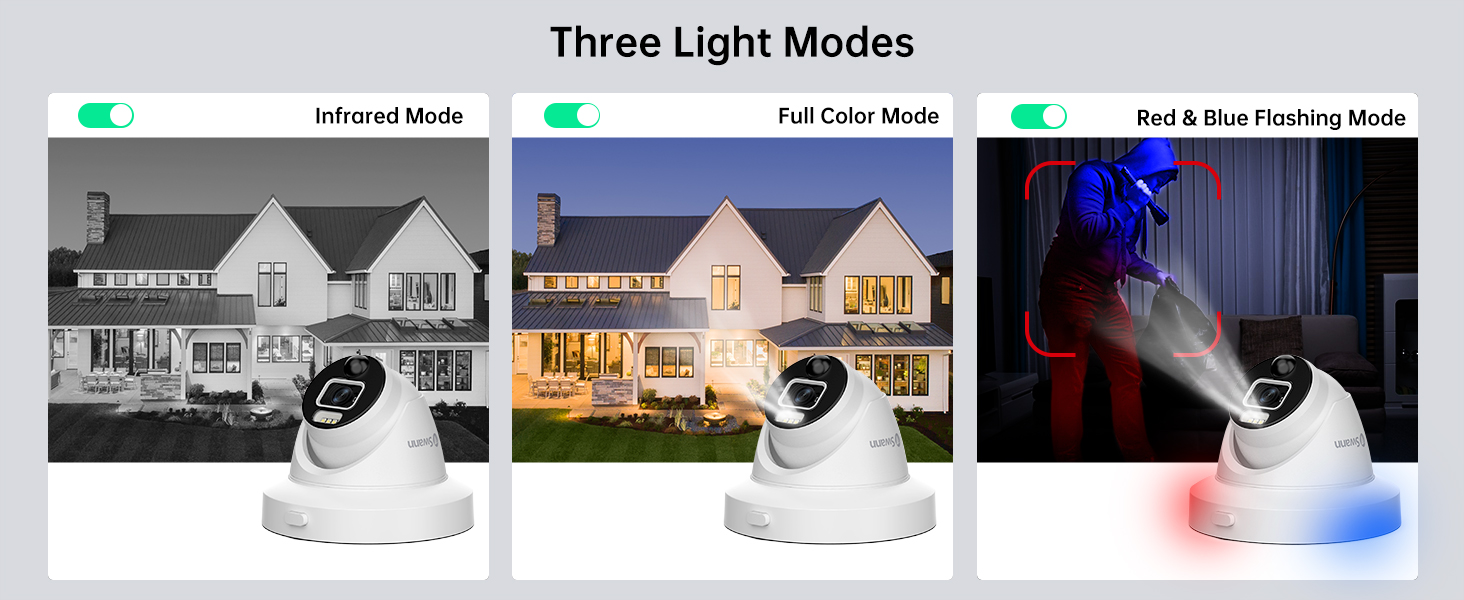
Image: Demonstrates the clarity and color provided by Night2Day™ Full Color at Night technology compared to traditional black and white night vision.
3. True Detect Technology
True Detect heat and motion sensing accurately identifies movement from people and cars, minimizing false alarms triggered by environmental factors like wind or rain. This technology ensures that recordings and alerts are triggered only by relevant activity.
4. Flashing Lights & Spotlights
Upon detection of activity by True Detect, the cameras activate police-style red and blue flashing lights and integrated spotlights. These visual deterrents are designed to scare away potential intruders and provide additional illumination for clearer recording.

Image: A SwannForce camera with red and blue flashing lights actively deterring an intruder, illustrating the system's crime prevention capabilities.
5. 24/7 Surveillance & Storage
The system provides continuous 24/7 surveillance. The included 1TB HDD allows for extensive video storage, ensuring that footage is available when needed. The DVR supports external storage up to 4TB for expanded capacity.

Image: A multi-view display of live camera feeds, demonstrating the comprehensive coverage provided by the 24/7 surveillance system.
6. Remote Access & Mobile Alerts
Access your security system remotely via the Swann Security app on your mobile device. Receive reliable mobile alerts for detected activity, view gbe footage, and manage camera settings from anywhere.

Image: Remote monitoring of security camera feeds on a laptop and smartphone, highlighting the convenience of accessing your system from anywhere.
7. Iṣakoso ohun Integration
The system is compatible with voice assistants such as Hey Google and Alexa, allowing you to view camera feeds on compatible smart displays or TVs using voice commands.
8. Data Security & Privacy
Swann prioritizes your security and privacy. All data and video fileÀwọn s ni a fi ìkọ̀kọ̀ pa mọ́ tí a sì fi pamọ́ ní ààbò ní USA nípa lílo Amazon Web Services (AWS). Swann products and their components are NDAA compliant.

Image: An abstract representation of secure data storage, emphasizing the system's commitment to privacy and data protection.
Official ọja Video
Fidio: Oṣiṣẹ kan ti pariview of the SwannForce Enforcer 1080p Security System, highlighting its key features and crime prevention capabilities.
Itoju
- Ninu igbagbogbo: Awọn lẹnsi kamẹra nu lẹẹkọọkan pẹlu asọ, damp asọ lati rii daju ko didara aworan. Yago fun abrasive ose.
- Ṣayẹwo Awọn isopọ: Ensure all wired connections to the DVR and cameras are secure and free from damage.
- Awọn imudojuiwọn sọfitiwia: Regularly check for and install firmware updates for your DVR and cameras to ensure optimal performance and security.
- Ilera Wakọ lile: Monitor the health of your 1TB HDD through the DVR's settings. Consider backing up important footage lorekore.
- Idaabobo oju ojo: While cameras are IP66 weatherproof, ensure they are not exposed to direct, prolonged water submersion or extreme physical impact.

Image: A close-up of a weatherproof dome camera, emphasizing its durability in various environmental conditions.
Laasigbotitusita
- Ko si Ifihan fidio: Check all cable connections between the camera, DVR, and monitor. Ensure power adapters are securely plugged in.
- Didara Aworan Ko dara: Clean the camera lens. Ensure the camera is properly focused (if adjustable). Check for obstructions in the camera's field of view.
- Awọn Itaniji Iṣipopada eke: Adjust the sensitivity settings for True Detect in the DVR or app. Ensure the detection zones are configured correctly to avoid triggering by irrelevant movement.
- Awọn oran Wiwọle Latọna jijin: Verify your DVR is connected to the internet. Check your network settings and ensure the Swann Security app is updated to the latest version.
- DVR ko gba silẹ: Check the hard drive status in the DVR settings. Ensure there is sufficient storage space and that recording schedules are correctly configured.
Awọn pato
| Brand | Swann |
| Nọmba awoṣe | SODVK-846808DE-US |
| Asopọmọra Technology | Ti firanṣẹ |
| Ipinnu Yaworan fidio | 1080p |
| Nọmba ti awọn ikanni | 8 |
| Agbara Ibi ipamọ Iranti | 1 TB (ti o gbooro si 4 TB) |
| Pataki Awọn ẹya ara ẹrọ | Dual Detection Zone, Motion Sensor, Vehicle Detection, Color Night Vision, Flashing Lights, Spotlights |
| Iyipada oju ojo | IP66 |
| Ibiti Iran Night | Ẹsẹ 100 (mita 30) |
| Color Night Vision Range | Ẹsẹ 32 (mita 10) |
| Iwọn fireemu | 30fps, 15fps |
| Ipo Gbigbasilẹ | Iṣẹlẹ, Afowoyi |
| Viewigun igun | Awọn iwọn 90 |
| Ọja Mefa | 7.67 x 14.76 x 11.6 inches |
| Iwọn Nkan | 22.1 iwon |
Atilẹyin ọja
This Swann Security Camera System comes with a 1-Odun Atilẹyin ọja Limited. For specific terms and conditions, please refer to the warranty documentation included with your product or visit the official Swann webojula.
Atilẹyin
For further assistance, technical support, or to access additional resources, please visit the official Swann support website. You can also find FAQs, software downloads, and contact information for customer service.
Atilẹyin Ayelujara: www.swann.com/us/support


