1. Ifihan
Thank you for choosing the Wicked Audio Growl Bluetooth Speaker. This manual provides essential information for the safe and optimal use of your device. The Growl speaker is designed for portability and durability, featuring IP67 waterproof and dustproof ratings, true wireless stereo pairing, and a built-in power bank function.
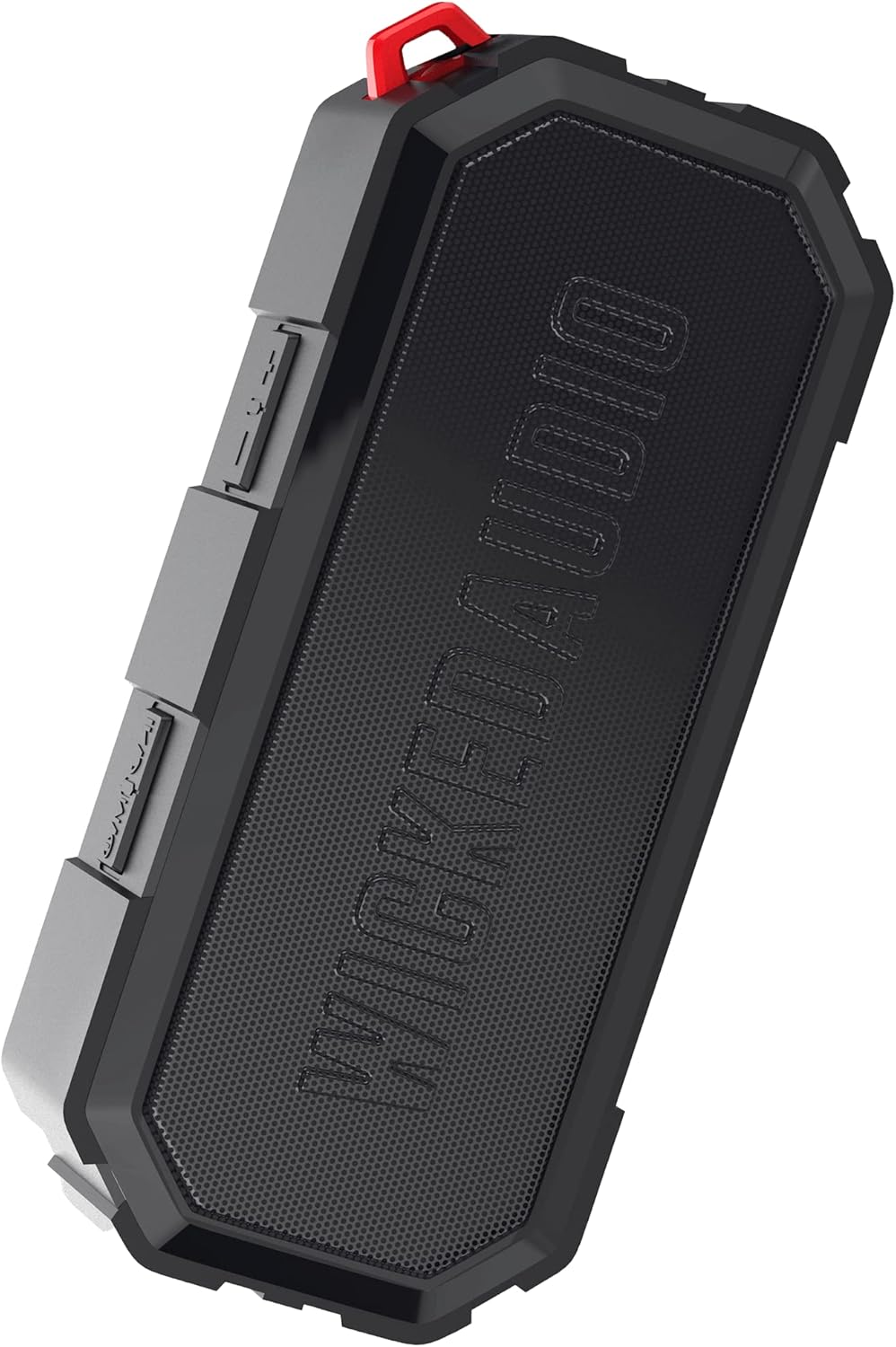
Image 1.1: The Wicked Audio Growl Bluetooth Speaker, showcasing awọn oniwe-iwapọ ati ki o gaungaun oniru.
2. Package Awọn akoonu
Jọwọ ṣayẹwo apoti fun awọn nkan wọnyi:
- Wicked Audio Growl Bluetooth Speaker
- Afowoyi Olumulo (iwe-ipamọ yii)
- USB-C Ngba agbara Cable
- Auxiliary (AUX) Audio Cable
3. Awọn ẹya Ọja
The Wicked Audio Growl speaker offers a range of features designed for an enhanced audio experience:
- IP67 Mabomire & Ko eruku: Provides protection against water immersion and dust ingress, making it suitable for various environments.
- Rugged & Durable Design: Constructed with a durable silicone case and protective covers for buttons and ports.
- True Wireless Stereo (TWS) Linkable Tech: Connect two Growl speakers wirelessly for a stereo sound experience.
- Banki Agbara ti a ṣe sinu: Features a 2600mAh battery that can be used to charge other devices via its USB-A output port.
- Akoko Idaraya: Títí dé wákàtí mẹ́rìndínlógún ti ìgbésí ayé bátìrì lórí agbára kan ṣoṣo.
- Deep Bass & Dynamic Sound: Equipped with dual 52mm drivers for powerful audio with enhanced bass, rich mids, and clear highs.
- Bluetooth 5.0 Asopọmọra: Offers a stable wireless connection up to 32 feet (10 meters).

Image 3.1: Visual representation of the speaker's waterproof, dustproof, and rugged characteristics.

Image 3.2: The Growl speaker highlighting its IP67 waterproof and dustproof rating.

Image 3.3: Key features of the Growl speaker including extended battery, dual drivers, and linkable tech.

Image 3.4: Close-up emphasizing the enhanced bass and dual 52mm drivers for superior sound.
4. Eto
4.1 Gbigba agbara si Agbọrọsọ
Before first use, fully charge your Growl speaker. The speaker has a USB-C charging port located under a protective cover.
- Open the protective cover on the side of the speaker to access the ports.
- So okun gbigba agbara USB-C ti a pese si ibudo USB-C ti agbọrọsọ.
- So opin okun miiran pọ si ohun ti nmu badọgba agbara USB (kii ṣe pẹlu) tabi ibudo USB ti kọnputa kan.
- Ina Atọka gbigba agbara yoo tan imọlẹ. Gbigba agbara ni kikun maa n gba to wakati mẹta.
- Once fully charged, disconnect the cable and securely close the protective cover to maintain IP67 rating.

Image 4.1: Illustration of the speaker's 40-hour battery life and 3-hour charging time.
4.2 Titan / Pa a
To power on or off the speaker, locate the power button on the control panel.
- Agbara Tan: Press and hold the Power button for a few seconds until you hear an audible indication.
- Agbara Pa: Press and hold the Power button again for a few seconds until you hear an audible indication.
4.3 Sisopọ Bluetooth
Connect your Growl speaker to a Bluetooth-enabled device.
- Ensure the speaker is powered on and within 32 feet (10 meters) of your device.
- Agbọ́hùnsọ̀ náà yóò wọ inú ipò ìsopọ̀ láìfọwọ́sí, tí ìmọ́lẹ̀ LED tí ń tàn yanranyanran fi hàn.
- Lori ẹrọ rẹ (foonuiyara, tabulẹti, ati bẹbẹ lọ), lọ si awọn eto Bluetooth ki o mu Bluetooth ṣiṣẹ.
- Wa fun available devices and select "Wicked Growl" from the list.
- Once connected, the LED indicator will stop flashing and remain solid, and you will hear a confirmation sound.
4.4 Otitọ Sitẹrio Alailowaya (TWS) Sisọpọ
For an immersive stereo experience, you can pair two Growl speakers together.
- Ensure both Growl speakers are powered on and not connected to any other Bluetooth device.
- On one speaker (this will be your primary speaker), press and hold the TWS pairing button (refer to button layout in section 5.1).
- Agbọrọsọ akọkọ yoo wa agbọrọsọ keji.
- Once connected, both speakers will emit a confirmation sound, and their LED indicators will synchronize.
- Bayi, so ẹrọ rẹ pọ si agbọrọsọ akọkọ nipasẹ Bluetooth gẹgẹbi a ti ṣalaye ni apakan 4.3. Audio yoo ṣiṣẹ nipasẹ awọn agbohunsoke mejeeji ni sitẹrio.

Image 4.2: Diagram illustrating the process of wirelessly pairing two Growl speakers for dual audio.
4.5 Iranlọwọ (AUX) Input
You can connect devices without Bluetooth using the 3.5mm AUX input.
- Open the protective cover on the side of the speaker.
- Connect one end of the provided 3.5mm AUX cable to the speaker's AUX port.
- So ìpẹ̀kun kejì mọ́ ibi tí a ti ń gbé ohùn sókè tàbí ibi tí a ti ń gbọ́ ohùn ẹ̀rọ rẹ.
- Agbọrọsọ yoo yipada laifọwọyi si ipo AUX.
5. Awọn ilana Iṣiṣẹ
5.1 bọtini Awọn iṣẹ
The Growl speaker features intuitive controls on its top panel:
| Bọtini | Iṣẹ (Tẹ Kukuru) | Iṣẹ (Tẹ pipẹ) |
|---|---|---|
| Bọtini agbara | N/A | Titan / Paa |
| Bọtini Muu ṣiṣẹ/Daduro | Mu orin ṣiṣẹ / sinmi; Dahun/Pari ipe | Kọ ipe |
| Iwọn didun soke (+) | Mu iwọn didun pọ si | Next Track |
| Iwọn didun isalẹ (-) | Din iwọn didun silẹ | Ti tẹlẹ Track |
| Bọtini TWS | N/A | Pilẹṣẹ TWS Sisopọ |
5.2 Lilo bi Bank Power
The Growl speaker can provide a power boost to your other devices.
- Open the protective cover on the side of the speaker.
- Connect your device's charging cable (USB-A end) to the speaker's USB-A output port.
- Connect the other end of your device's charging cable to your device.
- The speaker will begin charging your device. Note that using the power bank feature will reduce the speaker's playback time.
- Once charging is complete or you wish to stop, disconnect the cable and securely close the protective cover.

Image 5.1: The speaker functioning as a backup power bank for a smartphone.

Image 5.2: The Growl speaker connected via USB to charge a smartphone, demonstrating its power bank capability.
6. Itọju
Proper care will ensure the longevity of your Wicked Audio Growl speaker.
- Ninu: Nu agbọrọsọ nu pẹlu asọ, damp cloth. Do not use abrasive cleaners or solvents. Ensure all port covers are securely closed before cleaning with water.
- Ifihan omi: While IP67 rated, avoid prolonged submersion or exposure to high-pressure water jets. Always ensure port covers are sealed when near water.
- Ibi ipamọ: Tọju agbohunsoke ni itura, ibi gbigbẹ kuro lati awọn iwọn otutu ti o pọju ati imọlẹ orun taara.
- Itọju Batiri: Fún ìgbà tí batiri bá pẹ́ tó, má ṣe jẹ́ kí batiri náà máa jáde dáadáa nígbà gbogbo. Gba agbára sí agbọ́hùnsọ̀pọ̀ déédéé, kódà bí a kò bá lò ó fún ìgbà pípẹ́.
7. Laasigbotitusita
If you encounter issues with your Growl speaker, refer to the following common solutions:
| Isoro | Owun to le Solusan |
|---|---|
| Agbọrọsọ ko ni agbara lori | Rí i dájú pé batiri náà ti gba agbára. So mọ́ orísun agbára nípa lílo okùn USB-C. |
| Ko le so pọ nipasẹ Bluetooth | Ensure the speaker is in pairing mode (flashing LED). Turn off and on Bluetooth on your device. Forget "Wicked Growl" from your device's Bluetooth list and try pairing again. Ensure no other devices are connected to the speaker. |
| Ko si ohun | Check volume levels on both the speaker and your connected device. Ensure the correct input mode (Bluetooth or AUX) is selected. If using AUX, ensure the cable is fully inserted. |
| Didara ohun ko dara | Move the speaker closer to your Bluetooth device to reduce interference. Ensure the speaker is not obstructed. Check the audio source quality. |
| Sisopọ TWS kuna | Ensure both speakers are powered on and not connected to any other Bluetooth device. Try resetting both speakers by powering them off and on, then re-attempt TWS pairing. |
| Bank agbara ko gba agbara ẹrọ | Ensure the speaker has sufficient charge. Check the USB cable and connection. Some devices may require more power than the speaker can provide. |
8. Awọn pato
Detailed technical specifications for the Wicked Audio Growl Bluetooth Speaker:
| Ẹya ara ẹrọ | Sipesifikesonu |
|---|---|
| Orukọ awoṣe | Dagba |
| Nọmba Awoṣe Nkan | WIBTS70 |
| Ẹya Bluetooth | 5.0 |
| Alailowaya Ibiti | Titi de 32 ẹsẹ (10 mita) |
| Iwọn Agbọrọsọ | Meji 52mm Awakọ |
| Agbọrọsọ Agbara Ijade ti o pọju | 5 Wattis |
| Idahun Igbohunsafẹfẹ | 20000 Hz |
| Ipalara | 16 ohm |
| Batiri Iru | 1 Litiumu Ion batiri |
| Agbara Batiri | 2600 mAh |
| Akoko ere | Titi di wakati 40 |
| Akoko gbigba agbara | Isunmọ. wakati meji 3 |
| Gbigba agbara Port | USB-C |
| Power Bank o wu | USB-A |
| Mabomire Rating | IP67 |
| Ọja Mefa | 20.5D x 5.5W x 15H |
| Iwọn | 680 g |
| Àwọ̀ | Dudu |

Image 8.1: Visual summary of the speaker's sleek design, durability, and key specifications.
9. Atilẹyin ọja ati Support
Wicked Audio provides a 12-osu lopin atilẹyin ọja for the Growl Bluetooth Speaker from the date of purchase. This warranty covers manufacturing defects and ensures your product performs as expected under normal use.
For warranty claims, technical support, or any inquiries regarding your Wicked Audio Growl speaker, please contact Wicked Audio customer service through their official webaaye tabi alaye olubasọrọ ti a pese pẹlu iwe rira rẹ.
Jọwọ ṣe idaduro ẹri rira rẹ fun iṣẹ atilẹyin ọja.


