1. Ifihan
Thank you for choosing the MLOVE BV230 Portable Bluetooth Speaker. This manual provides essential information for setting up, operating, and maintaining your speaker. The BV230 is designed for portability, delivering high-quality audio with enhanced bass, and features IP56 dust and water resistance, making it suitable for various environments.
2. Package Awọn akoonu
Jọwọ rii daju pe gbogbo awọn nkan wa ninu package:
- 1 x MLOVE BV230 Bluetooth Speaker
- 1 x USB Iru-C Okun Ngba agbara
- 1 x Lanyard
- 1 x Ilana itọnisọna (iwe yii)
3. Ọja Ipariview
Mọ ararẹ pẹlu awọn paati ati awọn idari ti agbọrọsọ.
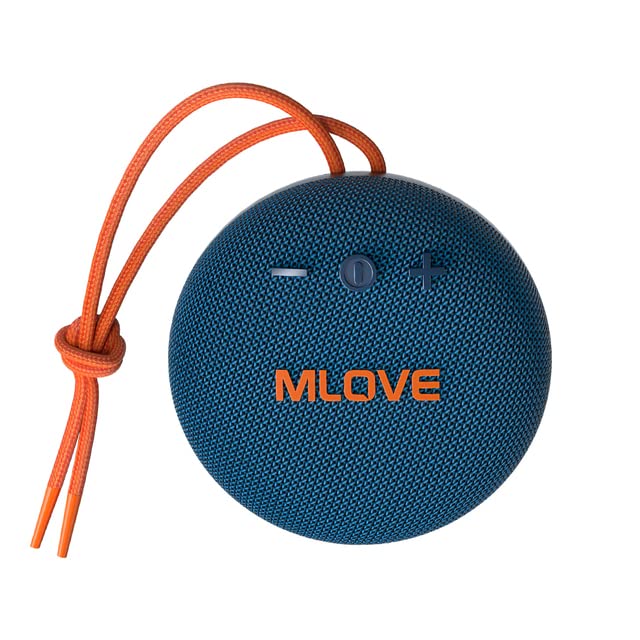
Nọmba 3.1: Iwaju view of the MLOVE BV230 speaker, showing the power button, volume controls, and MLOVE branding.
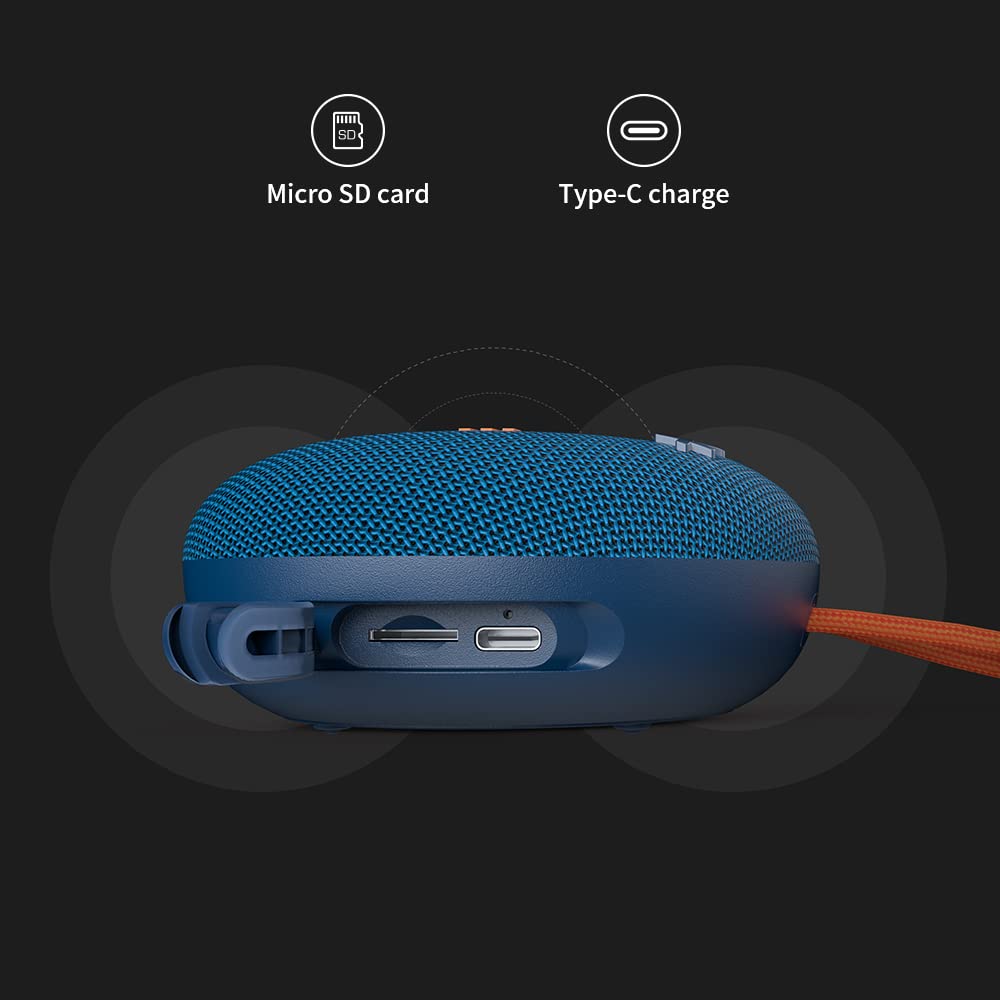
Nọmba 3.2: Apa view of the MLOVE BV230 speaker, highlighting the Micro-SD card slot and the USB Type-C charging port, protected by a rubber flap.
Awọn bọtini Iṣakoso:
- Bọtini agbara: Tẹ ki o si dimu mọ lati tan/pa ina. Tẹ kukuru lati mu/danu orin tabi dahun/pari awọn ipe.
- Iwọn didun soke (+): Tẹ kukuru lati mu iwọn didun pọ si. Tẹ gun fun orin atẹle.
- Iwọn didun isalẹ (-): Tẹ kukuru lati dinku iwọn didun. Tẹ gun fun orin iṣaaju.
4. Eto
4.1 Gbigba agbara si Agbọrọsọ
Ṣaaju lilo akọkọ, gba agbara si agbọrọsọ ni kikun.
- Open the rubber flap on the side of the speaker to expose the charging port.
- Connect the included USB Type-C charging cable to the speaker's charging port.
- So opin okun miiran pọ si ohun ti nmu badọgba agbara USB (kii ṣe pẹlu) tabi ibudo USB ti kọnputa kan.
- The charging indicator light will illuminate during charging and turn off once fully charged. A full charge takes approximately 3 hours.
4.2 Titan / Pa a
- Lati Fi agbara: Tẹ mọlẹ Bọtini Agbara fun isunmọ awọn aaya 2-3 titi ti o fi gbọ ifọrọranṣẹ.
- Lati Paarẹ: Tẹ mọlẹ Bọtini Agbara fun isunmọ awọn aaya 2-3 titi ti o fi gbọ ifọrọranṣẹ.
4.3 Sisopọ Bluetooth
Connect your BV230 speaker to a Bluetooth-enabled device.
- Rii daju pe agbọrọsọ ti wa ni titan ati ni ipo sisọpọ Bluetooth (itọkasi nipasẹ LED didan).
- Lori ẹrọ rẹ (foonuiyara, tabulẹti, ati bẹbẹ lọ), mu Bluetooth ṣiṣẹ ki o wa awọn ẹrọ to wa.
- Select "BV230" from the list of found devices.
- Once connected, the speaker will provide an audible confirmation, and the LED indicator will stop flashing.
- The speaker will automatically reconnect to the last paired device when powered on, if within range (up to 10 meters).
4.4 Otitọ Sitẹrio Alailowaya (TWS) Sisọpọ
Connect two MLOVE BV230 speakers for a true wireless stereo experience.

Nọmba 4.1: Two BV230 speakers demonstrating True Wireless Stereo (TWS) pairing for enhanced audio.
- Ensure both BV230 speakers are powered on and not connected to any other Bluetooth device.
- On one of the speakers (this will be the primary speaker), double-press the Power button. The speaker will enter TWS pairing mode.
- The two speakers will automatically search for and connect to each other. You will hear an audible confirmation once TWS pairing is successful.
- Now, connect your Bluetooth device to the primary speaker (the one you initiated TWS pairing on) as described in Section 4.3.
- Ohun yoo mu ṣiṣẹ ni sitẹrio kọja awọn agbohunsoke mejeeji.
4.5 Micro-SD Card Playback
Play music directly from a Micro-SD card.
- Open the rubber flap on the side of the speaker.
- Fi kaadi Micro-SD sii (pẹlu ohun ti a ṣe atilẹyin fun) files) into the Micro-SD card slot until it clicks into place.
- The speaker will automatically switch to Micro-SD card playback mode.
- Use the Power button for play/pause and the Volume +/- buttons for track control.
5. Awọn ilana Iṣiṣẹ
5.1 Sisisẹsẹhin Orin
- Ṣiṣẹ/Daduro: Kukuru tẹ bọtini agbara.
- Iwọn didun Up: Kukuru tẹ bọtini '+'.
- Iwọn didun isalẹ: Kukuru tẹ bọtini '-'.
- Orin t’okan: Tẹ bọtini '+' gun.
- Tẹlẹ Orin: Tẹ bọtini '-' gun.
5.2 Ọwọ-Ọfẹ Npe
Gbohungbohun ti a ṣe sinu ngbanilaaye fun awọn ipe laisi ọwọ nigbati o ba sopọ nipasẹ Bluetooth.

Nọmba 5.1: The BV230 speaker facilitating a hands-free call, demonstrating its built-in microphone functionality.
- Idahun Ipe: Short press the Power button when an incoming call is received.
- Ipe Ipari: Kukuru tẹ bọtini agbara nigba ipe kan.
- Kọ Ipe: Long press the Power button when an incoming call is received.
6. Itọju
6.1 Ninu
To maintain the speaker's appearance and functionality:
- Nu agbọrọsọ nu pẹlu asọ, damp asọ.
- Maṣe lo awọn afọmọ abrasive, ọti-lile, tabi awọn nkan ti kemikali.
- Ensure the charging port and Micro-SD slot are dry before use or charging.
6.2 Omi ati Eruku Resistance (IP56)
The MLOVE BV230 speaker is rated IP56, meaning it is protected against dust ingress and can withstand water jets from any direction. This makes it suitable for outdoor use and splashes.

Nọmba 6.1: The BV230 speaker in water, illustrating its IP56 water resistance.
- Ensure the rubber flap covering the charging port and Micro-SD slot is securely closed to maintain water and dust resistance.
- Do not intentionally submerge the speaker in water for extended periods.
- Avoid exposing the speaker to saltwater or other chemicals, as this may damage the seals.
- If the speaker gets wet, wipe it dry before charging or opening the port flap.
6.3 Ibi ipamọ
- Tọju agbohunsoke ni itura, aye gbigbẹ kuro lati orun taara ati awọn iwọn otutu to gaju.
- Ti o ba wa ni ipamọ fun akoko ti o gbooro sii, gba agbara si batiri si isunmọ 50% ni gbogbo oṣu diẹ lati fa igbesi aye batiri gun.
7. Laasigbotitusita
If you encounter issues with your speaker, refer to the following solutions:
| Isoro | Owun to le Solusan |
|---|---|
| Agbọrọsọ ko ni agbara lori. | Rii daju pe batiri ti gba agbara. So agbohunsoke pọ si orisun agbara nipa lilo okun USB Iru-C. |
| Ko le so pọ nipasẹ Bluetooth. |
|
| Ko si ohun tabi iwọn kekere. |
|
| TWS sisopọ kuna. |
|
| Iṣoro gbigba agbara. |
|
8. Awọn pato
Key technical specifications for the MLOVE BV230 speaker:
| Ẹya ara ẹrọ | Ẹ̀kúnrẹ́rẹ́ |
|---|---|
| Orukọ awoṣe | BV230 |
| Awọn iwọn (L x W x H) | 100.8 x 100.8 x 46 mm (approx. 108D x 46W x 108H Millimeters) |
| Iwọn Nkan | 198 g (approx. 280 g with packaging) |
| Agbọrọsọ o wu Power | 5 Wattis |
| Agbara Batiri | 1500 mAh litiumu polima |
| Akoko ere | Titi di awọn wakati 8 (ni iwọn 70%) |
| Akoko gbigba agbara | O fẹrẹ to awọn wakati 3 |
| Gbigba agbara Port | USB Iru-C |
| Ẹya Bluetooth | 5.0 |
| Alailowaya Ibiti | Titi de awọn mita 10 (33 ẹsẹ) |
| Omi & Eruku Resistance | IP56 |
| Ohun elo | Aṣọ |
| Ọna Iṣakoso | Fọwọkan |
| Ipo Ijade Ohun | Sitẹrio (pẹlu sisopọ TWS) |
9. Atilẹyin ọja ati Support
The MLOVE BV230 Portable Bluetooth Speaker comes with a 12-osu atilẹyin ọja lati ọjọ rira, ibora awọn abawọn iṣelọpọ.
For technical support, warranty claims, or further assistance, please contact your retailer or the manufacturer directly. Please retain your proof of purchase for warranty service.


