1. Ifihan
The TASI TA612C is a portable digital thermometer designed for precise temperature measurement using K/J type thermocouples. This model supports four channels, allowing simultaneous measurement of multiple points. It features a VA digital color display, data hold function, MAX/MIN value tracking, extensive data storage capabilities, an alarm buzzer, and automatic shutdown for convenient and efficient operation. The TA612C also includes a USB interface for data upload and real-time measurement.
2. Package Awọn akoonu
Please check the package contents upon unboxing to ensure all items are present and undamaged.
- 1 x TASI TA612C Thermometer
- 4 x K-type Thermocouple Probes
- 1 x Okun USB
- 1 x Apo Ibi ipamọ
- 1 x Afọwọṣe olumulo (Gẹẹsi)

3. Awọn ẹya Ọja
- 4-Channel Measurement: Simultaneously monitor temperatures from up to four different locations using K/J type thermocouples.
- Ibi iwọn otutu ti o tobi: Wọ́n ń wọn iwọn otutu láti -200℃ sí 1372℃ (-328℉ sí 2501℉).
- VA Digital Color Display: Provides clear and easy-to-read temperature values and operational status.
- Iṣẹ idaduro data: Freezes the current temperature reading on the display.
- MAX/MIN Value Tracking: Records and displays the maximum and minimum temperatures measured during a session.
- Ibi ipamọ data ti o gbooro: Stores up to 5000 groups of temperature data.
- USB Data Logger: Allows data upload to a computer and real-time measurement monitoring via USB connection.
- Adjustable Probe Error Compensation (ADJ): Compensates for probe inaccuracies within a range of -9℃ to 9℃.
- Itaniji giga/Kekere: Configurable alarm limits (default 1300℃/-200℃) with dual sound and light alerts.
- Tiipa Aifọwọyi: Ṣe itọju igbesi aye batiri nipa pipa a laifọwọyi lẹhin akoko aiṣiṣẹ.

4. Eto
4.1 Ipese Agbara
The TA612C thermometer can be powered by three AA/LR06 batteries (not included) or via a 5V 1A USB power source. Ensure batteries are inserted with correct polarity. For continuous operation or data transfer, connect the device using the provided USB cable.
4.2 Àwọn Ìwádìí Thermocouple Tó Sopọ̀
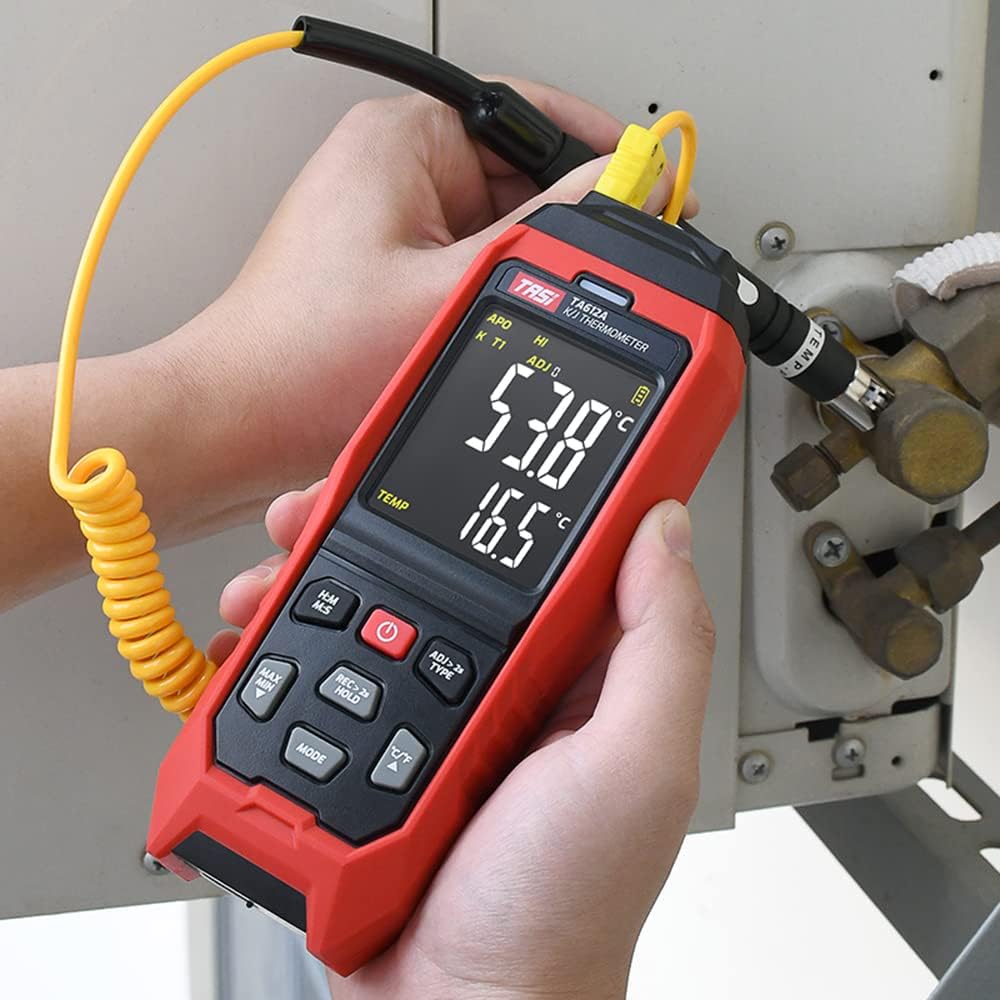
The device supports K/J type thermocouples. Four K-type probes are included in the package. Connect the thermocouple probes to the corresponding input jacks (T1, T2, T3, T4) at the top of the device. Ensure a secure connection for accurate readings.
5. Awọn ilana Iṣiṣẹ
5.1 Agbara Tan / Pa
- Tẹ awọn Bọtini agbara (
 ) láti tan ẹ̀rọ náà.
 - Tẹ mọlẹ Bọtini agbara fun bii iṣẹju-aaya meji lati pa ẹrọ naa.
5.2 Ifihan Loriview
The VA color display provides comprehensive information. Refer to the diagram below for key indicators:

5.3 Ipilẹ wiwọn
Once powered on and probes are connected, the device will automatically begin displaying temperature readings for each active channel. The sampling rate is approximately 1 time per second.
5.4 Data idaduro
Tẹ awọn REC > 2s DÚRÓ button briefly to activate/deactivate the data hold function. The 'HOLD' indicator will appear on the display when active.
5.5 MAX/MIN Value
Tẹ awọn MAX MIN button to cycle through current, maximum (MAX), and minimum (MIN) temperature readings. The corresponding indicator will show on the display.
5.6 Ìyípadà Ẹ̀yà (°C/°F)
Tẹ awọn ° C / ° F bọtini lati yipada laarin awọn iwọn otutu Celsius ati Fahrenheit.
5.7 Data ipamọ
The TA612C can store up to 5000 groups of temperature data. To manually record data, press and hold the REC > 2s DÚRÓ button for more than 2 seconds. The 'REC' indicator will flash, and the data group number will increment. The device stores the temperature values of the thermocouple channels, not ambient temperature.

5.8 Itaniji Eto
The device has default high/low alarm limits of 1300℃ and -200℃. Consult the full user manual for detailed instructions on how to adjust these alarm thresholds. When an alarm condition is met, the device will provide both sound and light alerts.
5.9 Probe Error Compensation (ADJ)
The TA612C allows for probe error compensation (ADJ) within a range of -9℃ to 9℃. This feature helps to fine-tune the accuracy of readings for specific probes. Refer to the detailed user manual for steps on how to access and adjust this setting.
6. Data Management (USB)
The TA612C model features a USB interface for data connectivity. Connect the thermometer to a computer using the provided USB cable. This allows for:
- Gbigbe data: Transfer stored temperature data from the device to your computer for analysis and record-keeping.
- Wiwọn akoko gidi: Monitor live temperature readings on your computer screen, which can be useful for long-term logging or detailed observation.
Software for data management is typically available from the manufacturer's website, as indicated in the included user manual.
7. Itọju
7.1 Ninu
Lati nu ẹrọ naa, lo asọ, damp cloth. Do not use abrasive cleaners, solvents, or immerse the device in water. Ensure the device is powered off and disconnected from any power source before cleaning.
7.2 Ibi ipamọ
When not in use, store the thermometer and its probes in the provided storage bag in a cool, dry place, away from direct sunlight and extreme temperatures. Remove batteries if the device will not be used for an extended period to prevent leakage.
7.3 Batiri Rirọpo
When the battery indicator shows low power, replace the three AA/LR06 batteries. Ensure the device is powered off before opening the battery compartment and observe correct polarity when inserting new batteries.
8. Laasigbotitusita
- Ẹrọ ko ni agbara lori: Check battery installation and ensure batteries are not depleted. If using USB power, verify the cable and power source.
- Awọn kika ti ko pe: Ensure thermocouple probes are correctly and securely connected. Check for any visible damage to the probes. Consider using the ADJ compensation feature if a known offset exists.
- Ifihan ti ṣofo tabi yiyi: Replace batteries or connect to USB power. If the issue persists, contact customer support.
- Awọn ọran gbigbe data: Ensure the USB cable is properly connected to both the device and the computer. Verify that the correct software/drivers are installed on your computer.
- Itaniji ko ṣiṣẹ: Check alarm settings to ensure limits are correctly configured and the alarm function is enabled.
For issues not covered here, please refer to the comprehensive user manual or contact KKnoon customer support.
9. Imọ ni pato
| Paramita | Sipesifikesonu |
|---|---|
| Awoṣe | TA612C |
| ikanni | 4 Awọn ikanni |
| Ibi ipamọ data | 5000 Awọn ẹgbẹ |
| Data Upload & Real-time Measurement | Supported (USB) |
| Ohun elo | ABS (Acrylonitrile Butadiene Styrene), PC (Polycarbonate) |
| K/J Type Measurement Range | -200 ~ 1372℃ / -328 ~ 2501℉ |
| Yiye | ±0.2% + 0.7℃ |
| High/Low Alarm Limit (Default) | 1300℃ / -200℃ |
| ADJ Compensation Range | -9℃ ~ 9℃ |
| SampOṣuwọn ling | Approx. 1 time/s |
| Ibi ti ina elekitiriki ti nwa | 3 x AA/LR06 Batteries (not included) or USB 5V 1A |
| Iwọn Nkan | 177 x 70 x 35 mm (6.97 x 2.76 x 1.38 inches) |
| Iwọn Nkan | 565 g (1.25 lbs) |
| Ifihan Iru | Digital VA Color Display |
| Asopọmọra Technology | USB |
10. Alaye Aabo
Please read and understand all safety instructions before using this device. Failure to follow these instructions may result in electric shock, fire, or personal injury.
- Má ṣe lo ẹ̀rọ náà bí ó bá dà bíi pé ó ti bàjẹ́ tàbí tí kò bá ṣiṣẹ́ dáadáa.
- Má ṣe gbìyànjú láti tún ẹ̀rọ náà ṣe tàbí láti ṣe àtúnṣe rẹ̀. Tọ́ka gbogbo iṣẹ́ ìtọ́jú náà sí àwọn òṣìṣẹ́ tó mọ̀ nípa rẹ̀.
- Ensure the correct type of thermocouple probes (K or J) are used and properly connected.
- Yago fun ṣiṣafihan ẹrọ naa si awọn iwọn otutu to gaju, ọriniinitutu, tabi oorun taara.
- Jeki ẹrọ naa kuro ni awọn aaye itanna to lagbara.
- Remove batteries if the device is not used for a long period to prevent battery leakage.
- Sọ awọn batiri ati ẹrọ naa sọnu ni ibamu si awọn ilana agbegbe.
11. Atilẹyin ọja ati Support
For warranty information, technical support, or service inquiries, please refer to the contact details provided in the original product packaging or visit the official KKnoon webojula. Tọju iwe-ẹri rira rẹ bi ẹri rira fun awọn iṣeduro atilẹyin ọja.