1. Ifihan
This user manual provides essential information for the safe and efficient operation of your HYCHIKA 3.6V Cordless Electric Rechargeable Screwdriver Drill Set. Please read this manual thoroughly before first use and keep it for future reference.
The HYCHIKA 3.6V Cordless Electric Screwdriver is designed for various screwing and light drilling tasks around the home. It features a maximum torque of 6 N-m, a 6.35 mm quick-change chuck, and a versatile design that allows for both pistol and straight grip configurations.
2. Awọn ilana aabo
Nigbagbogbo ṣe akiyesi awọn iṣọra aabo ipilẹ nigba lilo awọn irinṣẹ itanna lati dinku eewu ina, mọnamọna, ati ipalara ti ara ẹni.
- Aabo Agbegbe Iṣẹ: Jeki agbegbe iṣẹ rẹ mọ ki o si tan daradara. Awọn agbegbe idamu tabi awọn agbegbe dudu n pe awọn ijamba. Ma ṣe ṣiṣẹ awọn irinṣẹ agbara ni awọn bugbamu bugbamu, gẹgẹbi niwaju awọn olomi ina, gaasi, tabi eruku.
- Aabo Itanna: Yago fun olubasọrọ ara pẹlu ilẹ tabi ilẹ roboto bi paipu, imooru, awọn sakani, ati firiji. Ma ṣe fi awọn irinṣẹ agbara han si ojo tabi awọn ipo tutu.
- Aabo ti ara ẹni: Always wear eye protection. Use safety glasses, goggles, or a face shield. Wear hearing protection when operating noisy tools. Dress properly; avoid loose clothing or jewelry.
- Lilo ati Itọju: Maṣe fi agbara mu ohun elo agbara. Lo ohun elo agbara ti o pe fun ohun elo rẹ. Ge asopọ plug lati orisun agbara ati/tabi yọọ idii batiri kuro ṣaaju ṣiṣe eyikeyi awọn atunṣe, yiyipada awọn ẹya ẹrọ, tabi titoju awọn irinṣẹ agbara.
- Lilo ati Itọju Batiri: Recharge only with the charger specified by the manufacturer. Do not use battery packs with any other power tools. When battery pack is not in use, keep it away from other metal objects.
3. Package Awọn akoonu
Daju pe gbogbo awọn ohun ti a ṣe akojọ rẹ si isalẹ wa ninu package rẹ. Ti awọn ohun kan ba nsọnu tabi bajẹ, jọwọ kan si atilẹyin alabara.
- 1 x HYCHIKA 3.6V Cordless Screwdriver
- 19 x Screwdriver Bits
- 1 x Pẹpẹ Ifaagun
- 1 x Adapter Gbigba agbara
- 1 x Itọsọna olumulo

Figure 3.1: Contents of the HYCHIKA 3.6V Cordless Screwdriver package, including the screwdriver, various bits, and charging adapter.
4. Ọja Awọn ẹya ara ẹrọ ati irinše
Familiarize yourself with the different parts of your cordless screwdriver.

Figure 4.1: Key components of the screwdriver, including the magnetic chuck, PUSH button, front LED light, On/Off switch, LED charger indicator, 3.5mm charger port, and forward & reverse button.
- Magnetic Chuck: 1/4 inch (6.35mm) quick-change chuck for easy bit installation and removal.
- Imọlẹ LED iwaju: Ó tan ìmọ́lẹ̀ sí ibi iṣẹ́ fún ìríran tó dára síi ní àyíká òkùnkùn.
- Tan/Pa Yipada: Activates and deactivates the screwdriver.
- Bọ́tìnì Siwaju & Yipada: Controls the rotation direction for screwing and unscrewing.
- LED Charger Indicator: Provides status of battery charging.
- 3.5mm Charger Port: Connection point for the charging adapter.
- Bọtini PUSH: Used to adjust the grip configuration from pistol to straight.
5. Eto
5.1 Ngba agbara si Batiri naa
The screwdriver is powered by a 3.6V 2000 mAh Lithium-Ion battery. Before first use, fully charge the battery.
- Connect the charging adapter to the 3.5mm charger port on the screwdriver.
- So ohun ti nmu agbara gbigba sinu iho ina deede.
- The LED charger indicator will illuminate during charging. Once fully charged, the indicator may change color or turn off depending on the model.
- Yọ ṣaja kuro ni kete ti gbigba agbara ti pari.

Figure 5.1: The screwdriver connected to its charging adapter, indicating a full charge.
The screwdriver is designed to maintain full power output even when the battery is low, ensuring consistent performance until the battery is depleted.
5.2 Fifi screwdriver Bits
The screwdriver features a 1/4 inch (6.35mm) magnetic quick-change chuck for easy bit installation.
- Yan awọn yẹ screwdriver bit fun nyin iṣẹ-ṣiṣe.
- Insert the bit into the magnetic chuck until it is securely seated. The magnetic chuck will hold the bit firmly in place.
- To remove a bit, simply pull it out of the chuck. Bits with grooves are designed for easier removal.

Figure 5.2: Visual guide for inserting a bit into the magnetic chuck and removing it.
6. Awọn ilana Iṣiṣẹ
6.1 Adjusting Grip Configuration
The screwdriver can be used in two grip configurations: pistol grip or straight grip, for enhanced versatility and comfort.
- To change the grip, press and hold the "PUSH" button located at the top of the screwdriver.
- While holding the button, rotate the handle ninety degrees to switch between pistol and straight configurations.
- Release the "PUSH" button once the desired configuration is achieved. The handle will lock into place.
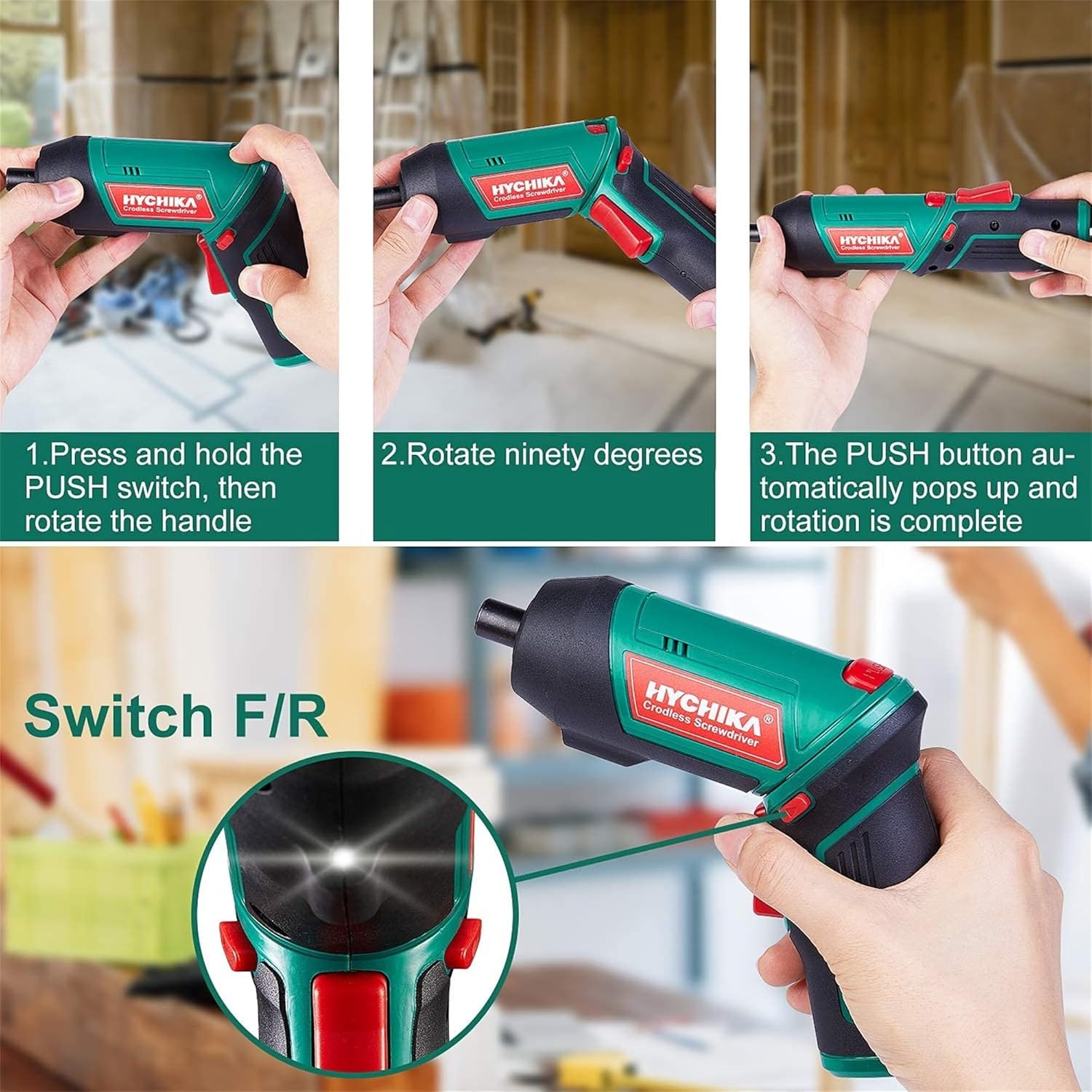
Figure 6.1: Demonstrates the process of transforming the screwdriver's grip by pressing the PUSH button and rotating the handle.
6.2 Forward and Reverse Operation
The forward/reverse button controls the direction of rotation for screwing and unscrewing.
- To drive screws (forward rotation), push the forward/reverse button to the left (when viewed lati ẹhin ọpa).
- To remove screws (reverse rotation), push the forward/reverse button to the right.
- When the button is in the center position, the tool is locked, preventing accidental activation.
6.3 Lilo Imọlẹ Iṣẹ LED
The built-in LED light automatically illuminates when the screwdriver is in operation, providing visibility in dimly lit areas.

Figure 6.2: The integrated LED light provides clear illumination for working in dark environments.
7. Itọju
Regular maintenance ensures the longevity and optimal performance of your screwdriver.
- Ninu: Keep the ventilation openings clean and free from dust. Use a soft, damp asọ lati nu ọpa casing. Maṣe lo awọn kẹmika ti o lewu tabi awọn afọmọ abrasive.
- Itọju Bit: Clean screwdriver bits after use. Store them in the provided case to prevent loss and damage.
- Ipamọ Batiri: If storing the tool for an extended period, ensure the battery is partially charged (around 50%) and store it in a cool, dry place. Recharge the battery every 3-6 months to maintain its health.
- Ayẹwo gbogbogbo: Periodically check for any loose screws, damaged cords, or worn parts. Do not use the tool if any damage is observed.
8. Laasigbotitusita
This section addresses common issues you might encounter with your screwdriver.
| Isoro | Owun to le Fa | Ojutu |
|---|---|---|
| Screwdriver ko ni tan. | Batiri ti dinku. Forward/Reverse switch is in the center (locked) position. | Gba agbara si batiri ni kikun. Titari siwaju / yiyipada si osi tabi ọtun. |
| Screwdriver loses power quickly. | Batiri ko gba agbara ni kikun. Battery life degraded. | Rii daju pe batiri ti gba agbara ni kikun ṣaaju lilo. If battery life is significantly reduced, contact customer support for replacement options. |
| Bits are not held securely in the chuck. | Bit is not fully inserted. Chuck is dirty or damaged. | Push the bit firmly into the chuck until it clicks into place. Clean the chuck area. If damage is visible, contact customer support. |
Ti iṣoro naa ba wa lẹhin igbiyanju awọn iṣeduro wọnyi, jọwọ kan si atilẹyin alabara.
9. Awọn pato
| Ẹya ara ẹrọ | Sipesifikesonu |
|---|---|
| Brand | Overstock (HYCHIKA) |
| Nọmba awoṣe | c131a012-0da9-4306-aeab-b1d9ff5cd4b7 |
| Voltage | 3.6 Volts |
| Orisun agbara | Agbara Batiri |
| Iyara | 180 RPM |
| Ohun kan Torque | 6 Newton Meters (6 N-m) |
| Batiri Iru | Litiumu Iwon |
| Agbara Batiri | 2000 mAh |
| Iwọn Chuck | 1/4 inch (6.35mm) |
| Ohun elo | Ṣiṣu, Roba |
| Àwọ̀ | Alawọ ewe |
| UPC | 616859793583 |
10. Atilẹyin ọja ati Support
Overstock offers lifetime after-sales service for this product. For any questions, concerns, or technical assistance, please contact our customer support team.
Please have your model number (c131a012-0da9-4306-aeab-b1d9ff5cd4b7) and purchase information ready when contacting support.


