Ọja Pariview
The Nitecore EMR06 is a compact and lightweight electronic mosquito repeller designed for outdoor use. It utilizes pyrethroid-based repellent mats to create a protective zone against mosquitoes. Its portable design, USB-C rechargeability, and durable construction make it suitable for various outdoor activities.

Iwaju view of the Nitecore EMR06 Mosquito Repeller, showcasing its compact design and the included Nitecore sticker.
Package Awọn akoonu
- Nitecore EMR06 Mosquito Repeller
- 3x Mosquito Repellent Mats
- USB-C Ngba agbara Cable
- Lanyard
- Nitecore Sticker
Ṣeto
Gbigba agbara ẹrọ naa:
Before first use, fully charge the EMR06 using the provided USB-C cable. Connect the USB-C end to the device's charging port and the other end to a USB power source (e.g., wall adapter, power bank). The charging indicator will show progress and turn solid when fully charged.
Inserting a Repellent Mat:
Locate the mat slot on the device. Gently slide one mosquito repellent mat into the designated slot. Ensure the mat is fully inserted and lies flat within the heating area.

Demonstration of inserting a mosquito repellent mat into the EMR06 device.
Attaching the Back Clip (Optional):
The EMR06 comes with a removable back clip. Align the clip with the grooves on the back of the device and slide it into place until it clicks securely. This allows attachment to MOLLE systems, belts, or backpack straps for hands-free operation.
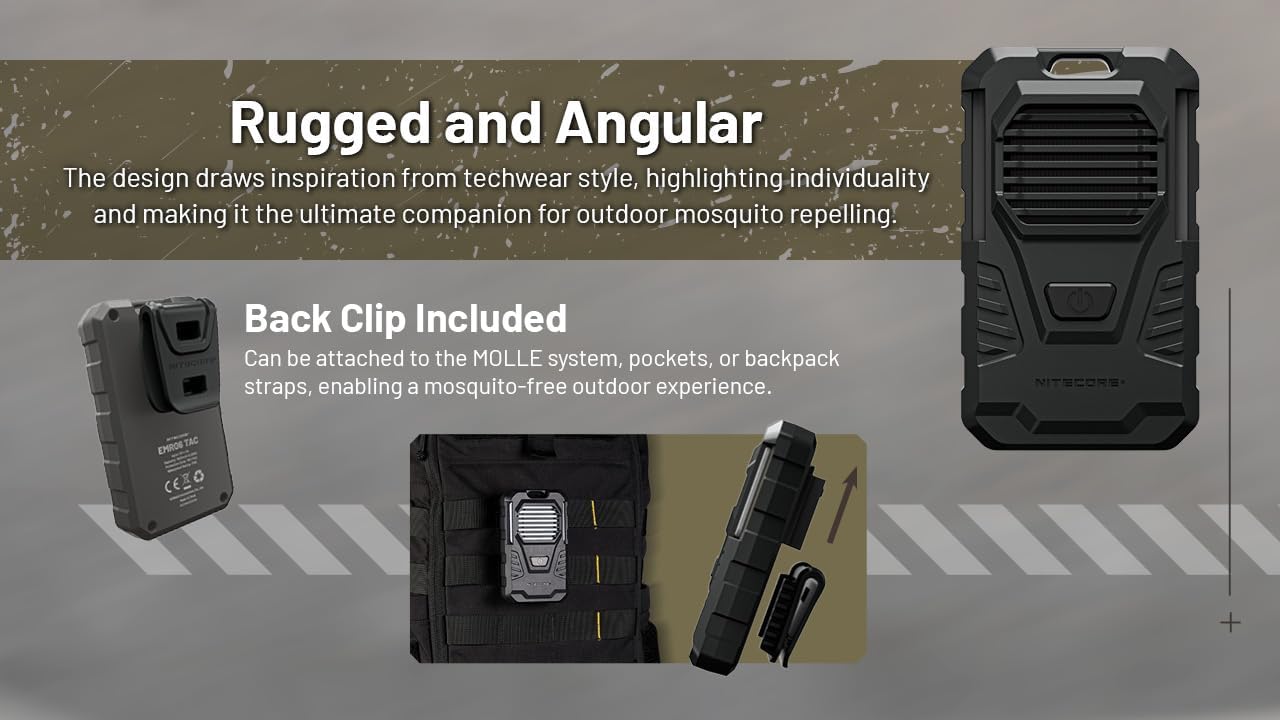
The EMR06 with its back clip, demonstrating how it can be attached to a MOLLE system for portability.
Awọn ilana Iṣiṣẹ
Titan / Pipa:
To turn on the device, press the power button once, then quickly press and hold it again until the indicator light turns blue. To turn off, long press the power button again.
Ṣiṣayẹwo Ipele Batiri:
When the device is off, a single short press of the power button will illuminate the indicator light to show the current battery level.
Placement for Optimal Protection:
For best results, place the EMR06 in an open area where air can circulate around it. It creates a protective zone of up to 16 feet. Avoid placing it directly against surfaces that might block the repellent vapor.

The EMR06 effectively creates a 16-foot mosquito protection zone, ideal for outdoor activities like fishing.
Itoju
Replacing Repellent Mats:
Repellent mats typically last for several hours of continuous use. Replace the mat when it appears discolored or when mosquito repellent effectiveness diminishes. Ensure the device is off and cooled before replacing mats.
Ninu:
Nu ẹrọ naa pẹlu asọ, damp Aṣọ. Má ṣe lo àwọn kẹ́míkà líle tàbí àwọn ohun ìfọmọ́ tí ó máa ń pa ara. Rí i dájú pé ẹ̀rọ náà gbẹ kí o tó kó o pamọ́ tàbí kí o tó lò ó.
Ibi ipamọ:
Store the EMR06 in a cool, dry place away from direct sunlight and extreme temperatures when not in use for extended periods. Remove any used repellent mats before storage.
Laasigbotitusita
| Isoro | Owun to le Fa | Ojutu |
|---|---|---|
| Ẹrọ ko ni titan. | Low battery; Incorrect power-on sequence. | Charge the device fully; Follow the correct power-on sequence (press once, then quickly press and hold). |
| Mosquitoes still present. | Repellent mat exhausted; Incorrect placement; Strong wind. | Replace the repellent mat; Ensure proper placement in an open area; Relocate to a less windy spot. |
| Ẹrọ ko gba agbara. | Okùn tàbí orísun agbára tí ó ní àbùkù; Ìdènà ibudo gbigba agbara. | Try a different USB-C cable and power source; Check charging port for debris. |
Awọn pato
| Ẹya ara ẹrọ | Ẹ̀kúnrẹ́rẹ́ |
|---|---|
| Awoṣe | EMR06 |
| Awọn iwọn | 5.51 x 9.14 x 2.82 cm (2.17 x 3.60 x 1.11 inches) |
| Iwọn | 90.72 g (3.2 iwon) |
| Agbegbe Idaabobo | Up to 16 ft radius |
| Batiri | Batiri Li-ion 1800mAh ti a ṣe sinu |
| Akoko ṣiṣe | Isunmọ. wakati meji 3.5 |
| Gbigba agbara Port | USB-C |
| Omi Resistance | IPX5 |
| Atako Ipa | 1.5 mita |
| Ohun elo | Durable Molded Polycarbonate |

Detailed dimensions and weight of the Nitecore EMR06, highlighting its ultra-lightweight and compact design.
Atilẹyin ọja ati Support
For warranty information and technical support, please refer to the official Nitecore webaaye tabi kan si olupin agbegbe rẹ. Tọju iwe-ẹri rira rẹ bi ẹri rira fun awọn iṣeduro atilẹyin ọja.
Manufacturer: Sysmax


