1. Alaye Aabo
Jọwọ tẹle awọn iṣọra aabo wọnyi lati yago fun ipalara tabi ibajẹ si ẹrọ naa:
- Idaabobo Oju: Do not shine the flashlight directly into eyes. The high lumen output can cause temporary vision impairment or permanent eye damage.
- Ooru: The flashlight may become warm during prolonged use, especially in high brightness modes. This is normal. Avoid direct contact with hot surfaces for extended periods.
- Awọn ọmọde: Pa kuro ni arọwọto awọn ọmọde. Eyi kii ṣe nkan isere.
- Aabo Batiri: Do not attempt to disassemble the built-in battery. Do not expose the device to extreme temperatures or fire.
- Omi Resistance: The flashlight has an IPX4 rating, meaning it is splash-proof. Do not submerge it in water. Ensure the USB-C port cover is securely closed to maintain water resistance.
2. Package Awọn akoonu
Daju pe gbogbo awọn nkan wa ninu apo rẹ:
- 1 x FITORCH V10 EDC Flashlight
- 1 x Okun Ngba agbara USB-C
- 1 x Oruka bọtini
- 1 x Itọsọna olumulo (iwe yii)

Image: The FITORCH V10 flashlight shown with its included USB-C charging cable and key ring.
3. Ọja Ipariview ati Awọn ẹya ara ẹrọ
The FITORCH V10 is a compact and powerful EDC (Everyday Carry) flashlight designed for versatility and convenience. It features multiple lighting modes, a built-in rechargeable battery, and a magnetic tail cap.

Aworan: Pariview of the flashlight's multifunctional features, including high brightness lamp beads, beeping warning, multi-source sidelights, USB-C charging, magnetic adsorption, and portable design.
Awọn ẹya pataki:
- Imọlẹ giga: Up to 1000 lumens with a beam distance of up to 100 meters (328 feet).
- Awọn ọna Imọlẹ Ọpọ: 5 main white light modes and 7 side light modes (white, warm, green, red, blue, red flash, red-blue flashing).
- Imọlẹ UV 365nm: Integrated UV light for checking banknotes, fluorescent agents, and more.
- Iwapọ ati Gbigbe: Weighs 46g and measures 2.6" x 1.3" x 0.6", with a keychain design.
- Iru oofa: Allows for hands-free attachment to ferrous surfaces.
- USB-C Gbigba agbara: Built-in 1000mAh battery with fast charging (under 2 hours).
- Ikole ti o tọ: Made from aluminum alloy and premium PC materials.
- IPX4 Omi Resistance: Splash-proof for daily use.
- 80dB Beeping Alarm: Fun awọn ipo pajawiri.
4. Eto
Gbigba agbara akọkọ:
Before first use, fully charge the flashlight. The V10 features a built-in 1000mAh rechargeable battery and a USB-C fast charging port.
- Wa ibudo gbigba agbara USB-C ni ẹgbẹ ti ina filasi naa.
- Open the waterproof plug covering the port.
- Connect the provided USB-C cable to the flashlight and the other end to a USB power source (e.g., computer, wall adapter, power bank).
- During charging, the indicator lights will show the charging status. A red light typically indicates charging, and a green light indicates a full charge.
- Charging time is approximately 120-180 minutes (2-3 hours).
- Once fully charged, disconnect the cable and securely close the waterproof plug to maintain IPX4 water resistance.

Image: The flashlight connected via USB-C cable, showing the charging indicator lights (red for charging, green for full).
5. Awọn ilana Iṣiṣẹ
The V10 flashlight is controlled by two buttons: the Main Light button (power symbol) and the Side Light button (lightning bolt symbol).
Isẹ Imọlẹ akọkọ:

Image: Diagram illustrating the 5 main light modes: Turbo, High, Medium, Low, and Economic.
- Tan/PA: Double-click the Main Light button to turn on the main light. Long press the Main Light button to turn off.
- Awọn ọna Yipada: Once the main light is on, click the Main Light button to cycle through the modes: High → Medium → Low → Economic.
- Turbo Mode (Main Light): Long press the Main Light button from any state (on or off) to instantly activate 1000 lumens Turbo mode. Release the button to turn off.

Image: A hand pressing the main light button to activate the 1000 lumen extreme brightness (Turbo) mode.
Side Light Operation:
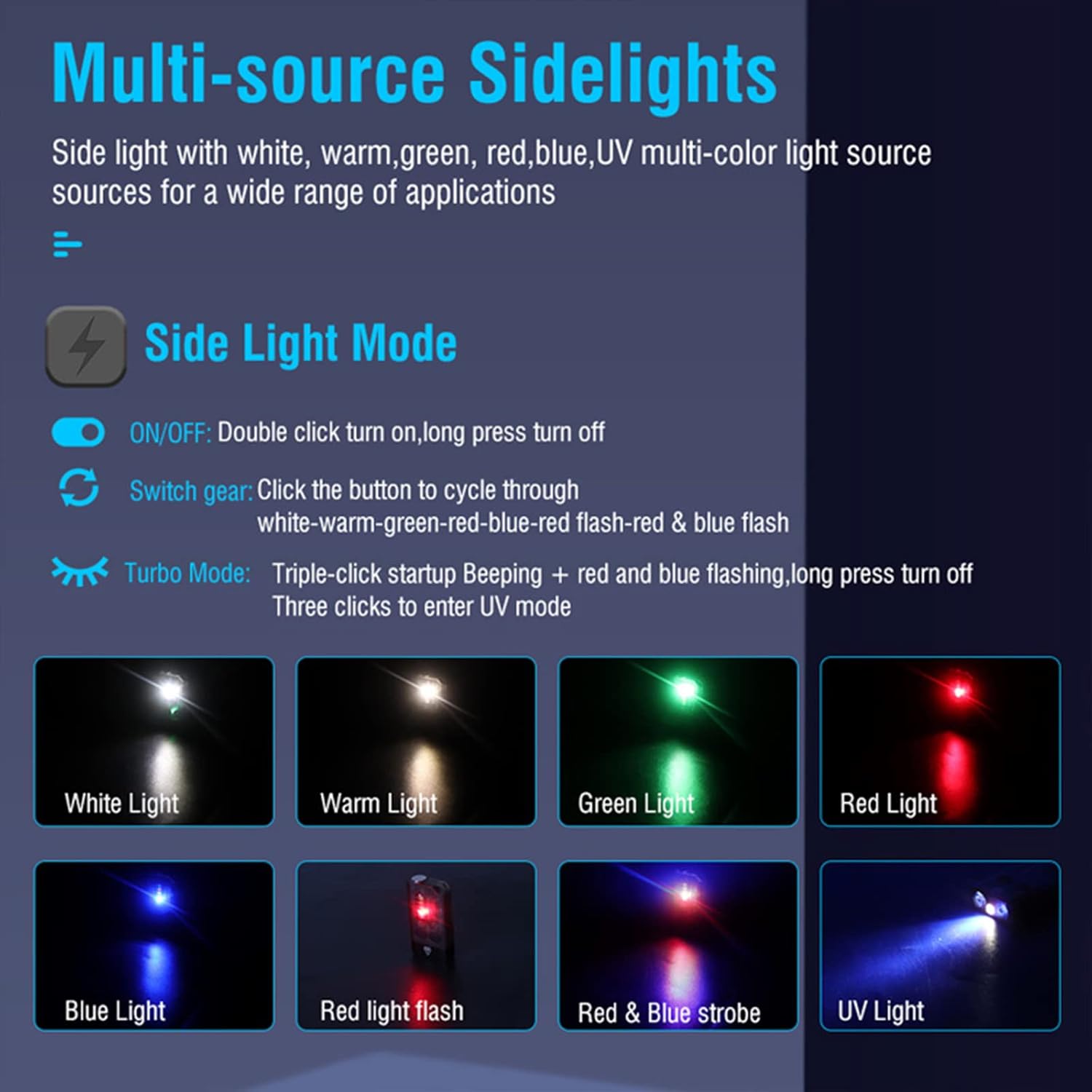
Image: Diagram showing the various side light modes: White, Warm, Green, Red, Blue, Red light flash, Red & Blue strobe, and UV Light.
- Tan/PA: Double-click the Side Light button to turn on the side light. Long press the Side Light button to turn off.
- Awọn ọna Yipada: Once the side light is on, click the Side Light button to cycle through the modes: White → Warm → Green → Red → Blue → Red Flash → Red-Blue Flashing.
- Ipo Imọlẹ UV: Triple-click the Side Light button from any state (on or off) to enter UV mode.

Image: The flashlight's 365nm UV light being used to inspect banknotes, detect fluorescent agents, and for antique appraisal or treasure hunt.
Beeping Alarm Flash:
- When in danger or an emergency, long press the Side Light button to immediately activate an 80dB beeping sound and red and blue flashing lights.
Image: The flashlight emitting a loud beeping sound and flashing red and blue lights for emergency signaling.
6. Itọju
Proper care will ensure the longevity and optimal performance of your FITORCH V10 flashlight.
- Ninu: Fi aṣọ tó mọ́ tó sì rọ̀ nu iná mànàmáná náà. Má ṣe lo àwọn ohun ìfọṣọ tàbí àwọn ohun èlò ìfọṣọ.
- Omi Resistance: Always ensure the USB-C port cover is securely closed when not charging to maintain the IPX4 splash-proof rating.
- Ibi ipamọ: Store the flashlight in a cool, dry place away from direct sunlight and extreme temperatures. If storing for extended periods, charge the battery every 3-6 months to prevent deep discharge.
- Itọju Batiri: The built-in battery is not user-replaceable. Do not attempt to open the flashlight.

Image: The flashlight shown with water splashes, demonstrating its IPX4 splash-proof capability.
7. Laasigbotitusita
If you encounter issues with your FITORCH V10, please refer to the following common problems and solutions:
| Isoro | Owun to le Fa | Ojutu |
|---|---|---|
| Ina filaṣi ko tan. | Batiri ti dinku. | Gba agbara ina naa ni kikun nipa lilo okun USB-C ti a pese. |
| Imọlẹ jẹ baibai tabi flickers. | Ipele batiri kekere. | Saji si flashlight. |
| Ina filaṣi ko gba agbara. | Loose cable connection or faulty power source/cable. | Ensure the USB-C cable is securely connected. Try a different USB port or power adapter. Check if the cable is damaged. |
| Awọn bọtini ko dahun. | Ibùgbé software glitch. | Allow the battery to fully discharge and then recharge it. This may reset the internal circuitry. |
| Omi ti wọ inu ẹrọ naa. | USB-C port cover was not closed or device was submerged. | Immediately turn off the device. Do not attempt to charge or use it. Contact customer support for assistance. |
If the problem persists after trying these solutions, please contact FITORCH customer support.
8. Awọn pato
| Ẹya ara ẹrọ | Sipesifikesonu |
|---|---|
| Awoṣe | V10 |
| Ohun elo | Aluminum alloy, PC |
| Agbara Batiri | 1000mAh (Itumọ ti) |
| Ngba agbara Interface | USB-C |
| Ngba agbara Voltage | 4.5V-5V |
| Akoko gbigba agbara | 120-180 iṣẹju |
| Imọlẹ ti o pọju | 1000 Lumens |
| Ijinna tan ina | 100 mita (328 ẹsẹ) |
| Runtime (Brightest Mode) | Titi di wakati 3.5 |
| Omi Resistance | IPX4 (Imudaniloju Asesejade) |
| Ọja Mefa | 2.6" x 1.3" x 0.6" (isunmọ 6.6cm x 3.3cm x 1.5cm) |
| Iwọn Nkan | 46g (1.62 iwon) |
| UV Light wefulenti | 365nm |
9. Atilẹyin ọja ati Support
FITORCH products are manufactured to high quality standards. For information regarding warranty coverage and customer support, please refer to the warranty card included with your product or visit the official FITORCH webojula.
If you have any questions or require assistance, please contact FITORCH customer service through the retailer where you purchased the product or via the contact information provided on the official FITORCH webojula.


