1. Ifihan
Thank you for choosing the BuTure VC70 Cordless Vacuum Cleaner. This manual provides important information on the safe operation, maintenance, and troubleshooting of your new appliance. Please read this manual thoroughly before first use and keep it for future reference.
2. Awọn ilana aabo
Nigbagbogbo tẹle awọn iṣọra aabo ipilẹ nigba lilo awọn ohun elo itanna lati dinku eewu ina, mọnamọna, tabi ipalara.
- Ma ṣe lo ita gbangba tabi lori awọn aaye tutu.
- Maṣe gba laaye lati lo bi nkan isere. Ifarabalẹ sunmọ jẹ pataki nigba lilo nipasẹ tabi sunmọ awọn ọmọde.
- Lo nikan gẹgẹbi a ti ṣalaye ninu itọnisọna yii. Lo awọn asomọ iṣeduro olupese nikan.
- Ma ṣe lo pẹlu okun tabi plug ti o bajẹ. Ti ohun elo ko ba ṣiṣẹ bi o ti yẹ, ti lọ silẹ, bajẹ, fi silẹ ni ita, tabi sọ sinu omi, da pada si ile-iṣẹ iṣẹ kan.
- Ma ṣe fa tabi gbe nipasẹ okun, lo okun bi imudani, ti ilẹkun kan lori okun, tabi fa okun ni ayika awọn egbegbe to mu tabi igun. Maṣe fi ohun elo ṣiṣẹ lori okun. Jeki okun kuro lati awọn aaye ti o gbona.
- Ma ṣe yọọ kuro nipa fifaa lori okun. Lati yọọ, di plug naa, kii ṣe okun naa.
- Ma ṣe mu plug tabi ohun elo pẹlu ọwọ tutu.
- Ma ṣe fi ohun kan sinu awọn ṣiṣi. Maṣe lo pẹlu eyikeyi ṣiṣi dina; pa eruku, lint, irun, ati ohunkohun ti o le dinku sisan afẹfẹ.
- Jeki irun, aṣọ alaimuṣinṣin, awọn ika ọwọ, ati gbogbo awọn ẹya ara kuro lati awọn ṣiṣi ati awọn ẹya gbigbe.
- Maṣe gbe ohunkohun ti o njo tabi ti nmu siga, gẹgẹbi awọn siga, awọn ere-kere, tabi eeru gbigbona.
- Ma ṣe lo lati gbe awọn olomi ina tabi ina, gẹgẹbi petirolu, tabi lo ni awọn agbegbe nibiti wọn le wa.
- Maṣe gbe awọn ohun elo oloro, gẹgẹbi bleach chlorine, amonia, tabi ẹrọ mimu.
- Ma ṣe lo laisi apo eruku ati/tabi awọn asẹ ni aaye.
- Pa gbogbo awọn idari ṣaaju yiyọ kuro.
- Lo itọju afikun nigbati o ba sọ di mimọ lori awọn pẹtẹẹsì.
- Má ṣe lò ó láti gbé àwọn nǹkan líle tàbí mímú bíi dígí, ìṣó, ìdènà, owó, àti bẹ́ẹ̀ bẹ́ẹ̀ lọ.
3. Package Awọn akoonu
Carefully unpack your BuTure VC70 and check that all items are present and in good condition. If any items are missing or damaged, please contact customer support.

Nọmba 3.1: All components of the BuTure VC70 cordless vacuum cleaner, including the main unit, extension wand, floor brush, crevice tool, 2-in-1 brush, wall mount, charger, and spare filter.
- Main Vacuum Body (with dustbin and motor)
- Ifaagun Ifaagun
- Motorized Floor fẹlẹ
- Ọpa Crevice
- 2-ni-1 Fẹlẹ Ọpa
- Wall Mount akọmọ
- Power Adapter / Ṣaja
- apoju Ajọ
- Afowoyi Olumulo (iwe-ipamọ yii)
4. Ọja Ipariview
Familiarize yourself with the main parts of your BuTure VC70 vacuum cleaner.

Nọmba 4.1: The BuTure VC70 cordless vacuum cleaner shown as a stick vacuum, and in handheld configurations with different attachments, along with the wall mount and filters.
- Ẹka akọkọ: Contains the motor, dustbin, and control panel.
- Ifaagun Ifaagun: Ó so ẹ̀rọ pàtàkì pọ̀ mọ́ fẹ́lẹ́ ilẹ̀ fún ìwẹ̀nùmọ́ tí ó dúró ṣánṣán.
- Fẹlẹ Ilẹ Ilẹ Mọto: Features an integrated brush with soft and hard bristles for effective cleaning on various floor types.
- Dustbin: Apoti ti o han gbangba fun gbigba eruku ati idoti.
- Eto Sisẹ: Multi-layer system designed to capture fine dust and allergens.
- Iboju Fọwọkan LED: Displays battery level, current mode, and maintenance reminders.
5. Eto ati Apejọ
Follow these steps to assemble your vacuum cleaner for first use.
5.1 Gbigba agbara akọkọ
Before first use, fully charge the battery. The battery is removable for convenient charging.
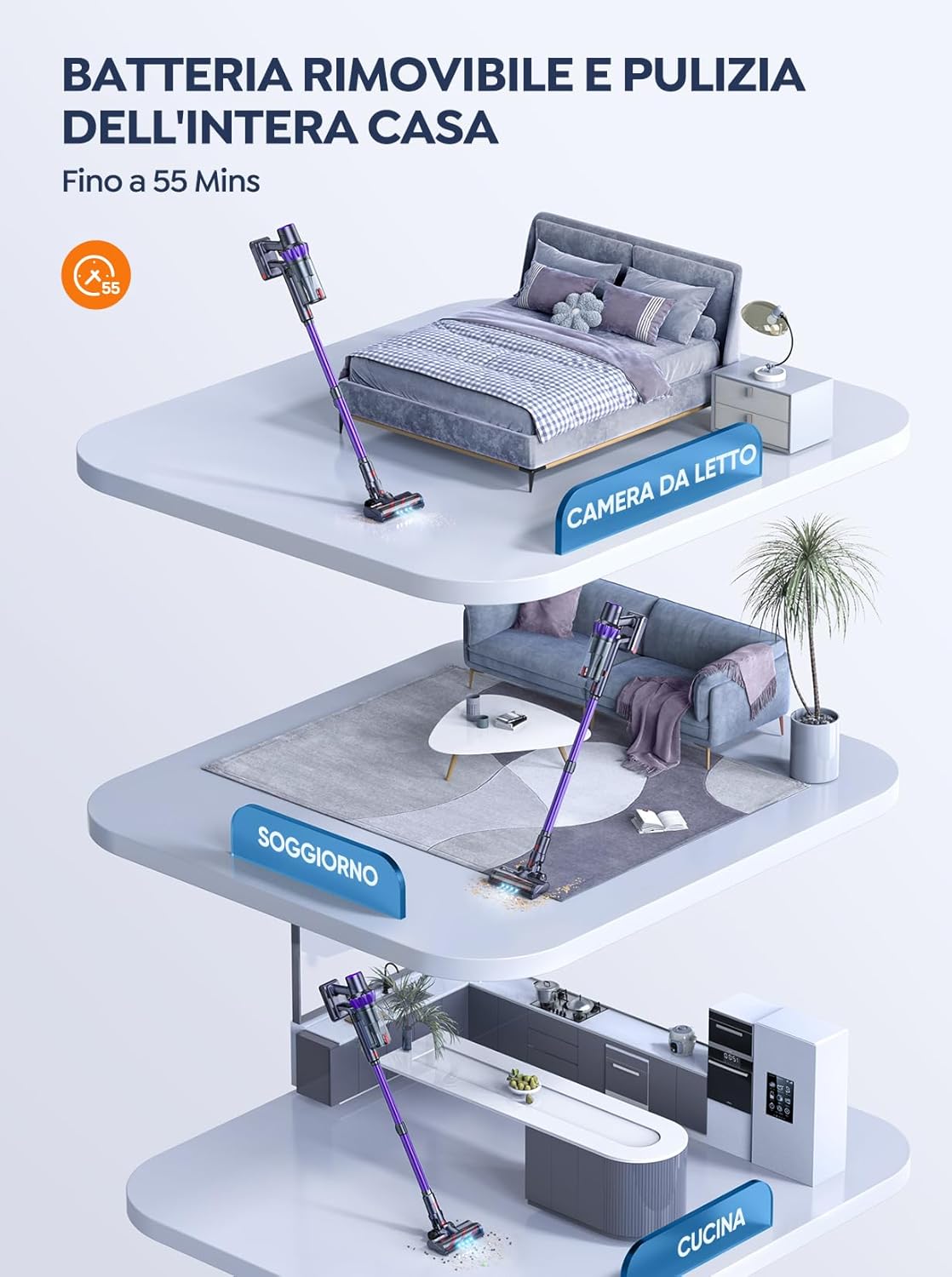
Nọmba 5.1: The removable battery allows for flexible charging options and extended cleaning time across multiple rooms.
- Connect the power adapter to the charging port on the main unit or directly to the battery if removed.
- Pulọọgi ohun ti nmu badọgba sinu iṣan ogiri kan.
- The LED screen will indicate charging status. A full charge typically takes 4-5 hours.
5.2 Nto Vacuum
- So ọ̀pá ìfàgùn mọ́: Insert the top end of the extension wand into the main vacuum body until it clicks into place.
- So fẹlẹ ilẹ mọ: Insert the bottom end of the extension wand into the motorized floor brush until it clicks into place.
- Attach Accessories (for handheld use): For handheld cleaning, you can directly attach the crevice tool or 2-in-1 brush tool to the main vacuum body.
6. Ṣiṣẹ Isenkanjade Igbale
Learn how to effectively use your BuTure VC70 for various cleaning tasks.
6.1 Agbara Tan / Pa ati Aṣayan Ipo

Nọmba 6.1: The intelligent LED touch screen provides real-time information on battery status and selected cleaning mode.
- Lati Fi agbara: Press the power button on the main unit. The vacuum will start in the default mode.
- Lati Yi Awọn ọna pada: Use the mode selection button on the LED touch screen to cycle through available suction modes (e.g., Eco, Standard, Max, Auto).
- Lati Paarẹ: Tẹ bọtini agbara lẹẹkansi.
6.2 Intelligent Automatic Suction Mode
The BuTure VC70 features an intelligent automatic suction mode that adjusts power based on floor type.
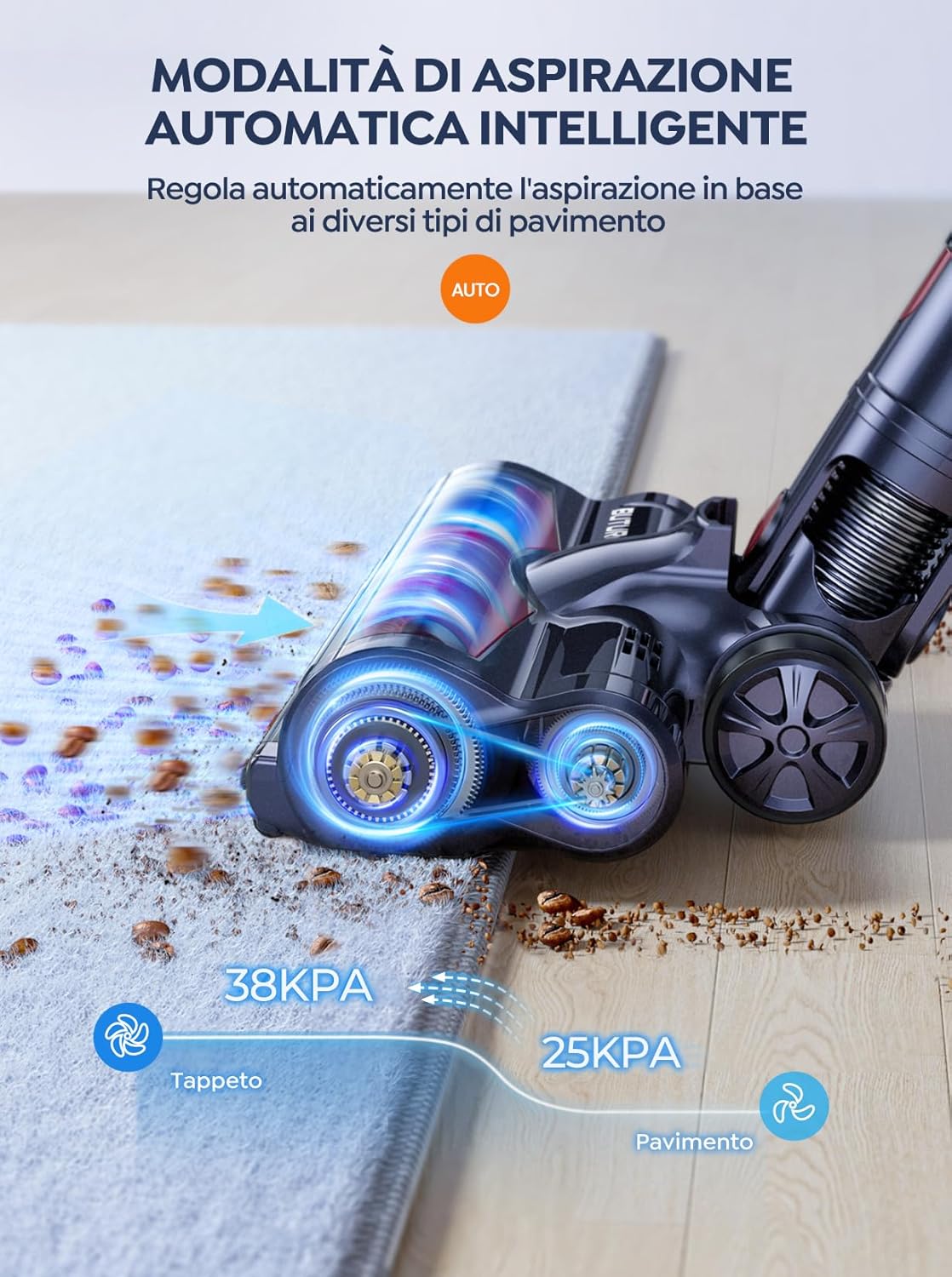
Nọmba 6.2: The vacuum automatically adjusts suction power, providing 38KPA for carpets and 25KPA for hard floors in Auto mode.
In Auto mode, the vacuum detects the floor type and automatically increases suction for carpets (up to 38KPA) and reduces it for hard floors (25KPA), optimizing cleaning efficiency and battery life.
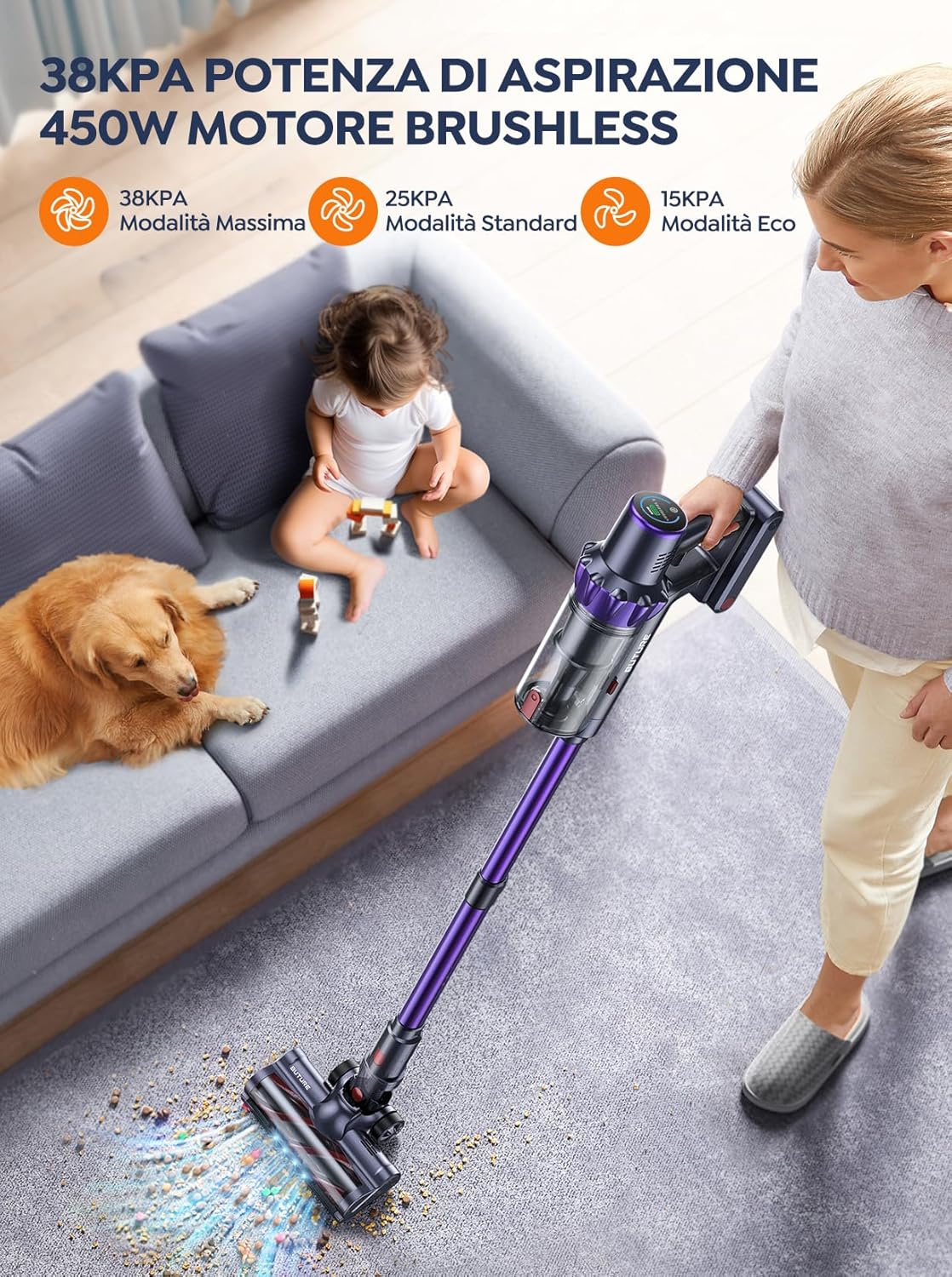
Nọmba 6.3: The 450W brushless motor delivers powerful suction, with modes including 38KPA Max, 25KPA Standard, and 15KPA Eco.
6.3 Lilo Awọn asomọ
- Irinṣẹ Crevice: Ó dára fún àwọn àlàfo tóóró, igun àti etí.
- Ohun èlò ìfọ́ 2-nínú-1: Use the brush for delicate surfaces like upholstery or curtains, and the nozzle for general dusting.
- Fẹlẹ Ilẹ Ilẹ Mọto: Designed for efficient cleaning of both hard floors and carpets. Its integrated bristles effectively pick up various debris.

Nọmba 6.4: The motorized floor brush features a combination of soft and hard bristles to effectively clean different types of debris from various floor surfaces.
7. Itọju
Itọju deede ṣe idaniloju iṣẹ ṣiṣe ti o dara julọ ati fa gigun igbesi aye ẹrọ igbale rẹ.
7.1 Ofo Dustbin
Tú àpótí ìdọ̀tí náà sílẹ̀ lẹ́yìn lílò kọ̀ọ̀kan tàbí nígbà tí a bá dé ìlà ìkún MAX.
- Tẹ bọtini itusilẹ apoti idoti lati yọ kuro ninu ẹrọ akọkọ.
- Open the dustbin lid and empty contents into a trash can.
- Close the lid and reattach the dustbin to the main unit.
7.2 Cleaning Ajọ
The BuTure VC70 features an advanced multi-layer filtration system. Clean filters regularly to maintain suction power.

Nọmba 7.1: The advanced multi-layer filtration system captures 99.99% of dust and dirt, ensuring cleaner exhaust air.
- Remove the dustbin and locate the filters inside.
- Gently tap the filters to remove loose dust.
- Rinse the filters under cold running water. Ensure they are completely dry before reinserting (allow 24-48 hours for air drying).
- Rọpo awọn àlẹ̀mọ́ ní gbogbo oṣù 3-6, ó da lórí bí a ṣe lò ó.
7.3 Ninu Roll fẹlẹ
Lojoojumọ, ṣayẹwo irun didan fun irun tabi idoti ti o ti dì mọ́ra.
- Turn off the vacuum and detach the motorized floor brush.
- Locate the brush roll access latch/button and open it.
- Remove the brush roll. Use scissors or a cleaning tool to cut and remove any tangled hair or fibers.
- Reinsert the brush roll and secure the access latch.
8. Laasigbotitusita
Tí o bá ní ìṣòro pẹ̀lú ẹ̀rọ ìfọṣọ rẹ, wo àtẹ yìí fún àwọn ìṣòro àti ìdáhùn tó wọ́pọ̀.
| Isoro | Owun to le Fa | Ojutu |
|---|---|---|
| Igbale ko ni tan | Batiri ko gba agbara Batiri ko fi sori ẹrọ daradara | Gba agbara si batiri ni kikun Rii daju pe batiri ti tẹ ni aabo si aaye |
| Agbara afamora kekere | Dustbin ti kun Ajọ ti wa ni didi Yipo fẹlẹ ti wa ni ti sopọ mọ Hose/nozzle is blocked | Sofo eruku Nu tabi ropo Ajọ Nu fẹlẹ eerun Check for and remove blockages |
| Fẹlẹ eerun ko nyi | Yipo fẹlẹ ti wa ni ti sopọ mọ Brush roll motor issue | Nu fẹlẹ eerun Kan si atilẹyin alabara ti iṣoro naa ba tẹsiwaju |
| Vacuum stops suddenly | Overheating Idaabobo mu ṣiṣẹ Batiri kekere | Turn off and allow to cool for 30 minutes Gba agbara si batiri |
9. Awọn pato
Technical specifications for the BuTure VC70 Cordless Vacuum Cleaner.
| Ẹya ara ẹrọ | Sipesifikesonu |
|---|---|
| Nọmba awoṣe | VC70 |
| Brand | BuTure |
| Ti won won Agbara | 450 Wattis |
| Voltage | 100-240 Awọn folti |
| Dustbin Agbara | 1.5 lita |
| Ariwo Ipele | 68 dB |
| Iwọn Nkan | 1.81 kilogira (isunmọ 4 lbs) |
| Batiri Iru | Litiumu-dẹlẹ |
| Àwọ̀ | Awọ aro |
10. Atilẹyin ọja ati Support
BuTure products are manufactured to the highest quality standards. For warranty information or technical support, please refer to the warranty card included with your purchase or visit the official BuTure website. Please have your model number (VC70) and purchase details ready when contacting support.


