1. Ifihan
This user manual provides detailed instructions for the installation, operation, and maintenance of your YuanLey 6 Port 2.5G Unmanaged Ethernet Switch. Please read this manual thoroughly before using the device to ensure proper functionality and to prevent damage.
The YuanLey 6 Port 2.5G Unmanaged Ethernet Switch is designed to provide high-speed network connectivity for various applications, including 2.5G NAS, 4K video streaming, gaming PCs, and WiFi 6 access points. Its plug-and-play design ensures easy setup without complex configurations.
2. Ọja Ipariview
The YuanLey 6 Port 2.5G Unmanaged Ethernet Switch is a compact and fanless network device featuring 4x 2.5 Gigabit Ethernet ports and 2x 10G SFP ports. It is built with a durable metal case and designed for stable, quiet operation.
Awọn ẹya pataki:
- 6 Port Configuration: Includes 4x 2.5G Base-T ports and 2x 10G SFP ports (compatible with 1G/2.5G modules, SFP modules not included).
- Super Fast Network Speeds: Offers up to 60Gbps switching capacity, providing 2.5x faster performance than traditional Gigabit switches.
- One-Key VLAN: Allows isolation of communication between RJ45 ports to enhance network security and reduce unnecessary traffic.
- Stable and Quiet Operation: Features a durable metal case with 6KV lightning protection, fanless design for silent operation, double-sided cooling holes, and a wide operating temperature range (-10~50°C).
- Pulọọgi ati Ṣiṣẹ: No configuration required; simply connect your devices.
- Compact Size & Mounting Options: Ṣe atilẹyin fun ipo tabili ati fifi sori ogiri mejeeji.
Aworan aworan:

This image displays the front panel of the switch, highlighting the four 2.5 Gigabit Ethernet ports (labeled 1-4) and the two 10 Gigabit SFP+ ports (labeled 5-6). The power indicator (PWR) and individual port link/activity LEDs are also visible. The overall design is compact and features a metal casing.

This image provides a closer look at the rear and front panels. It points out the DC Input Port (12V1.0A) and the S&V Dip Switch, which allows toggling between Standard Mode (S) and VLAN Mode (V). The PWR LED indicates power status (green for on, grey for off). The 4x 2.5Gbps ports have orange LEDs for 2.5Gbps links and green LEDs for 10/100/1000Mbps links. The SFP Indicator shows a green light when the link is normal.
3. Package Awọn akoonu
Jẹrisi pe gbogbo awọn ohun kan wa ninu package:
- 1 x YuanLey 6 Port 2.5G Unmanaged Ethernet Switch
- 1 x Agbara Adapter
- 1 x Itọsọna olumulo (iwe yii)
4. Eto
4.1 Asopọ agbara
- Connect the provided power adapter to the DC Input Port (12V1.0A) on the rear panel of the switch.
- Pulọọgi ohun ti nmu badọgba agbara sinu iṣan itanna boṣewa.
- Verify that the PWR LED on the front panel illuminates green, indicating the switch is powered on.
4.2 Network Connections (Plug and Play)
The YuanLey 6 Port 2.5G Unmanaged Ethernet Switch is designed for plug-and-play operation, requiring no complex software configuration.
- For 2.5G Ethernet Devices: Connect your devices (e.g., 2.5G NAS, gaming PC, WiFi 6 AP) to any of the 4x 2.5G Base-T ports (ports 1-4) using standard Ethernet cables (Cat5e or higher recommended for optimal performance).
- For 10G SFP Devices: Insert compatible 1G/2.5G/10G SFP modules (not included) into the 2x 10G SFP ports (ports 5-6). Then, connect your fiber optic cables or DAC cables to the SFP modules.
- Observe the port LEDs:
- For 2.5G Base-T ports (1-4): An orange LED indicates a 2.5Gbps link. A green LED indicates a 10/100/1000Mbps link.
- For 10G SFP ports (5-6): A green LED indicates a normal link connection.

This diagram illustrates how the YuanLey 2.5G switch integrates into a network. It shows connections to a 2.5G NAS, WiFi 6 AP, WiFi 6 Router, Laptop with 2.5G Ethernet Adapter, 2.5G Gaming PC, and 4K Video devices. The image also highlights the use of SFP modules for fiber optic connections, emphasizing the switch's versatility for high-performance networking.
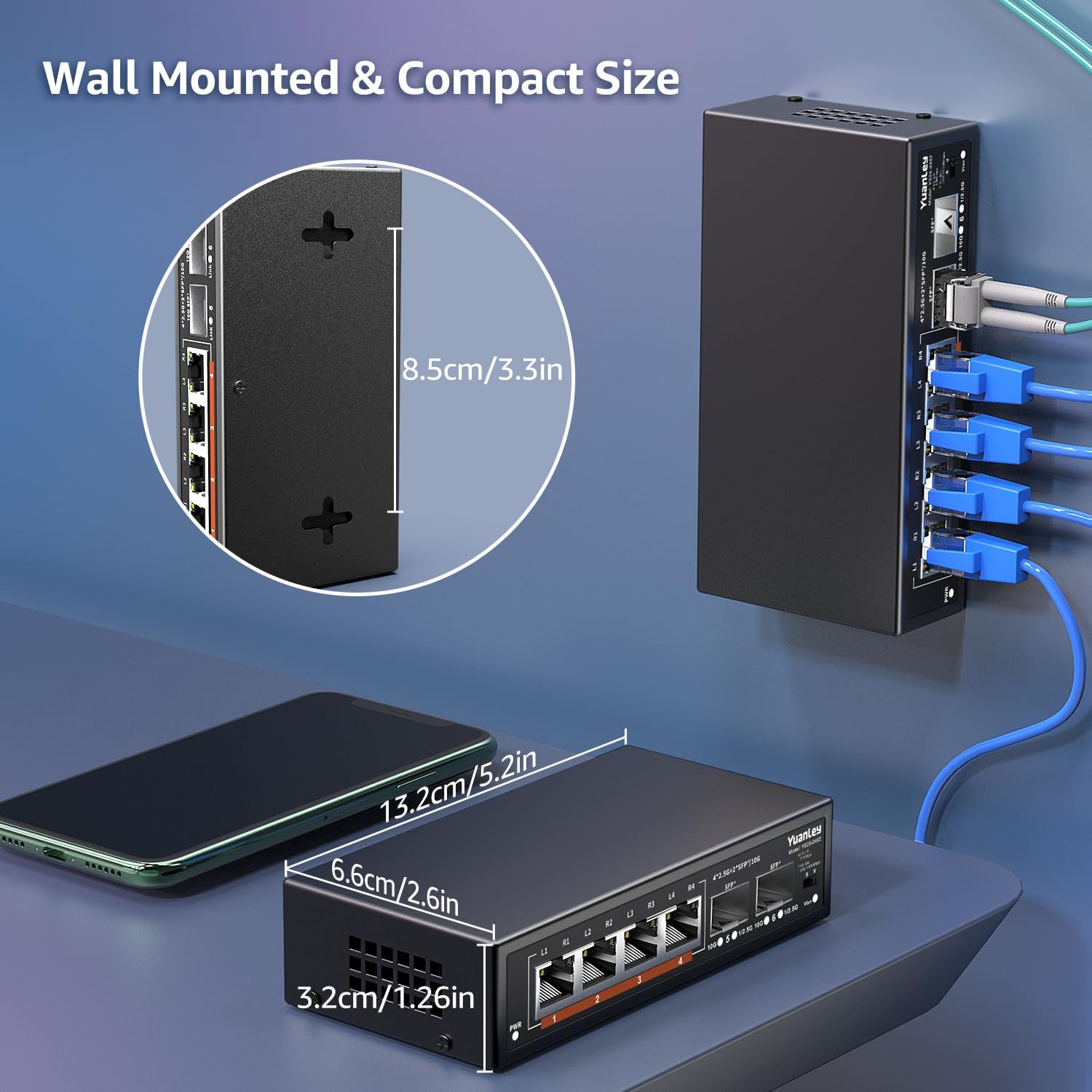
This image demonstrates the compact dimensions of the switch (5.2 inches long, 2.6 inches wide, 1.26 inches high) and its ability to be wall-mounted. The wall-mount slots are visible on the side, allowing for flexible placement in various environments, such as behind a desk or server rack.
5. Awọn ilana Iṣiṣẹ
5.1 Standard Mode vs. VLAN Mode
The switch features an S&V Dip Switch on the rear panel to select between two operating modes:
- Standard Mode (S): All ports can communicate with each other. This is the default mode and suitable for most home and small office networks.
- VLAN Mode (V): Communication between RJ45 ports (1-4) is isolated. This enhances network security and reduces unnecessary broadcast traffic, improving performance in specific scenarios. The SFP ports (5-6) typically remain accessible to all RJ45 ports in VLAN mode, acting as uplink ports.
To switch modes, simply toggle the S&V Dip Switch to the desired position. No reboot is typically required, but it is recommended to power cycle the device for the changes to take full effect in some network environments.
5.2 LED Atọka
The front panel LEDs provide visual status of the switch:
| Atọka | Ipo | Apejuwe |
|---|---|---|
| PWR | Alawọ ewe (Lori) | Ẹrọ naa ti wa ni titan. |
| PWR | Paa | Ẹrọ naa ti wa ni pipa. |
| L1-L4 (RJ45 Ports) | Orange (Lori) | 2.5Gbps link established. |
| L1-L4 (RJ45 Ports) | Alawọ ewe (Lori) | 10/100/1000Mbps link established. |
| L1-L4 (RJ45 Ports) | Imọlẹ | Data activity on the port. |
| SFP Indicator (Ports 5-6) | Alawọ ewe (Lori) | SFP link connected normally. |
| SFP Indicator (Ports 5-6) | Imọlẹ | Data activity on the SFP port. |
6. Itọju
6.1 Itọju Gbogbogbo
- Keep the switch in a cool, dry place, away from direct sunlight, heat sources, and excessive moisture.
- Ensure proper ventilation around the device. Although fanless, adequate airflow helps dissipate heat.
- Clean the exterior of the switch with a soft, dry cloth. Do not use liquid cleaners or aerosols.
- Yago fun gbigbe awọn nkan ti o wuwo si oke ti yipada.
6.2 famuwia imudojuiwọn
As an unmanaged switch, this device typically does not require user-initiated firmware updates. Any necessary updates are usually handled internally by the manufacturer. Do not attempt to flash firmware unless specifically instructed by YuanLey support.
7. Laasigbotitusita
| Isoro | Owun to le Fa | Ojutu |
|---|---|---|
| Kò sí agbára (PWR LED ti pa) | Ohun ti nmu badọgba agbara ko ni asopọ tabi aṣiṣe; iṣan agbara ko ṣiṣẹ. | Check power adapter connection. Try a different power outlet. Ensure the power adapter is the original one supplied with the switch. |
| No link light on a connected port | Incorrect cable; faulty cable; device not powered on; incompatible SFP module (for SFP ports). | Ensure the cable is correctly inserted. Try a different Ethernet cable. Verify the connected device is powered on. For SFP ports, ensure the SFP module is compatible and properly seated. |
| Iyara nẹtiwọọki ti o lọra | Cable quality; connected device limitation; network congestion; VLAN mode enabled unnecessarily. | Use Cat6 or higher Ethernet cables for 2.5G connections. Ensure connected devices support 2.5G or 10G speeds. Check for other network activities causing congestion. Verify S&V Dip Switch is in the desired mode (Standard for full communication). |
| Asopọmọra igba diẹ | Loose cable connection; environmental interference; faulty port. | Reseat all network cables. Try connecting to a different port on the switch. Ensure the switch is not near strong electromagnetic interference sources. |
If the problem persists after trying the above solutions, please contact YuanLey customer support for further assistance.
8. Awọn pato
| Ẹya ara ẹrọ | Apejuwe |
|---|---|
| Awoṣe | 6 Port | 4x2.5G +2x10G SFP |
| Awọn ibudo | 4x 2.5G Base-T Ethernet, 2x 10G SFP |
| Data Gbigbe Oṣuwọn | 2.5 Gigabits Per Second (RJ45), 10 Gigabits Per Second (SFP) |
| Yipada Agbara | Titi di 60Gbps |
| Awọn ajohunše | IEEE802.3bz (2.5G), Auto MDI/MDIX |
| VLAN | One-Key VLAN (RJ45 port isolation) |
| Ohun elo ọran | Irin |
| Itutu agbaiye | Oniru Fanless |
| Monomono Idaabobo | 6KV |
| Awọn iwọn otutu ti nṣiṣẹ | -10°C si 50°C |
| Ọja Mefa | 5.2 x 2.6 x 1.26 inches (13.2 x 6.6 x 3.2 cm) |
| Iwọn Nkan | 1.06 poun (0.48 kg) |
| Agbara Input | 12V1.0A DC |
| UPC | 790885573729 |
| ASIN | B0C64N2QN7 |
9. Atilẹyin ọja ati Support
YuanLey provides a standard warranty for this product. For specific warranty terms and conditions, please refer to the warranty card included with your purchase or visit the official YuanLey webojula.
For technical support, troubleshooting assistance, or warranty claims, please contact YuanLey customer service through their official channels. Contact information can typically be found on the product packaging or the YuanLey webojula.
Awọn orisun Ayelujara:
- YuanLey Official Store: Visit YuanLey Store on Amazon
10. Awọn fidio ọja osise
Fídíò tó tẹ̀lé yìí fi àwòrán hàn kedereview of the YuanLey 4 Port 2.5G Switch (similar model, demonstrating key features).
This video showcases the YuanLey 4 Port 2.5G Switch, highlighting its design, port configuration, and plug-and-play functionality. It demonstrates the ease of setup and the various applications for which the switch is suitable, such as connecting high-speed devices for gaming, 4K video, and office networks. The video also briefly touches upon features like the fanless design and compact size.


