1. Ifihan
The NOYAFA NF-468CS is a versatile network cable tester designed for verifying the integrity of various network and telephone cables. It supports testing for RJ45, RJ11, and RJ12 connectors, including Cat5, Cat5e, Cat6, Cat6a, Cat7, and Cat3 phone lines. This device helps identify common cabling faults such as short circuits, open circuits, miswires, cross-pairs, and split pairs. It also features a Power over Ethernet (POE) test function and a Quality Control (QC) function for crimping verification. The NF-468CS is an essential tool for network installation, maintenance, and troubleshooting in various environments.
2. Alaye Aabo
- Ka gbogbo awọn ilana ni pẹkipẹki ṣaaju lilo ẹrọ naa.
- Ma ṣe fi ẹrọ naa han si ọrinrin tabi iwọn otutu to gaju.
- Yago fun sisọ silẹ tabi tẹriba ẹrọ si ipa nla.
- Ma ṣe gbiyanju lati tunto tabi yi ẹrọ naa pada. Awọn atunṣe yẹ ki o ṣee ṣe nipasẹ oṣiṣẹ ti o peye nikan.
- Ensure cables are properly connected before performing tests to prevent damage to the tester or connected equipment.
- When performing POE tests, be aware of the voltage levels (up to 60V) and ensure proper handling.
3. Package Awọn akoonu
Idiwọn boṣewa pẹlu:
- Mainframe (Host Unit)
- Latọna kuro
- USB-C Charging Cable (Note: Power adapter not included)
- Itọsọna olumulo
4. Ọja Ipariview
The NOYAFA NF-468CS consists of a main unit (Host) and a detachable remote unit. Both units feature LED indicators to display test results.
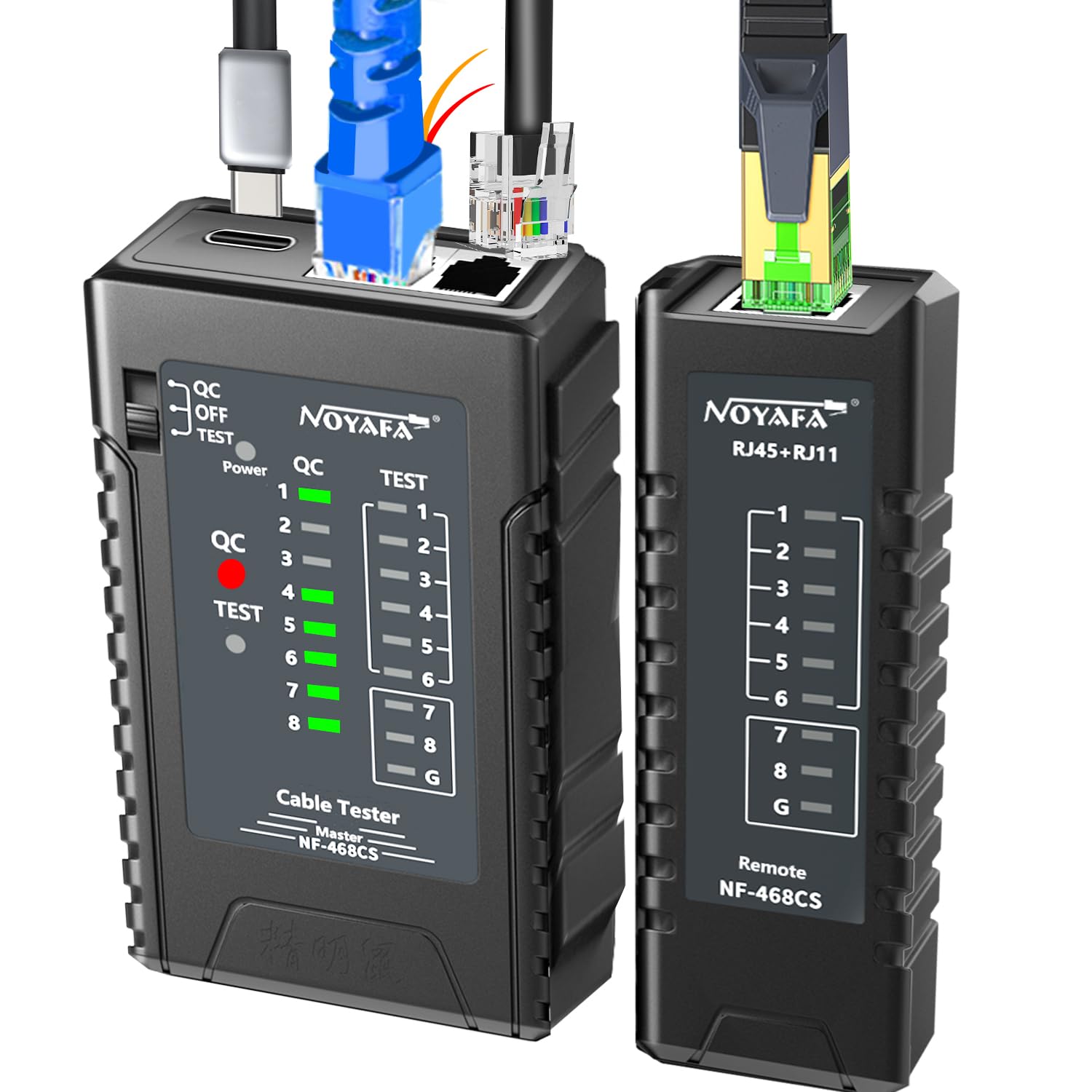
Image 4.1: NOYAFA NF-468CS Main Unit and Remote Unit. The main unit has RJ45, RJ11, and USB-C ports, along with LED indicators for QC, Power, and Test. The remote unit has RJ45 and RJ11 ports and corresponding LED indicators.
Main Unit (Host) Features:
- Ibudo RJ45: For testing Ethernet cables (Cat5, Cat5e, Cat6, Cat6a, Cat7).
- RJ11/RJ12 Port: For testing phone lines (Cat3).
- Ibudo Ngba agbara USB-C: For recharging the internal lithium battery.
- QC/OFF/TEST Switch: Selects between Quality Control mode, Power Off, and Test mode.
- LED Indicators (1-8, G): Display wire status (Pass, Miswire, Open, Short, Shielded).
- LED agbara: Ṣe afihan ipo agbara.
- LED QC: Indicates QC function status.
Remote Unit Features:
- Ibudo RJ45: Connects to the other end of the Ethernet cable for remote testing.
- RJ11/RJ12 Port: Connects to the other end of the phone line for remote testing.
- LED Indicators (1-8, G): Mirror the main unit's indicators to show wire status.
5. Eto
5.1 Ngba agbara si Batiri naa
The NF-468CS features a built-in 1100mAh rechargeable lithium battery. Before first use, or when the battery low voltage indicator appears, charge the device.
- Connect the supplied USB-C charging cable to the USB-C port on the main unit.
- Connect the other end of the USB-C cable to a standard USB power adapter (e.g., phone charger, computer USB port).
- The Power LED on the main unit will indicate charging status. Charge until fully charged.

Image 5.1: The main unit of the NF-468CS connected to a USB-C charger for battery replenishment.
6. Awọn ilana Iṣiṣẹ
6.1 Basic Cable Testing (RJ45, RJ11, RJ12)
This mode tests for continuity, open circuits, short circuits, and miswires.
- Ensure the main unit and remote unit are separated.
- Connect one end of the cable to be tested into the appropriate port (RJ45 or RJ11/RJ12) on the main unit.
- Connect the other end of the cable into the corresponding port on the remote unit.
- Slide the switch on the main unit to the 'TEST' position.
- Observe the LED indicators (1-8, G) on both the main and remote units.
Itumọ ti Awọn Atọka LED:
- All 1-8 LEDs light up sequentially on both units: Indicates a correctly wired cable (straight-through or cross-over, depending on cable type).
- One or more LEDs do not light up: Indicates an open circuit or a broken wire.
- LEDs light up in an incorrect sequence: Indicates a miswire or cross-pair fault.
- Multiple LEDs light up simultaneously or irregularly: Tọkasi a kukuru Circuit.
- 'G' LED lights up: Indicates a shielded cable (STP) has its shield connected correctly.

Image 6.1: Illustration of LED indicators for a well-connected cable (all 1-8 lights on) versus a poor connection (e.g., 5th wire core not crimped properly, 5th light off).
6.2 QC Function (Crimp Plug Error Detection)
The QC function allows for quick verification of RJ45 connector crimping quality, even without power.
- Slide the switch on the main unit to the 'QC' position.
- Connect the crimped RJ45 connector into the RJ45 port on the main unit.
- Observe the QC LED and the 1-8 LEDs.
Interpretation of QC Indicators:
- QC LED is green and all 1-8 LEDs light up: Indicates a correctly crimped connector.
- QC LED is red or specific 1-8 LEDs do not light up: Indicates a crimping error (e.g., poor connection, open wire).

Image 6.2: Demonstrates the QC function. Steps show connecting a network cable to the host unit for QC, then performing a full test. Examples of 'OK' and 'Poor connection' are shown.
6.3 POE Test Function
This function allows you to quickly determine the type of power supply and power supply state of a POE switch or router.
- Connect the network cable from the POE source (switch/router) directly to the RJ45 port on the main unit.
- Slide the switch on the main unit to the 'TEST' position.
- Observe the LED indicators (1-8, G) and the Power LED.
Interpretation of POE Indicators:
- 1-2 lights bright or 3-6 lights bright: Indicates an 'end jumper method' (12/36 core power supply).
- 4-5 lights bright or 7-8 lights bright: Indicates a 'middle jumper method' (45/78 core power supply).
- The device can withstand up to 60V, preventing damage from POE sources.

Image 6.3: Demonstrates POE testing, showing how different LED patterns indicate the power supply method (end-span or mid-span) and the device's anti-burning withstand voltage ti 60V.
6.4 Direct Connect Network Module Testing
The NF-468CS can be used to test network modules directly, such as wall jacks or patch panels.
- Connect one end of a short patch cable to the RJ45 port on the main unit.
- Connect the other end of the patch cable to the network module (e.g., wall jack).
- Connect the remote unit to the corresponding port on the other end of the cable run (e.g., patch panel).
- Slide the switch on the main unit to the 'TEST' position and observe the LEDs.

Image 6.4: The NF-468CS main unit connected to a wall jack via a patch cable, with the remote unit connected to the other end of the cable run, illustrating direct network module testing.
7. Itọju
7.1 Ninu
- Mu ese ẹrọ rẹ jẹ pẹlu asọ, asọ gbigbẹ.
- Ma ṣe lo abrasive ose tabi epo.
7.2 batiri Itọju
- Recharge the battery regularly, especially if the device will not be used for an extended period.
- Yago fun gbigba agbara si batiri ni kikun nigbagbogbo lati fa gigun aye rẹ.
- Tọju ẹrọ naa ni itura, aye gbigbẹ nigbati o ko ba wa ni lilo.
8. Laasigbotitusita
This section addresses common issues encountered during operation.
| Isoro | Owun to le Fa | Ojutu |
|---|---|---|
| No LEDs light up during test. | Device is off, battery is dead, or cable is completely open. | Ensure switch is in 'TEST' position. Charge the battery. Check cable for severe damage. |
| Incorrect LED sequence (e.g., 4 and 7 reversed). | Miswire or wrong order of cables. | Re-crimp the connector following the correct wiring standard (T568A or T568B). |
| Specific LED(s) do not light up. | Open circuit or poor connection for that specific wire. | Inspect the connector and cable for damage. Re-crimp if necessary. |
| Multiple LEDs light up irregularly. | Short circuit between wires. | Check for exposed wires or improper crimping causing contact between conductors. |
| QC function shows error. | Poor crimping of the RJ45 connector. | Re-crimp the connector, ensuring all wires are properly seated and crimped. |
9. Awọn pato
- Awoṣe: NF-468CS
- Awọn oriṣi USB ti o ni atilẹyin: RJ45 (Cat5, Cat5e, Cat6, Cat6a, Cat7), RJ11/RJ12 (Cat3 Phone Line)
- Awọn iṣẹ idanwo: Open, Short, Cross, Miswire, Split Pair, Shielded, POE Test, QC (Crimp Test)
- Max Test Distance: Titi de awọn mita 1000 (3280 ẹsẹ)
- POE Test Voltage Withstand: Titi di 60V
- Orisun Agbara: Batiri litiumu 3.7V 1100mAh ti a ṣe sinu
- Ibudo gbigba agbara: USB-C
- Awọn iwọn: Isunmọ 6.22 x 4.45 x 1.54 inches
- Ìwúwo: Isunmọ 6.74 iwon
- Awọn iwe-ẹri: CE, FCC, ISO 9001, RoHS
10. Atilẹyin ọja ati Support
NOYAFA products are designed for reliability and performance. This product comes with a standard manufacturer's warranty against defects in materials and workmanship. For specific warranty details, please refer to the warranty card included with your product or visit the official NOYAFA webojula.
For technical support, troubleshooting assistance, or service inquiries, please contact NOYAFA customer service through their official channels. You can also visit the NOYAFA Brand Store on Amazon fun alaye siwaju sii ati ọja oro.


