1. Ifihan
The Fodsports F1 PRO is a motorcycle Bluetooth headset designed to enhance communication and safety during rides. It features a unique safety light, intercom capabilities for two riders, high-fidelity audio with EQ sound modes, and a robust waterproof design. This manual provides detailed instructions for installation, operation, and maintenance to ensure optimal performance and user experience.

Image 1.1: Fodsports F1 PRO Headset highlighting key features.
2. Ohun ti o wa ninu Apoti
Jẹrisi pe gbogbo awọn paati wa ninu package:
- F1 PRO Bluetooth Headset Unit
- Agbọrọsọ & Gbohungbo Tube Lile
- Okun Ngba agbara USB
- Clip Agekuru
- Ipilẹ oofa (x2)
- 3M Glue Velcro (x2)
- Velcro (for speakers)
- Àwọn Páàdì Amúdàgbàsókè Agbọrọsọ
- User Manual (Start Guide)

Image 2.1: Package contents of the Fodsports F1 PRO.
3. Awọn ẹya Ọja
- Integrated Safety Light: Features 3 light colors (red, blue, green) and 9 light effects (long light, flashing, breathing) for enhanced visibility during night riding.
- 2-Rider Bluetooth Intercom: Supports communication between two riders with Bluetooth 5.0 technology, offering stable connectivity up to 1000 meters (0.62 miles).
- CVC Noise Cancellation & Hi-Fi Stereo Sound: Equipped with a professional noise-canceling microphone and a smart noise cancellation chip. Features 40mm high-fidelity speakers for clear audio even at high speeds.
- Eto Iṣagbesori oofa: Easy and secure magnetic base design for quick installation and removal on various helmet types.
- Igbesi aye batiri gigun: Built-in 1500 mAh battery provides up to 30 hours of talk time, 40 hours for the warning light, and 2 weeks of standby time.
- EQ Sound Modes: Enjoy 3 different music styles: HiFi Bass, Popular Golden Classic, and Pure Human Voice.
- IP67 Mabomire: Advanced casting process ensures excellent sealing, meeting international IP67 waterproof standards for use in various outdoor weather conditions, even at -15°F.
- Redio FM: Integrated FM radio allows users to listen to their favorite channels.
- Intelligent Battery Display: When paired with a phone, the remaining power level is displayed on the phone screen.

Image 3.1: Advanced technologies in the F1 PRO headset.
4. Eto
4.1 Mounting the Headset
The F1 PRO uses a magnetic base for easy attachment to various helmet types, including full-face, modular, and 3/4 open-face helmets.
- Clean the desired mounting area on the back of your helmet thoroughly.
- Peel off the protective film from one of the 3M Glue Velcro pads and firmly attach it to the helmet.
- Attach the magnetic base to the 3M Glue Velcro pad on the helmet.
- Align the F1 PRO headset with the magnetic base and allow it to snap into place. Ensure it is securely attached.

Image 4.1: Magnetic mounting system.

Image 4.2: Helmet compatibility for F1 PRO.
4.2 Fifi sori ẹrọ Agbọrọsọ ati Gbohungbohun
Install the speakers and microphone inside your helmet for optimal audio and communication.
- Wa awọn apo eti inu ibori rẹ.
- Attach the Velcro pads to the back of the speakers.
- Place the speakers inside the ear pockets, ensuring they are centered over your ears for clear sound. Use speaker booster pads if needed for better fit or volume.
- Route the microphone cable to the front of the helmet, positioning the microphone near your mouth. Secure the cable using the provided cable clips.
- Connect the speaker and microphone cables to the F1 PRO headset unit.
4.3 Ngba agbara si Ẹrọ
Before first use, fully charge the F1 PRO headset.
- Connect the USB charging cable to the charging port on the F1 PRO unit.
- So opin keji okun USB pọ mọ adapter agbara USB deede (ko si ninu rẹ) tabi ibudo USB kọmputa kan.
- Ina Atọka gbigba agbara yoo tan imọlẹ. Gbigba agbara ni kikun maa n gba to wakati mẹta.
- Ina atọka naa yoo yipada tabi pa ni kete ti gbigba agbara ba pari.
5. Awọn ilana Iṣiṣẹ
5.1 Agbara Tan / Pa
- Agbara Tan: Press and hold the Power button for approximately 3 seconds until you hear an audible prompt.
- Agbara Pa: Press and hold the Power button for approximately 3 seconds until you hear an audible prompt.
5.2 Bluetooth Pairing (with Phone)
- Ensure the F1 PRO is powered off.
- Press and hold the Power button for about 5-7 seconds until the indicator light flashes red and blue alternately, indicating pairing mode.
- Lórí fóònù alágbéka rẹ, mu Bluetooth ṣiṣẹ́ kí o sì wá àwọn ẹ̀rọ tó wà.
- Select "Fodsports F1 PRO" from the list of devices.
- Once paired, the indicator light will flash blue slowly, and you will hear a confirmation tone.
5.3 Intercom Pairing (with another F1 PRO)
- Ensure both F1 PRO units are powered off.
- On both units, press and hold the Intercom button (refer to device layout for specific button) for approximately 5 seconds until the indicator lights flash red and blue alternately.
- Briefly press the Intercom button on one of the units. The units will search for each other.
- Once connected, the indicator lights on both units will flash blue slowly, and you will hear a confirmation tone.
5.4 Sisisẹsẹhin Orin
- Ṣiṣẹ/Daduro: Briefly press the Multi-function button (or designated music control button).
- Orin t’okan: Tẹ bọtini Iwọn didun Up.
- Tẹlẹ Orin: Tẹ bọtini Iwọn didun isalẹ.
- Atunse iwọn didun: Press and hold the Volume Up or Volume Down buttons.
5.5 Awọn ipe foonu
- Idahun Ipe: Briefly press the Multi-function button.
- Ipe Ipari: Briefly press the Multi-function button.
- Kọ Ipe: Tẹ mọlẹ bọtini iṣẹ-ọpọlọpọ fun iṣẹju-aaya 2.
- Nọmba Ikẹhin Tun Tun: Tẹ bọtini Olona-iṣẹ lẹẹmeji.
5.6 Safety Light Modes
The F1 PRO features 3 light colors (red, blue, green) and 9 light effects. Use the dedicated Light Mode button to cycle through options.
- Briefly press the Light Mode button to change the light color (Red > Blue > Green).
- Double-press the Light Mode button to cycle through light effects (Long Light > Flashing > Breathing).
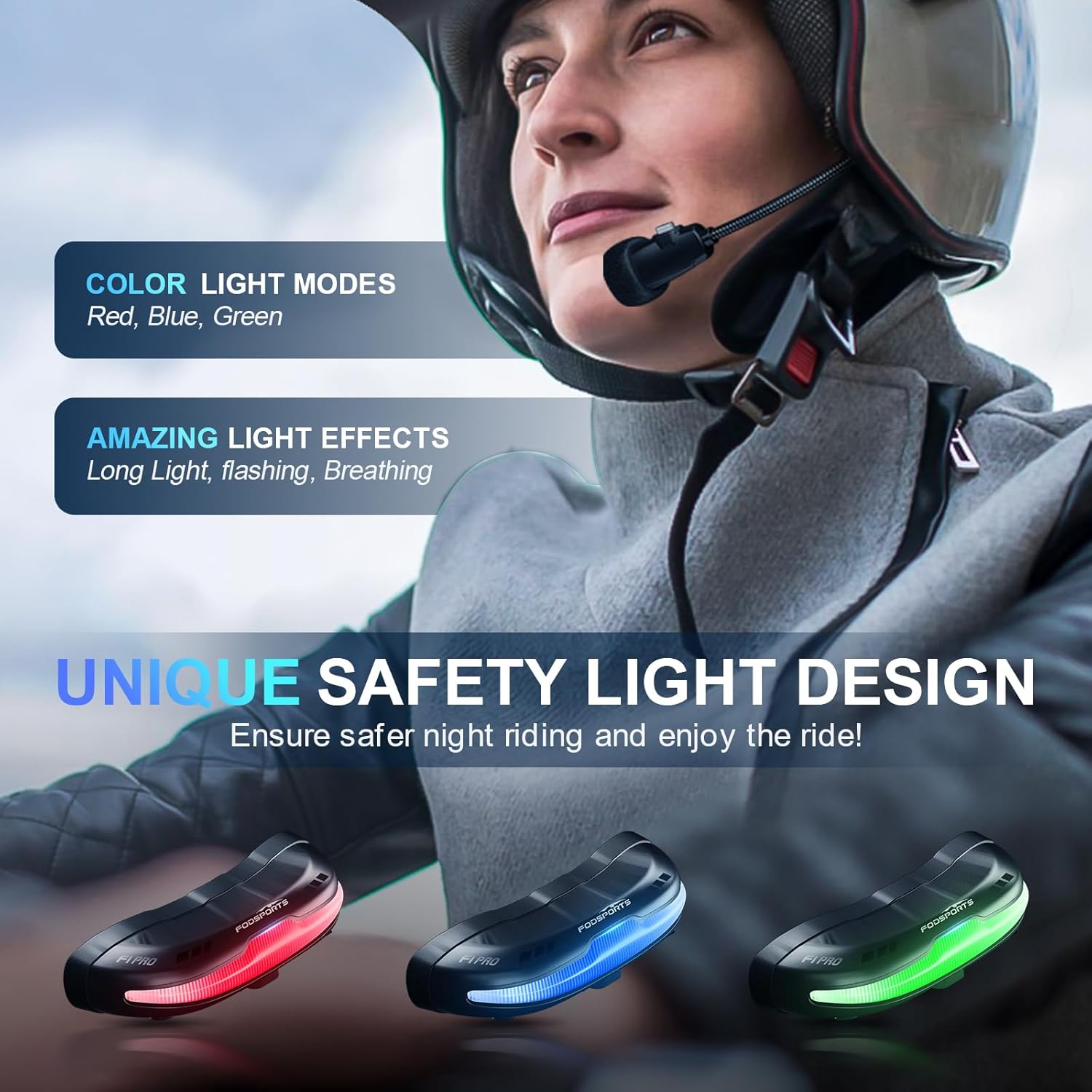
Image 5.1: Available safety light colors.
Àwọn Ìgbésẹ̀ Ohùn EQ 5.7
The F1 PRO offers three distinct EQ sound modes. Press the EQ button (refer to device layout) to switch between them:
- Báàsì HiFi
- Gíga Àgbàyanu Gíga Àgbàyanu
- Ohùn Ènìyàn Mímọ́

Image 5.2: EQ Sound Effects and Microphone.
5.8 Redio FM
To activate the FM radio, press the FM button (refer to device layout). Use the Volume Up/Down buttons to scan for stations.
5.9 Iranlọwọ ohun
Activate your phone's voice assistant (e.g., Siri) by briefly pressing the Voice Assistant button (refer to device layout).
6. Itọju
- Ninu: Wipe the headset unit with a soft, damp asọ. Yẹra fun lilo awọn kẹmika lile tabi awọn afọmọ abrasive.
- Ibi ipamọ: Tọ́jú ẹ̀rọ náà sí ibi tí ó tutù tí ó sì gbẹ nígbà tí a kò bá lò ó. Yẹra fún ìwọ̀n otútù tó le koko.
- Itọju Batiri: Lati pẹ aye batiri, yago fun gbigba agbara si batiri ni kikun nigbagbogbo. Gba agbara si ẹrọ nigbagbogbo, paapaa ti ko ba wa ni lilo fun awọn akoko ti o gbooro sii.
- Ifihan omi: While IP67 waterproof, avoid prolonged submersion. Ensure the charging port cover is securely closed before exposure to water.
7. Laasigbotitusita
- Ẹrọ ko ni agbara lori: Rii daju pe batiri ti gba agbara. Sopọ si orisun agbara ati gbiyanju lẹẹkansi.
- A ko le so pọ mọ foonu/intercom: Ensure the device is in pairing mode (flashing red and blue). Make sure other Bluetooth devices are not interfering. Try resetting the device (refer to specific reset instructions if available in a full manual).
- Ko si ohun lati awọn agbohunsoke: Check speaker connections to the main unit. Ensure volume is not set to minimum. Verify successful Bluetooth connection.
- Gbohungbohun ko ṣiṣẹ: Ensure the microphone is properly connected and positioned correctly near your mouth.
- Asopọ intercom dinku: Ensure both units are within the specified range (1000 meters) and there are no significant obstructions.
- Safety light not working: Check if the device is powered on. Cycle through light modes to ensure it's not off or in a very dim setting.
- Magnetic mount not holding: Ensure the helmet surface is clean and dry before applying the 3M adhesive. Allow sufficient time for the adhesive to cure.
8. Awọn pato
| Ẹya ara ẹrọ | Sipesifikesonu |
|---|---|
| Orukọ awoṣe | F1 PRO |
| Asopọmọra Technology | Bluetooth, Alailowaya |
| Ẹya Bluetooth | 5.0 |
| Ariwo Iṣakoso | Ìfagilé Ariwo Ti Nṣiṣẹ (CVC) |
| Agbara Batiri | 1500 mAh litiumu Iwon |
| Ìgbésí Ayé Bátìrì (Ọ̀rọ̀/Orin) | Titi di awọn wakati 30 |
| Battery Life (Warning Light) | Titi di awọn wakati 40 |
| Akoko Iduro | Up to 2 Weeks (350 Hours) |
| Akoko gbigba agbara | Awọn wakati 3 |
| Omi Resistance Ipele | IP67 mabomire |
| Audio Driver Iwon | 40 mm |
| Iwọn Igbohunsafẹfẹ | 20 Hz - 20,000 Hz |
| Iwọn Nkan | 74 Giramu (2.61 iwon) |
| Ohun elo | Ṣiṣu |
| Pataki Awọn ẹya ara ẹrọ | 9 Modes Safety Light, EQ Sounds, Magnetic Quick Mount, Noise Cancellation, Rechargeable Battery |
9. Atilẹyin ọja ati Support
Fodsports provides customer support for the F1 PRO Motorcycle Bluetooth Headset. For any issues or inquiries regarding this product, please contact the seller directly. The seller, YUANKUN-US, commits to replying within 12 hours.
To contact support, navigate to the product page on Amazon, locate the seller information (usually under the 'Add to Cart' button), and click on the seller's name (e.g., "YUANKUN-US") then select "Ask a question".
Jọwọ ṣe idaduro ẹri rira rẹ fun awọn iṣeduro atilẹyin ọja.


