1. Ifihan
The M5Stack Atom Echo is a compact and portable smart speaker development kit designed for voice interaction and AI capabilities. It integrates a microphone and speaker, enabling functions such as voice control and audio playback. This device is ideal for rapid prototyping in various applications including IIoT, home automation, smart retail, and STEM education.
Awọn ẹya pataki pẹlu:
- Iwapọ ati Gbigbe: Measuring only 24 x 24 x 17 mm, it is highly convenient for on-the-go use.
- Voice Interaction and AI Capabilities: Built-in microphone and speaker support voice control, story-telling, and integration with cloud platforms like AWS and Baidu.
- Wireless Music Playback: Utilizes ESP32's BT capabilities for seamless audio streaming from mobile devices.
- Asopọmọra Wapọ: Supports 2.4G Wi-Fi IEEE 802.11b/g/n for reliable wireless connection.
- RGB LED Status Display: An embedded SK6812 RGB LED provides visual indication of the device's operational status.

Figure 1: M5Stack Atom Echo Smart Speaker Dev Kit, a compact and portable device.
2. Àwọn Ẹ̀yà àti Ìwọ̀n Ọjà
The Atom Echo features several key components and a compact design, as detailed below.
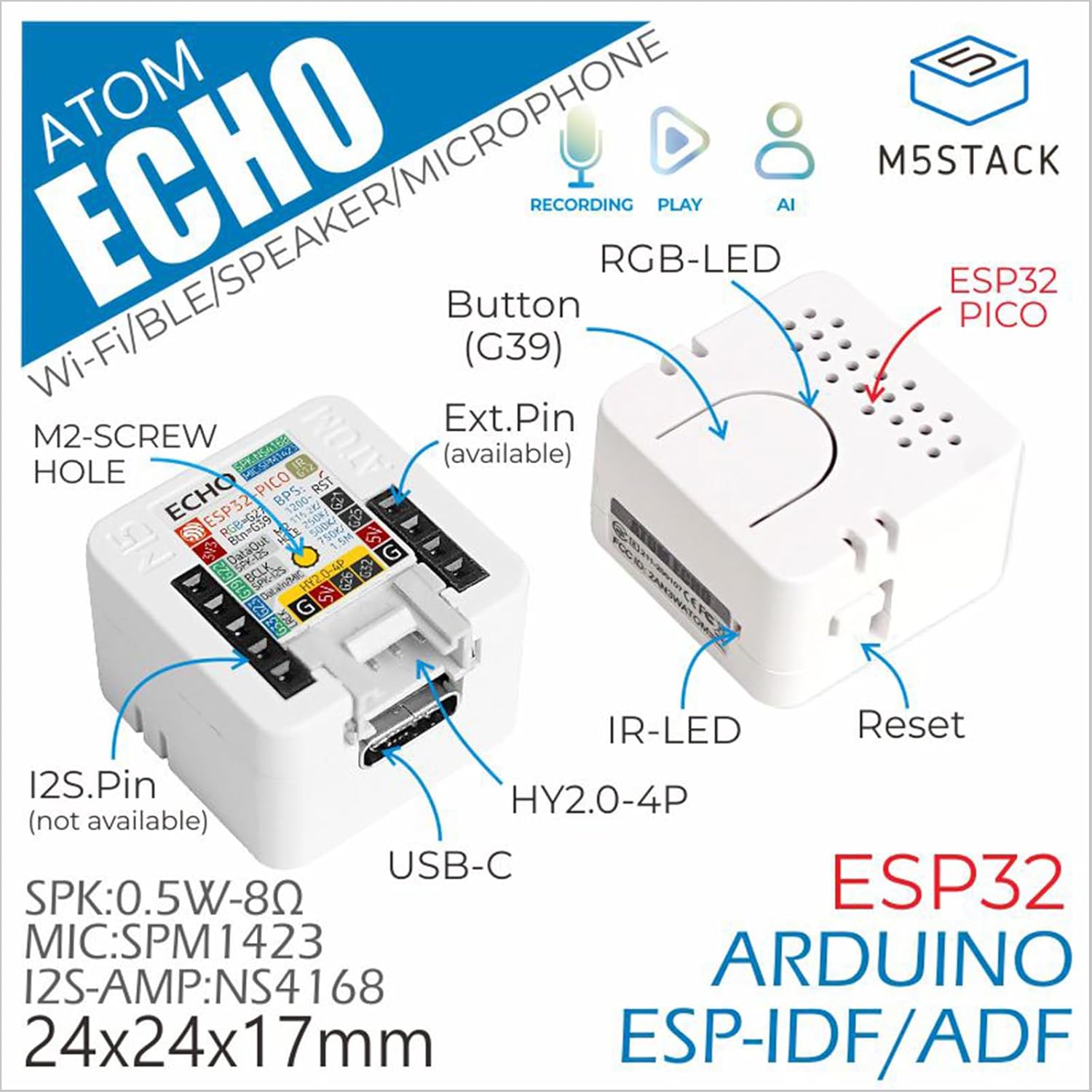
Figure 2: Detailed component diagram of the Atom Echo, highlighting the Button (G39), RGB-LED, ESP32 PICO, IR-LED, Reset button, USB-C port, Extension Pins, M2-screw hole, and I2S.Pin.

Figure 3: Dimensions of the Atom Echo, measuring 24mm (0.94in) in width and depth, and 17mm (0.67in) in height.

Figure 4: Size comparison of the Atom Echo next to a US Quarter, illustrating its compact form factor.
3. Eto ati Asopọmọra
The Atom Echo is designed for easy setup and versatile connectivity. It supports both Wi-Fi and Bluetooth for communication.
3.1 Agbara Lori
Connect the Atom Echo to a 5V DC power source using the USB-C port. The device will power on automatically.
3.2 Asopọmọra Alailowaya
The device supports 2.4G Wi-Fi (IEEE 802.11b/g/n) and Bluetooth. Specific connection procedures will depend on the firmware loaded onto the device. Refer to the official M5Stack documentation for detailed programming and connection guides.
For detailed tutorials and quick start guides, please visit the official M5Stack webojula:
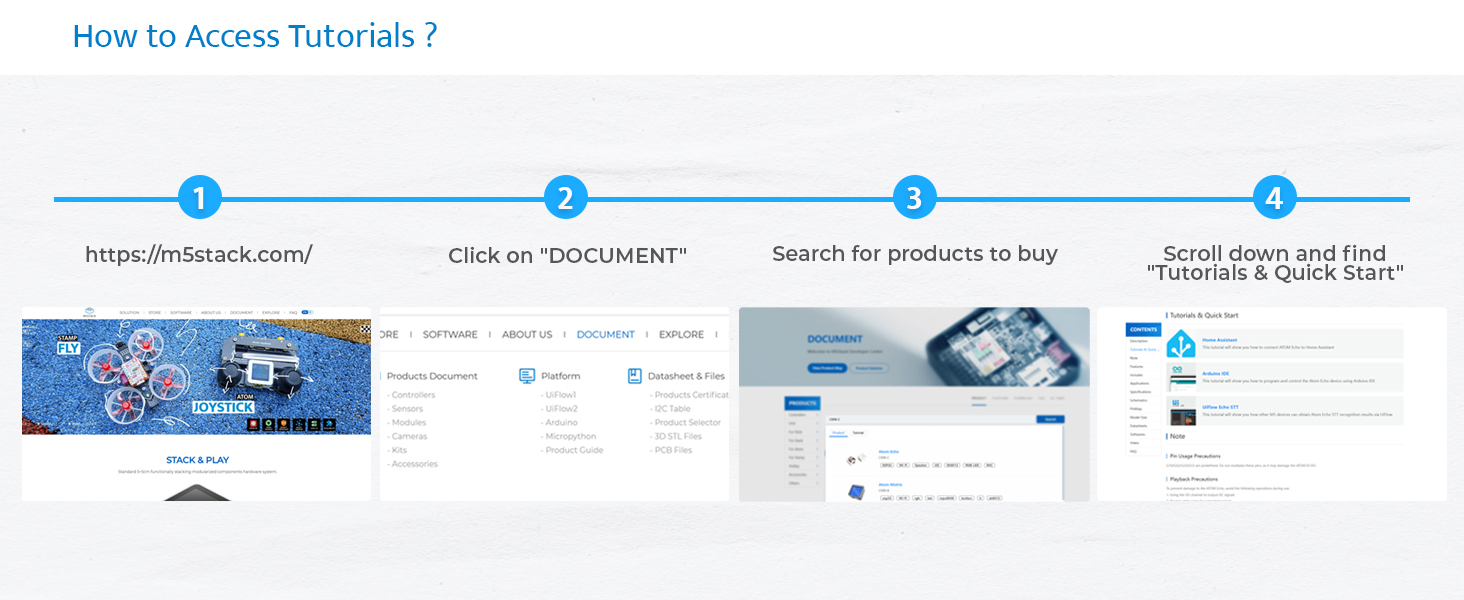
Figure 5: Steps to access tutorials and quick start guides on the M5Stack website (m5stack.com).
4. Operating the Atom Echo
The Atom Echo is primarily operated through its programmable button and voice commands, depending on the loaded application.
4.1 Voice Interaction
The built-in microphone allows for voice input. Depending on the programmed functionality, you can use voice commands for control, ask questions, or interact with AI services.
4.2 Audio Sisisẹsẹhin
The integrated speaker enables audio output. This can be used for playing music wirelessly via Bluetooth, delivering voice responses, or playing system notifications.
4.3 RGB LED Indicator
The RGB LED (SK6812) provides visual feedback on the device's status, such as connection status, active listening mode, or error indications. The specific color patterns and their meanings are defined by the loaded firmware.

Figure 6: Key features of the Atom Echo, including support for STT services, RGB LED status display, compact and lightweight design, and a GROVE expansion interface.
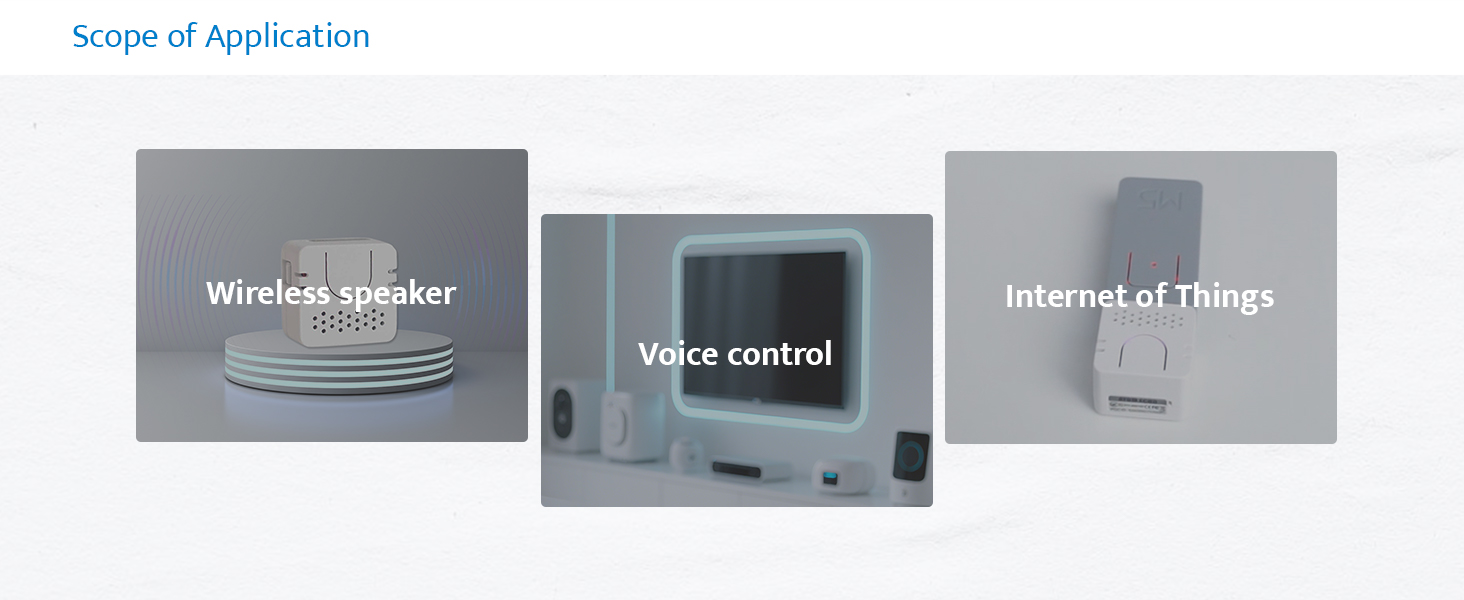
Olusin 7: Examples of Atom Echo applications, including use as a wireless speaker, for voice control, and in Internet of Things (IoT) projects.
5. Itọju
The M5Stack Atom Echo requires minimal maintenance. Keep the device clean and free from dust and moisture.
- Ninu: Lo aṣọ rírọrùn tí ó gbẹ láti nu ìta ẹ̀rọ náà. Má ṣe lo àwọn ohun ìfọṣọ omi tàbí àwọn ohun èlò ìfọṣọ.
- Ibi ipamọ: Tọju ẹrọ naa ni itura, aye gbigbẹ nigbati o ko ba wa ni lilo.
- Awọn ipo Ayika: Yago fun ṣiṣafihan ẹrọ naa si awọn iwọn otutu to gaju, oorun taara, tabi ọriniinitutu giga.
6. Laasigbotitusita
If you encounter issues with your Atom Echo, consider the following common troubleshooting steps:
- Ẹrọ ti ko ni agbara:
- Ensure the USB-C cable is securely connected to both the device and a working 5V power source.
- Gbiyanju okun USB-C ti o yatọ tabi ohun ti nmu badọgba agbara.
- Ko si Ijade Olohun:
- Verify that the device is properly programmed to output audio.
- Check the volume settings within your application or connected device.
- Ensure the speaker is not physically obstructed.
- Gbohungbohun Ko Dahun:
- Confirm that the microphone functionality is enabled and correctly configured in your firmware.
- Ensure there are no physical obstructions covering the microphone.
- Test in a quiet environment, as excessive background noise can affect performance.
- Awọn oran Asopọmọra (Wi-Fi/Bluetooth):
- Ensure the device is within range of your Wi-Fi router or Bluetooth device.
- Verify Wi-Fi credentials or Bluetooth pairing status in your firmware.
- Restart the Atom Echo and your router/Bluetooth device.
- Iwa airotẹlẹ:
- Perform a soft reset using the reset button if available, or by power cycling the device.
- Review your loaded firmware for any programming errors or conflicts.
- Consult the M5Stack official documentation and community forums for specific programming and debugging assistance.
7. Awọn pato
Detailed technical specifications for the M5Stack Atom Echo:

Olusin 8: Pariview of the Atom Echo's key specifications.
| Sipesifikesonu | Iye |
|---|---|
| Iṣagbewọle Voltage | 5 Volts (DC) |
| Iṣagbesori Iru | Ògiri Ògiri |
| Ohun elo | Ṣiṣu |
| Orukọ awoṣe | Atom Echo |
| Agbọrọsọ Iru | Multimedia |
| Pataki Ẹya | Eto siseto |
| Niyanju Lilo | Smart Speaker Development Kit |
| Awọn ẹrọ ibaramu | Foonuiyara, Tabulẹti |
| Iwọn Ẹka | 1.0 Iṣiro |
| Adarí Iru | Bọtini |
| Kakiri Ohun ikanni iṣeto ni | 2.0 |
| Àwọ̀ | Funfun |
| Awọn irinše to wa | 1x ATOM ECHO |
| Ọja Mefa | 0.94"D x 0.94"W x 0.67"H |
| Ibiti ọjọ ori (Apejuwe) | Gbogbo Ọjọ ori |
| Se mabomire | Eke |
| Atilẹyin ọja Iru | Lopin |
| Nọmba ti Awọn nkan | 1 |
| Ọna Iṣakoso | Ohùn |
| Imọ-ẹrọ Ibaraẹnisọrọ Alailowaya | Bluetooth, WiFi |
| Iwọn Agbọrọsọ | 16 millimeters |
| Orisun agbara | USB-C |
| Iwọn Iwọn Woofer | 40.2 millimeters |
| Omi Resistance Ipele | Ko Omi Resistant |
| Onibara Package Iru | FFP |
| Audio Driver Type | Yiyi Awakọ |
| Bluetooth Ibiti | 10 Mita |
| Nọmba ti Microphones | 1 |
| Subwoofer Asopọmọra Technology | Ailokun |
| Ilana Asopọmọra | Bluetooth, Wi-Fi, USB |
| Pẹlu MP3 ẹrọ orin bi? | Rara |
| Nọmba Awọn iyika | 1 |
| Nọmba ti Awọn ipele Agbara | 1 |
| Iwọn ero isise | 1 |
| Olupese | M5Stack Technology Co., Ltd. |
| Iwọn Nkan | 1.13 iwon |
| Nọmba awoṣe ohun kan | C008-C |
| Ọjọ Akọkọ Wa | Oṣu Kẹfa Ọjọ 12, Ọdun 2023 |
| Ilu isenbale | China |
| Brand | M5Stack |
| Agbọrọsọ Agbara Ijade ti o pọju | 0.5 Wattis |
| Idahun Igbohunsafẹfẹ | 240 Hz |
| Asopọmọra Technology | Bluetooth, Wi-Fi, USB, IR |
| Ipo Ijade Ohun | Mono |
8. Ohun ti o wa ninu Apoti
The M5Stack Atom Echo package includes the following items:
- 1x ATOM ECHO unit

Figure 9: Visual representation of the Atom Echo unit included in the package.
9. Atilẹyin ọja ati Support
The M5Stack Atom Echo comes with a limited warranty. For specific warranty terms and conditions, please refer to the documentation provided with your purchase or visit the official M5Stack webojula.
For technical support, additional resources, and community forums, please visit the M5Stack official webojula:


