1. Ifihan
This manual provides essential instructions for the safe and efficient use of your SONY VAIO Pro PK VJPK11 laptop. Please read this manual thoroughly before operating your device and retain it for future reference. It covers setup, operation, maintenance, and troubleshooting to ensure optimal performance and longevity of your laptop.
2. Ọja Ipariview
The SONY VAIO Pro PK VJPK11 is a portable computing device designed for productivity and multimedia. Familiarize yourself with its components and features.

Nọmba 2.1: Iwaju view of the SONY VAIO Pro PK VJPK11 laptop. This image displays the laptop open, revealing the screen, keyboard, and touchpad. The VAIO logo is visible on the screen, and an Intel Core i5 sticker is on the palm rest.
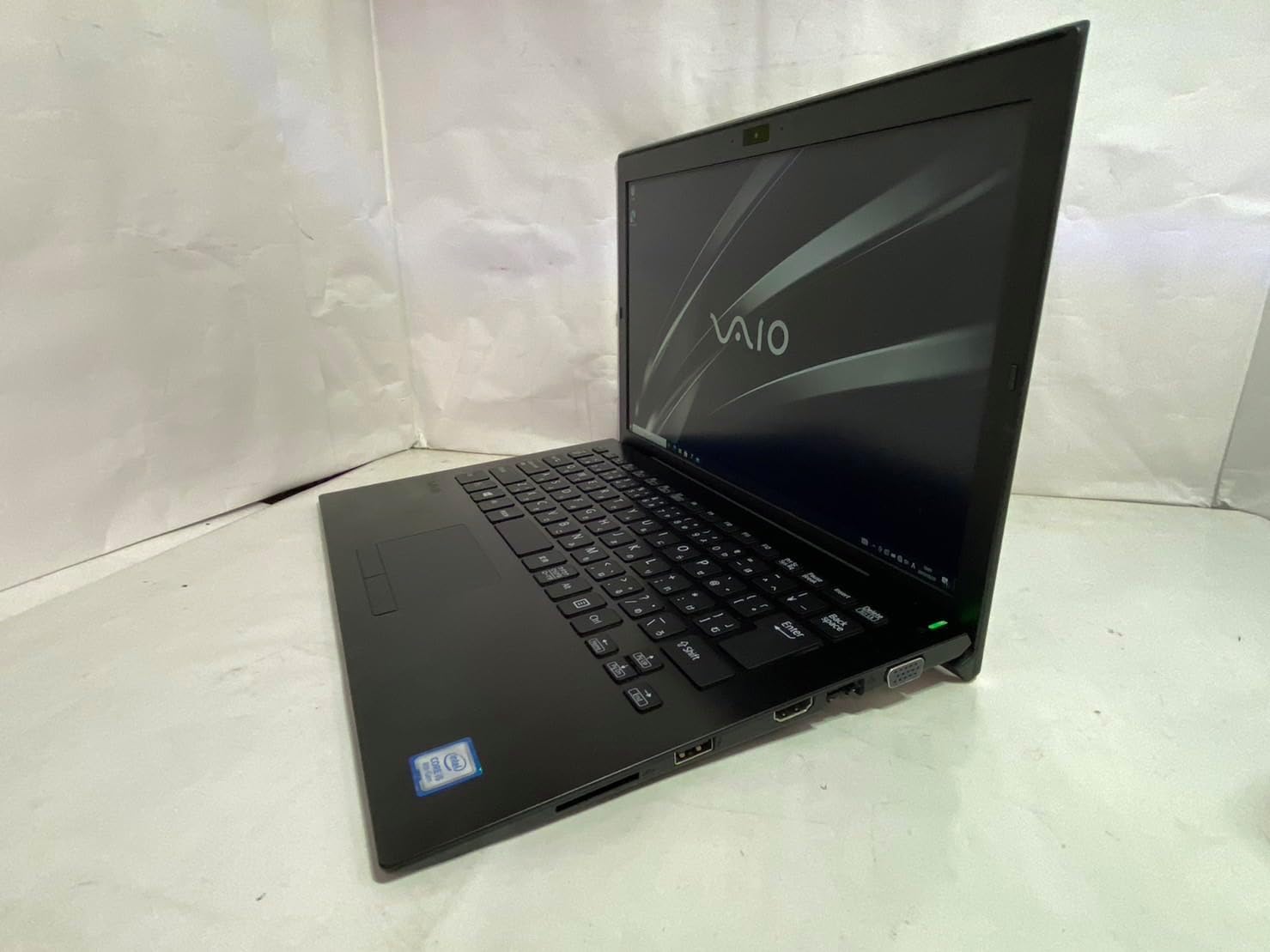
Nọmba 2.2: Apa osi view of the SONY VAIO Pro PK VJPK11 laptop. This image shows the left side of the laptop, highlighting various ports such as USB, HDMI, and a VGA port, along with a ventilation grille.

Nọmba 2.3: Oke view of the SONY VAIO Pro PK VJPK11 laptop with the lid closed. This image displays the sleek black finish of the laptop's lid, featuring the prominent silver VAIO logo in the center.
3. Eto
3.1 Ṣiṣii silẹ
Carefully remove the laptop and all accessories from the packaging. Ensure all components are present:
- SONY VAIO Pro PK VJPK11 Laptop
- AC Adapter ati Power Okun
- Awọn iwe aṣẹ (afọwọṣe yii, alaye atilẹyin ọja)
3.2 Nsopọ si Agbara
- So ohun ti nmu badọgba AC pọ si ibudo titẹ agbara lori kọǹpútà alágbèéká rẹ.
- So okùn agbára náà mọ́ ohun tí ń gbé AC sókè.
- Fi okùn agbára náà sínú ihò iná mànàmáná tí a fi ilẹ̀ ṣe.
- Allow the battery to charge fully before initial use, or use the laptop while connected to power.
3.3 Initial Boot-Up and Windows Setup
Press the power button to turn on the laptop. Follow the on-screen instructions to complete the Windows 10 Pro setup process. This typically involves selecting your region, language, accepting license agreements, and creating a user account.
4. Awọn ilana Iṣiṣẹ
4.1 Agbara Tan / Pa
- Lati Fi agbara: Press the power button located on the laptop.
- Lati Tii: Tẹ bọtini Ibẹrẹ, lẹhinna Power, ki o si yan 'Pa'.
- Lati Tun bẹrẹ: Tẹ bọtini Ibẹrẹ, lẹhinna Power, ki o si yan 'Tun bẹrẹ'.
- Lati Sun: Click the Start button, then Power, and select 'Sleep', or close the laptop lid.
4.2 Keyboard ati Touchpad
The laptop features a standard QWERTY keyboard and a multi-touch touchpad. Use the touchpad for cursor control and gestures. Refer to Windows settings for customizing touchpad sensitivity and gestures.
4.3 Nsopọ Peripherals
- Awọn ẹrọ USB: Connect USB devices (e.g., mouse, external drive) to the available USB 3.0 ports.
- Ifihan ita: Use the HDMI or VGA port to connect an external monitor or projector. Press Bọtini Windows + P to manage display modes.
- Nẹtiwọọki ti a firanṣẹ (LAN): Connect an Ethernet cable to the LAN port for a wired internet connection.
- Kaadi SD: Insert an SD card into the dedicated SD card slot for data transfer.
4.4 Lilo Webcam and Bluetooth
- Webkamẹra: Awọn ese webcam can be used for video calls and conferencing. Access it through applications like Camera or communication software.
- Bluetooth: Enable Bluetooth in Windows settings to connect wireless devices such as headphones, speakers, or mice.
5. Itọju
5.1 Ninu Kọǹpútà alágbèéká
Lo asọ asọ, ti ko ni lint die-die dampened with water or a screen cleaner to clean the display and exterior surfaces. Avoid harsh chemicals or abrasive materials. Ensure the laptop is powered off and unplugged before cleaning.
5.2 batiri Itọju
To prolong battery life, avoid extreme temperatures. If storing the laptop for an extended period, ensure the battery is charged to approximately 50%.
5.3 Software imudojuiwọn
Regularly check for and install Windows updates and driver updates from the SONY support webaaye lati rii daju iduroṣinṣin eto ati aabo.
5.4 Data Afẹyinti
Lokọọkan ṣe afẹyinti data pataki rẹ si kọnputa ita tabi ibi ipamọ awọsanma lati ṣe idiwọ pipadanu data.
6. Laasigbotitusita
This section addresses common issues you might encounter with your SONY VAIO Pro PK VJPK11.
6.1 Ko si Agbara
- Ensure the AC adapter is securely connected to the laptop and a working power outlet.
- Rii daju pe iṣan agbara n ṣiṣẹ nipa pilogi sinu ẹrọ miiran.
- Ti batiri naa ba ti gbẹ patapata, jẹ ki o gba agbara fun iṣẹju diẹ ṣaaju igbiyanju lati tan-an.
6.2 Ifihan oran
- Ti iboju ba ṣofo, gbiyanju lati ṣatunṣe imọlẹ ifihan nipa lilo awọn bọtini iṣẹ.
- If an external monitor is connected, ensure the correct display output mode is selected (Windows key + P).
- Tun kọǹpútà alágbèéká bẹrẹ.
6.3 Wi-Fi Asopọmọra isoro
- Rii daju pe Wi-Fi ṣiṣẹ ni awọn eto Windows.
- Tun olulana ati modẹmu bẹrẹ.
- Ṣayẹwo boya awọn ẹrọ miiran le sopọ si nẹtiwọki Wi-Fi kanna.
- Ṣe imudojuiwọn awọn awakọ nẹtiwọọki alailowaya rẹ.
6.4 Laptop Running Slow
- Pa awọn ohun elo ti ko wulo ti nṣiṣẹ ni abẹlẹ.
- Ṣayẹwo Oluṣakoso Iṣẹ-ṣiṣe fun awọn ilana ti n gba Sipiyu giga tabi Ramu.
- Ṣiṣe afọmọ disk ati defragmentation (fun HDD, ko ṣe pataki fun SSD).
- Rii daju pe Windows ati awọn awakọ ti wa ni imudojuiwọn.
7. Awọn pato
Key technical specifications for the SONY VAIO Pro PK VJPK11 laptop:
| Ẹya ara ẹrọ | Sipesifikesonu |
|---|---|
| Awoṣe | SONY VAIO Pro PK VJPK11 (VJPK11C11N) |
| isise | Intel Core i5-8250U (1.60GHz) |
| Àgbo | 8.00GB DDR3 SDRAM |
| Ibi ipamọ | 256GB SSD (SATA) |
| Ifihan | 14.0-inch Wide (1920x1080 pixels) |
| Awọn aworan | Intel Integrated Graphics |
| Eto isesise | Windows 10 Pro 64bit |
| Awọn ibudo | VGA, HDMI, USB 3.0, LAN, SD Card Slot |
| Asopọmọra | LAN, Bluetooth |
| Webkamẹra | Ti ṣepọ Webkamẹra |
8. Atilẹyin ọja ati Support
For information regarding your product's warranty, please refer to the warranty card included with your purchase or visit the official SONY support website. For technical assistance, contact SONY customer support or your authorized dealer.
Atilẹyin Ayelujara: https://www.sony.com/electronics/support


