1. Ọja Ipariview
The AFERIY Portable Power Station AF-P010 is a versatile and reliable power source designed for various applications, including home backup, outdoor activities, and emergency situations. It features a 512Wh LiFePO4 battery, an 800W AC output (1600W surge), and multiple charging and output ports to power a wide range of devices.

Aworan 1.1: Iwaju view of the AFERIY Portable Power Station AF-P010, showcasing its compact design and display panel.
Awọn ẹya pataki:
- Agbara giga & Ifihan: 512Wh battery capacity with 800W continuous AC output (1600W peak).
- Gbigba agbara yiyara: Fully recharges in approximately 1.5 hours via 400W AC input.
- Batiri ti o tọ: Equipped with LiFePO4 battery technology, offering over 3500 charge cycles to 80% capacity.
- Ọpọ Ibudo: Includes AC, USB-A QC3.0, USB-C (PD 100W/20W), DC6530, and car charging outlets.
- Ipese Agbara Ailopin (UPS): Automatic switchover in 0.1 seconds during power outages.
- Ifihan alaye: LCD panel shows real-time input/output wattage, battery level, and remaining usage time.
- Imọlẹ Ijọpọ: LED light with multiple modes (Lighting, SOS, Flashing) for various needs.
2. Awọn ilana aabo
Read all safety warnings and instructions carefully before using this product. Failure to follow these instructions may result in electric shock, fire, or serious injury.
- Maṣe ṣe titu, tunṣe, tabi yipada ẹya.
- Má ṣe gbé ẹ̀rọ náà síbi tí ó wà nítòsí àwọn ibi tí ó ń gbóná tàbí sí ibi tí oòrùn bá ń tàn tààrà.
- Yago fun ifihan si ojo tabi ọrinrin.
- Pa ẹrọ kuro lati awọn ọmọde ati awọn ohun ọsin.
- Lo awọn ohun elo atilẹba tabi ti a fọwọsi nikan.
- Rii daju pe fentilesonu to dara lakoko lilo ati gbigba agbara.
- Tí iná bá ń jó, lo ohun èlò ìpaná tó gbẹ. Omi lè fa ìkọlù iná mànàmáná.
- Do not operate the unit if it has been damaged or dropped.

Image 2.1: Diagram illustrating the Battery Management System (BMS) and its protective features, including short circuit, overload, and temperature protection.
3. Ọja irinše
Familiarize yourself with the components included in your package and the various ports on the power station.
Awọn akoonu idii:
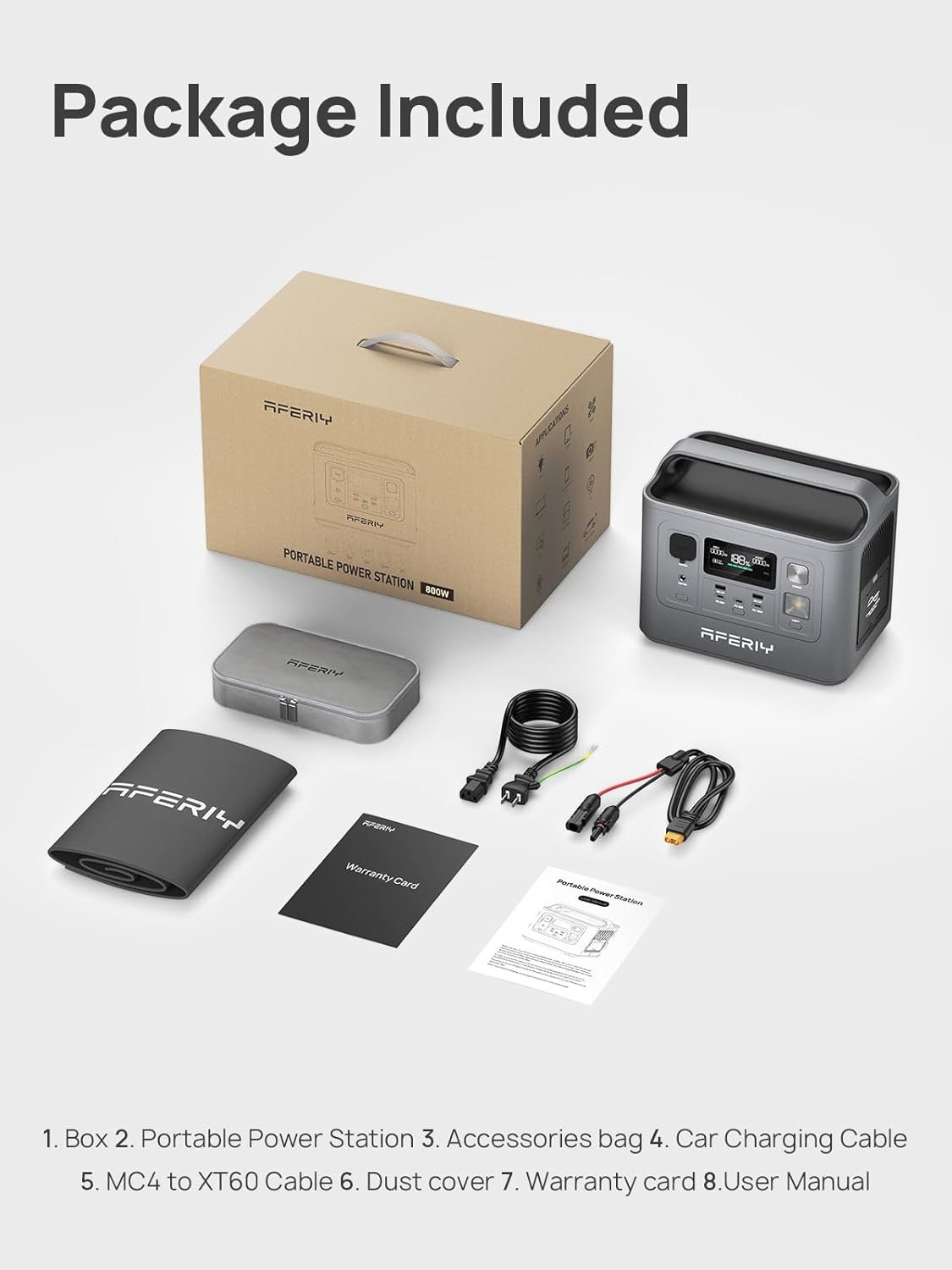
Image 3.1: Contents of the AFERIY Portable Power Station package, including the power station, accessories bag, car charging cable, MC4 to XT60 cable, dust cover, warranty card, and user manual.
- AFERIY Portable Power Station AF-P010
- Okun gbigba agbara AC
- Okun Ngba agbara ọkọ ayọkẹlẹ
- MC4 to XT60 Cable (for solar charging)
- Itọsọna olumulo
- Kaadi atilẹyin ọja
- Apo Awọn ẹya ẹrọ
- Ideri Eruku
Ifilelẹ Port:

Aworan 3.2: alaye view of the power station's front panel, labeling the car charger input, DC output port, DC control, main power button, USB ports (QC3.0, Type-C), and light control.
- AC Output (800W): Fun awọn ohun elo ile deede.
- USB-A QC3.0 (x2): For quick charging compatible USB devices.
- USB-C (PD 100W x1, PD 20W x2): For fast charging laptops, tablets, and smartphones.
- Ijade DC6530: For DC-powered devices.
- Car Charging Outlet: Fun awọn ẹrọ ọkọ ayọkẹlẹ 12V.
- Input DC: Fun gbigba agbara nipasẹ panẹli oorun tabi ṣaja ọkọ ayọkẹlẹ.
- Iṣawọle AC: For charging via wall outlet.
- Ifihan LCD: Ṣe afihan ipo iṣiṣẹ.
- Bọtini agbara: Lati tan-an/pa a kuro.
- Imọlẹ LED: Pese itanna.
4. Eto
Kí o tó lo ó fún ìgbà àkọ́kọ́, rí i dájú pé ibùdó agbára náà ti gba agbára pátápátá.
Gbigba agbara akọkọ:
- Unpack the power station and all accessories.
- Connect the AC charging cable to the AC input port on the power station.
- Plug the other end of the AC charging cable into a standard wall outlet (110V).
- The LCD display will show the charging status. The unit will be fully charged in approximately 1.5 hours.
- Ni kete ti o ti gba agbara ni kikun, ge asopọ okun gbigba agbara.
5. Awọn ilana Iṣiṣẹ
Titan/Pa:
- To turn on the power station, press and hold the main power button for a few seconds until the LCD screen illuminates.
- To turn off the power station, press and hold the main power button again until the LCD screen turns off.
Lilo Awọn Ibudo Ojade:
- Ijade AC: Press the AC button to activate the AC outlets. Plug your devices into the AC ports. Press the AC button again to turn off.
- Ijade USB: The USB-A and USB-C ports are typically active when the unit is on. Simply plug in your USB devices.
- DC Iṣelọpọ: Press the DC button to activate the DC6530 and car charging outlets. Plug in your 12V DC devices. Press the DC button again to turn off.
Ensure the total power consumption of connected devices does not exceed the power station's rated output (800W continuous, 1600W surge).

Image 5.1: The AFERIY Power Station connected to and powering various electronic devices, demonstrating its versatility for different power needs.
Gbigba agbara Ibusọ Agbara:
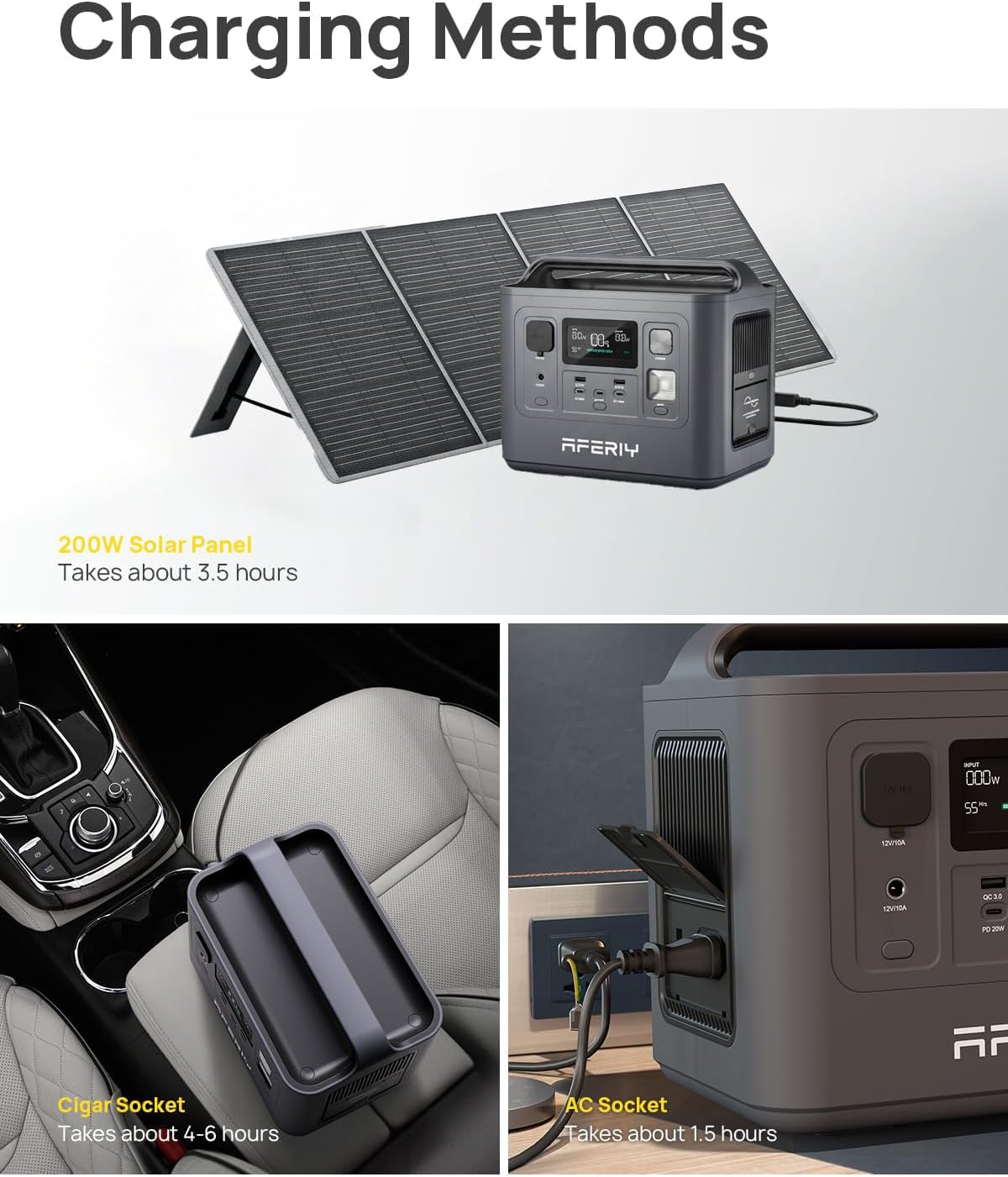
Image 5.2: Illustrations of the three primary charging methods: solar panel (top), car cigar socket (bottom left), and AC wall outlet (bottom right).
- Gbigba agbara ogiri AC: So okùn gbigba agbara AC pọ mọ ibudo titẹ sii AC ati ibudo ogiri. Gba agbara ni kikun laarin wakati 1.5.
- Gbigba agbara igbimọ oorun: Connect a compatible solar panel (max 200W) to the DC input port using the MC4 to XT60 cable. Charging time varies based on sunlight intensity and panel wattage (approx. 3.5 hours with 200W panel).
- Gbigba agbara ọkọ ayọkẹlẹ: Connect the car charging cable to the DC input port and your vehicle's 12V car charging outlet. Full charge in approximately 4-6 hours.
Iṣẹ UPS:
When the power station is connected to an AC wall outlet and has devices plugged into its AC output, it can function as an Uninterruptible Power Supply (UPS). In the event of a power outage, the unit will automatically switch to battery power within 0.1 seconds to continue powering connected devices.
Iṣẹ Imọlẹ LED:
- Press the light button once for standard illumination.
- Press again for SOS mode (flashing pattern).
- Press a third time for flashing mode.
- Tẹ ni igba kẹrin lati pa ina naa.
Alaye Ifihan LCD:

Aworan 5.3: Isunmọ view of the power station's LCD display, showing input/output wattage, ogorun batiritage, and estimated remaining usage time.
Ifihan LCD naa pese alaye gidi-akoko nipa ipo ibudo agbara:
- Atọka Ipele Batiri: Ṣe afihan ogorun batiri lọwọlọwọtage.
- Agbara titẹ sii: Ṣe afihan wattage being drawn for charging.
- Agbara Ijade: Ṣe afihan wattage being consumed by connected devices.
- Akoko to ku: Estimates the remaining operating time or charging time based on current power usage.
- Awọn itọkasi aṣiṣe: Alerts for various issues such as overload or temperature warnings.
6. Itọju
Itọju to peye n ṣe idaniloju pe ibudo agbara rẹ yoo pẹ to ati pe yoo ṣiṣẹ daradara.
Ibi ipamọ:
- Tọ́jú ibùdó agbára iná mànàmáná sí ibi tí ó tutù tí ó sì gbẹ, kúrò níbi tí oòrùn tààrà àti igbóná tó le koko.
- Fun ibi ipamọ igba pipẹ, gba agbara si ẹyọkan si isunmọ 50-80% ni gbogbo oṣu 3-6 lati ṣetọju ilera batiri.
- Avoid storing in environments with high humidity or corrosive substances.
Ninu:
- Ensure the unit is turned off and disconnected from all power sources before cleaning.
- Use a soft, dry cloth to wipe the exterior. Do not use abrasive cleaners or solvents.
- Jeki awọn ṣiṣi afẹfẹ kuro ninu eruku ati idoti.
Itọju Batiri:

Aworan 6.1: Ti abẹnu view highlighting the LiFePO4 battery cells and the Battery Management System (BMS), which contributes to the battery's extended lifespan of over 3500 cycles.
- The LiFePO4 battery is designed for a long lifespan (over 3500 cycles).
- Yago fun gbigba agbara si batiri ni kikun nigbagbogbo, nitori eyi le dinku igbesi aye rẹ lapapọ.
- If the unit will not be used for an extended period, charge it to 50-80% before storage.
7. Laasigbotitusita
If you encounter issues with your AFERIY Portable Power Station, refer to the following common problems and solutions.
| Isoro | Owun to le Fa | Ojutu |
|---|---|---|
| Ẹka ko ni tan-an | Batiri ti yọ gbogbo ara rẹ kuro patapata; Bọtini agbara ko ti tẹ fun igba pipẹ. | Gba agbara si ẹrọ naa nipa lilo adapter AC; Tẹ bọtini agbara ki o si di mu fun awọn aaya 3-5. |
| Ijade AC ko ṣiṣẹ | AC output not activated; Device power consumption too high; Overload protection triggered. | Press the AC button to activate; Check device wattage; Ge asopọ ẹrọ naa, tun ẹrọ naa bẹrẹ. |
| Unit ko gba agbara | Charging cable not properly connected; Charger fault; Extreme temperature. | Ensure all connections are secure; Try a different charging method; Move unit to a suitable temperature range (0-40°C). |
| Ifihan LCD fihan koodu aṣiṣe | Internal fault; Overload; Over-temperature. | Refer to the specific error code in the full manual (if available) or contact customer support. Disconnect devices and allow unit to cool if temperature related. |
If the problem persists after attempting these solutions, please contact AFERIY customer support.
8. Awọn pato
Detailed technical specifications for the AFERIY Portable Power Station AF-P010.
| Ẹya ara ẹrọ | Sipesifikesonu |
|---|---|
| Awoṣe | AF-P010 |
| Batiri Iru | LiFePO4 |
| Agbara | 512Wh |
| Ijade AC | 800W (Continuous), 1600W (Peak) |
| AC Voltage | 110V |
| Ṣiṣejade USB-A | 2 x QC3.0 |
| USB-C o wu | 1 x PD 100W, 2 x PD 20W |
| DC Iṣelọpọ | 1 x DC6530, 1 x Car Charging Outlet |
| AC Input Charging Time | Approx. 1.5 hours (400W) |
| Solar Input (Max) | 200W |
| Awọn iwọn (L x W x H) | 10.6" x 6.6" x 8.2" (26.9cm x 16.8cm x 20.8cm) |
| Iwọn | 12.3 lbs (5.6 kg) |
| Awọn iwọn otutu ti nṣiṣẹ | 0°C si 40°C (32°F si 104°F) |
| Awọn iwe-ẹri | UL, CE, FCC, PSE, RoHS, TELEC |

Image 8.1: Graphic illustrating the pure sine wave output of the power station, ensuring compatibility with sensitive electronics.

Image 8.2: A person carrying the AFERIY Portable Power Station, demonstrating its lightweight and portable design for easy transport.
9. Atilẹyin ọja ati Support
Alaye Atilẹyin ọja:
The AFERIY Portable Power Station AF-P010 comes with an industry-leading 5-year warranty, with an additional 2 years available upon product registration, totaling up to 7 years of coverage. This warranty covers defects in materials and workmanship under normal use.
Please retain your proof of purchase for warranty claims. The warranty does not cover damage caused by misuse, accidents, unauthorized modifications, or natural disasters.
Atilẹyin Onibara:
For any questions, technical assistance, or warranty claims, please contact AFERIY customer support through the following channels:
- Imeeli: Refer to your warranty card or the official AFERIY webaaye fun awọn alaye olubasọrọ.
- Webojula: Visit the official AFERIY webojú òpó wẹ́ẹ̀bù fún àwọn ìbéèrè tó ń fa ìbéèrè, àwọn ohun èlò ìrànlọ́wọ́, àti àwọn fọ́ọ̀mù ìbánisọ̀rọ̀.
When contacting support, please provide your product model (AF-P010) and purchase date to expedite assistance.


