1. Ifihan
The LEKATO AM-718 is a versatile 2-in-1 device combining a digital metronome with a portable Bluetooth speaker. Designed for musicians, it offers precise tempo guidance, vocal counting, and audio playback capabilities, making it suitable for practicing various musical instruments.
2. Awọn ẹya Ọja
- Isopọpọ Bluetooth: Connects via Bluetooth 5.0 for beat sounds and music playback with a 10-meter range and low latency.
- Iṣẹ ṣiṣe to pọ: Features vocal counts, powerful sound output, and a clear LED tempo indicator. Includes a 3.5mm earphone jack for private practice.
- Essential Rhythm Tool: Offers a tempo range of 30 to 260 beats per minute, 10 beat options (0-9), and 8 rhythm patterns to support diverse musical genres.
- Apẹrẹ to gbe: Compact and durable, allowing for easy transport and use as a portable Bluetooth speaker when the metronome function is disengaged.
- Batiri gbigba agbara: Built-in lithium battery provides approximately 10 hours of playtime on a 2-hour charge. Includes a USB Type-C cable for convenient charging.
3. Package Awọn akoonu
The LEKATO AM-718 package typically includes:
- LEKATO AM-718 Bluetooth Speaker Metronome
- USB Iru-C Ngba agbara USB
- Itọsọna olumulo
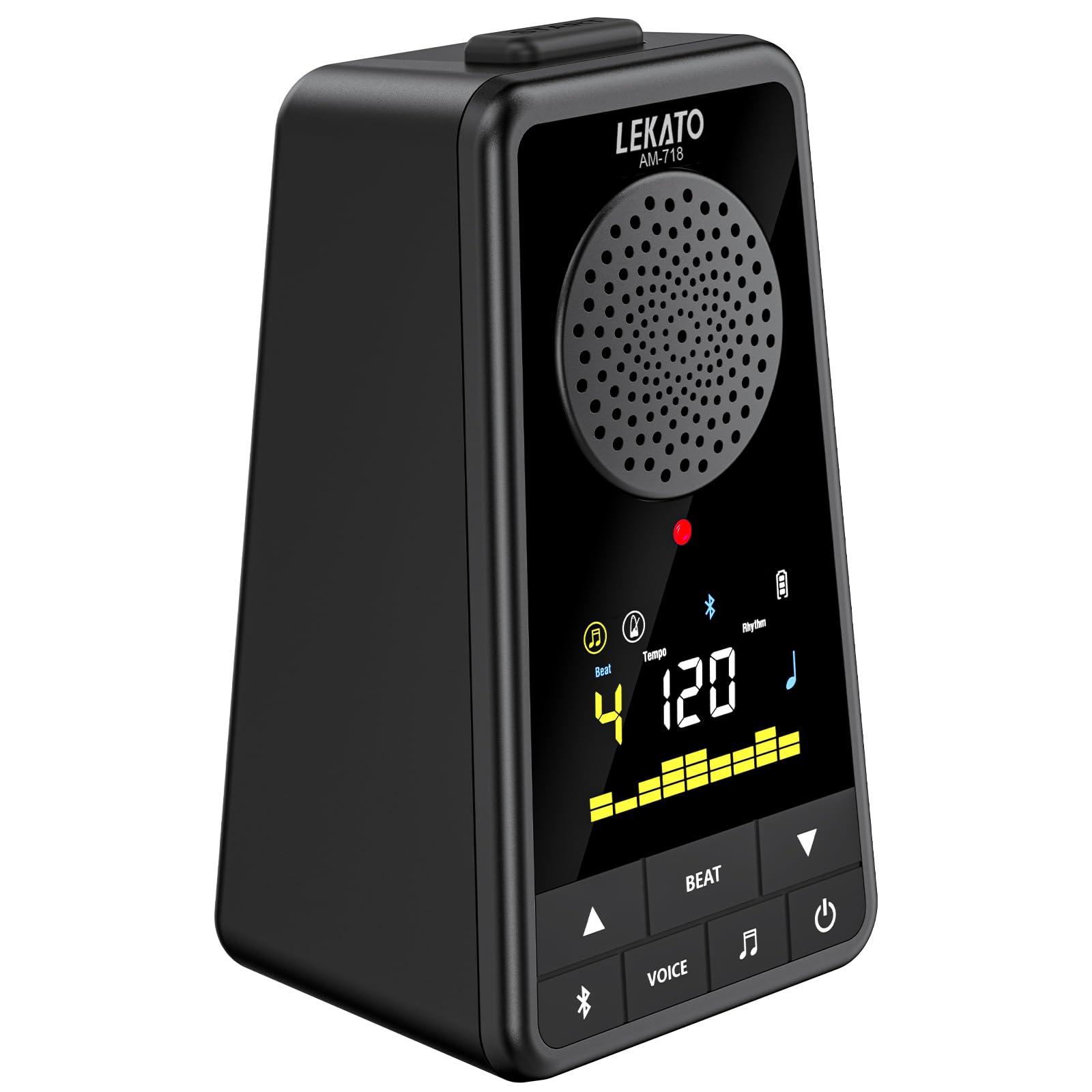
Image: The LEKATO AM-718 device shown with its USB-C charging cable and user manual.
4. Ifilelẹ ẹrọ ati Awọn iṣakoso

Aworan: Iwaju ati ẹgbẹ view of the LEKATO AM-718 metronome, highlighting its speaker, display, and control buttons.
- Iboju ifihan: Shows current beat, tempo, rhythm pattern, and battery status.
- Tempo Knob: Rotates to adjust the beats per minute (BPM).
- Bọtini BT: Mu ipo sisopọ Bluetooth ṣiṣẹ.
- VOICE Button: Toggles vocal counting on/off.
- BEAT Button: Cycles through different beat counts (0-9).
- RHY Button: Cycles through different rhythm patterns.
- Bọtini agbara: Yipada ẹrọ si tan/pa.
- Ifaworanhan didun: Adjusts the overall sound output volume.
- Jack agbekọri (3.5mm): Fun ikọkọ gbigbọ.
- USB 5V (Type-C) Port: Fun gbigba agbara ẹrọ.
5. Eto
5.1 Ngba agbara si Ẹrọ
- Connect the provided USB Type-C cable to the USB 5V port on the side of the metronome.
- Pulọọgi opin okun USB miiran sinu ohun ti nmu badọgba agbara USB ibaramu (kii ṣe pẹlu) tabi ibudo USB ti kọnputa kan.
- The battery indicator on the display will show charging status. A full charge typically takes 2 hours.

Image: The LEKATO AM-718 metronome connected to a USB-C cable for charging.
5.2 Titan / Pa a
- Tẹ mọlẹ bọtini agbara fun awọn aaya 2 lati tan ẹrọ naa tabi pa.
6. Awọn ilana Iṣiṣẹ
6.1 Metronome Išė
- Adjusting Tempo: Rotate the Tempo knob clockwise to increase BPM or counter-clockwise to decrease BPM (range: 30-260 BPM).
- Changing Beat: Press the BEAT button to cycle through different beat counts (0, 1, 2, 3, 4, 5, 6, 7, 8, 9).
- Selecting Rhythm: Press the RHY button to choose from 8 different rhythm patterns.
- Vocal Counting: Press the VOICE button to toggle vocal counting (e.g., "one, two, three, four") on or off.
- Bẹrẹ / Sinmi: Press the Power button briefly to start or pause the metronome.

Image: The LEKATO AM-718 metronome displaying vocal counts "one two three four" on its screen, indicating the vocal counting feature is active.
6.2 Bluetooth Agbọrọsọ Išė
- Pipọpọ: Turn on Bluetooth on your phone or instrument. Wa fun the device named "AM-718" and pair.
- Sisisẹsẹhin ohun: Once paired, you can play music or backing tracks through the metronome's speaker.
- Ndapọ Audio: The device can mix metronome beats with Bluetooth audio.
- Standalone Speaker: To use solely as a Bluetooth speaker, turn off the metronome beat sound.

Image: The LEKATO AM-718 metronome functioning as a wireless mobile speaker, showing Bluetooth connectivity range.
6.3 Agbekọri Lilo
- Plug 3.5mm headphones into the headphone jack for private practice sessions.
7. Itọju
- Jeki ẹrọ naa gbẹ ki o si kuro ni iwọn otutu to gaju.
- Clean with a soft, dry cloth. Avoid abrasive cleaners.
- Store in a safe place to prevent physical damage.
8. Laasigbotitusita
- Ko si Ohun: Check volume level and ensure headphones are properly connected or Bluetooth is paired correctly.
- Ẹrọ Ko Tii: Rí i dájú pé batiri náà ti gba agbára. So mọ́ orísun agbára nípa lílo okùn USB-C.
- Awọn oran Isopọpọ Bluetooth: Ensure the device is in pairing mode and within the 10-meter range. Try restarting both the metronome and the Bluetooth source device.
9. Awọn pato
| Iwọn Nkan | 12 iwon |
| Ọja Mefa | 3.78 x 2.83 x 5.75 inches |
| Batiri Iru | Litiọmu (pẹlu rẹ̀) |
| Asopọmọra | Bluetooth 5.0, USB Iru-C |
| Ibiti tẹmpo | 30-260 BPM |
| Akoko ere | Up to 10 hours (on 2-hour charge) |
10. Awọn fidio ọja osise
Pariview of Electronic Metronome for Guitar Piano Violin Musical
Àpèjúwe Fídíò: Fídíò yìí fún wa ní àkójọpọ̀ gbogbogbòòview of the electronic metronome, demonstrating its basic functions and how it can be used with various musical instruments like guitar, piano, and violin. It highlights the device's compact design and ease of use.
11. Atilẹyin ọja ati Support
For warranty information and customer support, please refer to the official LEKATO website or contact their customer service directly. Details can typically be found in the included user manual or on the product packaging.


