1. Ifihan
Thank you for choosing the TEEHO Keyless Entry Door Lock with 2 Handles. This manual provides detailed instructions for installation, operation, and maintenance to ensure optimal performance and security. Please read this manual thoroughly before installation and keep it for future reference.
Package Awọn akoonu
- 1 Electronic Keypad Deadbolt
- 1 Door Lever Handle Set (2 handles)
- 1 Keypad Deadbolt Lock
- 4 AA batiri
- Iṣagbesori Hardware
- Itọsọna olumulo
Key Awọn ẹya ara ẹrọ
- Iwọle Alailowaya: Supports up to 20 user access codes (4-10 digits) and one-time codes.
- Smart-Locking: Adjustable auto-lock feature (10-99 seconds) and one-touch auto-lock.
- Imudara Aabo: ANSI Grade 3 smart door lock cylinder, anti-peeping password function, mute mode, vacation mode, and backlit keypad.
- Apẹrẹ ti o tọ: Constructed from durable alloy with an IP54 weather resistance rating.
- Fifi sori Rọrun: A ṣe apẹrẹ fun iṣeto ti o rọrun.
2. Alaye Aabo
Jọwọ ṣe akiyesi awọn iṣọra ailewu wọnyi lati yago fun ipalara tabi ibajẹ ọja naa:
- Má ṣe gbìyànjú láti tú tàbí ṣe àtúnṣe sí titiipa náà. Èyí lè fa ìbàjẹ́ kí ó sì sọ àtìlẹ́yìn náà di òfo.
- Use only the specified AA batteries. Do not mix old and new batteries or different types of batteries.
- Pa gbogbo awọn irinše kuro ni arọwọto awọn ọmọde.
- Dabobo bọtini foonu lati ọrinrin pupọ tabi ifihan omi taara.
- Ensure proper installation to prevent malfunction. If unsure, consult a qualified locksmith or installer.
3. Ọja Ipariview
The TEEHO Keyless Entry Door Lock system combines a keypad deadbolt with a door lever for comprehensive security and convenience.
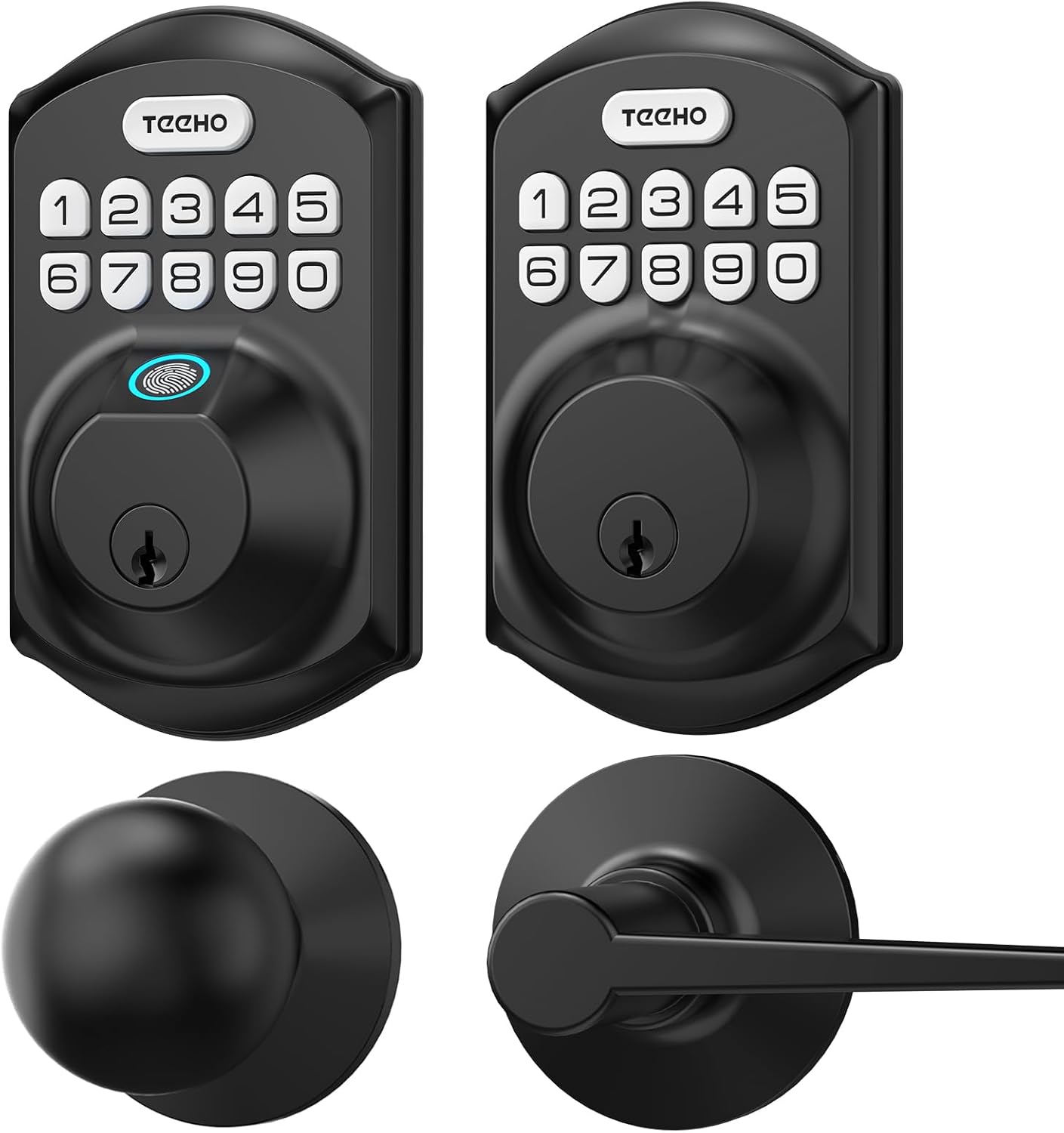
Aworan 3.1: Pariview of the TEEHO Keyless Entry Door Lock components, including the electronic keypad deadbolt, a standard deadbolt, and two door lever handles, all in a matte black finish.

Aworan 3.2: The TEEHO Keyless Entry Door Lock installed on a white door, featuring the electronic keypad deadbolt above a matching door lever. The interior view shows the corresponding hardware.
4. Eto ati fifi sori
The TEEHO Keyless Entry Door Lock is designed for easy installation. Follow these steps carefully.
4.1 Múra Ilẹ̀kùn sílẹ̀
- Ensure your door meets the required dimensions for installation (standard door thickness and backset).
- Yọ eyikeyi ohun elo titiipa ti o wa tẹlẹ.
4.2 Install the Deadbolt Latch
- Insert the deadbolt latch into the door edge. Ensure the “UP” marking is facing upwards.
- Secure the latch with screws.
4.3 Install the Exterior Keypad Assembly
- Feed the cable through the hole in the door.
- Align the exterior keypad assembly with the deadbolt latch and secure it to the door.
4.4 Install the Interior Mounting Plate
- Attach the interior mounting plate to the door, ensuring the cable passes through the plate.
- Ṣe aabo awo iṣagbesori pẹlu awọn skru.
4.5 Connect Cables and Install Interior Assembly
- So okun pọ lati apejọ ita si apejọ inu.
- So àkójọpọ̀ inú ilé náà mọ́ àwo ìfìsí náà kí o sì fi àwọn skru dè é.
4.6 Fi Awọn batiri sii
- Yọ ideri batiri kuro lati inu apejọ inu.
- Insert 4 AA batteries, observing polarity (+/-).
- Rọpo ideri batiri naa.

Aworan 4.1: Ohun exploded view of the TEEHO Keyless Entry Door Lock components, illustrating the internal mechanism and how the exterior keypad, interior assembly, and deadbolt latch fit together during installation.
4.7 Install Door Lever Handles
- Install the latch mechanism for the door lever into the door edge.
- Attach the exterior and interior door lever handles, securing them according to the provided instructions.
5. Awọn ilana Iṣiṣẹ
Learn how to use the various features of your TEEHO Keyless Entry Door Lock.
5.1 Ṣiṣii ilẹkun
- Lilo koodu olumulo kan: Enter your 4-10 digit user code on the keypad, then press the “Lock” button (or checkmark/enter button if present). The lock will retract.
- Using a Physical Key: Fi kọ́kọ́rọ́ tí a lè lò sínú ihò kọ́kọ́rọ́ náà kí o sì yí i padà láti ṣí i.

Aworan 5.1: A person using the TEEHO Keyless Entry Door Lock, highlighting the keypad and a fingerprint sensor for quick unlocking. The image suggests a rapid identification and unlocking process.
5.2 Titiipa ilekun
- Titiipa Aifọwọyi: Ti o ba ti ṣiṣẹ, titiipa yoo ṣiṣẹ laifọwọyi lẹhin akoko ti a ṣeto (awọn aaya 10-99) ni kete ti ilẹkun ba ti wa ni pipade.
- Titiipa Ifọwọkan Kan: Press and hold any key on the keypad for 2 seconds to instantly lock the door.
- Titiipa Afowoyi: From the interior, turn the thumb-turn to lock the deadbolt.

Aworan 5.2: A visual representation of the auto-lock and one-touch locking features of the TEEHO Keyless Entry Door Lock. It shows a timer icon indicating automatic locking after 10-99 seconds and a lock icon for the 2-second one-touch lock.
5.3 Ọrọigbaniwọle ti ko ni ipa lori wiwo
To prevent others from guessing your code, you can enter random digits before or after your actual code. The lock will still recognize the correct sequence within the longer entry.

Aworan 5.3: An illustration of the anti-peep tactile keypad feature. It demonstrates how random digits can be added before or after the actual password to obscure it from onlookers, enhancing security.
5.4 Ipo ipalọlọ
The lock can be set to mute mode to disable keypad tones for quiet operation.
5.5 Ipo Isinmi
Activate vacation mode for enhanced security when you are away for an extended period. This mode typically disables all user codes until manually deactivated.
6. Programming Codes
The lock supports up to 20 user codes and one-time codes.

Aworan 6.1: An infographic detailing the access options for the TEEHO Keyless Entry Door Lock, showing support for up to 20 user codes, one-time PIN codes, and two physical keys for unlocking.
6.1 Adding User Codes
- Press the “Program” button (usually located on the interior assembly).
- Enter the default master code (refer to quick start guide or factory settings).
- Follow the voice prompts or indicator lights to enter a new 4-10 digit user code.
- Confirm the new code.
6.2 Pípa àwọn Kóòdù Olùlò rẹ́
- Press the “Program” button.
- Tẹ koodu titunto si sii.
- Follow the prompts to select the option for deleting user codes.
- Enter the specific user code to be deleted or choose to delete all user codes.
6.3 Setting One-Time Codes
One-time codes are ideal for temporary access (e.g., for delivery personnel or service providers). Once used, the code is automatically deleted.
- Press the “Program” button.
- Tẹ koodu titunto si sii.
- Follow the prompts to select the one-time code option.
- Enter the desired one-time code.
7. Itọju
7.1 Batiri Rirọpo
The lock is powered by 4 AA batteries, providing over 1 year of use under normal conditions. Replace batteries when the low battery indicator appears or when the lock becomes unresponsive.
- Yọ ideri batiri kuro lori apejọ inu.
- Yọ awọn batiri atijọ kuro.
- Fi awọn batiri AA tuntun 4 sii, ni idaniloju polarity ti o pe.
- Rọpo ideri batiri naa.
7.2 Ninu
Fọ ìta titiipa naa pẹlu asọ rirọ, damp asọ. Yago fun abrasive ose tabi olomi ti o le ba ipari tabi itanna irinše.
8. Laasigbotitusita
| Isoro | Owun to le Fa | Ojutu |
|---|---|---|
| Titiipa ko dahun si titẹ bọtini itẹwe. | Àwọn bátìrì tí kò tó; kódù tí kò tọ́; àìṣiṣẹ́ lórí bọ́tìnnì. | Replace batteries; re-enter code carefully; contact support if issue persists. |
| Iṣẹ́ títìpa àdáni kò ṣiṣẹ́. | Feature disabled; incorrect time setting. | Ensure auto-lock is enabled and set to desired time in programming. |
| Titiipa naa nira lati yi tabi ṣiṣẹ. | Misalignment during installation; worn components. | Check installation alignment; lubricate moving parts if necessary; contact support for severe issues. |
| Keypad backlight not working. | Batteries low; setting disabled. | Replace batteries; check programming settings for backlight. |
9. Awọn pato
- Brand: TEEHO
- Awoṣe: Keyless Entry Door Lock with 2 Handles
- Titiipa Iru: Keypad Deadbolt with Door Lever
- Ẹya Pataki: Keyless Entry, Auto-Lock, One-Time Code, Anti-Peep Password, Mute Mode, Vacation Mode, Backlit Keypad
- Idiyele Aabo: Ipele ANSI 3
- Atako oju ojo: IP54
- Orisun Agbara: 4 AA Batteries (approx. 1 year lifespan)
- Awọn koodu Iwọle: Up to 20 user codes (4-10 digits)
- Ọna Iṣakoso: Touch Keypad, Mechanical Key
10. Atilẹyin ọja ati Support
TEEHO products are manufactured to high-quality standards. For warranty information, technical support, or assistance with your product, please refer to the warranty card included in your package or visit the official TEEHO website. Please have your product model and purchase date available when contacting support.


