1. Awọn Ilana Aabo pataki
Jọ̀wọ́ ka gbogbo ìtọ́ni náà dáadáa kí o tó lo ẹ̀rọ yìí. Pa ìwé ìtọ́ni yìí mọ́ fún ìtọ́kasí ọjọ́ iwájú.
- Ohun elo yii jẹ ipinnu fun lilo ile nikan.
- Maṣe fi ohun elo naa bọ inu omi tabi awọn olomi miiran.
- Keep the appliance away from water sources, especially when charging.
- Do not use the appliance if the cord or plug is damaged. Contact customer support for repair.
- Always ensure the appliance is switched off before cleaning or performing maintenance.
- Pa mọ́ kúrò lọ́wọ́ àwọn ọmọdé. Ohun èlò yìí kì í ṣe ohun ìṣeré.
- Yago fun olubasọrọ pẹlu gbigbe awọn ẹya ara.
- Do not use the trimmer on irritated skin or open wounds.
- Only use the charging adapter supplied with the appliance.
2. Ọja Ipariview
The HTC AT-206A is a rechargeable hair trimmer designed for precise grooming tasks such as edging, outlining, dry shaving, and light shaping around areas like the neck, ears, and sideburns.

Image 2.1: HTC AT-206A Trimmer and its retail packaging, showing the device and included accessories.
Awọn eroja:
- Trimmer Unit (HTC AT-206A)
- Ngba agbara USB
- Fifọ Fẹlẹ
- Lubricating Oil Bottle
- Comb Asomọ
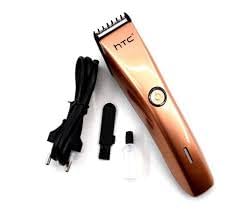
Image 2.2: The HTC AT-206A trimmer displayed with its charging cable, cleaning brush, oil bottle, and comb attachment.
3. Eto ati gbigba agbara
3.1 Gbigba agbara akọkọ
- Before first use, fully charge the trimmer for approximately 8-10 hours.
- Rii daju pe gige ti wa ni pipa.
- Connect the charging cable to the trimmer's charging port.
- Plug the adapter into a suitable electrical outlet.
- The charging indicator light (if present) will illuminate to show charging is in progress.
- Once fully charged, disconnect the charger from the outlet and the trimmer.
3.2 Attaching the Comb Attachment
- Rii daju pe gige ti wa ni pipa.
- Align the comb attachment with the trimmer blade.
- Gently push the comb attachment onto the blade until it clicks into place.
- To remove, gently pull the comb attachment away from the blade.
4. Awọn ilana Iṣiṣẹ
4.1 Ipilẹ isẹ
- Rii daju pe o ti gba agbara trimmer.
- Press the power button to turn the trimmer on.
- Press the power button again to turn the trimmer off.
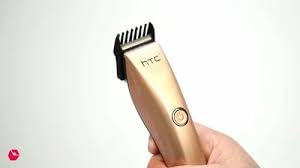
Image 4.1: The HTC AT-206A trimmer held in hand, demonstrating its ergonomic design for ease of use.
4.2 Àwọn Ọ̀nà Ìtọ́jú Gígé
- Fún àbájáde tó dára jùlọ, lo ẹ̀rọ ìtọ́jú irun tó mọ́ tó sì gbẹ.
- Hold the trimmer at a slight angle against the skin.
- Gbé ohun èlò ìtọ́jú náà lọ́ra díẹ̀díẹ̀ sí ibi tí irun náà ti ń dàgbà.
- Use the comb attachment for longer hair lengths (0.5mm-13mm).
- For edging and outlining, use the trimmer without the comb attachment for a closer trim.
- Stretch the skin taut with your free hand to ensure a smooth surface for trimming.
5. Itọju ati Cleaning
Regular cleaning and maintenance will ensure optimal performance and extend the life of your trimmer.
5.1 Ninu awọn Blades
- Ensure the trimmer is switched off and disconnected from the charger.
- Use the provided cleaning brush to remove any loose hairs from the blades.
- For a more thorough clean, you may carefully detach the blade head (refer to specific instructions if provided with your model for blade removal).
- Do not rinse the entire trimmer under water unless explicitly stated as waterproof.
5.2 Oiling awọn Blades
- After cleaning, apply 1-2 drops of the provided lubricating oil onto the blades.
- Tan trimmer fun iṣẹju diẹ lati gba epo laaye lati pin kaakiri.
- Pa epo ti o pọju kuro pẹlu asọ asọ.
- Oiling the blades regularly (e.g., after every few uses) helps maintain cutting efficiency and prevents rust.
5.3 Ibi ipamọ
Store the trimmer in a cool, dry place, away from direct sunlight and moisture. Ensure it is fully charged before storing for extended periods.
6. Laasigbotitusita
If you encounter any issues with your trimmer, refer to the following common problems and solutions:
- Trimmer ko ni tan:
Ensure the trimmer is fully charged. Check if the charging cable is properly connected and the power outlet is functional. - Poor trimming performance / pulling hair:
The blades may be dull or clogged with hair. Clean and oil the blades as described in the Maintenance section. Ensure the trimmer is adequately charged. - Batiri ko dani idiyele:
Ensure the trimmer is charged for the recommended duration. If the issue persists, the battery may need replacement. Contact customer support. - Ariwo pupọ tabi gbigbọn:
The blades might be misaligned or require oiling. Clean and oil the blades. If the problem continues, discontinue use and contact customer support.
7. Awọn pato
| Ẹya ara ẹrọ | Sipesifikesonu |
|---|---|
| Nọmba awoṣe | AT-206A (SA-144) |
| Orisun agbara | Batiri gbigba agbara |
| Blade elo | Stainless Steel (Metal) |
| Cutting Length Range | 0.5mm - 13mm (with comb attachment) |
| Awọn iwọn (L x W x H) | 18.7 x 4.9 x 11.2 cm |
| Niyanju Lilo | Dry Shaving, Edging, Light Shaping, Outlining (Neck, Ears, Sideburns, Face) |
| Àwọ̀ | Dudu |
| Olupese | CHINA |
8. Atilẹyin ọja ati Support
This product is covered by a standard manufacturer's warranty. Please refer to the product packaging or contact your retailer for specific warranty terms and conditions.
Fún ìrànlọ́wọ́ ìmọ̀ ẹ̀rọ, ìrànlọ́wọ́ ìṣòro, tàbí ẹ̀tọ́ àtìlẹ́yìn, jọ̀wọ́ kan sí olùtajà tàbí olùpèsè taara. Pa ẹ̀rí ìrajà rẹ mọ́ fún àwọn ìbéèrè tó bá ní í ṣe pẹ̀lú àtìlẹ́yìn.


