1. Ifihan
This manual provides essential information for the safe and effective operation of the KAIWEETS HT206D Smart Digital Clamp Meter. Please read this manual thoroughly before use and retain it for future reference.
2. Alaye Aabo
Always adhere to local and national safety codes. Use appropriate personal protective equipment (PPE) when working with electrical circuits. This device is designed for professional use and requires a basic understanding of electrical principles.
- Má ṣe kọjá iye ìtẹ̀síwájú tó pọ̀ jùlọ tí a sọ fún gbogbo ìwọ̀n.
- Ṣọra pupọ nigbati o ba n ṣiṣẹ pẹlu awọn iyika laaye.
- Ṣe àyẹ̀wò àwọn ìdènà ìdánwò fún ìbàjẹ́ kí o tó lò ó lẹ́ẹ̀kan. Rọpò àwọn ìdènà tí ó bàjẹ́ lẹ́sẹ̀kẹsẹ̀.
- Do not operate the meter if it appears damaged or is not functioning correctly.
- Rii daju pe ideri batiri ti wa ni pipade ni aabo ṣaaju ṣiṣe.
- Avoid using the meter in environments with high humidity, extreme temperatures, or explosive gases.
3. Ọja Ipariview
The KAIWEETS HT206D is a smart digital clamp meter designed for accurate electrical measurements. It features a D-shaped jaw for easy clamping and a clear display for readings.

Image 3.1: KAIWEETS HT206D Smart Digital Clamp Meter highlighting key features like 6000 Counts T-RMS, Auto Shutdown, CAT.IV 600V safety rating, and Auto-ranging capability.
Awọn ẹya pataki pẹlu:
- Ipo Smart: Ṣe idanimọ vol AC/DC laifọwọyitage/current, resistance, and continuity.
- RMS otitọ: Provides accurate measurements for non-linear loads.
- Awọn iṣiro 6000 Ifihan: High-resolution digital display.
- D-Shaped Jaws: Designed for secure clamping and holding test leads.
- Non-Olubasọrọ Voltage (NCV) Iwari: Detects electrical status without direct contact.
- Àlẹmọ Pass Kekere (LPF): For accurate measurements on variable frequency drives.
- Awọn iṣẹ afikun: MAX/MIN, Data Hold, Flashlight, Auto-Off.

Aworan 3.2: Pariview of the KAIWEETS HT206D's multi-functional capabilities, showing icons for AC/DC voltage, resistance, continuity, frequency, temperature, NCV, and inrush current measurements.
4. Eto
4.1. Fifi sori batiri
The meter requires batteries for operation. To install or replace batteries:
- Rii daju pe mita naa ti wa ni pipa.
- Wa yara batiri ni ẹhin mita naa.
- Lo screwdriver lati ṣii ideri iyẹwu batiri naa.
- Insert new batteries, observing correct polarity.
- Ni aabo pa ideri kompaktimenti batiri ni aabo.
4.2. Agbara akọkọ Lori
Press the power button to turn on the meter. The default intelligent mode will activate, automatically identifying common measurement signals.
5. Awọn ilana Iṣiṣẹ
5.1. Ipò Ọlọ́gbọ́n
When the meter is powered on, it defaults to Smart Mode. In this mode, the meter automatically detects and measures AC/DC voltage, AC/DC current, resistance, and continuity, simplifying operation.
5.2. Aṣayan iṣẹ
Rotate the rotary dial to select specific measurement functions as needed. Press the SEL/FUNC button to cycle through sub-functions within a selected range (e.g., AC/DC voltagati).
5.3. AC / DC Voltage Idiwon
Lati wiwọn voltage:
- Insert the red test lead into the "VΩHz" input jack and the black test lead into the "COM" input jack.
- Yan voltage measurement function using the rotary dial.
- So awọn itọsọna idanwo ni afiwe si Circuit tabi paati labẹ idanwo.
- Ka voltage iye lori ifihan.

Image 5.1: Demonstrations of AC/DC Voltage Test (top) and AC/DC Current Test (bottom) using the KAIWEETS HT206D clamp mita.
5.4. AC / DC Iwọn Iwọn lọwọlọwọ
Lati wiwọn lọwọlọwọ:
- Select the current measurement function (A~) or (A=) using the rotary dial.
- Ṣii clamp Ẹnu-ẹsẹ̀ kí o sì fi ẹ̀rọ ìdarí kan ṣoṣo sí i. Rí i dájú pé àwọn ẹ̀nu-ẹsẹ̀ náà ti sé pátápátá.
- Ka iye lọwọlọwọ lori ifihan naa.
5.5. Resistance and Continuity Measurement
Láti wọn resistance tabi ṣayẹwo ilosiwaju:
- Insert the red test lead into the "VΩHz" input jack and the black test lead into the "COM" input jack.
- Select the resistance/continuity function using the rotary dial.
- So àwọn ìtọ́sọ́nà ìdánwò pọ̀ mọ́ ara ẹ̀rọ náà. Fún ìtẹ̀síwájú, ìró kan ń fi hàn pé ìyípo tí ń lọ lọ́wọ́lọ́wọ́ ni.
5.6. Non-olubasọrọ Voltage (NCV) erin
The NCV function allows detection of AC voltage lai taara olubasọrọ.
- Tẹ awọn NCV button on the right side of the meter.
- Move the meter's NCV sensor close to the conductor.
- Mita naa yoo tọka si wiwa AC voltage through audible beeps and visual indicators (Low Voltage 'L' or High Voltage 'H').

Image 5.2: Non-contact Voltage Test demonstrating the meter's ability to detect both low and high voltage lai ti ara olubasọrọ.
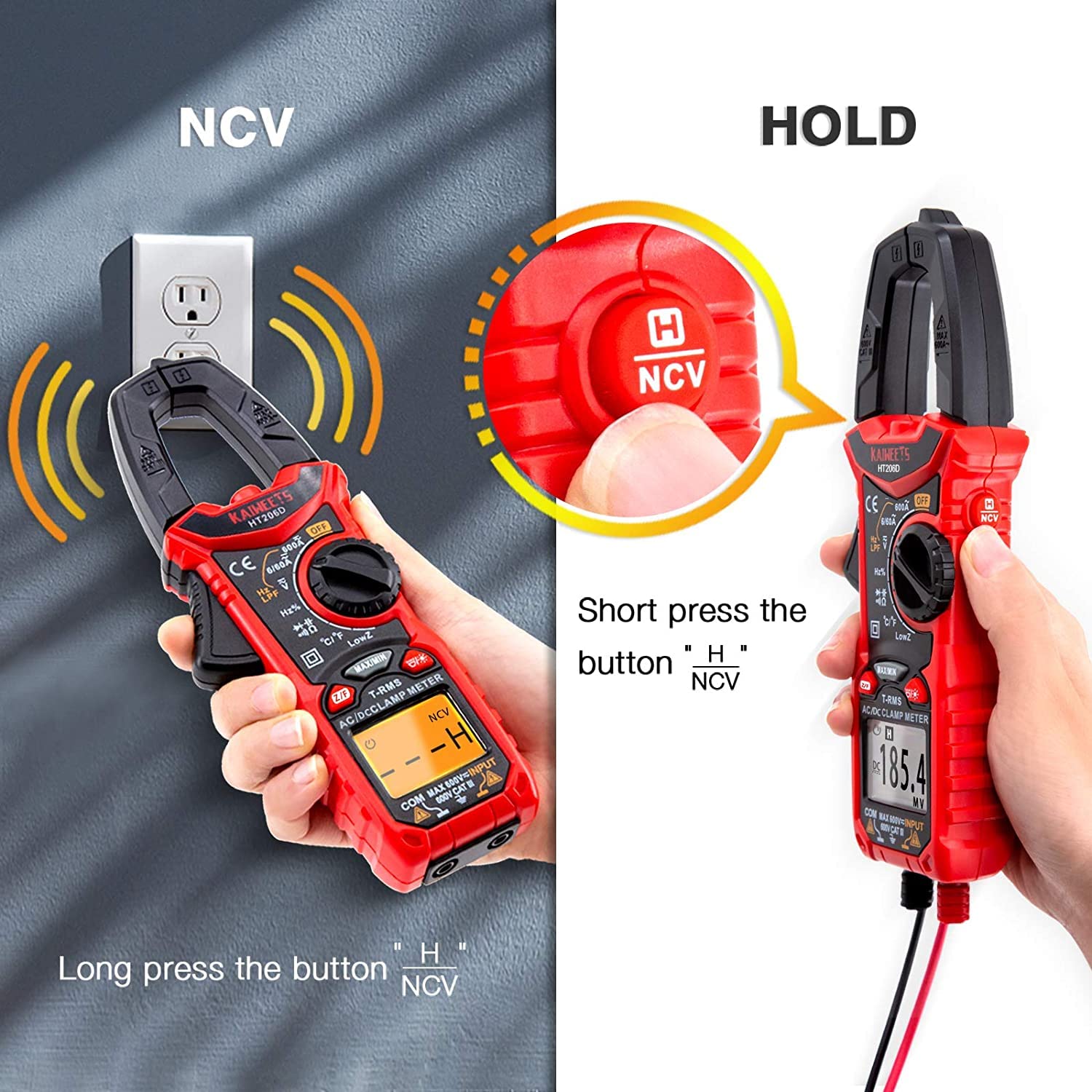
Image 5.3: Illustration of activating the NCV function with a long press and the Data Hold function with a short press of the NCV/HOLD button.
5.7. Àlẹ̀mọ́ Ìrìn Àjò Kekere (LPF)
The LPF function is used for accurate voltage measurements on variable frequency drives (VFDs) or other noisy circuits. It filters out high-frequency interference.
- Yan AC voltagiṣẹ e.
- Tẹ awọn LPF button to activate the Low Pass Filter.
- Tẹsiwaju pẹlu AC voltage measurement as usual.

Image 5.4: Explanation of the Low Pass Filter (LPF) function, illustrating its effect on measurement accuracy for motor drive outputs.
5.8. Ìwọ̀n Ìṣirò Inrush
The Inrush function measures the initial surge current when a device is powered on.
- Select the Inrush current function using the rotary dial.
- Ṣii clamp jaws and enclose one conductor of the device to be tested.
- Power on the device. The meter will capture and display the peak inrush current.

Image 5.5: Inrush Current Test in progress, demonstrating the meter's capability to measure the initial current surge with a range of 5-600A.
5.9. Dá Dátà dúró (DÁTÍ)
Tẹ awọn DIMU button (short press the NCV button) to freeze the current reading on the display. Press it again to release the hold function.
5.10. MAX/MIN Measurement
Tẹ awọn MAX/MIN button to record the maximum and minimum values during a measurement session. Press again to cycle between MAX, MIN, and current readings.
5.11. Flashlight
Press the flashlight button to illuminate the measurement area. Press again to turn it off.
5.12. Auto-Pa Išė
The meter will automatically power off after approximately 15 minutes of inactivity to conserve battery life. Press any button or rotate the dial to reactivate it.
6. Itọju
6.1. Ninu
Nu mita c naaasing pẹlu ipolowoamp cloth and mild detergent. Do not use abrasives or solvents. Ensure the meter is dry before storage or use.
6.2. Batiri Rirọpo
Rọpo awọn batiri nigbati ifihan batiri kekere ba han lori ifihan. Wo Abala 4.1 fun awọn ilana fifi sori ẹrọ batiri.
6.3. Ibi ipamọ
Tí a kò bá lo mita náà fún ìgbà pípẹ́, yọ àwọn batiri náà kúrò kí ó má baà jẹ́ kí omi máa jò. Tọ́jú mita náà sí ibi tí ó tutù, tí ó gbẹ, tí kò sí ìmọ́lẹ̀ oòrùn tààrà àti ooru tó le koko.
7. Laasigbotitusita
| Isoro | Owun to le Fa | Ojutu |
|---|---|---|
| Mita ko ni agbara lori. | Awọn batiri ti o ku tabi ti ko tọ ti fi sori ẹrọ. | Ropo awọn batiri, aridaju ti o tọ polarity. |
| Awọn kika ti ko pe. | Incorrect function selected, damaged test leads, or external interference. | Verify function selection, inspect/replace test leads, move away from strong electromagnetic fields. |
| Ko si ohun orin ilosiwaju. | Ṣíṣí Circuit tàbí resistance gíga. | Check the circuit for breaks or high resistance points. |
| NCV ko iwari voltage. | Ko si AC voltage present, or sensor not close enough to the conductor. | Rii daju pe AC voltage is present. Move the NCV sensor closer to the live conductor. |
8. Awọn pato
The KAIWEETS HT206D Smart Digital Clamp Meter offers the following general specifications:

Image 8.1: Key specifications of the KAIWEETS HT206D, including measurement ranges for current, voltage, capacitance, and display count, along with special features.
- Ifihan: 6000 Awọn iṣiro
- Agbara AC/DC: Titi di 600A
- AC/DC Voltage: Titi di 600V
- Agbara: Títí dé 100mF
- Iwọn otutu: Celsius / Fahrenheit
- Iru wiwọn: RMS otitọ
- Iwọn Aabo: CAT.IV 600V
- Orisun Agbara: Agbara Batiri
- Awọn ẹya pataki: Smart Mode, NCV, LPF, LowZ, Inrush Current, Data Hold, MAX/MIN, Flashlight, Auto-Off
9. Atilẹyin ọja ati Support
KAIWEETS offers a 3-year after-sales service for the HT206D Smart Digital Clamp Meter, along with lifetime technical assistance.
For any questions, technical support, or warranty claims, please contact KAIWEETS customer service through their official channels or the retailer where the product was purchased.


