1. Ifihan
Welcome to the user manual for your Canon PowerShot IXUS 285 HS Digital Camera. This guide provides essential information on setting up, operating, and maintaining your camera to help you capture high-quality photos and videos. The IXUS 285 HS combines a 20.2MP 1/2.3" CMOS sensor with a DIGIC 4+ image processor, offering 12x optical zoom and Full HD 1080p video recording capabilities.
2. Package Awọn akoonu
Jọwọ rii daju pe gbogbo awọn nkan wọnyi wa ninu package rẹ:
- Canon PowerShot IXUS 285 HS Digital Camera (Black)
- NB11L Replacement Battery
- Sandisk 64GB Ultra Memory Card
- Small Camera Case
- Ṣaja Batiri Ita
- Oluka kaadi iranti
- 12-inch Rọ Tripod
- Ninu Apo
- Apamọwọ Kaadi Iranti

Image: Canon PowerShot IXUS 285 HS camera with included accessories: NB11L battery, external charger, and wrist strap.
3. Àwọn Ẹ̀yà àti Àwọn Ìṣàkóso Kámẹ́rà
Familiarize yourself with the main components and controls of your camera.
3.1 Iwaju View

Aworan: Iwaju view of the Canon PowerShot IXUS 285 HS camera, showing the lens, flash, and Canon branding.
- Lẹnsi: Lẹ́nsì Ìmúsúnmọ́ Optical 12x.
- Filaṣi: Filaṣi ti a ṣe sinu fun awọn ipo ina kekere.
- AF-assist Beam/Self-timer Lamp: Assists autofocus and indicates self-timer operation.
- Gbohungbohun: Records audio during video capture.
3.2 Ẹyìn View
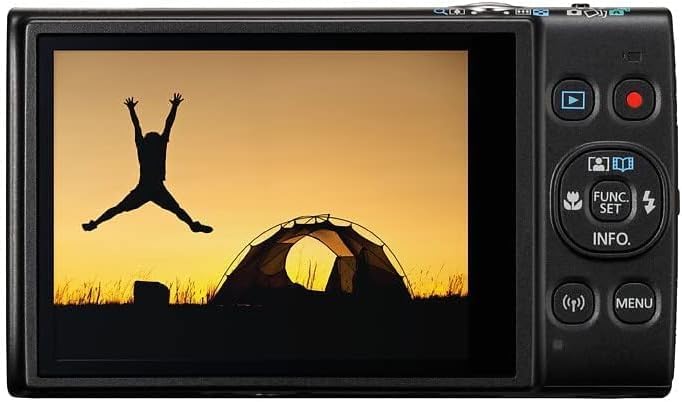
Aworan: Ẹyin view of the Canon PowerShot IXUS 285 HS camera, displaying the 3.0-inch LCD monitor and various control buttons.
- Atẹle LCD: 3.0-inch 461k-dot display for composing and reviewawọn aworan inu.
- Bọtini ṣiṣiṣẹsẹhin: Tẹ ipo ṣiṣiṣẹsẹhin si view awọn fọto ati awọn fidio.
- Movie Button: Bẹrẹ ati da gbigbasilẹ fidio duro.
- FUNC./SET Button: Accesses shooting functions and confirms selections.
- Àwọn bọ́tìnì ìtọ́sọ́nà (Sókè/Ìsàlẹ̀/Òsì/Ọ̀tún): Lilọ kiri awọn akojọ aṣayan ati ṣatunṣe awọn eto.
- Bọtini MENU: Opens the camera's main menu.
- Wi-Fi/NFC Button: Activates wireless connectivity features.
4. Eto
4.1 Fifi Batiri naa sii
- Ṣii ideri batiri ni isalẹ kamẹra.
- Insert the NB11L battery pack with the contacts facing the correct direction, as indicated inside the compartment.
- Gently push the battery until it locks into place.
- Pa ideri batiri naa ni aabo.
4.2 Fifi kaadi iranti sii
- Ṣii ideri batiri / kaadi iranti ni isalẹ kamẹra.
- Insert the Sandisk 64GB Ultra Memory Card into the card slot with the label facing the correct direction.
- Push the card gently until it clicks into place.
- Pa ideri naa ni aabo.
4.3 Ngba agbara si Batiri naa
- Remove the NB11L battery from the camera.
- Insert the battery into the external charger (CB-2LF).
- Pulọọgi ṣaja sinu iṣan agbara kan. Ina Atọka gbigba agbara yoo tan imọlẹ.
- Once charging is complete, the indicator light will change or turn off. Remove the battery from the charger.
5. Ṣiṣẹ kamẹra
5.1 Titan / Pa a
- Lati mu agbara ṣiṣẹ, tẹ bọtini naa TAN/PA bọtini be lori oke kamẹra.
- Lati pa agbara, tẹ awọn TAN/PA bọtini lẹẹkansi.
5.2 Basic Photography (Auto Mode)
- Turn on the camera. It will typically start in Smart Auto mode.
- Frame your subject using the LCD monitor.
- Use the zoom lever (around the shutter button) to adjust the optical zoom.
- Tẹ bọtini titiipa ni agbedemeji si isalẹ lati dojukọ. Fireemu idojukọ yoo tan alawọ ewe nigbati idojukọ ba waye.
- Tẹ bọtini titiipa ni kikun si isalẹ lati ya aworan naa.
5.3 Gbigbasilẹ fidio
- With the camera powered on, press the dedicated Bọtini fiimu on the rear of the camera to start recording.
- Tẹ awọn Bọtini fiimu lẹẹkansi lati da gbigbasilẹ duro.
- The camera records Full HD 1080p video at 30 frames per second.
5.4 Sisisẹsẹhin
- Tẹ awọn Bọtini Sisisẹsẹhin (often indicated by a triangle icon) on the rear of the camera.
- Lo awọn bọtini itọsọna lati lilö kiri nipasẹ awọn fọto ati awọn fidio rẹ.
- Lati jade kuro ni ipo ṣiṣiṣẹsẹhin, tẹ bọtini naa Bọtini Sisisẹsẹhin again or the shutter button to return to shooting mode.
5.5 Wi-Fi ati NFC Asopọmọra
The camera features built-in Wi-Fi with NFC for wireless sharing of images and videos to a linked smartphone or tablet. Refer to the camera's on-screen menu for detailed instructions on connecting to a device and using the Canon Camera Connect app.
6. Itọju
6.1 Ninu kamẹra
- Ara Kamẹra: Lo asọ ti o rọ, ti o gbẹ lati nu ara kamẹra nu. Fun idoti alagidi, die-die dampen awọn asọ pẹlu omi.
- Lẹnsi: Lo fẹlẹ lẹnsi tabi ẹrọ fifun lati yọ eruku kuro. Fun smudges, lo asọ afọmọ lẹnsi ati omi mimọ lẹnsi. Yago fun fifọwọkan dada lẹnsi pẹlu awọn ika ọwọ rẹ.
- Atẹle LCD: Rọra mu ese pẹlu asọ ti o gbẹ. Yago fun titẹ lile loju iboju.
6.2 Ibi ipamọ
- When not in use, store the camera in a cool, dry, well-ventilated area, away from direct sunlight and high humidity.
- Yọ batiri kuro ti kamẹra ko ba ni lo fun igba pipẹ.
- Use the provided camera case for protection during transport.
7. Laasigbotitusita
Ti o ba pade awọn iṣoro pẹlu kamẹra rẹ, gbiyanju awọn igbesẹ laasigbotitusita ipilẹ wọnyi:
- Kamẹra ko ṣiṣẹ lori: Rii daju pe batiri ti gba agbara ni kikun ati fi sii daradara.
- Ko le ya awọn aworan: Ṣayẹwo boya o ti fi kaadi iranti sii ati pe o ni aaye ọfẹ ti o to. Rii daju pe o ti yọ fila lẹnsi kuro.
- Awọn aworan ko ṣoro: Ensure the lens is clean. Check if the camera is focusing correctly (press the shutter button halfway). Use Intelligent IS for sharper handheld shots.
- Filaṣi ko ina: Check flash settings to ensure it's not set to 'Off' or 'Flash Off'.
- Awọn iṣoro asopọ Wi-Fi: Ensure Wi-Fi is enabled on both the camera and your smart device. Refer to the Canon Camera Connect app instructions.
For more detailed troubleshooting, please refer to the official Canon support webojula.
8. Awọn pato
| Ẹya ara ẹrọ | Sipesifikesonu |
|---|---|
| Nọmba awoṣe | 1076C001 |
| Sensọ Aworan | 20.2MP 1/2.3" CMOS |
| Aworan isise | DIGIC 4+ |
| Sun-un Optical | 12x |
| Focal Length (35mm Equiv.) | 25-300mm |
| Iduroṣinṣin Aworan | Intelligent IS (Optical) |
| Gbigbasilẹ fidio | Full HD 1080p ni 30fps |
| Atẹle LCD | 3.0" 461k-dot |
| Asopọmọra | Built-in Wi-Fi with NFC |
| ISO ifamọ | Titi di 3200 |
| Tesiwaju ibon | 7.2 fps |
| Awọn iwọn (W x H x D) | 3.9 x 2.3 x 0.9 inches (isunmọ.) |
| Iwọn | 2.4 iwon (isunmọ.) |
| Olupese | Canon |
9. Atilẹyin ọja ati Support
For information regarding your product's warranty, please refer to the warranty card included in your original packaging or visit the official Canon website. For technical support, product registration, or service inquiries, please contact Canon customer support directly or visit their support portal online.
Official Canon Support Webojula: https://www.usa.canon.com/support


