Ọrọ Iṣaaju
Thank you for choosing the COULAX Sonic Electric Toothbrush. This manual provides essential information for the safe and effective use of your new toothbrush. Please read it thoroughly before first use and keep it for future reference.

Image: The COULAX Sonic Electric Toothbrush, showcasing the main unit, charging base, and a set of six replacement brush heads, all neatly packaged.
Package Awọn akoonu
- 1 x COULAX Sonic Electric Toothbrush Handle
- 6 x DuPont Brush Heads
- 1 x Okun Ngba agbara USB
- 1 x Toothbrush Holder
- 1 x Itọsọna olumulo
Ṣeto
Gbigba agbara ni ibẹrẹ
Before first use, fully charge the toothbrush. Connect the USB charging cable to the charging port on the toothbrush handle and plug the other end into a compatible USB power source (e.g., power bank, PC, phone charger). A full charge typically takes approximately 3 hours and can provide up to 60 days of use (based on 2 minutes of brushing, twice a day).
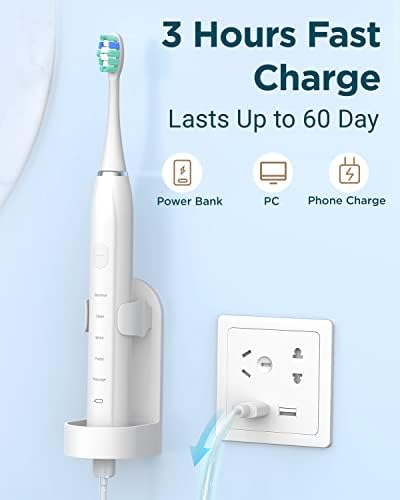
Image: The electric toothbrush connected to a wall adapter via a USB cable, illustrating the charging process. The image highlights the '3 Hours Fast Charge' and 'Lasts Up to 60 Day' features.
So a fẹlẹ Head
Align the brush head with the metal shaft on the toothbrush handle and push it down firmly until it clicks into place. Ensure it is securely attached before use.
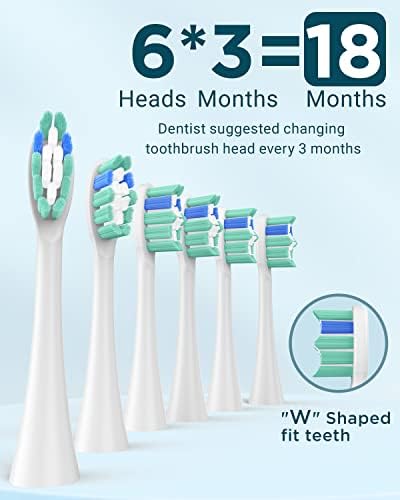
Aworan: A sunmọ-soke view of six replacement DuPont brush heads, emphasizing their 'W' shaped design for effective cleaning. Text indicates that 6 heads provide 18 months of use, with dentists suggesting changing heads every 3 months.
Awọn ilana Iṣiṣẹ
Titan / Paa
To turn the toothbrush ON, press the power button once. To turn the toothbrush OFF, press and hold the power button for at least three seconds.
Yiyan Ipo
The toothbrush features 5 performance modes to suit various dental needs. Press the power button repeatedly to cycle through the modes:
- Ipo mimọ: For daily dental care and thorough cleaning.
- Ipò kókó: Recommended for first-time users or individuals with sensitive teeth and gums.
- Ipo funfun: Designed for stain removal and teeth whitening.
- Ipo Polish: For polishing teeth and enhancing brightness.
- Ipo ifọwọra: Gently massages gums to improve circulation.
Smart Timer and Quadpacer
The intelligent 2-minute timer ensures you brush for the dentist-recommended duration. The toothbrush will pause briefly every 30 seconds, signaling you to move to another quadrant of your mouth. This helps ensure even and thorough cleaning across all areas.
Brushing Technique
Apply a small amount of toothpaste to the brush head. Place the brush at a 45-degree angle to your gums. Gently move the brush across your teeth, allowing the sonic vibrations to do the work. Do not scrub aggressively. The toothbrush's micro-vibrations are highly effective at removing plaque.
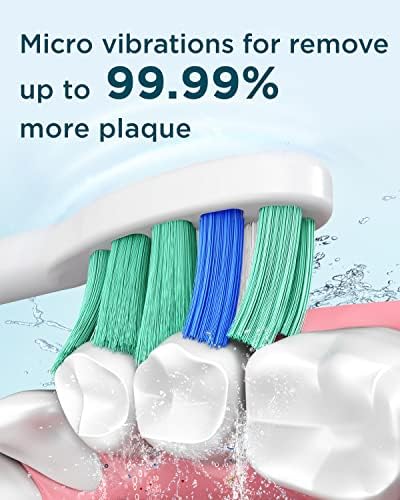
Aworan: A ti ga view of the toothbrush bristles in action, demonstrating how micro-vibrations effectively remove up to 99.99% more plaque from tooth surfaces.

Image: A woman demonstrating the use of the COULAX electric toothbrush, highlighting its effectiveness for teeth whitening and breath freshening.
Itoju
Ninu ehin ehin
After each use, rinse the brush head and handle thoroughly under running water. The toothbrush is IPX7 waterproof, allowing for easy rinsing. Wipe the handle dry with a soft cloth. Do not immerse the charging base in water.
Rirọpo fẹlẹ Heads
Dentists recommend replacing your toothbrush head every 3 months, or sooner if the bristles become frayed. To replace, pull the old brush head straight off the handle and push a new one on until it clicks into place.
Laasigbotitusita
- Bọọti ehin ko tan: Ensure the toothbrush is fully charged. If the battery is low, charge it for at least 3 hours.
- Gbigbọn tí kò lágbára: This may indicate a low battery. Recharge the toothbrush. If the issue persists after charging, contact customer support.
- Fọ́ orí fífọ́ kò dúró lórí rẹ̀: Ensure the brush head is pushed down firmly until it clicks into place. If it still detaches, the brush head or handle may be damaged.
- Atọka gbigba agbara ko ṣiṣẹ: Ṣàyẹ̀wò okùn USB àti ìsopọ̀ orísun agbára. Gbìyànjú ibudo USB tàbí adapter mìíràn.
Awọn pato
| Ẹya ara ẹrọ | Apejuwe |
|---|---|
| Nọmba awoṣe | HH06015 U17 |
| Orisun agbara | Battery Powered, Corded Electric (USB charging) |
| Batiri Iru | 1 batiri litiumu ion (pẹlu) |
| Igbesi aye batiri | Up to 60 days on a full charge (2 min/2x a day) |
| Akoko gbigba agbara | Isunmọ. wakati meji 3 |
| Mabomire Rating | IPX7 (handle) |
| Awọn ọna Fẹlẹ | 5 (Clean, Sensitive, White, Polish, Massage) |
| Pataki Awọn ẹya ara ẹrọ | Brushing Timer (2-minute with 30-second quadpacer) |
| Iru Ori Fọ́lẹ̀ | DuPont bristles, 'W' shaped |
| Iduroṣinṣin Nkan | Rirọ |
| Ibiti ọjọ ori | Adult and Kids |
| Package Mefa | 7.64 x 5.08 x 1.69 inches |
| Iwọn Nkan | 9.88 iwon |
| Olupese | Wenzhou Liangte Electric Co.,Ltd. |
| ASIN | B0CCRFVFS8 |
Atilẹyin ọja ati Support
For warranty information and customer support, please refer to the documentation included with your purchase or visit the official COULAX website. If you encounter any issues not covered in this manual, please contact COULAX customer service for assistance.


