1. Ifihan
Thank you for choosing the De'Longhi Rivelia EXAM440.35.BG Automatic Coffee Machine. This appliance is designed to provide a premium coffee experience with ease of use and customizable options. Please read this manual carefully before using the appliance to ensure proper operation, maintenance, and safety.
2. Awọn Ilana Aabo pataki
Nigbagbogbo tẹle awọn iṣọra aabo ipilẹ nigba lilo awọn ohun elo itanna lati dinku eewu ina, mọnamọna, ati ipalara si eniyan.
- Ka gbogbo awọn ilana ṣaaju lilo.
- Maṣe fi ọwọ kan awọn aaye ti o gbona. Lo awọn ọwọ tabi awọn koko.
- Lati daabobo lodi si ina, mọnamọna, ati ipalara ti ara ẹni, maṣe fi okun, plugs, tabi ohun elo bọ inu omi tabi omi miiran.
- Abojuto sunmọ jẹ pataki nigbati eyikeyi ohun elo ba lo nipasẹ tabi sunmọ awọn ọmọde.
- Yọọ kuro lati inu iṣan nigbati ko si ni lilo ati ṣaaju ṣiṣe mimọ. Gba laaye lati tutu ṣaaju fifi sii tabi mu awọn ẹya kuro, ati ṣaaju ki o to nu ohun elo naa.
- Ma ṣe ṣiṣẹ ohun elo eyikeyi pẹlu okun ti o bajẹ tabi pulọọgi tabi lẹhin aiṣe ohun elo, tabi ti bajẹ ni eyikeyi ọna. Pada ohun elo pada si ile-iṣẹ iṣẹ ti a fun ni aṣẹ fun idanwo, atunṣe, tabi atunṣe.
- Lilo awọn asomọ ẹya ẹrọ ti a ko ṣeduro nipasẹ olupese ohun elo le ja si ina, mọnamọna, tabi ipalara ti ara ẹni.
- Maṣe lo ni ita.
- Ma ṣe jẹ ki okun duro lori eti tabili tabi counter, tabi fi ọwọ kan awọn aaye ti o gbona.
- Ma ṣe gbe sori tabi sunmọ gaasi ti o gbona tabi ina ina, tabi ni adiro ti o gbona.
- Nigbagbogbo so plug to ohun elo akọkọ, ki o si pulọọgi okun sinu ogiri iṣan. Lati ge asopọ, tan eyikeyi iṣakoso si “pa”, lẹhinna yọ plug kuro ni iṣan ogiri.
- Ma ṣe lo ohun elo fun miiran ju lilo ti a pinnu lọ.
- Lo iṣọra ti o ga julọ nigbati o ba n sọ ina gbigbona nu.
3. Ọja Ipariview
The De'Longhi Rivelia EXAM440.35.BG is a compact automatic coffee machine featuring a 3.5-inch color touchscreen, a manual milk frother, and the innovative Bean Switch System for easily changing coffee bean varieties.

Nọmba 3.1: Iwaju view of the De'Longhi Rivelia EXAM440.35.BG coffee machine in Sand Beige.
Awọn eroja pataki:
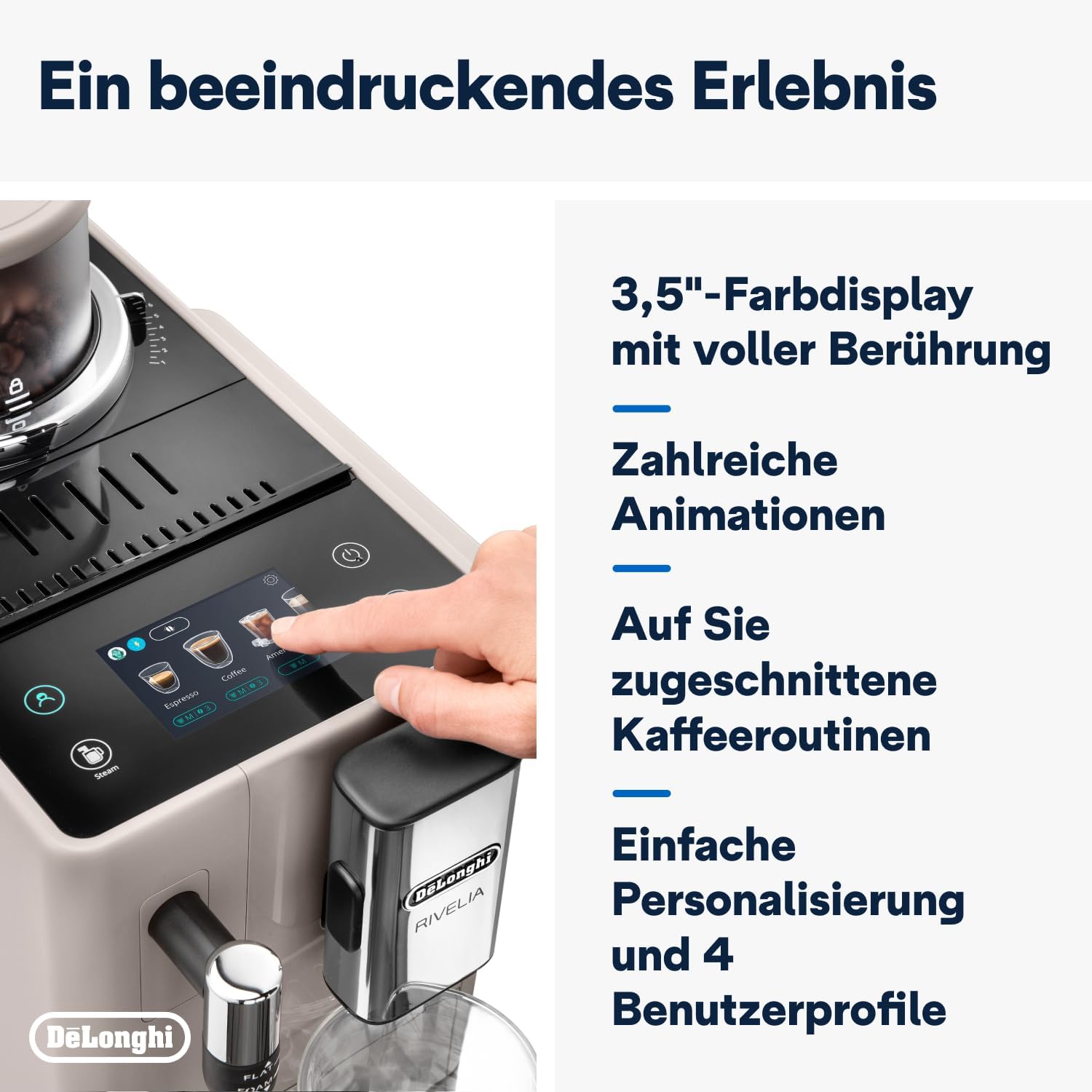
- 3.5" Full-Touch Color Display: For intuitive control and personalized coffee routines.
- Bean Switch System: Two interchangeable 250g bean containers for different coffee varieties.
- Frọọti wara afọwọṣe: For preparing creamy milk foam for lattes and cappuccinos.
- Omi omi: Agbara yiyọ kuro, 1.4-lita.
- Àwo Drip àti Àpótí Ilẹ̀: For collecting excess water and used coffee grounds.
- Kofi Spout: Adijositabulu iga fun orisirisi titobi ago.

Nọmba 3.2: The De'Longhi Rivelia series, showcasing various color options including Sand Beige.
4. Ni ibẹrẹ Oṣo
4.1 Ṣiṣii ati Gbe
- Farabalẹ yọ ẹrọ naa kuro ninu apoti rẹ.
- Gbé ẹ̀rọ náà sí orí ilẹ̀ tí ó dúró ṣinṣin, tí ó tẹ́jú, jìnnà sí àwọn ìtújáde omi àti àwọn orísun ooru.
- Rí i dájú pé ààyè tó péye wà ní àyíká ẹ̀rọ náà fún afẹ́fẹ́ àti wíwọlé sí àwọn èròjà.
4.2 Kikun Omi Omi
- Yọ ojò omi kuro ni ẹgbẹ ti ẹrọ naa.
- Fi omi tútù tútù kún inú ojò náà títí dé àmì ìpele MAX.
- Rọpo ojò omi naa lailewu sinu ẹrọ naa.
4.3 Filling the Bean Container (Bean Switch System)
The Rivelia features two interchangeable bean containers. You can switch between them to enjoy different coffee varieties.
- Lift the lid of a bean container.
- Tú awọn ewa kofi titun sinu apo eiyan naa. Maṣe kun.
- Place the filled bean container onto the machine's bean hopper. Ensure it is seated correctly.
- To switch beans, simply lift the current container, replace it with another filled container, and the machine will detect the change.

Nọmba 4.1: The Bean Switch System with two interchangeable bean containers.

Nọmba 4.2: Illustration of filling the bean container with fresh coffee beans.
4.4 Lilo Akọkọ ati Iyika Fọ
Before making your first coffee, perform a rinsing cycle to clean the internal circuits.
- Pulọọgi ẹrọ naa sinu iṣan agbara kan.
- Tan ẹrọ naa nipa lilo bọtini agbara.
- Follow the on-screen instructions for the initial setup, including language selection and water hardness.
- The machine will automatically perform a rinsing cycle. Place a container under the coffee spouts and hot water spout to collect the water.
- Ni kete ti yiyi ṣan omi ti pari, ẹrọ naa ti ṣetan fun lilo.
5. Isẹ
5.1 Using the 3.5" Full-Touch Color Display
The intuitive touchscreen allows you to select beverages, customize settings, and manage user profiles.

Nọmba 5.1: The 3.5-inch full-touch color display in use, showing beverage selection.
- Àṣàyàn Ohun Mímú: Swipe through the menu to choose from 8 pre-programmed coffee recipes.
- Isọdi: Adjust coffee strength, temperature, and volume for each drink.
- Olumulo Profiles: Create up to 4 personalized user profiles to save your favorite settings. The machine adapts its menu based on your routine.
- Ìmọ̀-ẹ̀rọ Ìyípadà Ẹ̀wà: This technology automatically adjusts grinding parameters, dosage, and brewing temperature to optimize extraction for the selected coffee bean variety.
5.2 Ngbaradi kofi ohun mimu
- Ensure the water tank is filled and a bean container is in place.
- Gbe ago kan labẹ awọn spouts kofi.
- Yan ohun mímu tí o fẹ́ láti inú àkójọ àfọwọ́kọ.
- Adjust settings (strength, volume) if desired.
- Press the "Start" icon to begin brewing.

Nọmba 5.2: A selection of coffee drinks, including espresso, americano, and milk-based beverages.
5.3 Lilo Frother Wara Ọwọ
The integrated steam wand allows you to manually froth milk for creamy cappuccinos and lattes.
- Fill a milk jug with cold milk (dairy or non-dairy).
- Gbe awọn ọpá nya si sinu wara, o kan ni isalẹ awọn dada.
- Activate the steam function via the touchscreen.
- Move the jug up and down to create desired foam texture.
- Nígbà tí ó bá ti gbó, pa iṣẹ́ ìgbóná náà kí o sì nu ọ̀pá náà lẹ́sẹ̀kẹsẹ̀.

Nọmba 5.3: Demonstrating the manual milk frother for creating creamy milk foam.
5.4 Gbona omi Dispense
The machine can also dispense hot water for teas or other hot beverages.
- Fi ago kan si abẹ omi gbigbona (nigbagbogbo ọpa steam).
- Select the hot water function from the touchscreen.
- Press "Start" to dispense hot water.
6. Ninu ati Itọju
Ṣiṣe mimọ nigbagbogbo ṣe idaniloju iṣẹ ṣiṣe ti o dara julọ ati fa igbesi aye ti ẹrọ kọfi rẹ pọ.
6.1 Daily Cleaning
- Àwo Drip àti Àpótí Ilẹ̀: Sofo ati ki o fi omi ṣan ni ojoojumọ. Ẹrọ naa yoo tọ ọ nigbati eiyan ilẹ nilo sisọnu.
- Omi omi: Fi omi ṣan lojoojumọ ki o tun kun pẹlu omi titun.
- Kofi Spouts: Parẹ pẹlu ipolowoamp asọ.
- Wara Ara: Lẹ́yìn lílo kọ̀ọ̀kan, fi ìpolówó nu ọ̀pá steam náàamp cloth and purge steam briefly to clear any milk residue.
6.2 osẹ Cleaning
- Ẹyọ Pọnti: Remove the brew unit (refer to the machine's internal instructions for removal) and rinse it thoroughly under running water. Allow it to air dry before reinserting.
- Bean Containers: Empty and clean the bean containers, especially when switching bean types, to prevent oil buildup.
6.3 Nipasẹ
The machine will indicate when descaling is required. Use only De'Longhi descaling solution and follow the on-screen instructions precisely. Descaling regularly prevents limescale buildup and maintains coffee quality.
7. Laasigbotitusita
This section addresses common issues you might encounter with your De'Longhi Rivelia EXAM440.35.BG.
| Isoro | Owun to le Fa | Ojutu |
|---|---|---|
| Ẹrọ ko ni tan-an. | Kò sí ohun tí a fi sínú rẹ̀; ibi tí agbára iná ti bàjẹ́. | Ṣayẹwo asopọ okun agbara; gbiyanju kan ti o yatọ iṣan. |
| "Fill Water Tank" message appears, but tank is full. | Water tank not inserted correctly; sensor issue. | Remove and reinsert the water tank firmly. Ensure the float in the tank moves freely. |
| Kofi jẹ alailagbara tabi omi. | Bí a ṣe ń lọ ọtí líle jù; ìwọ̀n kọfí tó tó; àwọn ewa àtijọ́. | Adjust grind setting finer; increase coffee strength via menu; use fresh beans. |
| Wara frother ko producing foomu. | A dí ọ̀pá ìgbóná omi; wàrà kò tutu tó; irú wàrà tí kò tọ́. | Nu ọ̀pá ìgbóná dáadáa; lo wàrà tútù; rí i dájú pé wàrà yẹ fún fífó. |
| Touchscreen unresponsive or scratched. | glitch software igba diẹ; ti ara bibajẹ. | Restart the machine. If scratched, contact customer support for service options. Avoid abrasive cleaners. |
8. Imọ ni pato
| Ẹya ara ẹrọ | Ẹ̀kúnrẹ́rẹ́ |
|---|---|
| Brand | De'Longhi |
| Nọmba awoṣe | EXAM440.35.BG |
| Àwọ̀ | Yanrin Beige |
| Awọn iwọn (L x W x H) | 43 x 24.5 x 38.5 cm |
| Iwọn | 9.8 kilo |
| Omi ojò Agbara | 1.4 liters |
| Agbara | 1450 Wattis |
| Voltage | 240 Volts |
| Ohun elo | Irin |
| Pataki Awọn ẹya ara ẹrọ | 4 olumulo profiles, 8 coffee beverages, Bean Switch System, Integrated steam wand, Coffee routines, Bean Adapt Technology |
| Tiipa aifọwọyi | Bẹẹni |
Nọmba 8.1: Product dimensions: 245mm (width) x 430mm (depth) x 385mm (height).
9. Atilẹyin ọja ati Support
9.1 atilẹyin ọja Alaye
Your De'Longhi Rivelia EXAM440.35.BG coffee machine comes with a standard manufacturer's warranty. Please refer to the warranty card included in your product packaging for specific terms and conditions, including the warranty period and coverage details. Keep your proof of purchase for warranty claims.
9.2 Onibara Support
Fún ìrànlọ́wọ́ ìmọ̀ ẹ̀rọ, àwọn ohun èlò ìtọ́jú tàbí iṣẹ́, jọ̀wọ́ kan sí ìrànlọ́wọ́ oníbàárà De'Longhi. O lè rí ìwífún nípa ìbánisọ̀rọ̀ lórí De'Longhi tó jẹ́ ti ìjọba. webaaye tabi ni iwe ti a pese pẹlu ohun elo rẹ.
- Atilẹyin Ayelujara: Ṣabẹwo si De'Longhi osise webAaye fun FAQs, awọn itọnisọna laasigbotitusita, ati iforukọsilẹ ọja.
- Atilẹyin foonu: Contact numbers are typically listed in your warranty booklet or on the brand's webojula.