Ọrọ Iṣaaju
Thank you for choosing the Auronic Electric Air Dehumidifier. This appliance is designed to effectively remove excess moisture from the air, creating a more comfortable and healthier indoor environment. It is ideal for use in various spaces such as bathrooms, basements, and living areas, helping to prevent issues like mold, mildew, and dampness. Please read this manual thoroughly before operation to ensure proper use, maintenance, and safety.

Figure 1: Auronic Electric Air Dehumidifier (Model AU3129 12L)
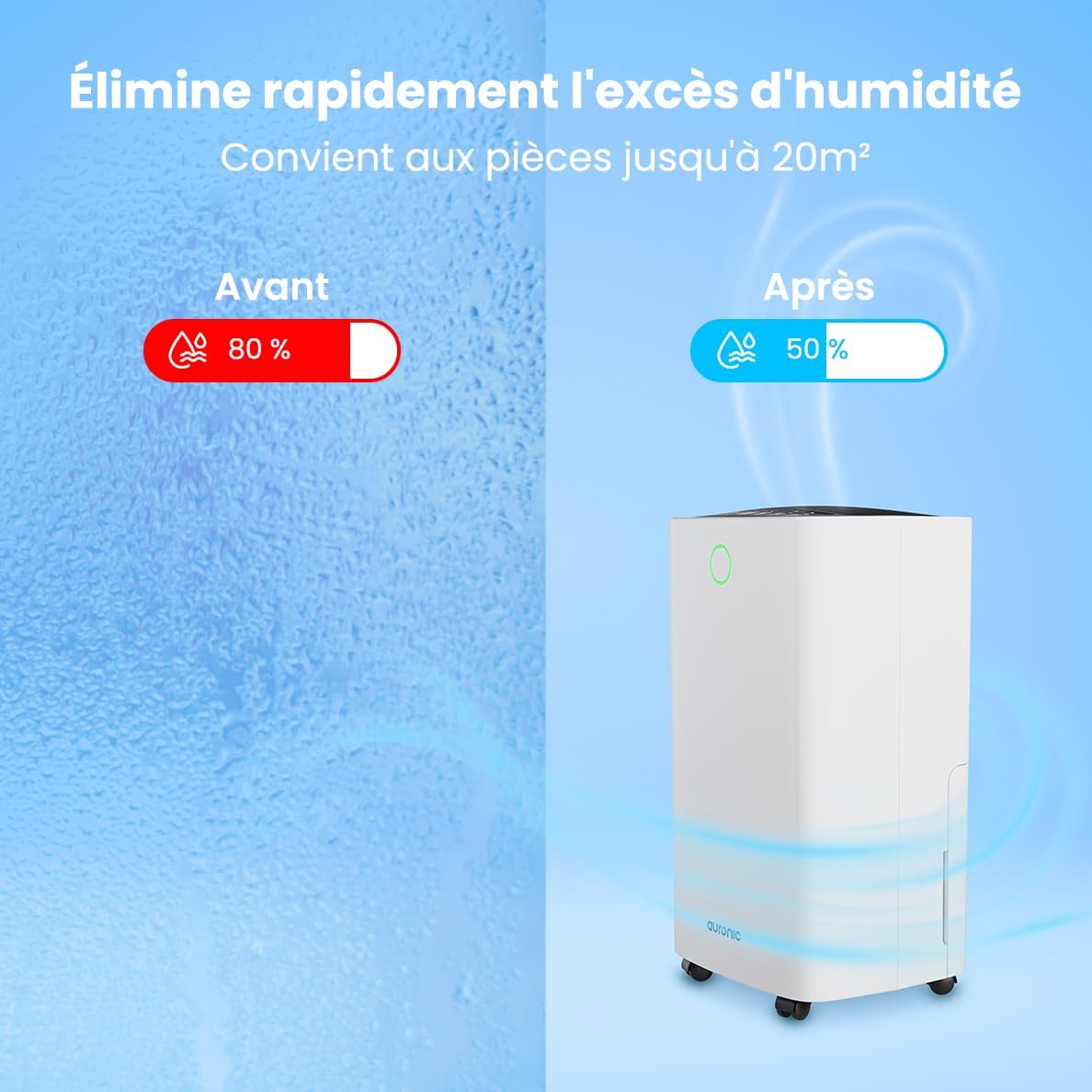
Figure 2: Humidity Reduction Effectiveness
Alaye Aabo
Lati dinku eewu ina, mọnamọna, tabi ipalara, nigbagbogbo tẹle awọn iṣọra aabo ipilẹ wọnyi:
- Ka gbogbo awọn ilana ṣaaju lilo ohun elo naa.
- Rii daju pe ipese agbara ibaamu voltage pato lori awọn Rating aami.
- Ma ṣe ṣiṣẹ dehumidifier ti okun agbara tabi plug ba bajẹ.
- Nigbagbogbo gbe ẹyọ naa sori iduro, ipele ipele.
- Keep the appliance at least 20 cm away from walls or other objects to ensure proper airflow.
- Ma ṣe fi awọn ika ọwọ tabi awọn nkan ajeji si ẹnu-ọna afẹfẹ tabi iṣan.
- Yọ ẹ̀rọ amúlétutù kúrò kí o tó fọ, gbé e, tàbí ṣe àtúnṣe èyíkéyìí.
- Ma ṣe lo ohun elo ni tutu tabi damp environments where water may splash.
- Jeki kuro ni arọwọto awọn ọmọde.
- If the unit has been tilted, allow it to stand upright for at least 24 hours before plugging it in.
Ọja Pariview
Familiarize yourself with the components of your Auronic Dehumidifier.

Figure 3: Dehumidifier Dimensions and Included Accessories

Figure 4: Easy Portability with Wheels and Handle
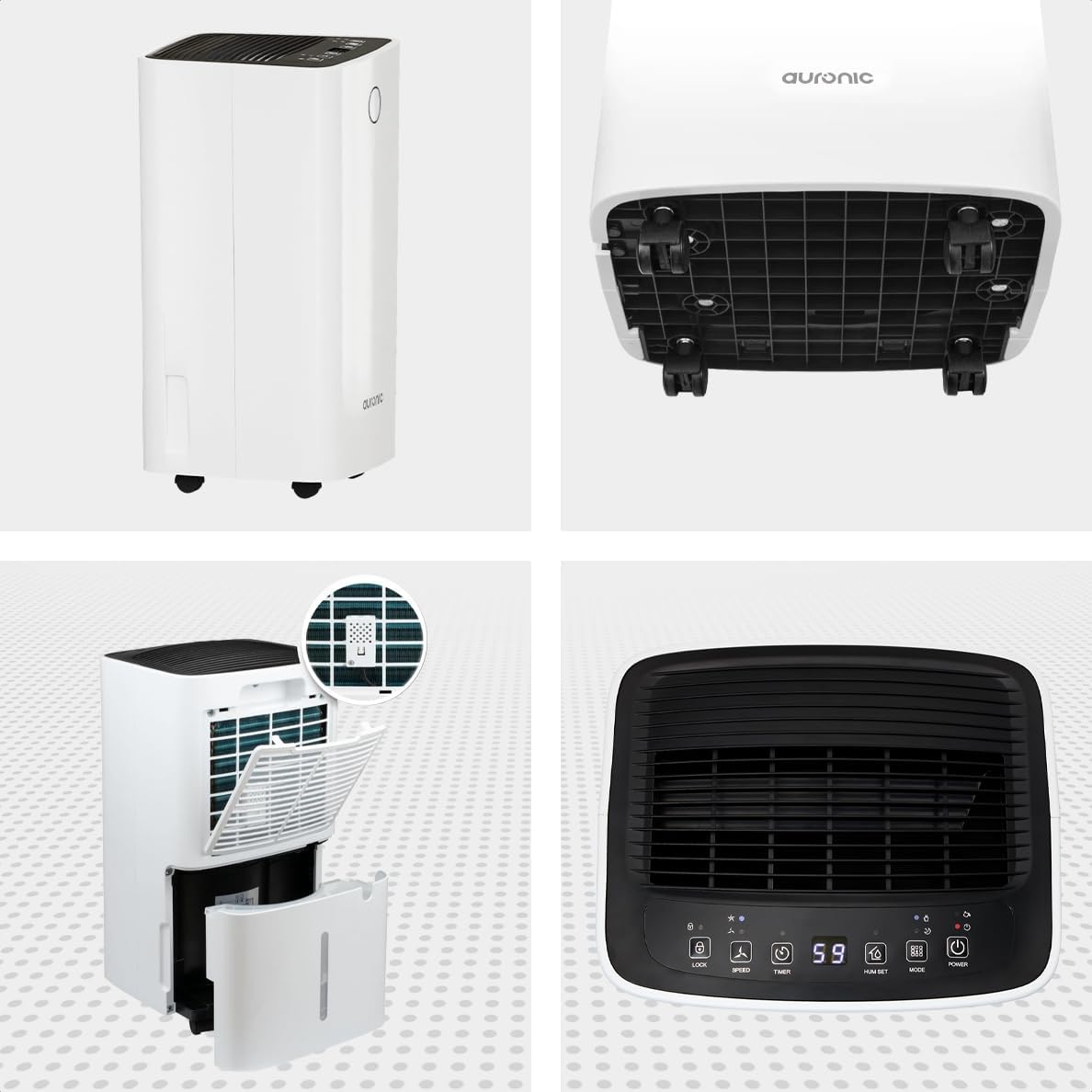
Àwòrán 5: Ìgun Púpọ̀ View of the Dehumidifier

olusin 6: Iṣakoso Panel Loriview
Awọn eroja pataki:
- Ibi iwaju alabujuto: Intuitive interface for setting modes, humidity levels, and timer.
- Wiwọle/Olugbafẹfẹ: Where air enters and exits the unit. Ensure these are not obstructed.
- Omi omi: Removable 2-liter tank for collecting condensed water.
- Itẹlẹsọna Isanjade Imugbẹ: Port for attaching a hose for continuous drainage.
- Awọn kẹkẹ ati Imudani: Fun irọrun gbigbe.
- Asẹ afẹfẹ: Located at the back, helps filter dust from the air.
Ṣeto
- Ṣii silẹ: Farabalẹ yọ dehumidifier kuro ninu apoti rẹ. Ṣe idaduro apoti fun ibi ipamọ iwaju tabi gbigbe.
- Ibi: Place the unit upright on a firm, level surface in the desired location. Ensure there is at least 20 cm of clear space around all sides for proper air circulation.
- Iduro akọkọ: If the unit was tilted during transport, let it stand upright for a minimum of 24 hours before plugging it in. This allows the refrigerant to settle.
- Asopọ agbara: Pulọọgi okun agbara sinu iṣan itanna ti ilẹ.
- Omi omi: Rii daju pe o ti fi ojò omi sinu ẹyọ naa daradara. Dehumidifier kii yoo ṣiṣẹ ti ojò ba kun tabi joko ni aibojumu.
Awọn ilana Iṣiṣẹ
Awọn iṣẹ igbimọ Iṣakoso:
| Bọtini/Atọka | Išẹ |
|---|---|
| Bọtini agbara | Yi ẹrọ TAN tabi PA. |
| Bọtini Ipo | Cycles through operating modes (e.g., Dehumidify, Laundry Drying, Sleep). |
| Hum Set Button | Adjusts the desired humidity level (e.g., 40% - 80% RH). |
| Bọtini Aago | Ṣeto aifọwọyi-an tabi aago aafọwọyi pipa (to awọn wakati 12). |
| Bọtini iyara | Adjusts fan speed (e.g., High, Low). |
| Titiipa Bọtini | Titiipa iṣakoso nronu lati yago fun awọn ayipada lairotẹlẹ. |
| Humidity Indicator LED | Changes color based on current humidity level (e.g., Blue: <45%, Green: 45-65%, Red: >65%). Figure 7: Humidity Indicator LED Explained |
Isẹ gbogbogbo:
- Tan-an: Tẹ awọn Agbara button. The display will show the current room humidity.
- Ṣètò ọriniinitutu ti a fẹ́: Tẹ awọn Hum Set button repeatedly to select your desired humidity level. The unit will operate until this level is reached, then cycle on and off to maintain it.
- Yan Ipo: Tẹ awọn Ipo button to choose between different operating modes.
- Ipo Somimi: Standard operation to reduce ambient humidity.
- Ipo gbigbe ifọṣọ: Increases fan speed and continuous operation to assist in drying clothes.

Figure 8: Using the Dehumidifier for Laundry Drying
- Ipo orun: Operates at a lower fan speed and reduced noise level for quiet nighttime use.

Figure 9: Silent Operation for Nighttime Use
- Ṣeto Aago: Tẹ awọn Aago button to set an auto-off time (when the unit is on) or an auto-on time (when the unit is off).

Figure 10: Integrated Timer Function
- Iyara Olufẹ: Lo awọn Iyara button to adjust the fan speed as desired.
- Titiipa ọmọ: Tẹ mọlẹ Titiipa button for 3 seconds to activate/deactivate the child lock function.
Imudanu Tesiwaju:
For continuous operation without emptying the water tank, you can connect the included drain hose to the continuous drain outlet. Ensure the hose is sloped downwards to allow gravity drainage into a suitable receptacle or drain.

Figure 11: Continuous Drainage Setup
Itoju
Itọju deede ṣe idaniloju iṣẹ ṣiṣe ti o dara julọ ati fa gigun igbesi aye ti dehumidifier rẹ.
Ṣofo Omi Omi:
When the water tank is full, the unit will automatically stop operating and an indicator light will illuminate. Carefully remove the tank, empty the collected water, and reinsert it firmly until it clicks into place.

Figure 12: Removing the 2-Liter Water Tank
Ninu Ajọ Afẹfẹ:
Ajọ afẹfẹ yẹ ki o di mimọ ni gbogbo ọsẹ meji tabi diẹ sii nigbagbogbo da lori lilo ati didara afẹfẹ.
- Pa a kuro ki o yọọ kuro ni ẹrọ mimu kuro.
- Wa ki o yọ àlẹmọ afẹfẹ kuro lati ẹhin ẹyọkan naa.
- Clean the filter with warm, soapy water or use a vacuum cleaner to remove dust.
- Fi omi wẹ̀ ẹ́ dáadáa kí o sì jẹ́ kí àlẹ̀mọ́ náà gbẹ pátápátá kí o tó tún fi sínú rẹ̀.
Ninu Ẹka Ita:
Mu ese ita ti dehumidifier pẹlu asọ, damp asọ. Maṣe lo awọn kẹmika ti o lewu tabi awọn afọmọ abrasive.
Laasigbotitusita
Ṣaaju ki o to kan si atilẹyin alabara, jọwọ tọka si awọn ọran ti o wọpọ ati awọn ojutu wọnyi:
| Isoro | Owun to le Fa | Ojutu |
|---|---|---|
| Dehumidifier ko ni tan. | No power, power cord loose, water tank full or improperly seated. | Check power connection, empty and reinsert water tank correctly. |
| Ko si omi ti a gba. | Room humidity too low, temperature too low, air filter clogged, continuous drain hose connected. | Check room humidity/temperature, clean air filter, ensure continuous drain hose is not connected if tank collection is desired. |
| Ẹka jẹ alariwo. | Unit not on a level surface, air filter clogged, internal component issue. | Place on a level surface, clean air filter. If noise persists, contact support. |
| Dehumidification is slow or ineffective. | Room size too large, doors/windows open, air inlets/outlets blocked, air filter dirty. | Ensure room is sealed, clear obstructions, clean air filter. |
Awọn pato
| Ẹya ara ẹrọ | Ẹ̀kúnrẹ́rẹ́ |
|---|---|
| Brand | Auronic |
| Orukọ awoṣe | Auronic Silent Low Consumption Dehumidifier |
| Awọn iwọn Ọja (L x W x H) | 21.5 x 47 x 25.5 cm |
| Iwọn Nkan | 11 kilo |
| Agbára (Ìyọkúrò ọrinrin) | 12 liters fun ọjọ kan |
| Iwọn Omi Omi | 2 liters |
| Agbara | 185 Wattis |
| Àwọ̀ | Funfun |
| Pataki Awọn ẹya ara ẹrọ | Easy to use, Laundry Drying function, Prevents and effectively eliminates humidity, 2-liter tank, Automatic shut-off. |
| Iṣeduro Lilo | Abele |
Atilẹyin ọja ati Support
Auronic products are manufactured to the highest quality standards. For warranty information, technical support, or service inquiries, please refer to the contact details provided on your purchase receipt or visit the official Auronic website. Please have your model number (AU3129 12L) and purchase date ready when contacting support.


