Ọrọ Iṣaaju
The Coby Ultimate Wireless Speaker is designed to deliver a powerful and immersive audio experience, complemented by dynamic light-up modes. This portable speaker is engineered for high-fidelity sound, ensuring crisp highs, rich mids, and deep bass. With its travel-friendly design and extended battery life, it is suitable for various environments, from personal listening to social gatherings.

Image: The Coby Ultimate Wireless Speaker, showcasing its vibrant, multi-color light display on the front grille. The speaker is black with a robust, portable design.
Ọja Pariview ati Awọn iṣakoso
Familiarize yourself with the speaker's layout and controls for optimal use.
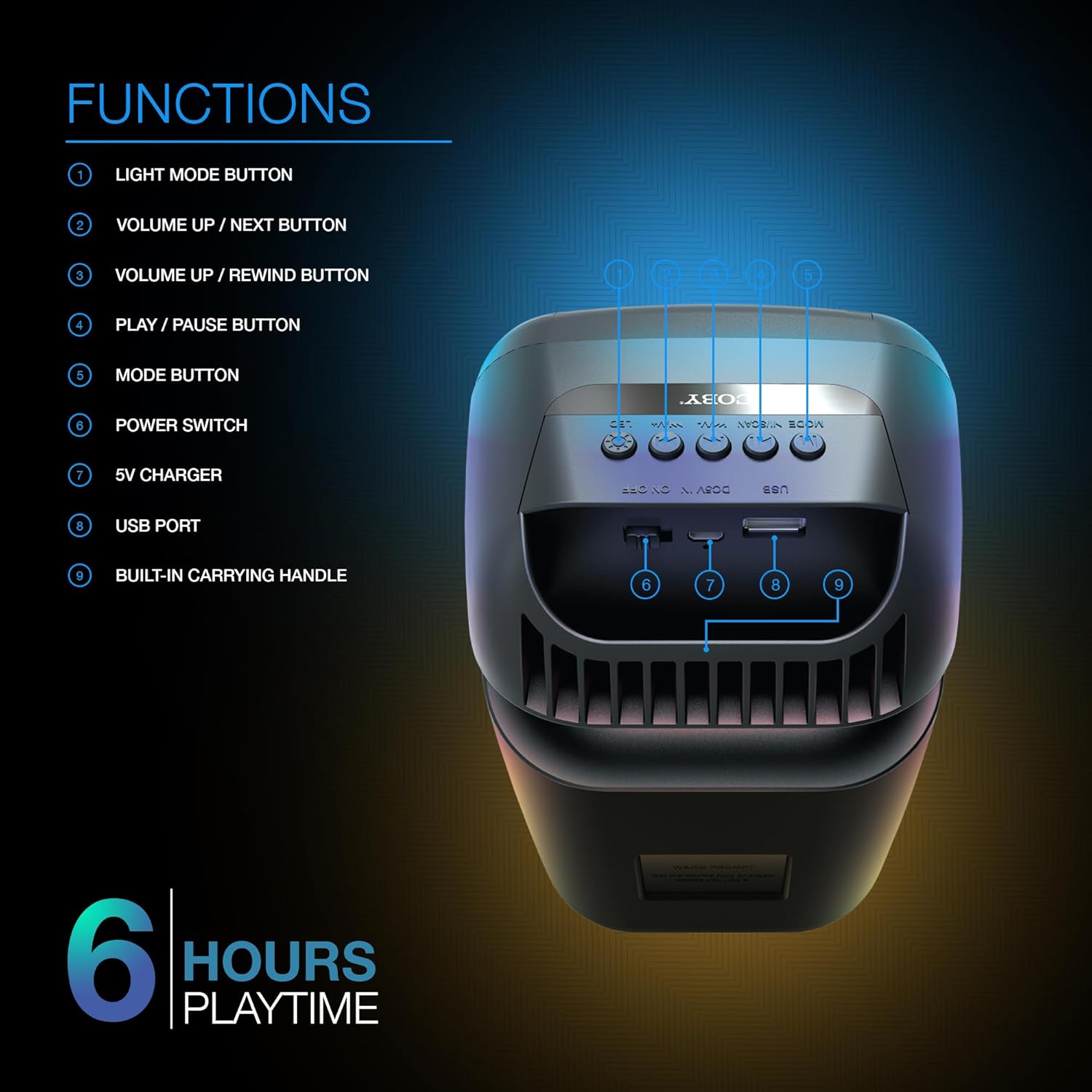
Image: A detailed diagram illustrating the top and rear controls of the Coby Ultimate Wireless Speaker. Numbered labels point to each function: Light Mode Button, Volume Up/Next, Volume Up/Rewind, Play/Pause, Mode Button, Power Switch, 5V Charger Port, USB Port, and Built-in Carrying Handle.
Awọn iṣẹ iṣakoso:
- Bọtini Ipo Imọlẹ: Cycles through the 5 dazzling light-up modes.
- Bọ́tìnì Ìwọ̀n Gíga / Bọ́tìnì Tókàn: Ṣe alekun iwọn didun tabi fo si orin atẹle.
- Volume Up / Rewind Button: Decreases volume or rewinds the current track.
- Bọtini Mu / Sinmi: Ó bẹ̀rẹ̀ tàbí ó dá ìṣíṣẹ́ ohùn dúró.
- Bọtini Ipo: Switches between different input modes (e.g., Bluetooth, FM Radio).
- Agbara Yi pada: Yipada agbọrọsọ si tan tabi paa.
- 5V Ṣaja: Ibudo fun sisopọ okun gbigba agbara.
- Ibudo USB: For USB media playback or charging external devices (if supported).
- Built-in Carrying Handle: Fun irọrun gbigbe.
Ṣeto
1. Gbigba agbara Agbọrọsọ
Before first use, fully charge the speaker. Connect the provided 5V charging cable to the 5V Charger port on the speaker and plug the other end into a compatible USB power adapter (not included). The charging indicator light will show the charging status. A full charge provides up to 6 hours of playtime.
2. Agbara lori / Paa
Locate the Power Switch on the speaker. Slide the switch to the 'ON' position to power on the device. Slide it to the 'OFF' position to power off.
3. Sisopọ Bluetooth
- Ensure the speaker is powered on and in Bluetooth mode (indicated by the Mode button).
- Lori ẹrọ alagbeka rẹ (foonuiyara, tabulẹti, ati bẹbẹ lọ), mu Bluetooth ṣiṣẹ ki o wa awọn ẹrọ to wa.
- Select "Coby CPA9000" or a similar name from the list of found devices.
- Once connected, the speaker will emit an audible confirmation, and you can begin streaming audio.
The speaker features Bluetooth version 5.3 for fast pairing and stable audio streaming.
Isẹ
1. Sisisẹsẹhin Audio
- Ṣiṣẹ/Daduro: Press the Play/Pause button to start or pause the current track.
- Atunse iwọn didun: Use the Volume Up / Next and Volume Up / Rewind buttons to adjust the playback volume.
- Tọpinpin lilọ kiri: Briefly press the Volume Up / Next button to skip to the next track. Briefly press the Volume Up / Rewind button to go to the previous track.
2. Light-Up Modes
The speaker features 5 dazzling light-up modes that synchronize with your music. Press the Light Mode Button to cycle through the available light patterns and effects. Choose the mode that best suits your mood or environment.
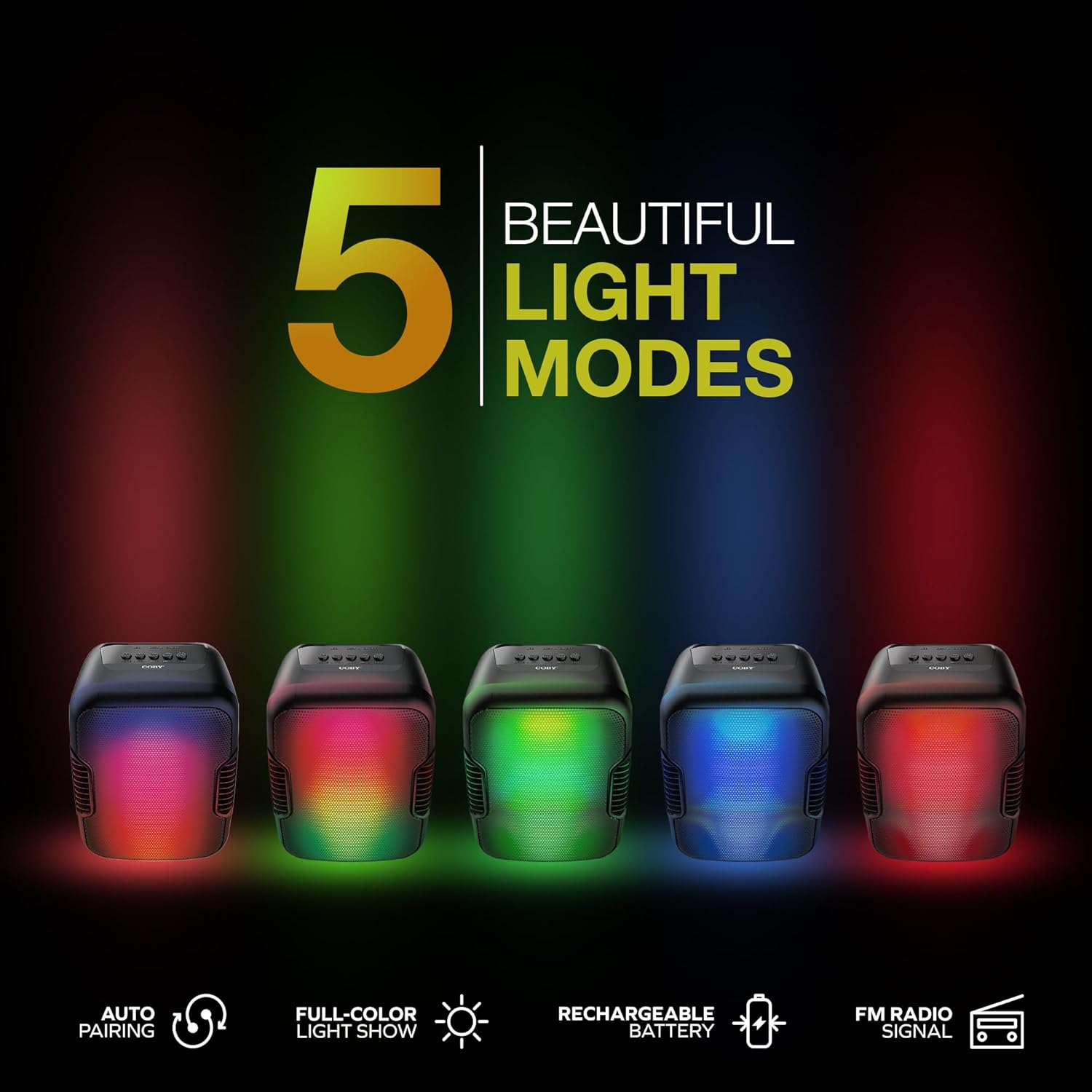
Image: Five Coby Ultimate Wireless Speakers arranged in a row, each displaying a different vibrant light mode, illustrating the variety of visual effects available.
3. FM Radio Function
To use the FM Radio, press the Mode button until you hear the FM radio signal. The speaker will automatically scan and tune into available stations. Use the Volume Up / Next and Volume Up / Rewind buttons to navigate between stations.
Itoju
- Ninu: Lo asọ ti o rọ, ti o gbẹ lati nu ita ti agbọrọsọ. Ma ṣe lo abrasive ose tabi epo.
- Ibi ipamọ: Tọju agbohunsoke ni itura, aye gbigbẹ kuro lati orun taara ati awọn iwọn otutu ti o pọju nigbati o ko ba wa ni lilo fun awọn akoko ti o gbooro sii.
- Itọju Batiri: Láti mú kí batiri pẹ́ sí i, má ṣe jẹ́ kí batiri náà máa jáde dáadáa nígbà gbogbo. Gba agbára sí agbọ́hùnsọ̀pọ̀ déédéé, kódà bí kò bá tiẹ̀ jẹ́ pé a ń lò ó déédéé.
Laasigbotitusita
| Isoro | Owun to le Fa | Ojutu |
|---|---|---|
| Agbọrọsọ ko ni agbara lori. | Batiri ti dinku. | Charge the speaker fully using the provided charging cable. |
| Ko si ohun lati agbọrọsọ. | Volume is too low or muted; Device not paired correctly; Incorrect mode selected. | Increase volume on both speaker and connected device. Re-pair Bluetooth. Press Mode button to select correct input. |
| Asopọ Bluetooth jẹ riru. | Device is out of range; Interference from other devices. | Move the connected device closer to the speaker. Avoid placing speaker near other wireless devices. |
| Light modes are not working. | Light mode feature is off. | Press the Light Mode Button to activate and cycle through modes. |
Awọn pato

Image: The Coby Ultimate Wireless Speaker shown with its dimensions: 9.46 inches height, 4.92 inches width, and 4.33 inches depth.
| Ẹya ara ẹrọ | Ẹ̀kúnrẹ́rẹ́ |
|---|---|
| Orukọ awoṣe | CPA9000 FLAME |
| Agbọrọsọ Iru | Subwoofer |
| Asopọmọra Technology | Bluetooth |
| Imọ-ẹrọ Ibaraẹnisọrọ Alailowaya | Bluetooth 5.3 |
| Ipo Ijade Ohun | Sitẹrio |
| Igbesi aye batiri | Titi di awọn wakati 6 |
| Orisun agbara | Agbara Batiri (Batiri Lithium ion 1 to wa) |
| Awọn iwọn Ọja (D x W x H) | 4.33" x 4.92" x 9.46" |
| Iwọn Nkan | 14.1 iwon |
| Pataki Ẹya | USB Port, Light-Up Modes, Built-in Handle, FM Radio |
| Awọn ẹrọ ibaramu | Foonuiyara, Tabulẹti |
| Ọna Iṣakoso | Awọn bọtini lori ẹrọ |
| Se mabomire | ERO |
| UPC | 810071493751 |
Atilẹyin ọja ati Support
The Coby Ultimate Wireless Speaker comes with a limited warranty. For specific warranty terms and conditions, please refer to the documentation included with your purchase or visit the official Coby website. For technical support or further assistance, please contact Coby customer service.


