1. Ifihan
This manual provides detailed instructions for the setup, operation, and maintenance of your boAt Aavante Bar 490 Bluetooth Soundbar. Please read this manual thoroughly before using the product to ensure proper functionality and to maximize your audio experience.

Image 1.1: The boAt Aavante Bar 490 Bluetooth Soundbar in Classic Black.
2. Package Awọn akoonu
Daju pe gbogbo awọn nkan ti a ṣe akojọ rẹ si isalẹ wa ninu package rẹ:
- boAt Aavante Pẹpẹ 490 Soundbar
- Ngba agbara USB
- Afowoyi Olumulo (iwe-ipamọ yii)
- Kaadi atilẹyin ọja
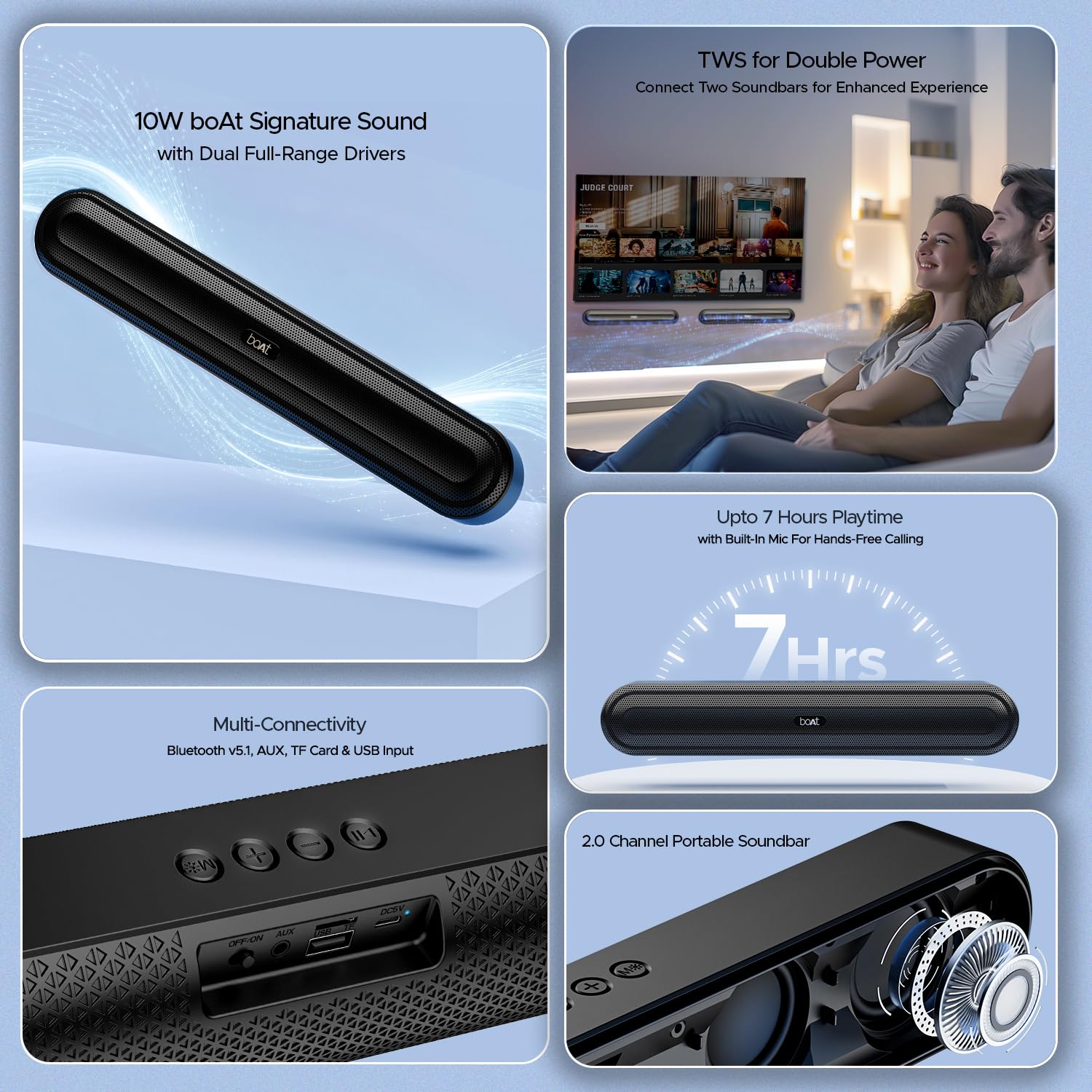
Aworan 2.1: Pariview of the boAt Aavante Bar 490 and its key features, including package contents.
3. Ọja Ipariview
3.1. Awọn iṣakoso ati awọn ibudo
Familiarize yourself with the control buttons and connectivity ports on your Aavante Bar 490.

Aworan 3.1: Isunmọ view of the control buttons and multi-connectivity ports (Bluetooth v5.1, AUX, TF Card, USB Input) on the soundbar.
- Bọtini agbara: Tẹ ki o si dimu mọ lati tan/pa. Tẹ kukuru lati yi awọn ipo pada.
- Iwọn didun isalẹ (-): Din iwọn didun silẹ.
- Iwọn didun soke (+): Mu iwọn didun pọ si.
- Bọ́tìnnì Ṣíṣe/Sánu duro: Mu orin ṣiṣẹ tabi da duro. Dahun/pari awọn ipe.
- Bọtini Ipo (M): Switch between input modes (Bluetooth, AUX, USB, TF Card).
- PA/ON Yipada: Yipada agbara akọkọ.
- Ibudo AUX: Fun asopọ ohun afetigbọ.
- Ibudo USB: Fun ṣiṣiṣẹsẹhin drive USB.
- Iho Kaadi TF: Fún ìgbádùn káàdì TF.
- Ibudo DC5V: Fun gbigba agbara ẹrọ.
4. Eto
4.1. Charging the Soundbar
Before first use, fully charge the soundbar. Connect the provided charging cable to the DC5V port on the soundbar and the other end to a compatible USB power adapter (not included). The LED indicator will show charging status and turn off when fully charged. A full charge provides up to 7 hours of playback.

Image 4.1: The boAt Aavante Bar 490 highlighting its up to 7 hours of playtime on a single charge.
4.2. Agbara Tan / Paa
- Ensure the OFF/ON switch at the back is in the "ON" position.
- Press and hold the Power button on the top panel for 3 seconds to power on the soundbar.
- To power off, press and hold the Power button again for 3 seconds.
4.3. Sisopọ Bluetooth
- Power on the soundbar. It will automatically enter Bluetooth pairing mode (indicated by a flashing LED).
- Lori ẹrọ rẹ (foonuiyara, tabulẹti, ati bẹbẹ lọ), mu Bluetooth ṣiṣẹ ki o wa awọn ẹrọ to wa.
- Select "Aavante Bar 490" from the list.
- Once paired, the LED indicator will turn solid blue, and you will hear a confirmation tone.
The soundbar supports Bluetooth v5.1 for stable and efficient wireless connection up to 10 meters.
4.4. TWS (Stẹrio Alailowaya Alailowaya) Isọpọ
For an enhanced stereo experience, you can pair two Aavante Bar 490 soundbars together.
- Ensure both Aavante Bar 490 units are powered on and in Bluetooth pairing mode (not yet connected to any device).
- On one of the soundbars, double-press the Mode button (M). It will search for the other unit.
- Once successfully paired, you will hear a confirmation tone, and the LED indicators on both units will synchronize.
- Now, connect your device to one of the paired soundbars via Bluetooth as described in Section 4.3. Both soundbars will play audio in stereo.

Image 4.2: Illustration of two boAt Aavante Bar 490 soundbars connected via TWS for an enhanced audio experience.
4.5. Other Connectivity Modes
Press the Mode button (M) to cycle through the following input options:
- Ipo AUX: So ẹ̀rọ ohun èlò ìgbọ́rọ̀ kan pọ̀ nípa lílo okùn AUX 3.5mm kan mọ́ ibudo AUX.
- Ipo USB: Insert a USB flash drive into the USB port. The soundbar will automatically play audio files.
- Ipo Kaadi TF: Insert a TF (microSD) card into the TF card slot. The soundbar will automatically play audio files.
5. Awọn ilana Iṣiṣẹ
5.1. Sisisẹsẹhin Orin
- Ṣiṣẹ/Daduro: Kukuru tẹ bọtini Play/Daduro.
- Atunse iwọn didun: Kukuru tẹ awọn bọtini didun Up (+) tabi Iwọn didun isalẹ (-) awọn bọtini.
- Orin t’okan: Tẹ bọtini iwọn didun Up (+) gun.
- Tẹlẹ Orin: Tẹ bọtini Iwọn didun isalẹ (-) gun.
5.2. Ọwọ-Ọfẹ Npe
When connected via Bluetooth, the built-in microphone allows for hands-free calls.
- Idahun Ipe: Kukuru tẹ bọtini Play/Daduro.
- Ipe Ipari: Kukuru tẹ bọtini Dun/Daduro lakoko ipe kan.
- Kọ Ipe: Gun tẹ bọtini Play/Sinmi.
6. Itọju
- Keep the soundbar away from water, moisture, and extreme temperatures.
- Nu ẹrọ naa pẹlu asọ ti o tutu, ti o gbẹ. Ma ṣe lo abrasive ose tabi epo.
- Avoid dropping or subjecting the soundbar to strong impacts.
- Tọju ni itura, aye gbigbẹ nigbati o ko ba wa ni lilo fun awọn akoko gigun.
7. Laasigbotitusita
| Isoro | Owun to le Fa | Ojutu |
|---|---|---|
| Soundbar does not power on. | Low battery; OFF/ON switch is off. | Charge the soundbar; ensure OFF/ON switch is in the "ON" position. |
| Ko le so pọ nipasẹ Bluetooth. | Soundbar not in pairing mode; device Bluetooth is off; too far from device. | Ensure soundbar is in pairing mode; enable Bluetooth on your device; move closer to the soundbar (within 10m). |
| Ko si ohun. | Volume too low; incorrect input mode; cable not connected properly. | Increase volume; switch to correct input mode (Bluetooth, AUX, USB, TF); check cable connections. |
| TWS sisopọ kuna. | One or both units already connected to a device; units too far apart. | Disconnect both units from any Bluetooth devices; ensure they are close to each other during TWS pairing. |
8. Awọn pato
- Orukọ awoṣe: Aavante Pẹpẹ 490
- Irú Agbọrọsọ: Pẹpẹ ohun
- Ijade ohun: 2.0 ikanni
- Agbara Ijade: 10W RMS
- Awọn awakọ: Dual Full-Range Drivers
- Ẹya Bluetooth: v5.1
- Ibiti Bluetooth: Ti o to awọn mita 10
- Asopọmọra: Bluetooth, AUX, USB, TF Card
- Igbesi aye batiri: Titi di wakati 7
- Iru Batiri: Litiumu polima (1 x 12V to wa)
- Gbohungbohun ti a ṣe sinu: Bẹ́ẹ̀ni (fún ìpè láìsí ọwọ́)
- Ọna Iṣakoso: Awọn bọtini ifọwọkan
- Awọn iwọn ọja: 38.7D x 6.5W x 5.5H
- Ìwọ̀n Nkan: 650 giramu

Image 8.1: Dimensions of the boAt Aavante Bar 490 soundbar.
9. Atilẹyin ọja ati Support
The boAt Aavante Bar 490 comes with a standard 1-odun lopin atilẹyin ọja Láti ọjọ́ tí o ti rà á. Jọ̀wọ́ wo Káàdì Ìdánilójú tí ó wà nínú rẹ̀ fún àwọn òfin àti àdéhùn kíkún.
For technical support, service, or warranty claims, please contact boAt customer service:
- Imeeli: info@imaginemarketingindia.com
- Olupese: Fojuinu Marketing Limited
- Adirẹsi: Unit no. 204 & 205, 2nd floor, D-wing & E-wing, Corporate Avenue, Andheri Ghatkopar Link Road, Mumbai, Maharashtra-400093, India
You can also download the boAt Hearables App for additional features and user guides. Scan the QR code below:

Image 9.1: QR code to download the boAt Hearables App for additional features and support.
10. Awọn fidio ọja
Fidio 10.1: A kukuru ṣaajuview ifihanasing the boAt Aavante Bar 490 Bluetooth Soundbar's features, including 10W RMS sound, dual full-range drivers, 7 hours playback, multi-connectivity, and hands-free calling. This video is provided by the seller.
Video 10.2: A finifini loriview of the boAt Aavante Bar 490, highlighting its 10W RMS Signature Sound, dual drivers, and Bluetooth 5.1 connectivity. This video is provided by the seller.


