1. Ifihan
The Zebronics Astra 30 is a portable Bluetooth speaker designed for a versatile audio experience. It features 14W output, dual 52mm drivers, dual passive radiators for enhanced bass, and multiple connectivity options including Bluetooth v5.3, FM radio, AUX, USB, and mSD card support. This manual provides instructions for setting up, operating, and maintaining your speaker.
2. Package Awọn akoonu
Jọwọ ṣayẹwo package fun awọn nkan wọnyi:
- Speaker - 1 unit
- Charging cable - 1 unit
- User manual - 1 unit
3. Ọja Ipariview
Mọ ararẹ pẹlu awọn paati ati awọn idari ti agbọrọsọ.

Aworan 3.1: Iwaju view of the Zebronics Astra 30 speaker, showcasing apẹrẹ dudu didan ati grille agbọrọsọ rẹ.
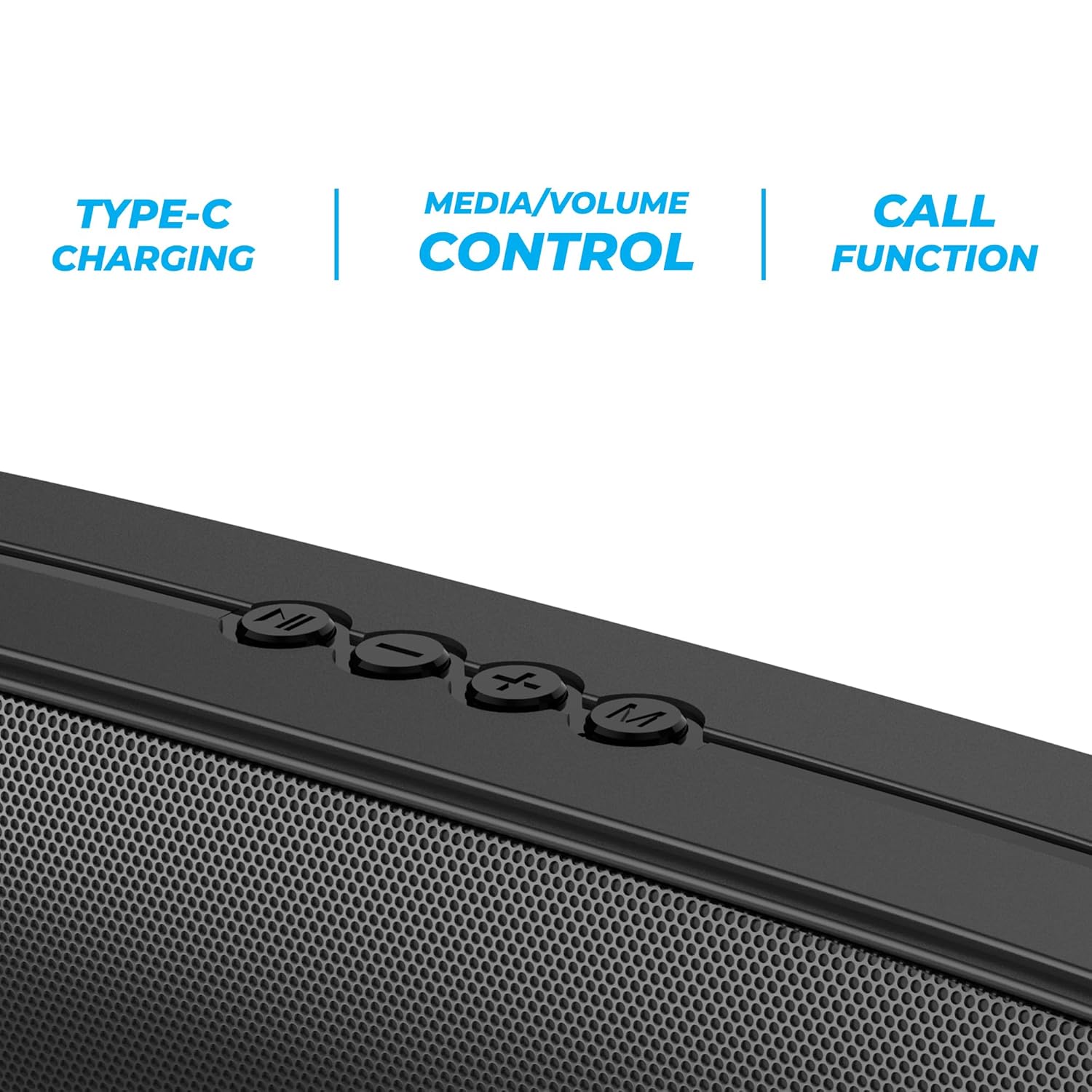
Aworan 3.2: Close-up of the control panel buttons on the top of the speaker, including power, volume, and mode controls.

Aworan 3.3: Ẹyìn view of the speaker showing the multi-connectivity ports: USB, Micro SD slot, AUX input, and Type-C charging port.
4. Eto
4.1 Gbigba agbara si Agbọrọsọ
Before initial use, fully charge the speaker. The Zebronics Astra 30 features a built-in rechargeable battery with Type-C charging.
- So okùn gbigba agbara Iru-C ti a pese mọ ibudo gbigba agbara lori agbọrọsọ naa.
- So opin okun miiran pọ si ohun ti nmu badọgba agbara USB (kii ṣe pẹlu) tabi ibudo USB ti kọnputa kan.
- The charging indicator will illuminate during charging and turn off once fully charged.
A full charge takes approximately 4 hours and provides up to 12 hours of playback time at 50% volume.

Aworan 4.1: Illustration indicating the speaker's 12-hour playback capability on a single charge.
4.2 Titan / Pa a
To power on or off the speaker, press and hold the power button located on the control panel until you hear an audible prompt or see the indicator light change.
5. Awọn ilana Iṣiṣẹ
5.1 Sisopọ Bluetooth
The Zebronics Astra 30 uses Bluetooth v5.3 for wireless audio streaming.
- Tan agbọrọsọ naa. Yoo wọ ipo isopọ Bluetooth laifọwọyi, ti a fihan nipasẹ LED ti n tan imọlẹ.
- Mu Bluetooth ṣiṣẹ lori foonu alagbeka rẹ, tabulẹti, tabi ẹrọ miiran.
- Wa fun "ZEB-ASTRA 30" in the list of available Bluetooth devices.
- Select "ZEB-ASTRA 30" to connect. Once paired, the speaker will confirm with an audible tone, and the LED will stop flashing.
- Ti o ba beere fun ọrọ igbaniwọle, tẹ "0000".
5.2 Otitọ Alailowaya Sitẹrio (TWS) iṣẹ
Connect two Zebronics Astra 30 speakers for a true wireless stereo experience.
- Ensure both ZEB-ASTRA 30 speakers are powered on and not connected to any Bluetooth device.
- On one of the speakers (this will be the primary speaker), press and hold the TWS button (often combined with the Mode button) until you hear a pairing tone.
- Awọn agbohunsoke meji yoo sopọ laifọwọyi si ara wọn. Ni kete ti o ti sopọ, iwọ yoo gbọ ohun orin idaniloju kan.
- Ní báyìí, so ẹ̀rọ rẹ pọ̀ mọ́ agbọrọsọ àkọ́kọ́ nípasẹ̀ Bluetooth gẹ́gẹ́ bí a ti ṣàlàyé rẹ̀ ní Apá 5.1. Ohùn náà yóò máa ṣiṣẹ́ nínú sitíréò nípasẹ̀ àwọn agbohùn méjèèjì.

Aworan 5.1: Visual representation of two Zebronics Astra 30 speakers connected via TWS for stereo sound.
5.3 FM Redio Ipo
Láti lo rédíò FM tí a ṣe sínú rẹ̀:
- Agbara lori agbọrọsọ.
- Tẹ bọtini 'M' (Ipo) lati yipada si ipo redio FM.
- Lati ṣe ayẹwo-laifọwọyi ati fi awọn ibudo FM ti o wa pamọ, tẹ mọlẹ Bọtini Dun/Daduro. Agbọrọsọ yoo ṣayẹwo ati tọju awọn ibudo laifọwọyi.
- Lo awọn bọtini orin ti tẹlẹ/tẹle lati lọ kiri laarin awọn ibudo ti a fipamọ.
- For optimal reception, ensure the charging cable is connected as an antenna.
5.4 Ipo Input AUX
Connect external audio devices using the AUX input:
- Agbara lori agbọrọsọ.
- Press the 'M' (Mode) button to switch to AUX mode.
- So opin kan ti okun ohun afetigbọ 3.5mm (kii ṣe pẹlu) si ibudo AUX lori agbọrọsọ.
- So ìpẹ̀kun kejì mọ́ ohùn tí ẹ̀rọ rẹ ń gbọ́ jáde (fún àpẹẹrẹ, fóònù alágbèéká, ẹ̀rọ orin MP3).
- Audio yoo ṣiṣẹ ni bayi nipasẹ agbọrọsọ lati ẹrọ ti o sopọ.
5.5 USB and Micro SD Card Playback
Mu ohun ṣiṣẹ files directly from a USB pen drive or Micro SD card:
- Agbara lori agbọrọsọ.
- Insert a USB pen drive (up to 32GB) or a Micro SD card into the respective slot.
- Agbọrọsọ naa yoo ṣawari ẹrọ ibi ipamọ naa laifọwọyi ati bẹrẹ si dun ohun naa files. If not, press the 'M' (Mode) button to switch to USB or SD card mode.
- Use the Play/Pause and Previous/Next track buttons to control playback.
5.6 Ipe Išė
Nígbà tí a bá so a pọ̀ mọ́ fóònù alágbéka nípasẹ̀ Bluetooth, a lè lo agbọ́hùnsọ̀ fún àwọn ìpè tí a kò ní fi ọwọ́ ṣe.
- Idahun/Ipe Ipari: Tẹ bọtini Play/Sinmi ni ẹẹkan.
- Kọ Ipe: Tẹ mọlẹ bọtini Dun/Sinmi.
- Nọmba Ikẹhin Tun Tun: Lẹẹmeji tẹ bọtini Play/Sinmi.
5.7 Ìṣàkóso Ìwọ̀n àti Ìdábòbò Ìròyìn
The speaker features integrated controls for audio playback:
- Iwọn didun Up: Tẹ bọtini '+'.
- Iwọn didun isalẹ: Tẹ bọtini '-'.
- Orin t’okan: Tẹ mọlẹ bọtini '+'.
- Tẹlẹ Orin: Tẹ mọlẹ bọtini '-'.
- Ṣiṣẹ/Daduro: Tẹ bọtini Play/Sinmi.
6. Itọju
- Clean the speaker with a soft, dry cloth. Do not use harsh chemicals or abrasive cleaners.
- Jẹ́ kí agbọ́rọ̀sọ náà jìnnà sí ooru tó le koko, oòrùn tààrà, àti ọrinrin.
- Yago fun sisọ tabi tẹriba agbọrọsọ si awọn ipa to lagbara.
- Tọju agbohunsoke ni itura, ibi gbigbẹ nigbati o ko ba lo fun awọn akoko gigun.
- The speaker is rated as waterproof. However, avoid submerging it in water for prolonged periods. Ensure the port cover is securely closed to maintain water resistance.
7. Laasigbotitusita
| Isoro | Owun to le Solusan |
|---|---|
| Agbọrọsọ ko ni agbara lori. | Rii daju pe batiri ti gba agbara. So agbohunsoke pọ si orisun agbara nipa lilo okun Iru-C. |
| Ko le so pọ nipasẹ Bluetooth. |
|
| Ko si ohun tabi iwọn kekere. |
|
| Gbigba redio FM ko dara. | Ensure the Type-C charging cable is connected to act as an antenna. Try repositioning the speaker. |
| TWS sisopọ kuna. |
|
8. Awọn pato
| Ẹya ara ẹrọ | Ẹ̀kúnrẹ́rẹ́ |
|---|---|
| Orukọ awoṣe | ZEB-ASTRA 30 |
| Agbara Ijade | 14 Wattis |
| Awakọ Iwon | Dual 52mm |
| Ẹya Bluetooth | v5.3 |
| Awọn aṣayan Asopọmọra | Bluetooth, FM, AUX, USB, Micro SD |
| USB/Micro SD Max Capacity | 32GB |
| Igbesi aye batiri | Titi di awọn wakati 12 (ni iwọn 50%) |
| Akoko gbigba agbara | wakati meji 4 |
| Gbigba agbara Iru | Iru-C |
| Omi Resistance | Mabomire |
| Awọn iwọn Ọja (D x W x H) | 5.7 x 35.4 x 6.5 centimeters |
| Iwọn Nkan | 645 giramu |
| Ipalara | 3 ohms |
| Ifihan Ibuwọlu-si-Noise | 75 dB |

Aworan 8.1: Graphic highlighting the 14W RMS output and dual 52mm drivers of the Zebronics Astra 30 speaker.
9. Atilẹyin ọja ati Support
The Zebronics Astra 30 speaker comes with a 1 Odun Atilẹyin ọja Lopin lati ọjọ ti o ra. Jọwọ ṣe idaduro iwe rira rẹ fun awọn iṣeduro atilẹyin ọja.
For technical support, service, or warranty inquiries, please contact Zebronics customer service. Contact details can typically be found on the official Zebronics webaaye tabi lori apoti ọja rẹ.
Manufacturer: Zebronics India Private Limited
Address: 13/7, Smith Road, Royapettah, Chennai-600002


