1. Ifihan
This manual provides essential information for the safe and efficient operation, maintenance, and troubleshooting of your Roborock S8 Robot Vacuum and Mop Cleaner. Please read this manual thoroughly before using the product and retain it for future reference.

Image 1.1: The Roborock S8 Robot Vacuum and Mop Cleaner, shown in white, alongside a smartphone displaying its control application. This image illustrates the product's design and its smart control capabilities.
2. Ọja irinše
The Roborock S8 package includes the following items:
- S8 Robot Vacuum (1)
- VibraWash Water Tank (1)
- VibraWash Mop Cloth (1)
- VibraWash Mop Cloth Mount (1)
- Ibùdó gbigba agbara (1)
- Okun Agbara (1)
- Ilana olumulo (1)
3. Eto
3.1 Gbigba agbara ibi iduro
Place the charging dock on a hard, level surface against a wall. Ensure there is at least 0.5 meters (1.6 feet) of clear space on both sides and 1.5 meters (4.9 feet) in front of the dock for optimal navigation and return. Connect the power cable to the charging dock and plug it into a power outlet.
3.2 Gbigba agbara akọkọ
Place the robot onto the charging dock. The robot will automatically power on and begin charging. For first-time use, ensure the robot is fully charged before operation. This typically takes several hours.
3.3 App fifi sori ati so pọ
- Download the Roborock app from your device's app store.
- Ṣii app naa ki o ṣẹda akọọlẹ kan tabi wọle.
- Follow the in-app instructions to add your Roborock S8 device. This typically involves pressing and holding specific buttons on the robot to enter pairing mode and connecting to the robot's temporary Wi-Fi network.
- Once paired, the app will guide you through initial mapping and settings.

Image 3.1: A smartphone screen showing the comprehensive Roborock app control interface, which includes features like 3D Mapping, Custom Routine, Smart No-Go Zones, Route Tracking, Schedule Cleaning, and Multi-Level Mapping.
4. Awọn ilana Iṣiṣẹ
4.1 Bíbẹ̀rẹ̀ àti Dídúró Símọ́
Press the power button on the robot or use the Roborock app to start a cleaning cycle. Press again to pause. To send the robot back to the charging dock, press the home button on the robot or select the 'Dock' option in the app.
4.2 ReactiveAI 3D Obstacle Avoidance
The Roborock S8 utilizes ReactiveAI 3D Obstacle Avoidance technology, combining 3D structured light and infrared imaging, to identify and bypass common household objects in both well-lit and dark environments. This system helps prevent the robot from getting stuck or damaging items.

Image 4.1: The Roborock S8 robot vacuum demonstrating its Reactive 3D Obstacle Avoidance by gracefully navigating around slippers in a room, highlighting its ability to identify and avoid potential hazards in varying light conditions.
4.3 DuoRoller Brush System
The S8 features a dual rubber brush system designed to enhance vacuuming performance and minimize hair tangles. This system effectively picks up dirt, debris, and pet hair from various floor types, including hardwood, tiles, carpets, and rugs.
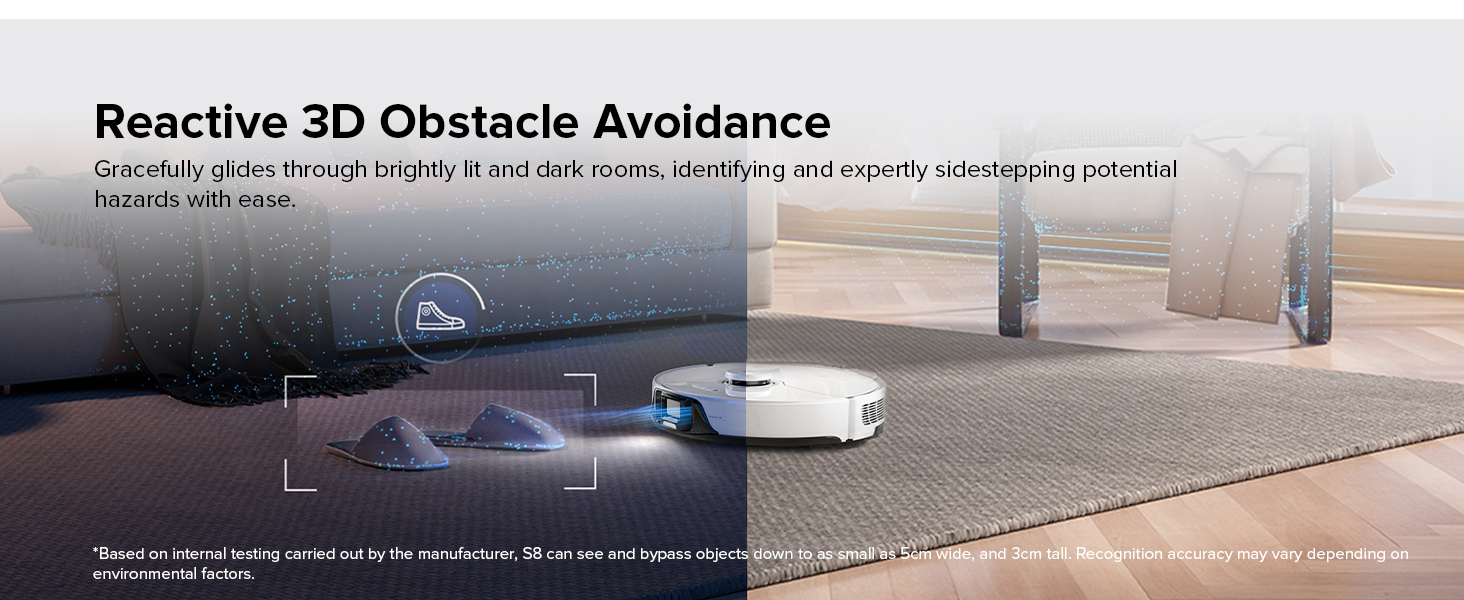
Image 4.2: An illustration of the Roborock S8's DuoRoller Brush system, showing two red rubber brushes working in tandem to collect various types of debris from the floor, emphasizing its enhanced vacuuming capability and reduced hair tangles.
4.4 6000Pa HyperForce Suction
The robot delivers 6000Pa of HyperForce suction power, effectively removing dust, debris, and pet hair. For carpets, the Carpet Boost+ feature automatically increases suction for deeper cleaning.

Image 4.3: The Roborock S8 robot vacuum operating on a carpet, with a visual representation of 6000 Pa suction power lifting dust and debris, illustrating its effective cleaning capabilities.
4.5 Sonic Mopping with VibraRise 2.0
The Upgraded VibraRise 2.0 Mopping System provides high-speed scrubbing at up to 3000 times per minute with over 6N consistent mopping pressure. This sonic mopping technology is effective at removing dried-on stains. The mop module can lift up to 5mm when a carpet is detected, preventing wetting.

Image 4.4: The Roborock S8 robot vacuum mopping a floor with visible water spills, demonstrating its Sonic Mopping Technology with vibrations emanating from the device, indicating high-speed scrubbing and effective stain removal.

Image 4.5: A series of images illustrating the Roborock S8's 5mm Mop Lifting feature, showing the mop raised when recognizing carpet, when returning to the charging dock, and when fully docked, preventing wetness on carpets or the dock area.
4.6 PreciSense LiDAR Navigation
The robot uses PreciSense LiDAR Navigation for precise mapping and efficient navigation of your home. This technology allows for quick mapping and accurate route planning, ensuring comprehensive cleaning coverage.

Image 4.6: The Roborock S8 robot vacuum navigating a room, with blue light indicating its PreciSense LiDAR Navigation system actively mapping the environment and identifying small objects on the floor.
4.7 Awọn ẹya ọlọgbọn nipasẹ Iṣakoso Ohun elo
The Roborock app provides extensive control and customization options:
- 3D Ìyàwòrán: Create detailed 3D maps of your home, allowing you to add furniture and define specific cleaning areas.
- Iyaworan Iyara: Rapidly generate a map of your home for immediate use.
- Àwọn Agbègbè Tí Kò Ní Ọ̀nà Tó Lọ́gbọ́n: Ṣeto awọn agbegbe ti robot yẹ ki o yago fun.
- Custom Routine: Set personalized cleaning schedules and routines for different areas.
- Iṣeto Iṣeto: Program the robot to clean at specific times.
- Ṣíṣe Àwòrán Ìpele Púpọ̀: Automatically recognize and map up to four different floor levels in your home.

Image 4.7: A 3D map of a house displayed on a screen, illustrating the 3D Mapping feature of the Roborock app, which allows users to virtually build their house, add furniture, and define No-Go Zones for precise cleaning.

Image 4.8: The Roborock S8 robot vacuum operating in a multi-level home environment, with an overlay showing the app's Multi-Level Mapping feature, indicating its ability to recognize and manage maps for up to four different floors.

Image 4.9: A visual representation of the Roborock app interface demonstrating Custom Cleaning Routines, with a floor plan showing different rooms scheduled for cleaning at specific times (e.g., Kitchen at 11:00, Living Room at 13:00), highlighting personalized cleaning management.
4.8 Iṣakoso ohun
The Roborock S8 supports voice control through compatible smart home devices such as Amazon Alexa and Google Home. Link your robot to your smart assistant for hands-free operation.

Image 4.10: A woman relaxing in a living room, with a speech bubble indicating a voice command, "Hi Alexa, ask Roborock to clean.", demonstrating the voice control feature of the Roborock S8 robot vacuum.
4.9 Off-Peak Charging
Schedule charging during off-peak electricity hours to save on energy costs and contribute to environmental sustainability.

Image 4.11: The Roborock S8 robot vacuum docked and charging, with a prominent green lightning bolt icon, symbolizing the Off-Peak Charging feature designed to optimize energy consumption.
5. Itọju
Regular maintenance ensures optimal performance and extends the lifespan of your Roborock S8.
5.1 Cleaning the DuoRoller Brushes
Periodically remove the main brushes and clean any tangled hair or debris. Use the cleaning tool provided to cut and remove hair wrapped around the brushes.
5.2 Cleaning Ajọ
The S8 uses cloth and foam filters. Remove the dustbin and tap out loose dirt. Rinse the filter under running water (if washable) and allow it to air dry completely before reinserting. Do not use a brush or fingers to clean the filter.
5.3 Omi Omi ati Itọju Asọ Mop
After each mopping session, empty any remaining water from the VibraWash water tank. Remove the VibraWash mop cloth and wash it. It can be hand-washed or machine-washed. Ensure the mop cloth is clean and dry before the next use.
5.4 Sensọ Cleaning
Wipe all sensors (cliff sensors, wall sensors, charging contacts) with a soft, dry cloth to ensure proper function and navigation.
6. Laasigbotitusita
If you encounter issues with your Roborock S8, refer to the following common solutions:
- Robot ko gba agbara: Ensure the charging dock is powered on and the robot is correctly aligned with the charging contacts. Clean the charging contacts on both the robot and the dock.
- Rọ́bọ́ọ̀tì tí ó ti di tàbí tí kò lè rìn kiri: Clear any obstacles from the robot's path. Clean the ReactiveAI 3D sensors and LiDAR sensor. Ensure there is adequate lighting for optimal obstacle avoidance.
- Poor vacuuming performance: Clean the DuoRoller brushes and empty the dustbin. Check and clean the filter.
- Poor mopping performance: Ensure the water tank is filled and the mop cloth is clean and properly attached. Check for blockages in the water nozzle.
- Awọn oran Asopọmọra App: Ensure your robot is within Wi-Fi range and your Wi-Fi network is 2.4GHz (the S8 only supports 2.4GHz Wi-Fi). Restart the robot and your router.
- Awọn ariwo ti ko wọpọ: Check the main brushes and side brush for tangled hair or foreign objects. Inspect the wheels for debris.
For persistent issues, consult the in-app help section or contact Roborock customer support.
7. Awọn pato
| Ẹya ara ẹrọ | Sipesifikesonu |
|---|---|
| Brand | roborock |
| Orukọ awoṣe | S8 |
| Pataki Ẹya | Bagless, Robot Vacuum Mop Combo, Dual Brush Cleaning, Powerful 6000Pa Suction, Sonic Mopping, Intelligent Mop Lifting, ReactiveAI 3D Obstacle Avoidance, App Control, Works with Alexa |
| Àwọ̀ | Funfun |
| Àlẹmọ Iru | Cloth, Foam |
| Igbesi aye batiri | 180 iṣẹju |
| Voltage | 220 Volts |
| Orisun agbara | Agbara Batiri |
| Awọn ẹrọ ibaramu | Amazon Echo, Google Home, Àwọn Foonu Alagbeka |
| Fọọmù ifosiwewe | Robotik |
| UPC | 195043003887 |
| Ọja Mefa | 17.52 x 15.63 x 5.39 inches |
| Iwọn Nkan | 15.17 iwon |
| Awọn batiri | 1 batiri litiumu ion (pẹlu) |
8. Onibara Support
For further assistance, technical support, or warranty inquiries, please refer to the official Roborock website or contact their customer service directly. Keep your purchase receipt and product serial number handy when contacting support.


