1. Ifihan
Thank you for choosing the Devoko 120x60cm Electric Standing Desk. This desk is designed to enhance your workspace by allowing seamless transitions between sitting and standing positions, promoting better posture, reducing fatigue, and increasing productivity. This manual provides essential information for the safe assembly, operation, and maintenance of your new desk.

Image 1: The Devoko 120x60cm Electric Standing Desk in a typical setup, showcasing its spacious design and monitor support.
2. Aabo ikilo
- Agbara iwuwo to pọ julọ: Maa ko koja awọn ti o pọju fifuye agbara ti 70 kg (154 lbs). Overloading the desk can cause damage or injury.
- Apejọ to ni aabo: Ensure all components are securely mounted and tightened according to the assembly instructions before use.
- Movement and Adjustment: Exercise caution when moving or adjusting the desk due to its metal structure and electrical components. Keep hands and objects clear of moving parts.
- Awọn ọmọde ati awọn ohun ọsin: Pa awọn ọmọde ati awọn ẹranko mọ kuro ni tabili lakoko iṣẹ-ṣiṣe lati yago fun ijamba.
- Ibi ti ina elekitiriki ti nwa: Use only the provided power adapter and ensure it is connected to a grounded outlet. Do not operate the desk with a damaged power cord or plug.
- Idasonu Olomi: Avoid spilling liquids on the control panel or motor components. In case of a spill, immediately unplug the desk and allow it to dry completely before reconnecting power.
3. Eto ati Apejọ
Detailed installation instructions are included in the product packaging. Please follow these instructions carefully for proper assembly. The desk features a robust metal frame and a multi-part wooden tabletop designed for stability.
Awọn imọran Apejọ bọtini:
- Aaye iṣẹ: Rii daju pe o ni ample aaye fun ijọ.
- Tabletop Alignment: The tabletop consists of multiple wooden parts. Take time to align them properly during assembly to ensure a smooth and even surface.
- Iṣakoso USB: Utilize the integrated cable pass-throughs to keep your workspace tidy.

Image 2: Integrated design features such as cable management, rounded corners, and a convenient hook for headphones or bags.
4. Awọn ilana Iṣiṣẹ
Your Devoko electric standing desk is equipped with an intuitive control panel for easy height adjustment and memory functions.
4.1. Giga tolesese
- Adjusting Up: Tẹ mọlẹ OKE (▲) button to raise the desk to your desired standing height.
- Adjusting Down: Tẹ mọlẹ Si isalẹ (▼) button to lower the desk to your desired sitting height.
- The desk height can be adjusted smoothly and quietly between 73 cm ati 118 cm. Release the button once the desired height is reached.
4.2. Awọn tito iranti
The control panel allows you to save two preferred height settings for quick recall.
- Nfipamọ Tito tẹlẹ:
- Adjust the desk to your desired height (e.g., sitting height).
- Tẹ awọn M button (or similar memory button, if present). The LED display may flash.
- Immediately press either 1 or 2 to save the current height to that memory slot.
- Rírántí Àkójọpọ̀ kan: Nìkan tẹ awọn 1 or 2 button corresponding to your saved height. The desk will automatically move to that position.
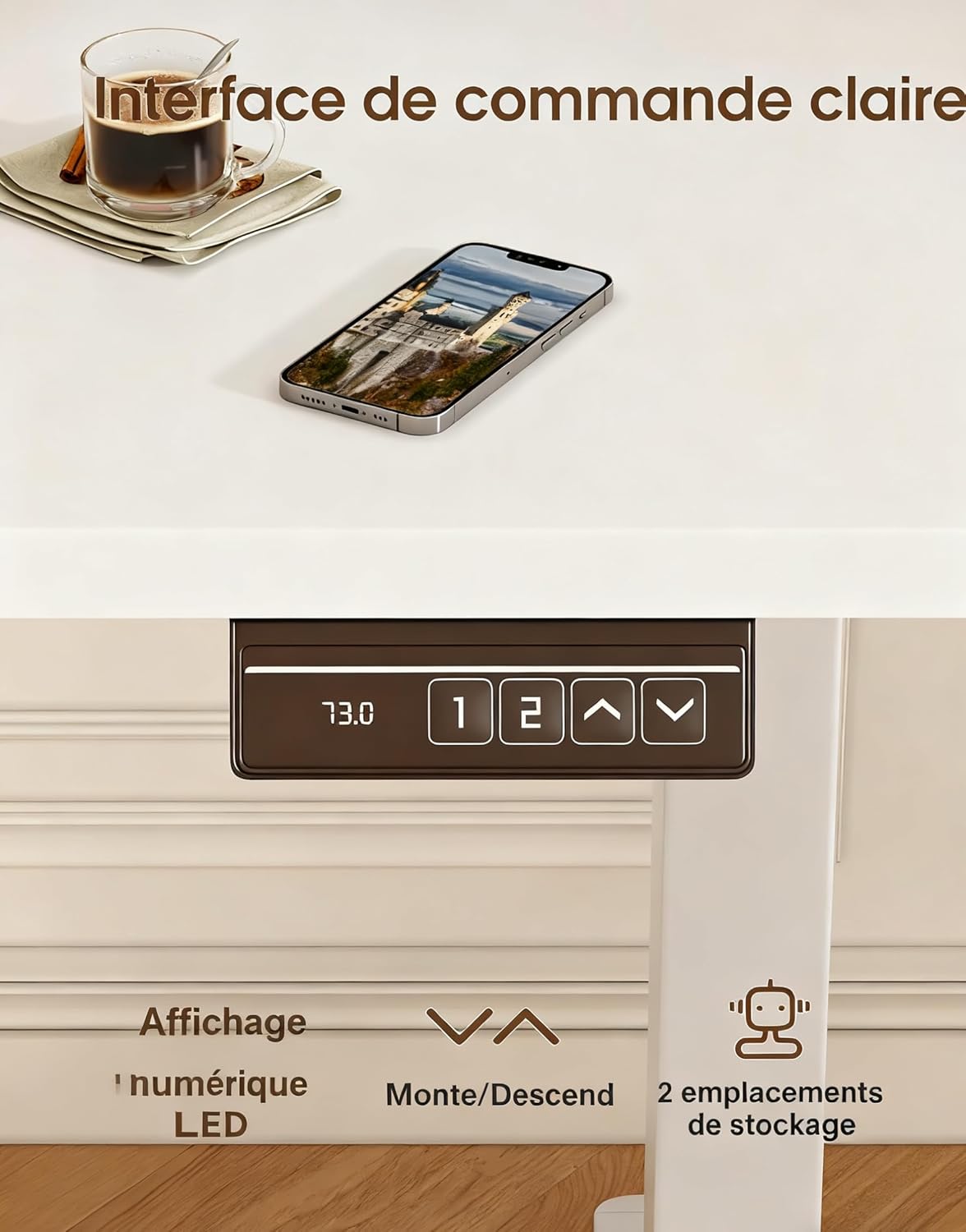
Image 3: The desk's control panel, featuring an LED display for current height, up/down adjustment buttons, and two memory preset buttons.

Image 4: Visual guide demonstrating proper ergonomic posture when using the desk in both sitting and standing positions, highlighting the benefit of the monitor support.
5. Itọju
- Ninu: Pa awọn ipele tabili nu pẹlu asọ, damp asọ. Yago fun abrasive ose tabi simi kemikali ti o le ba awọn ipari.
- Ṣayẹwo Awọn isopọ: Lokọọkan ṣayẹwo gbogbo awọn skru ati awọn boluti lati rii daju pe wọn wa ni wiwọ. Tun-mu ti o ba wulo.
- Ayẹwo USB: Inspect the power cord and motor cables for any signs of wear or damage. Replace immediately if damage is found.
- Itọju mọto: The desk's motors are designed for durability (tested over 20,000 cycles). Avoid continuous operation for extended periods without rest to prevent overheating.
6. Laasigbotitusita
| Isoro | Owun to le Fa | Ojutu |
|---|---|---|
| Iduro ko gbe. | A ti ge okùn agbara kuro; Apọju; Aṣiṣe mọto. | Check power connections. Reduce weight on desk. Unplug for 10 minutes, then reconnect. |
| Iduro n gbe lainidi tabi ṣe ariwo dani. | Ẹrù tí kò dọ́gba; Àwọn ìsopọ̀ tí kò dọ́gba; Ìdènà. | Distribute weight evenly. Check all assembly screws. Ensure no objects are obstructing the legs. |
| Awọn tito iranti ko ṣiṣẹ. | Awọn tito tẹlẹ ko ni ipamọ daradara. | Re-save the memory presets following the instructions in Section 4.2. |
| Desk wobbles. | Loose connections; Uneven floor. | Ensure all screws are tightened. Adjust leveling feet if your floor is uneven. |
If you encounter issues not listed here or if the problem persists after attempting the solutions, please contact customer support.
7. Awọn pato

Image 5: Key specifications and dimensions of the Devoko Electric Standing Desk.
| Ẹya ara ẹrọ | Ẹ̀kúnrẹ́rẹ́ |
|---|---|
| Nọmba awoṣe | 0463 |
| Brand | Devoko |
| Àwọ̀ | Funfun |
| Tabletop Dimensions (L x W) | 120 cm x 60 cm (47.2 ni x 23.6 ninu) |
| Giga tolesese Range | 73 cm - 118 cm (28.7 ni - 46.5 in) |
| Product Dimensions (L x W x H at lowest) | 60 x 120 x 72 cm |
| Agbara iwuwo | 70 kg (154 lbs) |
| Iwọn Ọja | 22 kg (48.5 lbs) |
| Ohun elo | Wood (Tabletop), Metal (Base) |
| Awọn ẹya ara ẹrọ | Adjustable, Electric, 2 Memory Presets, Monitor Support |
| Ariwo Ipele | <60dB |
8. Atilẹyin ọja ati Support
For warranty information, please refer to the documentation included with your purchase or contact the seller directly. Devoko is committed to providing quality products and customer satisfaction.
If you have any questions, require assistance with assembly, or need troubleshooting support, please contact the Devoko customer service team or the retailer from whom you purchased the product. Please have your model number (0463) and purchase details ready when contacting support.


