1. Ifihan
The CONTEC CMS1600B-vet is a handheld dual-probe color Doppler ultrasound diagnostic system. It consists of a main unit and dedicated control software. This system utilizes ultrasonic Doppler technology and ultrasonic echo theory to gather information on blood flow movement, tissue movement, and to generate images of organ tissues. Its compact size and ease of operation make it suitable for clinical ultrasound examinations in various animals, including canine, feline, ovine, bovine, and equine species.
2. Ọja Ipariview
The CMS1600B-vet system is designed for veterinary use, offering a range of adjustable parameters to suit different diagnostic needs. Key features include:
- Dual-Probe Design: Integrates both Convex and Linear probes for versatile applications.
- Asopọ Alailowaya: Effective WiFi transmission distance of not less than 10 meters (in open areas) between the main unit and control software.
- Batiri gbigba agbara: Ṣe atilẹyin gbigba agbara alailowaya fun irọrun.
- Awọn ẹya ara ẹrọ Ifihan: Full-screen display support, image flip function, and cine-loop function.
- Awọn ọna Ṣiṣẹ: B, 2B, B/M, C, PW.
- Atunṣe Aworan: 8-segment TGC (Time Gain Compensation) adjustment.
The device is compact and ergonomically designed for handheld use, as shown in the image below.

Figure 2.1: The CONTEC CMS1600B-vet handheld ultrasound device.
The system includes the main ultrasound unit, a charging cable, and a software disc, all packaged for safe transport and storage.
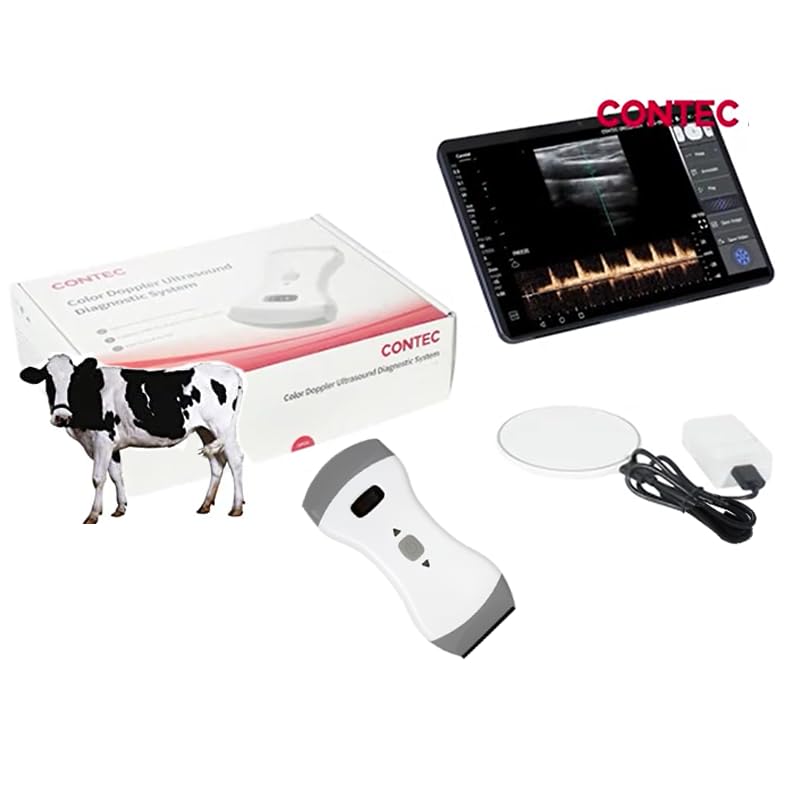
Ṣe nọmba 2.2: Apoti ọja ati awọn paati ti o wa.
3. Eto
3.1 Ngba agbara si Ẹrọ
Before initial use, ensure the device is fully charged. The CMS1600B-vet supports wireless charging. Connect the provided charging cable to a suitable power source and place the device on the charging pad, or directly connect the USB-C cable to the device's charging port.

Figure 3.1: Connecting the charging cable to the device.
3.2 Fifi sori ẹrọ ati isopọmọ sọfitiwia
The CMS1600B-vet operates with specific control software. Install the software on your mobile phone, tablet, or computer. The system is compatible with both iOS and Android operating systems.

Figure 3.2: The ultrasound software running on a smartphone and tablet, compatible with Android and iOS.
Once the software is installed, power on the ultrasound device. The device will broadcast a WiFi signal. Connect your mobile device or computer to this WiFi network. The effective transmission distance for the WiFi connection is approximately 10 meters in an open area.

Figure 3.3: Wireless connection of the ultrasound device to a tablet via WLAN.
4. Awọn ilana Iṣiṣẹ
4.1 Titan / Pa a
Press and hold the power button located on the device to turn it on or off. The device features an indicator light and a small display to show battery status and operational mode.

Figure 4.1: The device in hand, showing the power button and battery indicator.
4.2 Ṣíṣe Àyẹ̀wò
Once connected to the control software, select the appropriate probe (Convex or Linear) and working mode (B, 2B, B/M, C, PW) for the examination. Adjust parameters such as TGC (Time Gain Compensation) as needed for optimal image quality. The software supports full-screen display, image flip, and cine-loop functions for comprehensive analysis.

Figure 4.2: The ultrasound device being used, with the live image displayed on a connected tablet.
5. Clinical Applications
The dual-probe design of the CMS1600B-vet allows for a wide range of clinical applications in veterinary diagnostics:
- Linear Probe Applications:
- Ti iṣan
- MSK (Musculoskeletal)
- Awọn itọju ọmọde
- Oyan
- Karotid
- Tairodu
- Awọn ẹya kekere
- Convex Probe Applications:
- Ikun
- Ọkàn ọkan
- Ẹkọ nipa ikun
- Oyun
- Urology
- Àrùn
This versatility makes the system suitable for comprehensive diagnostic imaging across various animal types and medical conditions.

Olusin 5.1: Pariview of clinical applications for the Linear and Convex probes.
The integrated dual probe design is clearly visible, catering to different examination requirements for animals like cats and dogs.

Figure 5.2: The CONTEC CMS1600B-vet device alongside a kitten and a puppy, highlighting its application in veterinary settings.
6. Itọju
6.1 Ninu
Regularly clean the device, especially the probe surfaces, with a soft cloth dampened with a mild disinfectant solution. Ensure no liquid enters the device openings. Do not use abrasive cleaners or solvents.
6.2 batiri Itọju
To prolong battery life, avoid fully discharging the device frequently. Charge the device regularly, even if not in constant use. Store the device in a cool, dry place when not in use for extended periods.
7. Laasigbotitusita
- Ẹrọ ko ṣiṣẹ lori: Ensure the battery is charged. Connect to the charger and attempt to power on again.
- Ko si aworan loju iboju: Verify that the device is powered on and successfully connected to the control software via WiFi. Check the WiFi connection status on your mobile device or computer.
- Didara aworan ti ko dara: Adjust the TGC settings in the software. Ensure proper contact between the probe and the animal's skin, using ultrasound gel as necessary.
- Awọn iṣoro asopọ WiFi: Ensure your mobile device is within the 10-meter effective range of the ultrasound unit. Check for interference from other wireless devices.
8. Awọn pato
- Awoṣe: CMS1600B-vet
- Awọn iwọn ọja: 6.34 x 2.84 x 1.18 inches
- Ìwúwo: 1.41 iwon
- Awọn ọna Ṣiṣẹ: B, 2B, B/M, C, PW
- TGC Adjustment: 8-apakan
- Asopọmọra: Wireless (WiFi), effective range > 10m (open area)
- Gbigba agbara: Wireless, USB-C
- Awọn ẹya ara ẹrọ Ifihan: Full-screen display, image flip, cine-loop
- Ibamu: iOS, Android
- Awọn ohun elo: Canine, feline, ovine, bovine, equine, etc.
9. Atilẹyin ọja ati Support
For detailed warranty information and technical support, please refer to the official CONTEC webAaye ayelujara tabi kan si oniṣowo ti a fun ni aṣẹ rẹ. Pa iwe-ẹri rira rẹ mọ fun awọn ẹtọ atilẹyin ọja.