Ọrọ Iṣaaju
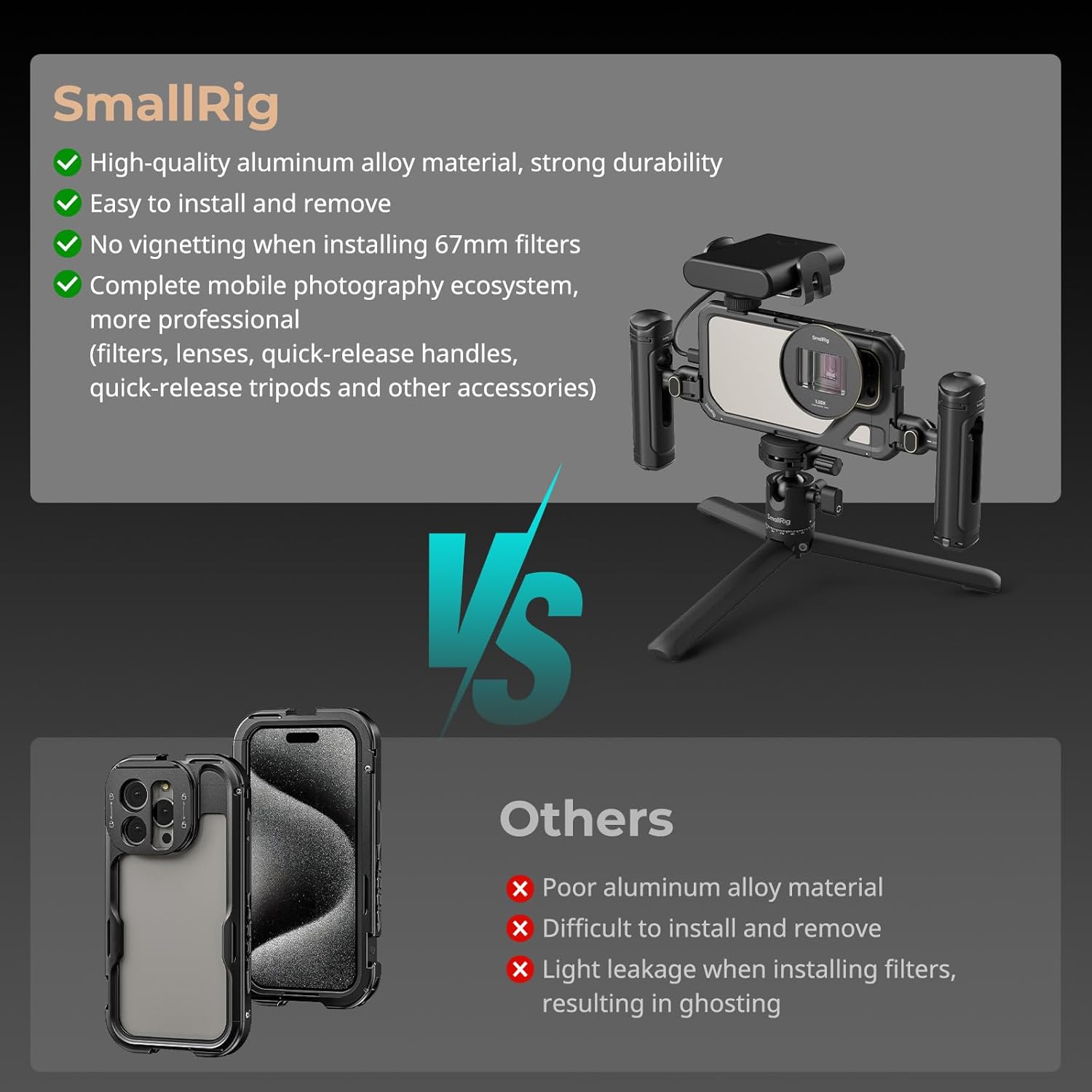
This manual provides detailed instructions for the proper use and maintenance of your SmallRig iPhone 15 Pro Max Phone Cage 4391B. This phone cage is designed to enhance your mobile videography and photography experience by providing a secure mounting solution for your iPhone 15 Pro Max, along with various accessory attachment points and a 67mm magnetic filter adapter.

Figure 1: SmallRig iPhone 15 Pro Max Phone Cage with included 67mm filter adapter and lens mount options.
Package Awọn akoonu
Daju pe gbogbo awọn nkan ti a ṣe akojọ rẹ si isalẹ wa ninu package rẹ:
- 1 x Phone Cage for iPhone 15 Pro Max
- 1 x 67mm Magnetic Filter Adapter
- 3 x apoju skru
- 1 x Itọsọna olumulo
Ṣeto
1. Installing Your iPhone 15 Pro Max
- Locate the one-click locking system on the phone cage. Press the unlock button to open the cage.
- Carefully align your iPhone 15 Pro Max with the cage, ensuring the camera module fits correctly into its designated opening.
- Slide the iPhone into the cage until it is fully seated. Close the cage until you hear a click, indicating it is securely locked.

Figure 2: The one-click locking system allows for quick and secure installation of your iPhone 15 Pro Max.
2. Attaching the 67mm Magnetic Filter Adapter
- The phone cage comes with a pre-installed M-mount lens backplate. The 67mm magnetic filter adapter is designed to attach directly to this backplate.
- Align the magnetic filter adapter with the camera module opening on the cage. The magnetic connection will secure it in place.
- You can then attach any 67mm magnetic filters (VND, CPL, black diffusion, starburst, etc., sold separately) to the adapter.

Figure 3: The 67mm magnetic filter adapter attaches magnetically to the cage, allowing for quick filter changes.
3. Expanding with External Lenses
The phone cage supports various external lenses. It comes with an M-mount lens backplate. For 17mm/37mm threaded lenses or Moment T-series lenses, you will need to purchase the corresponding lens backplates (e.g., 17mm/37mm Threaded lens mount 4394/4395 and T-series lens mount 4399 are not included).
- To change the lens backplate, carefully remove the existing one by unscrewing the retaining screws.
- Install the desired lens backplate and secure it with the provided screws.
- Attach your external lens to the newly installed backplate.

Figure 4: The cage supports different lens mounts for M-mount, 17mm/37mm threaded, and T-series lenses (backplates sold separately).
4. Attaching Accessories (Handles, Tripods, Microphones, LED Lights)
The phone cage features multiple 1/4"-20 threaded holes and cold shoe mounts for attaching various accessories.
- Quick Release Handles: The cage utilizes SmallRig's HawkLock quick-release ecosystem. Align compatible quick-release handles (e.g., SmallRig Rotatable QR handle adapter 4610, QR handles 4402/4403, sold separately) with the quick-release mounts on the cage and slide them in until they lock securely. This allows for easy switching between horizontal and vertical shooting.
- Cold Shoe Mounts: Use the integrated cold shoe mounts to attach microphones, LED lights, or other cold shoe compatible accessories.
- 1/4"-20 Threaded Holes: These universal mounting points allow for attachment of tripods, magic arms, or other accessories with 1/4"-20 screws.
- Wrist Strap Mount: A dedicated slot is available for attaching a wrist strap for added security.
Olusin 5: Pariview of the various mounting points including quick release mounts, 1/4"-20 threaded holes, and cold shoe mounts.
Awọn ilana Iṣiṣẹ
1. Gbogbogbo Lilo
The SmallRig iPhone 15 Pro Max Phone Cage is designed for stable and versatile mobile content creation. Its hollow design ensures full access to all iPhone buttons, ports, radar, and ultra-wide-angle lens, without affecting normal phone use or MagSafe wireless charging.
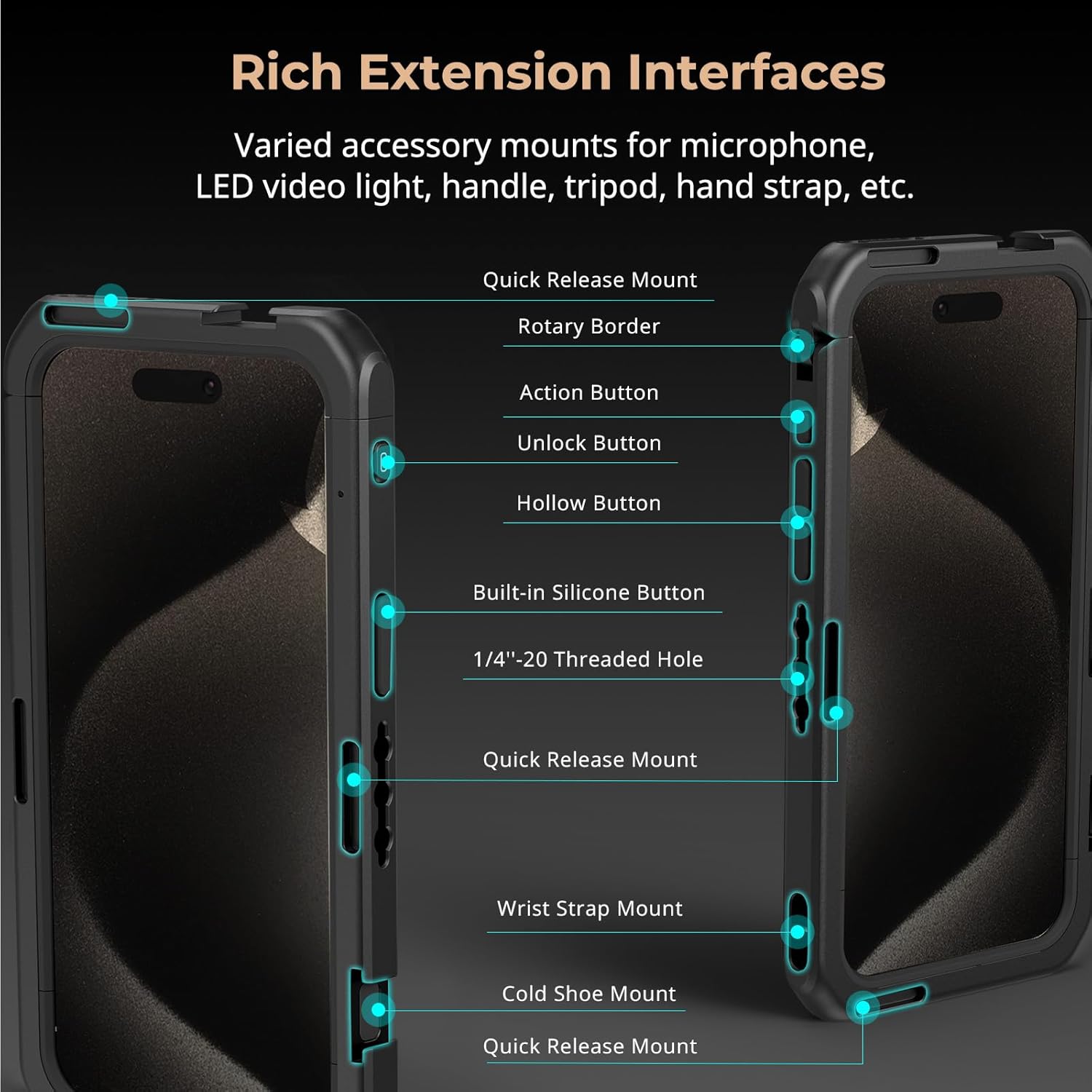
Figure 6: The hollow design ensures all phone functions remain accessible while in the cage.
2. Switching Between Horizontal and Vertical Shooting
When using compatible quick-release handles, you can quickly detach and reattach them to switch between horizontal and vertical shooting orientations without needing to remove the phone from the cage.
3. Using MagSafe Accessories
The cage is fully compatible with MagSafe wireless chargers and other MagSafe accessories. Simply attach your MagSafe accessory to the back of the iPhone while it is in the cage.
Video 1: Official SmallRig Mobile Video Cage for iPhone 15 Series demonstrating quick release and accessory mounting.
Itoju
- Ninu: Use a soft, dry cloth to wipe down the aluminum alloy frame. For silicone pads, a slightly damp asọ le ṣee lo. Yago fun awọn kemikali lile tabi awọn ohun elo abrasive.
- Filter Adapter Care: Keep the 67mm magnetic filter adapter clean and free of dust. Use a lens cleaning cloth for the glass elements.
- Itọju Skru: Periodically check all screws for tightness. Use the spare screws provided if any are lost or damaged.
- Ibi ipamọ: When not in use, store the phone cage and its accessories in a clean, dry place to prevent dust accumulation and potential damage.

Figure 7: The all-metal cage features built-in silicone pads for protection against shocks and scratches.
Laasigbotitusita
- iPhone not fitting: Ensure you have the correct cage model for your iPhone 15 Pro Max. The cage is not designed for use with a phone case.
- Accessories not attaching securely: For quick-release accessories, ensure they are fully seated and the locking mechanism is engaged. For threaded accessories, ensure the screw is tightened appropriately.
- Vignetting with external lenses: Ensure the correct lens backplate is installed for your specific external lens. Some ultra-wide lenses may experience slight vignetting depending on the lens design.
- MagSafe not working: Verify that the MagSafe accessory is correctly aligned with the MagSafe area on your iPhone. The hollow design of the cage should not interfere with MagSafe functionality.
Awọn pato
| Ẹya ara ẹrọ | Ẹ̀kúnrẹ́rẹ́ |
|---|---|
| ID ọja | 4391B |
| Awọn ẹrọ ibaramu | iPhone 15 Pro Max |
| Ohun elo | Aluminiomu Alloy, Silikoni |
| Iwọn Nkan | 116 Giramu (4.1 iwon) |
| Ti ṣe pọ Iwon | 176.6mm (L) x 95.5mm (W) x 17.1mm (H) |
| Ibamu Àlẹ̀mọ́ | 67mm Magnetic Filters |
| Lens Mount Compatibility | M-mount (included), 17mm/37mm threaded, Moment T-series (via optional backplates) |
| Iṣagbesori Points | Multiple 1/4"-20 threaded holes, Cold Shoe Mounts, Quick Release Mounts, Wrist Strap Mount |
Atilẹyin ọja ati Support
SmallRig products are manufactured to high-quality standards. For warranty information, product support, or any inquiries, please refer to the official SmallRig webojú òpó wẹ́ẹ̀bù tàbí kí o kàn sí iṣẹ́ oníbàárà wọn tààrà. Jọ̀wọ́ pa ẹ̀rí ríra rẹ mọ́ fún àwọn ẹ̀tọ́ ìdánilójú.
Fun iranlọwọ siwaju sii, ṣabẹwo si SmallRig Store on Amazon.


