1. Ifihan
Thank you for choosing the Pretul SOIN-110/130P Inverter Welder. This compact and efficient welding machine is designed for both coated electrode (SMAW) and tungsten (TIG) welding processes. It features an automatic BI-VOLTAGE 127-220V adaptation system, ensuring seamless operation across different power inputs without manual adjustments. This manual provides essential information for safe operation, setup, maintenance, and troubleshooting to ensure optimal performance and longevity of your welder.
2. Awọn ilana aabo
Máa fi ààbò sí ipò àkọ́kọ́ nígbà tí o bá ń lo ẹ̀rọ ìhunṣọ. Àìtẹ̀lé àwọn ìlànà wọ̀nyí lè yọrí sí ìpalára tàbí ikú ńlá.
- Ibalẹ ina le pa: Do not touch live electrical parts. Wear dry welding gloves and protective clothing. Insulate yourself from work and ground.
- Awọn eefin ati awọn gaasi le jẹ eewu: Pa ori rẹ kuro ninu eefin. Lo ategun tabi eefin lati yọ eefin kuro ni agbegbe mimi.
- Awọn egungun Arc Le Sun Oju ati Awọ: Wear a welding helmet with a proper shade filter. Wear safety glasses with side shields. Use protective clothing to cover all exposed skin.
- Ewu Ina ati Bugbamu: Remove all flammables from the welding area. Have a fire extinguisher readily available. Do not weld on containers that have held combustibles.
- Awọn ẹya gbigbona le fa awọn gbigbo nla: Allow the welder and workpieces to cool before handling. Use insulated gloves and tongs.
- Ka gbogbo Ìwé Ìtọ́sọ́nà náà: Understand all safety warnings and operating procedures before use.
- Lo ni agbegbe Afẹfẹ daradara: Ensure adequate airflow to prevent overheating and fume buildup.
- Ilẹ-ilẹ ti o tọ: Always ensure the welder is properly grounded according to local electrical codes.
3. Package Awọn akoonu
Carefully unpack the box and ensure all items are present and undamaged. If any items are missing or damaged, contact your supplier immediately.
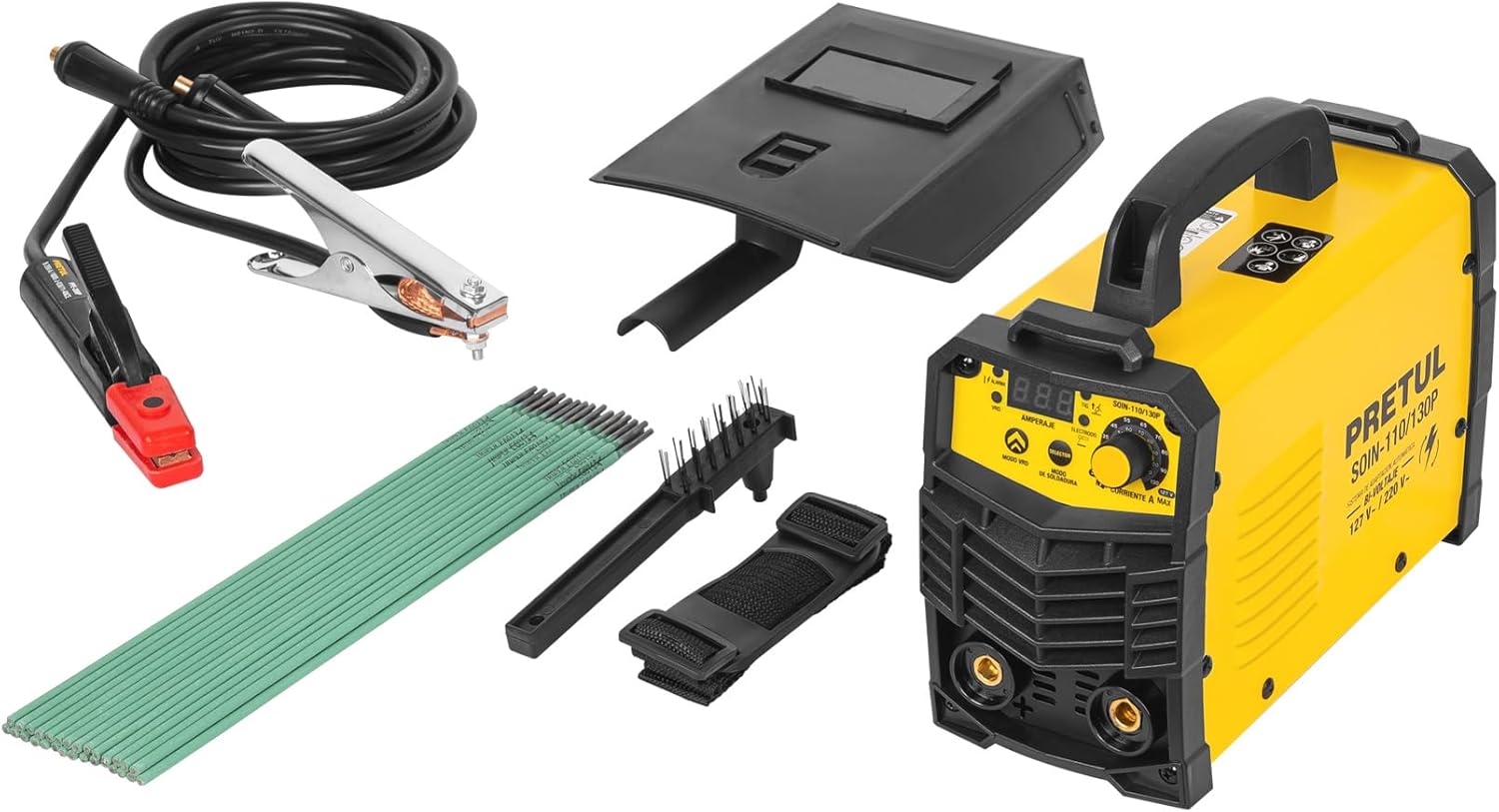
Figure 3.1: Pretul SOIN-110/130P Inverter Welder with all included accessories.
- Pretul SOIN-110/130P Inverter Welder Unit
- Okun Agbara pẹlu Pulọọgi
- 1 kg of 1/8" E6013-4 Electrodes
- Ilẹ Clamp Cable (2 m, #5 AWG / 16 mm²)
- Electrode Holder Cable (2 m, #5 AWG / 16 mm²)
- Protective Welding Mask
- Waya Fifọ
4. Ọja Ipariview
Familiarize yourself with the components and controls of your Pretul Inverter Welder.

olusin 4.1: Iwaju view of the welder with key components labeled.
- Cable Agbara: So alurinmorin si ipese itanna.
- Tan/Pa Yipada: Ṣe agbara ẹrọ naa tan tabi pa.
- Thermal Protection Light: Illuminates to indicate overheating, activating the thermal protection system.
- Ifihan Digital: Shows current settings and other operational information.
- Kọ́nì Àtúnṣe Lọ́wọ́lọ́wọ́: Used to precisely set the welding current (Ampigba).
- Quick-Change Terminals (Bornes): 3/8" terminals for quick and secure connection of welding cables.
- Mu: For easy portability of the unit.
Awọn Imọ-ẹrọ Bọtini
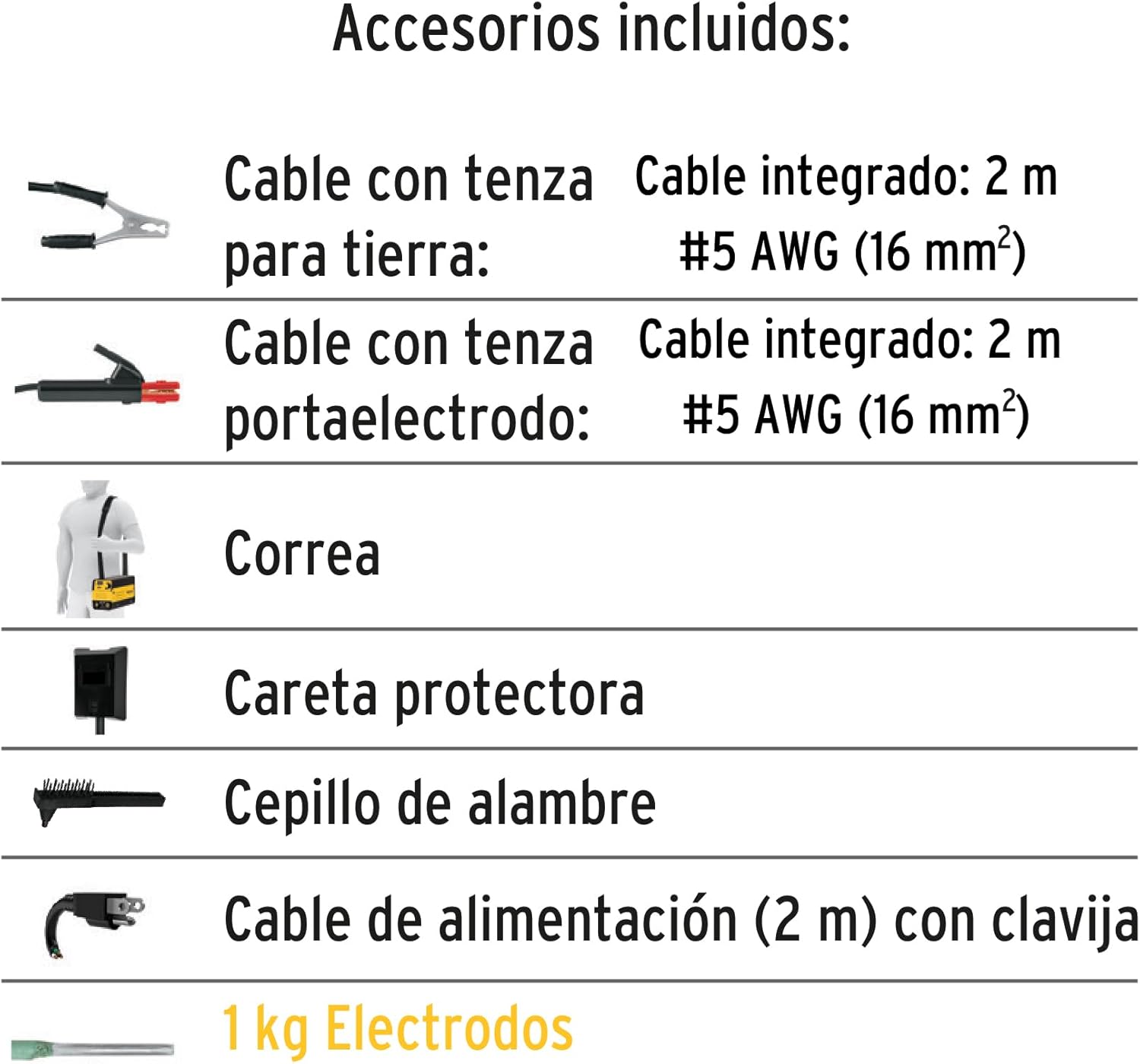
Olusin 4.2: Pariview of integrated welding technologies.
- IGBT Inverter Technology: Allows the welder to operate efficiently at any current level, providing a stable arc and reducing power consumption compared to conventional welders.
- Thermal Protect: An integrated protection system that safeguards the machine from overheating due to prolonged use or excessive load. The thermal protection light will illuminate when active.
- Agbara Arc: Automatically adjusts the optimal arc value, enabling stable welding and allowing for welding in various positions.
- Anti Stick: Prevents the electrode from sticking to the workpiece, reducing overheating and making it easier to restart the arc.
- Ibẹrẹ Gbona: Facilitates easy arc ignition by providing a temporary increase in current at the start of welding.
5. Imọ ni pato
Below are the detailed technical specifications for the Pretul SOIN-110/130P Inverter Welder.
| Ẹya ara ẹrọ | Sipesifikesonu |
|---|---|
| Nọmba awoṣe | 29959 |
| Iṣagbewọle Voltage | BI-VOLTAGE 127V / 220V (Automatic Adaptation) |
| Current Range (1 Phase) | 20 A DC - 110 A DC |
| Current Range (2 Phases) | 20 A DC - 130 A DC |
| Awọn ilana alurinmorin | SMAW (Coated Electrode), TIG (Tungsten) |
| Electrode Compatibility (SMAW) | 6013, 6011 (Up to 5/32"), 7018 (Up to 1/8") |
| Tungsten Electrode Compatibility (TIG) | 1 mm (0.039”) |
| Quick-Change Terminals | 3/8" |
| Awọn iwọn (Apapọ) | 36 x 27 x 22 cm |
| Ìwúwo (Apapọ) | 6.24 kg |
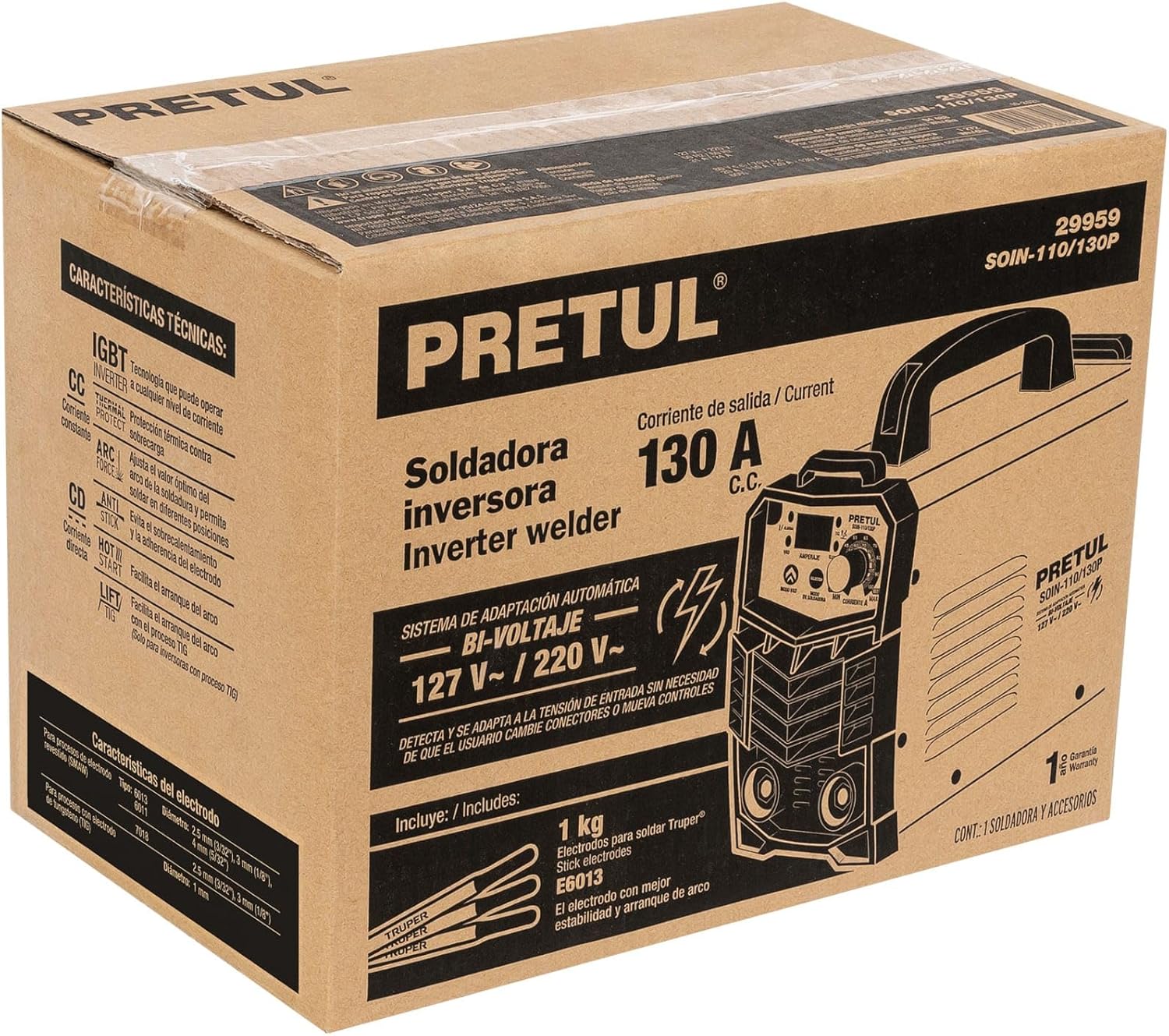
Figure 5.1: Electrode compatibility chart.
6. Eto
Follow these steps to set up your Pretul Inverter Welder for operation.
- Yan Ibi to Dara: Select a dry, well-ventilated area free from flammable materials. Ensure stable footing for the welder.
- So Ilẹ Clamp: So ilẹ clamp cable to the negative (-) quick-change terminal on the welder. Securely attach the ground clamp to the workpiece or a clean, bare metal part of the welding table, ensuring good electrical contact.
- So ohun tí ó so mọ́ elekitirodu: For SMAW (stick welding), attach the electrode holder cable to the positive (+) quick-change terminal. Insert the appropriate electrode into the holder. For TIG welding, connect the TIG torch (not included) to the appropriate terminal and gas supply.
- Asopọ agbara: Ensure the welder's ON/OFF switch is in the OFF position. Plug the power cable into a suitable 127V or 220V electrical outlet. The welder will automatically detect and adapt to the input voltage.
- Mura silẹ fun Alurinmorin: Put on all necessary personal protective equipment (PPE), including a welding helmet, gloves, and protective clothing.
7. Awọn ilana Iṣiṣẹ
Once the welder is set up, follow these steps for safe and effective operation.
- Agbara Tan: Turn the ON/OFF switch to the ON position. The digital display will illuminate.
- Ṣètò Ìsinsìnyí: Use the current adjustment knob to set the desired amperage for your welding task. Refer to electrode manufacturer recommendations or a welding chart for appropriate settings.
- Bẹrẹ Alurinmorin: Bring the electrode into contact with the workpiece to initiate the arc. The Hot Start feature will assist in easy arc ignition. Maintain a consistent arc length and travel speed.
- Monitor Thermal Protection: If the thermal protection light illuminates, stop welding immediately. Allow the machine to cool down before resuming operation. Do not bypass this safety feature.
- Ipari Alurinmorin: When finished, turn the welder off. Allow the workpiece and electrode holder to cool before handling.
- Nu kuro: Use the wire brush to clean slag from the weld.
Awọn imọran alurinmorin:
- Practice on scrap metal to get a feel for the machine and settings.
- Maintain a consistent arc length for a stable weld.
- Ṣatunṣe amperage based on material thickness and electrode type.
- Ensure good ventilation to disperse welding fumes.
8. Itọju
Regular maintenance ensures the longevity and safe operation of your welder.
- Ninu: Regularly clean the exterior of the welder with a dry cloth. Use compressed air to blow out dust and debris from the ventilation openings. Ensure the welder is unplugged before cleaning.
- Ayẹwo USB: Periodically inspect all cables (power, ground, electrode) for cuts, fraying, or damaged insulation. Replace damaged cables immediately.
- Ṣíṣàyẹ̀wò Ibùdó: Ensure quick-change terminals are clean and free of corrosion. Tighten connections as needed.
- Ibi ipamọ: Store the welder in a dry, clean environment, away from direct sunlight and extreme temperatures.
- Iṣẹ Ọjọgbọn: For internal cleaning or repairs, always consult a qualified service technician. Do not attempt to open the welder casinara rẹ.
9. Laasigbotitusita
This section addresses common issues you might encounter with your welder.
| Isoro | Owun to le Fa | Ojutu |
|---|---|---|
| Welder ko ni agbara lori. | No power supply; faulty power cable; internal fuse blown. | Check power outlet and connections. Inspect power cable for damage. If problem persists, seek professional service. |
| Thermal protection light is on. | Overheating due to prolonged use or insufficient ventilation. | Stop welding and allow the machine to cool down. Ensure proper ventilation around the unit. |
| Arc is difficult to strike or unstable. | Ti ko tọ amperage setting; poor ground connection; damp or incorrect electrode; worn electrode holder. | Ṣatunṣe amperage. Ensure ground clamp has good contact. Use dry, appropriate electrodes. Check electrode holder for wear. |
| Electrode sticks to workpiece. | Kekere amperage setting; improper arc length; Anti Stick feature not functioning. | Alekun amperage. Practice maintaining proper arc length. If Anti Stick is not working, professional service may be required. |
| Poor weld quality (porosity, spatter). | Incorrect settings; dirty workpiece; improper technique; damp amọna. | Ṣatunṣe amperage and travel speed. Clean workpiece thoroughly. Use proper welding technique. Ensure electrodes are dry. |
10. Atilẹyin ọja ati Support
Pretul products are manufactured to high-quality standards and are backed by a manufacturer's warranty against defects in materials and workmanship. Please refer to the warranty card included with your product for specific terms and conditions, or visit the official Pretul webaaye fun alaye atilẹyin ọja alaye.
For technical support, service, or to inquire about replacement parts, please contact Pretul customer service through their official channels. Keep your purchase receipt as proof of purchase for warranty claims.
Atilẹyin Ayelujara: www.pretul.com.mx (Akiyesi: Eyi jẹ aaye kan URL, please refer to the actual brand webaaye fun atilẹyin.)


