1. Ifihan
Thank you for choosing the Rojeco 2L Automatic Pet Feeder, Model RWSQ-02. This device is designed to provide consistent and timely meals for your pet, ensuring they maintain a healthy eating schedule. Please read this manual thoroughly before using the feeder to ensure proper operation and to maximize its lifespan.
Alaye Aabo
- Ohun elo yii wa fun lilo inu ile nikan.
- Ma ṣe rì ẹyọ akọkọ sinu omi tabi awọn olomi miiran.
- Pa a mọ kuro lọwọ awọn ọmọde ati awọn ẹranko nigbati wọn ko ba lo tabi nigba mimọ.
- Use only the original power adapter provided with the feeder.
- Rí i dájú pé a gbé ohun tí a fi ń jẹun sí orí ilẹ̀ tí ó dúró ṣinṣin, tí ó tẹ́jú.
- Only use dry pet food with a diameter suitable for the dispenser mechanism.
2. Ọja Ipariview
The Rojeco RWSQ-02 Automatic Pet Feeder consists of several key components designed for easy assembly and use.
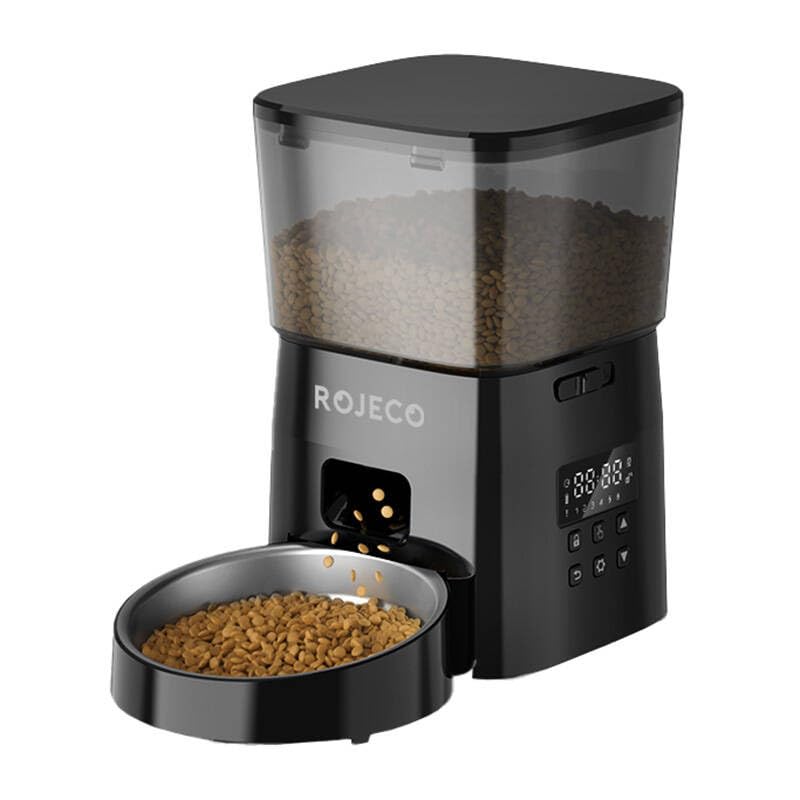
olusin 2.1: Iwaju view of the Rojeco 2L Automatic Pet Feeder.

olusin 2.2: Apa view of the Rojeco 2L Automatic Pet Feeder.
Awọn eroja:
- Omi ounje: Transparent container for storing dry pet food.
- Ẹka akọkọ: Houses the dispensing mechanism, control panel, and power input.
- Abọ Ounjẹ: Stainless steel bowl for pet food.
- Ideri: Secures the food tank and keeps food fresh.
- Adapter agbara: For connecting the feeder to an electrical outlet.
3. Eto
3.1 Unpacking ati Apejọ
- Ni ifarabalẹ yọ gbogbo awọn paati kuro ninu apoti.
- Gbe ẹyọ akọkọ sori alapin, dada iduroṣinṣin.
- Attach the stainless steel food bowl to the base of the main unit, ensuring it clicks securely into place.
- Place the food tank onto the main unit, aligning it properly.
- Secure the lid onto the food tank.
3.2 Ipese Agbara
- Connect the power adapter to the power input port on the back or side of the main unit.
- So ohun ti nmu badọgba naa sinu ibudo ina deede kan.
- The feeder will power on, and indicator lights may illuminate.
- Note: This model does not require batteries for primary operation.
3.3 Kíkún Àpótí Oúnjẹ
- Remove the lid from the food tank.
- Pour dry pet food into the tank. Ensure the food kibble size is appropriate for automatic feeders (typically 5-15mm in diameter) to prevent jamming.
- Maṣe ṣaju ojò naa.
- Rọpo ideri ni aabo.
4. Awọn ilana Iṣiṣẹ
The Rojeco RWSQ-02 features a simple button interface for programming meal schedules.
4.1 Iṣakoso igbimo Loriview
The control panel typically includes buttons for setting time, meals, portions, and a manual feed button. Refer to the markings on your specific unit for exact button functions.
4.2 Setting Meal Times and Portions
- Ṣeto Akoko lọwọlọwọ: Press and hold the "SET" button (or equivalent) until the time display flashes. Use the "UP" and "DOWN" buttons to adjust the hour and minute. Press "SET" again to confirm.
- Program Meal 1: Press the "MEAL" button (or equivalent) to enter meal programming mode. The display will show "M1". Use "UP" and "DOWN" to set the desired feeding time for Meal 1. Press "SET" to confirm.
- Set Portion for Meal 1: After setting the time for Meal 1, the portion size will flash. Use "UP" and "DOWN" to select the number of portions (each portion typically corresponds to a specific volume of food). Press "SET" to confirm.
- Program Additional Meals: Repeat steps for Meal 2, Meal 3, etc., as supported by your feeder (up to 4 meals are common).
- Jade Eto: The feeder will automatically exit programming mode after a few seconds of inactivity, or you can press a designated "EXIT" button if available.
4.3 Afowoyi ono
To dispense food manually, press the "MANUAL" button (or equivalent). Each press will dispense one portion of food. This is useful for extra treats or to test the feeder.
4.4 Awọn imọlẹ Atọka
The feeder may have indicator lights to show its status:
- Imọlẹ alawọ ewe: Tọkasi iṣẹ ṣiṣe deede.
- Red Light (Flashing/Solid): May indicate a low food level, a jam, or an error. Refer to the troubleshooting section.
5. Itọju
Regular cleaning ensures hygiene for your pet and extends the life of your feeder.
5.1 Ìtúpalẹ̀ fún Ìmọ́tótó
- Unplug the power adapter from the wall outlet and the feeder.
- Remove any remaining food from the tank.
- Remove the lid and the food tank from the main unit.
- Detach the stainless steel food bowl from the base.
5.2 Cleaning Awọn ilana
- Food Tank and Bowl: Wash these components with mild soap and water. Rinse thoroughly and dry completely before reassembly. These parts are typically dishwasher-safe on the top rack, but hand washing is recommended for longevity.
- Ẹka akọkọ: Mu ese ita ti akọkọ kuro pẹlu asọ, damp asọ. Ma ṣe fi ẹya akọkọ sinu omi. Ensure no water enters the control panel or power input.
- Dispenser Mechanism: Use a dry brush or cloth to remove any food residue from the dispenser chute.
5.3 Atunjọ
- Ensure all cleaned parts are completely dry.
- Reattach the food bowl to the main unit.
- Place the food tank back onto the main unit.
- Ṣe aabo ideri naa.
- Refill with dry pet food and reconnect the power.
6. Laasigbotitusita
If you encounter issues with your Rojeco Automatic Pet Feeder, refer to the following common problems and solutions:
| Isoro | Owun to le Fa | Ojutu |
|---|---|---|
| Atokan ko pin ounje. | Food tank is empty. Food kibble is jammed. Dispenser mechanism is blocked. Feeder is not powered on. | Refill the food tank. Check for and clear any kibble jams in the chute. Clean the dispenser mechanism. Rii daju pe ohun ti nmu badọgba agbara ti wa ni edidi ni aabo. |
| Indicator light is red/flashing. | Ipele ounjẹ kekere. Motor error or jam. | Refill the food tank. Check for jams and clear them. If the issue persists, contact customer support. |
| Scheduled meals are not dispensing. | Incorrect meal time settings. Feeder is not powered on. Food tank is empty. | Review and reset meal times and portions. Rii daju pe ohun ti nmu badọgba agbara ti wa ni edidi ni aabo. Refill the food tank. |
| Food gets stuck in the chute. | Kibble size is too large. Food is damp tabi alalepo. | Use dry food with appropriate kibble size (5-15mm). Ensure food is dry and stored properly. Clean the chute regularly. |
7. Awọn pato
| Ẹya ara ẹrọ | Ẹ̀kúnrẹ́rẹ́ |
|---|---|
| Brand | Rojeco |
| Nọmba awoṣe | RWSQ-02 |
| Agbara | 2 liters |
| Àwọ̀ | Dudu |
| Orisun agbara | AC Power Adapter (No batteries required for primary operation) |
| Awọn irinše to wa | 1 Automatic Pet Feeder, 1 Power Adapter |
| Iru Ounje ti a ṣeduro | Dry pet food (kibble size 5-15mm) |
8. Atilẹyin ọja ati Support
8.1 atilẹyin ọja Alaye
The Rojeco 2L Automatic Pet Feeder (Model RWSQ-02) comes with a standard manufacturer's warranty. Please refer to the warranty card included in your product packaging for specific terms and conditions, including the warranty period and coverage details. Keep your purchase receipt as proof of purchase for warranty claims.
8.2 Onibara Support
For technical assistance, troubleshooting beyond this manual, or warranty inquiries, please contact Rojeco customer support. Contact details can typically be found on the product packaging, the official Rojeco website, or your purchase platform.
Please have your model number (RWSQ-02) and purchase information ready when contacting support.


