1. Ifihan
This instruction manual provides detailed guidance for the assembly, operation, and maintenance of your Tecmojo 38U 4-Post Open Frame Server Rack. Designed for versatility and durability, this rack is suitable for organizing 19-inch network, server, AV, data, and IT equipment in various professional and home environments.
Key features of your server rack include:
- Ikole ti o tọ: Made from 2.5mm heavy-duty cold rolled steel with a 3450 lbs (1565 kg) weight capacity, featuring an electrostatic powder coat for rust and corrosion prevention.
- Ijinle Atunse: Offers a flexible depth range of 23.6 inches to 39.3 inches (600mm to 1000mm) to accommodate equipment of different sizes.
- Apẹrẹ Ọrẹ olumulo: Provides adequate storage space, a compact structure with a small footprint, and pre-drilled holes at the bottom for floor fixation, enhancing stability.
- Ìṣàkóso okun tó péye: Equipped with long striped holes on all four sides to facilitate clear, classified placement and easy management of cables, ensuring optimal airflow and accessibility.
- Ibamu Agbaye: EIA/ECA-310-E compliant, making it suitable for a wide range of 19-inch wide, directly installable equipment and rack shelves.
2. Alaye Aabo
Please read and understand all safety instructions before assembling or using the server rack. Failure to follow these instructions may result in injury or damage to the equipment.
- Ohun Èlò Púpọ̀: The server rack is heavy. Exercise caution when lifting and moving components. It is recommended to have at least two people for assembly and relocation.
- Apejọ to tọ: Assemble the rack on a flat, stable surface. Ensure all fasteners are securely tightened according to the instructions to prevent instability.
- Agbara iwuwo: Do not exceed the maximum weight capacity of 3450 lbs (1565 kg). Distribute equipment weight evenly across the rack.
- Awọn irinṣẹ: Use appropriate tools for assembly. An electric driver can save time, but ensure it is set to a low torque to avoid stripping screws.
- Iṣakoso USB: Properly route cables to prevent tripping hazards and ensure adequate airflow for equipment cooling.
3. Package Awọn akoonu
Rí i dájú pé gbogbo àwọn èròjà tí a kọ sí ìsàlẹ̀ wà nínú àpò rẹ kí o tó bẹ̀rẹ̀ sí í kó wọn jọ. Tí àwọn ẹ̀yà kan bá sọnù tàbí wọ́n bá bàjẹ́, jọ̀wọ́ kan sí ìrànlọ́wọ́ àwọn oníbàárà.

Image: The package contents for the Tecmojo 38U 4-Post Open Frame Server Rack, showing various screws, nuts, and the instruction manual.
- Vertical Rails (4)
- Adjustable Horizontal Beams (4)
- Top Brackets (2)
- Base Brackets (2)
- Assembly Hardware (M5 screws, M3 screws, washers, nuts, Allen key)
- Leveling Feet (4) or Casters (4) - (Specific type may vary based on purchase)
- Cable Management Hooks (Optional accessory)
- Ilana itọnisọna
4. Apejọ Awọn ilana
Follow these step-by-step instructions to correctly assemble your Tecmojo 38U 4-Post Open Frame Server Rack. It is recommended to assemble the rack on a soft surface like a carpet or drop cloth to prevent scratching.
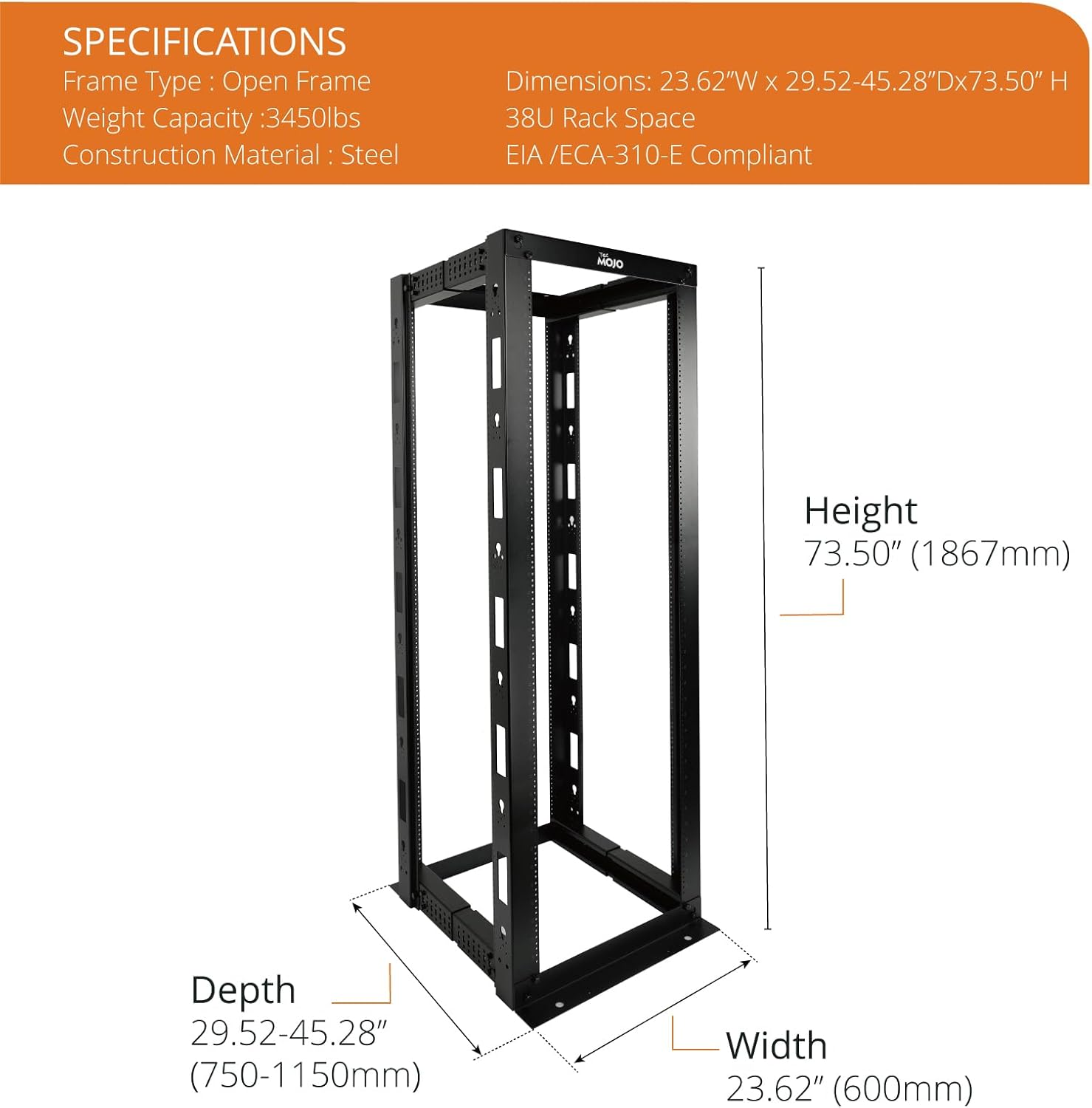
Image: An assembled Tecmojo 38U 4-Post Open Frame Server Rack, illustrating the overall structure before equipment installation.
4.1. Apejọ fireemu
Begin by assembling the main frame components. Ensure all parts are correctly oriented before tightening screws.
- Attach Base and Top Brackets to Vertical Rails: Secure the base and top brackets to the vertical rails using the provided M5 screws and washers. Ensure the numbered markings on the rails are facing outwards for easy reference during depth adjustment. Only finger-tighten screws at this stage.
- Connect Adjustable Beams: Connect the four adjustable horizontal beams between the vertical rails. These beams allow for depth adjustment. Refer to the specifications section or your manual for recommended depth settings based on your equipment. Use the provided M3 screws and washers. Again, only finger-tighten.
- Ṣe aabo fun gbogbo awọn asopọmọ: Once the frame is fully assembled and aligned, securely tighten all screws and fasteners using the provided Allen key or an electric driver set to a low torque. Avoid over-tightening to prevent stripping.

Aworan: A alaye view of the adjustable depth mechanism on the Tecmojo 4-Post Server Rack, showing how the horizontal beams can be extended or retracted to fit various equipment depths.
4.2. Optional: Attaching Leveling Feet or Casters
Depending on your setup, attach either the leveling feet for stationary use or casters for mobility to the bottom of the rack using the provided hardware. Ensure casters are installed facing the same direction for optimal movement.
4.3. Visual Assembly Guides
For a visual demonstration of the assembly process, please refer to the following videos:
Video: This video demonstrates the assembly of a 4-post adjustable depth server rack, showing the connection of vertical rails, horizontal beams, and the overall frame construction. It provides a visual aid for users to follow the assembly steps.
Video: This video provides an assembly guide for a CR Series server rack, detailing the process of connecting various frame components and ensuring structural integrity. It serves as a helpful visual aid for rack setup.
5. Awọn ilana Iṣiṣẹ
This section guides you on how to effectively use your server rack for mounting and managing equipment.
5.1. Mounting Equipment
The Tecmojo 38U rack is designed for 19-inch wide, EIA/ECA-310-E compliant equipment. To mount your devices:
- Identify Rack Units: The vertical rails are marked with U-heights to help you position your equipment accurately.
- Awọn ẹrọ to ni aabo: Use appropriate rack screws for the tapped holes to secure your devices. Ensure each device is firmly attached to both front and rear vertical rails for stability.
- Adjust Depth: If necessary, adjust the depth of the horizontal beams to match your equipment's requirements before mounting.

Image: An illustration showing different U-height options (38U, 45U) for the Tecmojo 4-Post Open Frame Server Rack, highlighting its versatility for various equipment sizes.
5.2. Iṣakoso USB
Effective cable management is crucial for maintaining airflow, preventing damage, and simplifying maintenance.
- Utilize Striped Holes: The long striped holes on the four sides of the rack are designed for organized cable routing. Use cable ties or Velcro straps (not included) to bundle and secure cables.
- Route Cables Neatly: Route power cables separately from data cables to minimize interference. Ensure cables do not obstruct equipment fans or access panels.
- Cable Management Hooks: If included or purchased separately, attach cable management hooks to the rack rails to further organize and support cable bundles.

Aworan: Isunmọ views highlighting the 2.5mm thick cold rolled steel construction and heavy-duty components of the Tecmojo server rack, emphasizing its durability and robust design.
6. Itọju
Regular maintenance ensures the longevity and optimal performance of your server rack.
- Ninu: Periodically wipe down the rack with a dry, soft cloth to remove dust and debris. Avoid using abrasive cleaners or solvents that could damage the powder coat finish.
- Ṣayẹwo Fastener: Annually inspect all screws, bolts, and connections to ensure they remain securely tightened. Re-tighten any loose fasteners to maintain structural integrity.
- Pipin fifuye: Regularly verify that equipment weight is evenly distributed within the rack to prevent stress on individual components and maintain overall stability.
- Ṣayẹwo Ayika: Ensure the environment around the rack is free from excessive dust, moisture, and extreme temperatures to protect both the rack and the mounted equipment.
7. Laasigbotitusita
This section addresses common issues you might encounter with your server rack and provides solutions.
- Àìdúróṣinṣin Àgbékalẹ̀: If the rack feels wobbly or unstable, first verify that all assembly fasteners are securely tightened. Ensure the rack is placed on a level surface. If using leveling feet, adjust them to ensure all four feet make firm contact with the floor.
- Difficulty Mounting Equipment: Ensure you are using the correct size rack screws for the tapped holes. Sometimes, powder coating can make threads feel tight; gently work the screw in or use a thread chaser if available. Verify that the equipment is properly aligned with the rack units.
- Equipment Overheating: Ensure proper cable management to avoid obstructing airflow. The open frame design promotes natural convection, but if equipment still overheats, consider adding external fan units (not included) to improve ventilation.
- Awọn eroja ti bajẹ: If any components are damaged during shipping or assembly, do not attempt to force them. Contact Tecmojo customer support for replacement parts.
8. Awọn pato
| Ẹya ara ẹrọ | Ẹ̀kúnrẹ́rẹ́ |
|---|---|
| Awoṣe | 4-Post/38U/Tapped Hole |
| Iru fireemu | Apẹrẹ Fireemu |
| Rack Units (U) | 38U |
| Ijinle Adijositabulu | 23.6 inches - 39.3 inches (600mm - 1000mm) |
| Agbara iwuwo | 3450 lbs (1565 kg) |
| Ohun elo | 2.5mm Heavy Duty Cold Rolled Steel |
| Àwọ̀ | Dudu |
| Ibamu | EIA/ECA-310-E |
| Awọn iwọn Ọja (D x W x H) | 29.52"D x 23.62"W x 73.5"H |
| Iwọn Nkan | 101.9 iwon |
9. Atilẹyin ọja ati Support
Tecmojo is committed to providing high-quality products and excellent customer service. For any inquiries or assistance, please refer to the following:
- Pada: This product is eligible for 30-day easy returns from the date of purchase. Please refer to the retailer's return policy for detailed instructions.
- Atilẹyin Onibara: For technical support, assembly questions, or product assistance, please visit the Tecmojo Store on Amazon tabi kan si wọn onibara iṣẹ taara.
- Awọn Eto Idaabobo: Extended protection plans may be available for purchase separately to provide additional coverage beyond the standard return period.


