Itọsọna olumulo
AXIS M5000-G 5 Megapixel Network Camera
Model: M5000-G | Brand: AXIS
1. Ifihan
This manual provides comprehensive instructions for the installation, operation, and maintenance of the AXIS M5000-G 5 Megapixel Network Camera. Please read this manual thoroughly before using the product to ensure proper functionality and safety.
The AXIS M5000-G is a high-performance network camera designed for surveillance applications, offering 5-megapixel resolution and PTZ capabilities for enhanced monitoring.
2. Alaye Aabo
Ṣe akiyesi awọn iṣọra aabo wọnyi lati yago fun ibajẹ si ọja tabi ipalara si ara rẹ:
- Ensure the power source matches the camera's requirements.
- Ma ṣe fi kamẹra han si awọn iwọn otutu to gaju tabi ọriniinitutu.
- Yago fun ifihan taara si awọn orisun ina to lagbara, eyiti o le ba sensọ aworan jẹ.
- Fifi sori yẹ ki o ṣe nipasẹ oṣiṣẹ oṣiṣẹ ni ibamu pẹlu awọn koodu itanna agbegbe.
- Ge asopọ agbara ṣaaju ṣiṣe afọmọ tabi ṣiṣe.
3. Package Awọn akoonu
Jẹrisi pe gbogbo awọn ohun kan wa ninu package:
- AXIS M5000-G Network Camera Unit
- Ohun èlò ìfisẹ́pọ̀ (àwọn skru, àwọn ìdákọ́ró)
- Installation Guide (Quick Start)
- Adaparọ Agbara (ti o ba wa pẹlu)
Note: Specific components may vary based on region or package version.
4. Ọja Ipariview
The AXIS M5000-G is a dome-style network camera designed for discreet and effective surveillance. It features a robust housing suitable for outdoor use and a PTZ (Pan-Tilt-Zoom) mechanism for flexible viewing awọn igun.

Nọmba 4.1: Iwaju view of the AXIS M5000-G Network Camera. This image shows the camera's dome shape, with the lens visible through the dark transparent cover. The main body is white.
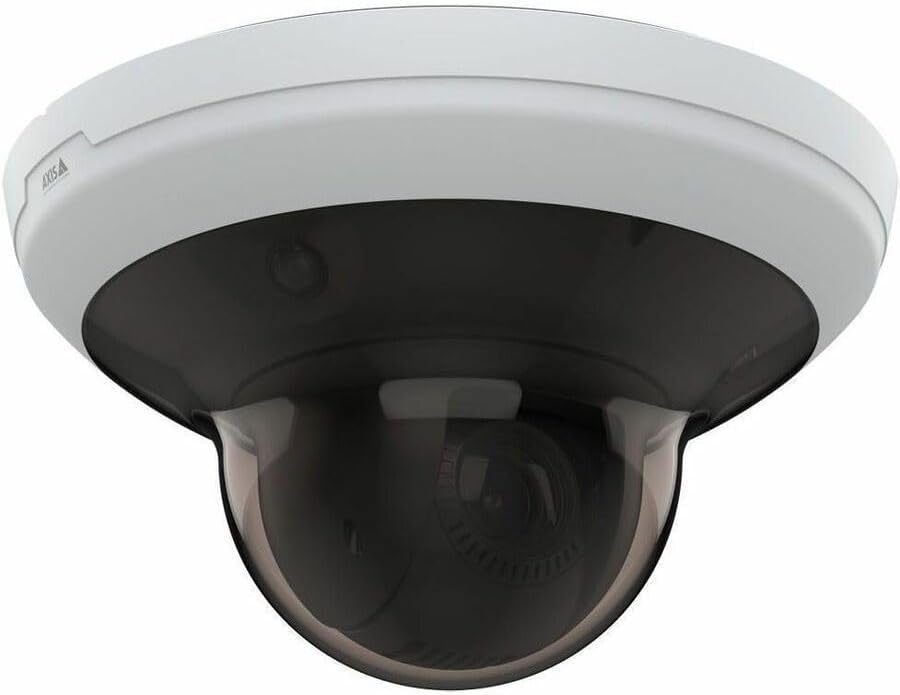
Nọmba 4.2: Igun view of the AXIS M5000-G Network Camera. This perspective highlights the camera's compact design and the subtle AXIS logo on the side of the white base.

Nọmba 4.3: Miiran angled view of the AXIS M5000-G Network Camera. Similar to Figure 4.2, this image provides a slightly different angle, emphasizing the smooth contours of the camera's housing.
5. Eto ati fifi sori
The AXIS M5000-G is designed for wall mount installation and requires a wired connection for network and power.
5.1 Iṣagbesori Kamẹra
- Yan Ibi kan: Select an outdoor location that provides the desired field of view and is within reach of a power source and network connection. Ensure the mounting surface is sturdy enough to support the camera's weight (approximately 5.7 pounds).
- Samisi Awọn aaye Liluho: Use the provided mounting template (if applicable) or the camera base to mark the drilling points on the wall.
- Awọn iho iho: Lilu awọn ihò awaoko ni awọn aaye ti o samisi. Fi awọn ìdákọró ogiri sii ti o ba jẹ dandan.
- Ṣe aabo ipilẹ: Attach the camera's mounting base to the wall using the provided screws.
- Attach Camera Unit: Secure the main camera unit to the mounted base, ensuring it clicks into place or is fastened according to the quick start guide.
5.2 Nsopọ agbara ati Nẹtiwọọki
- Asopọ agbara: Connect the provided power adapter to the camera's power input and then to a suitable electrical outlet. The camera operates on corded electric power.
- Isopọ nẹtiwọki: Connect an Ethernet cable from your network router or switch to the camera's network port. The camera uses wired connectivity technology.
- Ibẹrẹ ibẹrẹ: Allow the camera a few minutes to power on and establish a network connection.
6. Ṣiṣẹ kamẹra
The AXIS M5000-G camera is controlled primarily through a dedicated application or network video recorder (NVR) software.
6.1 Iṣeto ni ibẹrẹ
- Iwari Kamẹra: Use the AXIS IP Utility or your network's device discovery tools to find the camera's IP address on your network.
- Wiwọle Web Ni wiwo: Ṣii a web ẹrọ aṣawakiri ati tẹ adiresi IP kamẹra lati wọle si rẹ web ni wiwo.
- Wo ile: Enter the default username and password (refer to the quick start guide or manufacturer's documentation for default credentials). Change default credentials immediately for security.
- Eto nẹtiwọki: Configure network settings (e.g., static IP, DHCP) as required by your network environment.
- Ọjọ ati Aago: Set the correct date and time for accurate video timestamps.
6.2 Live View ati PTZ Iṣakoso
- Gbe View: Access the live video feed through the web interface or a compatible surveillance application. The camera provides 1080p video capture resolution and 5 MP effective still resolution.
- Pan, Pulọọgi, Sun-un (PTZ): Utilize the PTZ controls within the application to adjust the camera's viewing angle and zoom level. This feature allows for dynamic monitoring of large areas.
- Awọn ipo tito tẹlẹ: Configure and save specific PTZ positions for quick navigation to frequently monitored areas.
6.3 Išipopada erin ati titaniji
- Motion Only Alert Type: Configure motion detection zones and sensitivity settings within the camera's interface.
- Awọn iṣe Itaniji: Set up actions to be triggered upon motion detection, such as recording video, sending email notifications, or uploading images to an FTP server.
7. Itọju
Regular maintenance ensures optimal performance and longevity of your AXIS M5000-G camera.
- Fifọ lẹnsi naa: Gently wipe the camera lens and dome cover with a soft, clean, lint-free cloth. For stubborn dirt, use a mild lens cleaning solution applied to the cloth, not directly to the lens.
- Awọn imudojuiwọn famuwia: Periodically check the AXIS webAaye fun awọn imudojuiwọn famuwia. Mimu famuwia imudojuiwọn ni idaniloju wiwọle si awọn ẹya tuntun ati awọn abulẹ aabo.
- Ayẹwo USB: Regularly inspect all cables (power and network) for any signs of wear, damage, or corrosion, especially in outdoor installations.
- Awọn ayẹwo Ayika: Ensure the camera's environment remains within its specified operating temperature and humidity ranges.
8. Laasigbotitusita
This section addresses common issues you might encounter with the AXIS M5000-G camera.
| Isoro | Owun to le Fa | Ojutu |
|---|---|---|
| Ko si kikọ sii fidio | Power disconnected, network issue, incorrect IP address. | Check power connection. Verify network cable is securely connected. Confirm camera's IP address and network settings. Restart camera. |
| Didara aworan ti ko dara | Dirty lens, low light, incorrect resolution settings. | Clean the lens. Ensure adequate lighting. Adjust video resolution settings in the camera's web ni wiwo. |
| Awọn iṣakoso PTZ ko dahun | Network latency, software issue, camera malfunction. | Check network connection stability. Restart the camera and the control application. If issue persists, contact support. |
| Wiwa išipopada ko ṣiṣẹ | Incorrect sensitivity settings, detection zones not configured. | Review and adjust motion detection sensitivity. Ensure detection zones are properly defined in the camera's settings. |
9. Awọn pato
| Ẹya ara ẹrọ | Ẹ̀kúnrẹ́rẹ́ |
|---|---|
| Orukọ awoṣe | M5000-G Network Camera |
| Brand | AXIS |
| inu ile / ita gbangba Lilo | Ita gbangba |
| Orisun agbara | Okun Itanna |
| Asopọmọra Technology | Ti firanṣẹ |
| Ipinnu Yaworan fidio | 1080p |
| Ipinnu Iduro ti o munadoko | 5 MP |
| Iṣagbesori Iru | Ògiri Ògiri |
| Iru Itaniji | Išipopada Nikan |
| Awọn Iwọn Nkan (L x W x H) | 11.9 x 12 x 8.4 inches |
| Iwọn Nkan | 5.7 iwon |
| Olupese | AXIS COMMUNICATION INC |
10. Atilẹyin ọja ati Support
For warranty information, please refer to the documentation included with your purchase or visit the official AXIS website. AXIS provides support resources, including FAQs, troubleshooting guides, and contact information for technical assistance.
You can typically find more information and support on the AXIS Store on Amazon tabi olupese ká osise webojula.


