1. Ifihan
The Lefant M1 Robot Vacuum and Mop is an advanced cleaning device designed to automate floor maintenance. Featuring LiDAR navigation, powerful suction, and mopping capabilities, it efficiently cleans various floor types, including hard floors and carpets. This manual provides essential information for setup, operation, maintenance, and troubleshooting to ensure optimal performance of your device.

Figure 1: Lefant M1 Robot Vacuum and Mop with charging base and cleaning accessories.
2. Alaye Aabo
- Ka gbogbo awọn ilana ṣaaju lilo ohun elo naa.
- Do not allow children to operate the robot vacuum. Supervise children and pets when the robot is operating.
- Ensure the charging base is placed against a wall on a level surface, away from stairs or drop-offs.
- Jeki irun, aṣọ alaimuṣinṣin, awọn ika ọwọ, ati gbogbo awọn ẹya ara kuro lati awọn ṣiṣi ati awọn ẹya gbigbe.
- Maṣe gbe ohunkohun ti o njo tabi ti nmu siga, gẹgẹbi awọn siga, awọn ere-kere, tabi eeru gbigbona.
- Ma ṣe lo lati gbe awọn olomi ina tabi ina, gẹgẹbi petirolu, tabi lo ni awọn agbegbe nibiti wọn le wa.
- Do not use the appliance in a very hot or very cold environment (above 40°C / 104°F or below 0°C / 32°F).
- Only use the charging adapter provided by the manufacturer.
- Yọ eyikeyi awọn kebulu alaimuṣinṣin, awọn ohun kekere, tabi awọn ohun ẹlẹgẹ kuro ni ọna mimọ ṣaaju ṣiṣe.
3. Package Awọn akoonu
Jẹrisi pe gbogbo awọn ohun kan wa ninu package:
- Lefant M1 Robot Vacuum ati Mop
- Charging Port (Docking Station)
- Ngba agbara Adapter
- Filter (High Efficiency Filter)
- Fọ́lẹ̀ Ẹ̀gbẹ́ (ẹyọ méjì)
- Omi omi (160 milimita)
- Dust Box (520ml)
- Cleaning Cloth (1 piece)
- Disposable Cleaning Cloth (5 pieces)
- Mopping paadi Awo

Figure 2: All components included in the Lefant M1 package.
4. Ọja Ipariview
Robot Vacuum Components
- Sensọ LiDAR: Fún ìtọ́sọ́nà àti àwòrán tí ó péye.
- Awọn bọtini Iṣakoso: Power, Home, Spot Clean.
- 6D Anti-collision Infrared Sensors: For obstacle detection and avoidance.
- Awọn brushes ẹgbẹ: To sweep debris into the suction path.
- Fẹlẹ akọkọ: Fún fífọ àwọn kápẹ́ẹ̀tì àti ilẹ̀ líle.
- Awọn kẹkẹ Wiwakọ: For movement across various surfaces.
- Ibùdó ìdọ̀tí/Àpótí Omi: Houses the 2-in-1 dustbin and water tank.
- Awọn olubasọrọ gbigba agbara: For automatic recharging at the base.
Gbigba agbara Mimọ
- Awọn pinni gbigba agbara: Connects with the robot's charging contacts.
- Atọka Agbara: Ṣe afihan ipo gbigba agbara.
- Ibudo Gbigba Eruku: For automatic emptying of the robot's dustbin (if applicable model).
5. Eto
5.1 Ipò Ipìlẹ̀ Gbigba agbara
- Place the charging base against a wall in an open, uncluttered area.
- Ensure there is at least 0.5 meters (1.6 feet) of clear space on both sides of the base and 1.5 meters (5 feet) in front.
- So ohun ti nmu badọgba agbara pọ si ipilẹ gbigba agbara ati pulọọgi sinu iṣan ogiri.
5.2 Gbigba agbara akọkọ
- Place the robot vacuum onto the charging base, ensuring the charging contacts align.
- Allow the robot to fully charge before its first use (approximately 5 hours). The indicator light will change when fully charged.
5.3 App sori ati Asopọ
- Download the "Lefant" app from your smartphone's app store.
- Register an account and follow the in-app instructions to add your Lefant M1 device.
- Ensure your Wi-Fi network is 2.4GHz, as the robot only supports this frequency.
5.4 Installing Dustbin/Water Tank
- The Lefant M1 features a 2-in-1 dustbin and water tank.
- To install, open the top cover of the robot, insert the combined unit, and close the cover securely.
6. Awọn ilana Iṣiṣẹ
6.1 LiDAR Navigation and Mapping
The Lefant M1 uses advanced LiDAR technology and SLAM algorithms to create accurate maps of your home. This allows it to plan optimal cleaning routes, ensuring comprehensive coverage without repetition.

Figure 3: The Lefant M1 utilizing LDS Laser Navigation and FreeMove 3.0 technology for efficient path planning.

Figure 4: The robot's ability to map and store up to 3 separate maps for multi-floor homes.
6.2 Obstacle Avoidance (FreeMove 3.0)
Equipped with 6D anti-collision infrared sensors, the M1 detects surroundings in a 720-degree range, avoiding obstacles as close as 1.6 inches. This technology minimizes collisions and allows the robot to navigate in low-light conditions.
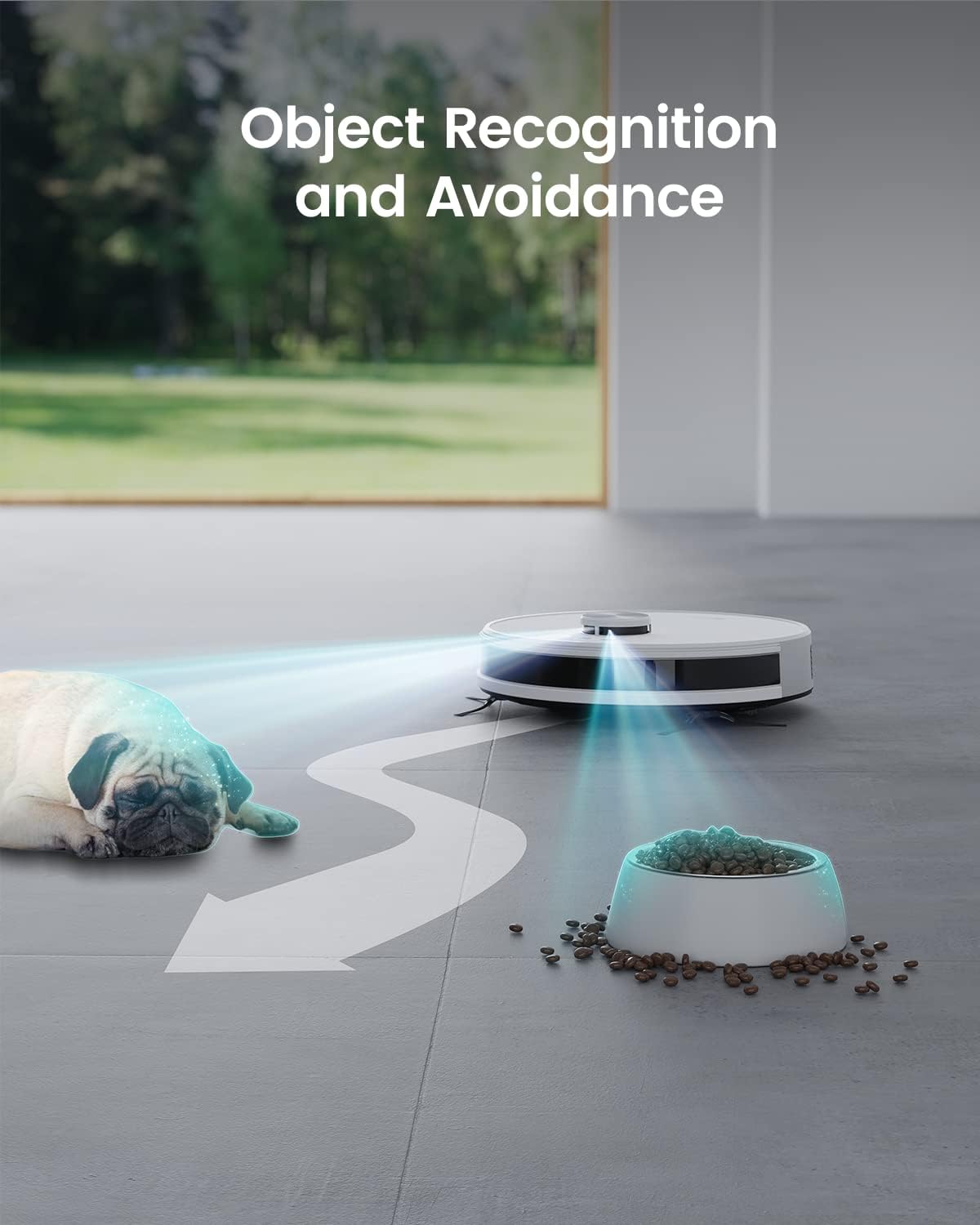
Figure 5: The robot demonstrating its object recognition and avoidance capabilities.
6.3 Multiple Cleaning Modes
Control your Lefant M1 through the dedicated app or voice commands (Alexa/Google Home). Available modes include:
- Àkókò: Schedule cleaning sessions.
- Zoning: Define specific areas for cleaning.
- Aami: Target small, heavily soiled areas.
- Awọn agbegbe Ko-lọ: Exclude certain areas from cleaning.
- Manual Remote Control: Direct the robot's movement.

Olusin 6: Pariview of the Lefant App control features including scheduling, suction control, real-time map, area cleaning, and No-Go Zones.
6.4 Vacuuming and Mopping Functionality
The M1 offers 4000Pa suction power with three adjustable levels for various debris types. Its 160ml water tank and 520ml dust collection bin allow for simultaneous vacuuming and mopping. The peristaltic pump ensures even water distribution with adjustable three-stage water flow rates.

Figure 7: Illustrates the 4000Pa suction power and the robot's ability to adapt to uneven ground.

Figure 8: Shows the electric water tank and 2-in-1 dust box with mopping pad plate.
When the mop holder is attached, the robot automatically avoids carpets to prevent wetting. When the mop is removed, suction power is boosted for deep carpet cleaning.
6.5 batiri Management
The 4000mAh lithium iron phosphate battery provides up to 150 minutes of cleaning time, covering up to 2000 sqft. The robot automatically returns to its charging base when the battery level falls below 15% or when cleaning is complete.
6.6 Iṣakoso ohun
The Lefant M1 can be controlled using voice commands via Amazon Alexa or Google Home for convenient operation.
6.7 Product Video: Lefant M2 Lidar Robot Vacuum and Mop Combo
Video 1: This video demonstrates the general features of a Lefant robot vacuum and mop combo, including LiDAR navigation, obstacle avoidance, carpet detection, app control for mapping and no-go zones, and automatic charging. While featuring the M2 model, the functionalities shown are representative of the M1's capabilities.
7. Itọju
Regular maintenance ensures the longevity and optimal performance of your Lefant M1. Always power off the robot before performing any maintenance.
7.1 Ìmọ́tótó Àpò Ìdọ̀tí àti Àlẹ̀mọ́
- Press the release button to remove the 2-in-1 dustbin/water tank unit.
- Open the dustbin compartment and empty debris into a trash bin.
- Remove the filter and tap it gently to dislodge dust. Rinse the filter under running water if necessary, and allow it to air dry completely before reinserting.
- Fi aṣọ gbígbẹ nu inu apoti idọti naa.
7.2 Roller Brush and Side Brush Cleaning
- Remove the main brush cover and lift out the main brush. Use the cleaning tool to cut and remove any hair or debris tangled around the brush.
- Pull off the side brushes. Remove any tangled hair or debris. Reinstall them securely.
7.3 Water Tank and Mop Pad Cleaning
- Empty any remaining water from the water tank. Rinse the tank thoroughly with clean water.
- Remove the mop pad from the mopping plate. Wash the mop pad by hand or machine. Allow it to air dry completely.
- If not using the mopping function for an extended period, ensure the water tank is empty and dry to prevent odors or mold.
7.4 Sensor and Charging Contact Cleaning
- Wipe all sensors (LiDAR, anti-collision, cliff sensors) and charging contacts on both the robot and the base with a clean, dry cloth.
7.5 Product Video: Cleaning and Maintaining Lefant LIDAR Robot Vacuum Mop
Video 2: This video provides a detailed guide on how to clean and maintain a Lefant LiDAR robot vacuum and mop, including steps for the dustbin, filters, brushes, and water tank. The procedures are generally applicable to the Lefant M1 model.
8. Laasigbotitusita
| Isoro | Owun to le Fa | Ojutu |
|---|---|---|
| Rọ́bọ́ọ̀tì kò bẹ̀rẹ̀ | Batiri kekere; Pa a agbara | Charge the robot; Turn on the power switch. |
| Robot di nigbagbogbo | Too many obstacles; Dark-colored rugs/surfaces | Clear the cleaning path; Use No-Go Zones for problematic areas. |
| Iṣẹ ṣiṣe mimọ ti ko dara | Full dustbin; Clogged filter/brushes | Empty dustbin; Clean filter and brushes. |
| Ko le sopọ si Wi-Fi | Incorrect Wi-Fi password; 5GHz network used | Verify password; Ensure 2.4GHz Wi-Fi is used. |
| Mopping leaves streaks/too wet | Dirty mop pad; Water flow setting too high | Clean/replace mop pad; Adjust water flow in the app. |
9. Awọn pato
| Ẹya ara ẹrọ | Sipesifikesonu |
|---|---|
| Brand | Lefant |
| Orukọ awoṣe | M1 |
| Lilọ kiri Iru | LiDAR Lilọ kiri |
| Agbara afamora | 4000 Pa |
| Agbara Apoti eruku | 520 milimita |
| Omi ojò Agbara | 160 milimita |
| Agbara Batiri | 4000 mAh (Lithium Iron Phosphate) |
| Akoko ṣiṣe | Titi di iṣẹju 150 |
| Akoko gbigba agbara | O fẹrẹ to awọn wakati 5 |
| Cleaning Area Coverage | Titi di 2000 sqft |
| Asopọmọra | 2.4GHz Wi-Fi nikan |
| Awọn awoṣe ibaramu | Amazon Echo, Google Home, Àwọn Foonu Alagbeka |
| Ọja Mefa | 32L x 32W x 9.4H |
| Iwọn Nkan | 4.16 kg |
| Dada iṣeduro | capeti, Ilẹ-ilẹ lile |
10. Atilẹyin ọja ati Support
For warranty information and customer support, please refer to the official Lefant webojula tabi kan si wọn onibara iṣẹ taara. Tọju iwe-ẹri rira rẹ bi ẹri rira fun eyikeyi awọn ibeere atilẹyin ọja.


