1. Ifihan
The Volkano VK-5095-BK Elegant Series Multi-Functional Smartwatch is designed to provide health tracking and smart notifications. It features a built-in body temperature and heart rate monitor for real-time health data. The smartwatch offers customizable watch faces and compatibility with various straps. Users can receive message and call notifications directly on their wrist.
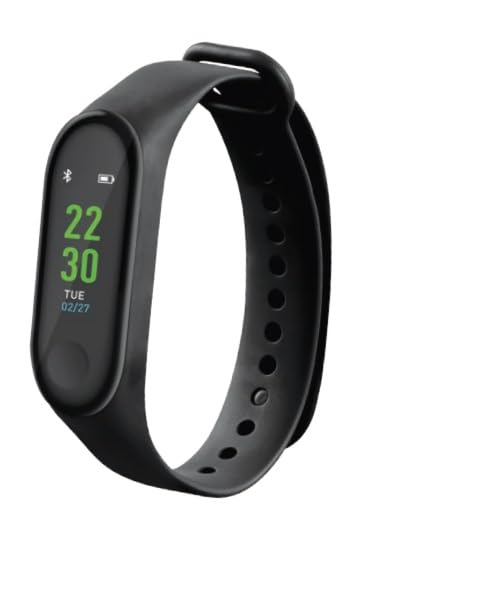
Image: Volkano VK-5095-BK Elegant Series Smartwatch. This image displays the front view of the smartwatch, highlighting its display and overall design.
2. Eto
2.1. Gbigba agbara Smartwatch
Before initial use, fully charge the smartwatch. Connect the provided charging cable to the charging port on the device and to a standard USB power adapter. The charging indicator on the screen will confirm charging status.
2.2. Fifi sori App ati Sisopọ
- Download the official Volkano smartwatch application from your mobile device's app store (iOS or Android).
- Rii daju pe Bluetooth ti ṣiṣẹ lori ẹrọ alagbeka rẹ.
- Open the Volkano app and follow the on-screen instructions to create an account or log in.
- Select 'Add Device' or 'Pair New Device' within the app.
- Locate and select 'VK-5095-BK' from the list of available devices.
- Confirm the pairing request on both your mobile device and the smartwatch.
3. Awọn ilana Iṣiṣẹ
3.1. Ipilẹ Lilọ kiri
The smartwatch features a 1.7-inch IPS full-touch display. Swipe left, right, up, or down to navigate through menus and functions. Tap to select an option or confirm an action. Press the side button to return to the home screen or wake the device.
3.2. Call and Message Notifications
Once paired with your mobile device, the smartwatch will display incoming call alerts and message notifications. You can view message content directly on the screen. Note that replying to messages or answering calls directly from the smartwatch may not be supported, depending on your device and app settings.
3.3. Abojuto Ilera
- Atẹle Oṣuwọn ọkan: Access the heart rate function from the main menu to measure your current heart rate. Ensure the smartwatch is worn snugly on your wrist for accurate readings.
- Atẹle iwọn otutu ara: Use the dedicated body temperature function to take a reading. Allow a few moments for the sensor to stabilize and provide an accurate measurement.
3.4. Sports Activity Modes
The smartwatch includes over 10 sports activity modes. Select your desired activity from the sports menu to track metrics such as steps, distance, calories burned, and duration. End the activity session to save your data.
3.5. Remote Music and Camera Control
When connected to your mobile device, the smartwatch can act as a remote control for music playback and camera shutter. Access these functions from the smartwatch menu to play/pause music, skip tracks, or remotely trigger your phone's camera.
4. Itọju
4.1. Ninu
Regularly clean your smartwatch with a soft, dry, lint-free cloth. Avoid using abrasive cleaners, solvents, or harsh chemicals that may damage the device or its sensors.
4.2. Itọju batiri
- Yago fun gbigba agbara si batiri ni kikun nigbagbogbo.
- Do not expose the device to extreme temperatures, as this can affect battery life and performance.
- Charge the device using only the provided cable and a compatible power adapter.
4.3. Ibi ipamọ
When not in use for extended periods, store the smartwatch in a cool, dry place. Ensure the battery has some charge to prevent deep discharge.
5. Laasigbotitusita
5.1. Ẹrọ Ko Titan
Ensure the smartwatch is fully charged. Connect it to the charger and wait a few minutes before attempting to power it on again.
5.2. Unable to Pair with Mobile Device
- Daju pe Bluetooth ti ṣiṣẹ lori ẹrọ alagbeka rẹ.
- Ensure the smartwatch is within range of your mobile device.
- Restart both the smartwatch and your mobile device.
- Check the Volkano app for any pending updates or specific pairing instructions.
5.3. Àwọn Ìkà Ìlera Tí Kò Péye
Ensure the smartwatch is worn correctly and snugly on your wrist. Avoid excessive movement during measurements. Clean the sensors on the back of the device. Environmental factors can sometimes affect readings.
5.4. Notifications Not Received
Check your mobile device's notification settings for the Volkano app to ensure all necessary permissions are granted. Verify that the smartwatch is properly connected via Bluetooth.
6. Awọn pato
| Ẹya ara ẹrọ | Ẹ̀kúnrẹ́rẹ́ |
|---|---|
| Nọmba awoṣe | VK-5095-BK |
| Ifihan | 1.7-inch IPS Full-Touch Display |
| Asopọmọra | Ailokun |
| Batiri Iru | 1 batiri litiumu ion (pẹlu) |
| Iwọn Nkan | 140 g |
| Package Mefa | 18.8 x 10.2 x 8.2 cm |
| Àwọ̀ | Dudu |
| To wa ninu Apoti | 1 X Volkano Elegant Series Multi-Functional Smartwatch |
| Awọn ọna aṣayan iṣẹ-ṣiṣe | 10+ Sports Activity Modes |
7. atilẹyin ọja Information
The Volkano VK-5095-BK Elegant Series Multi-Functional Smartwatch comes with a 1-Odun Atilẹyin ọja Limited. This warranty covers manufacturing defects and ensures dependable performance.
To extend your coverage, you may register your product to receive an additional 12-Month extension, totaling 24 Months of coverage by Volkano. Please refer to the official Volkano website or product registration portal for details on how to register.
8. Atilẹyin
For any questions, assistance, or support regarding your Volkano VK-5095-BK Smartwatch, please contact Volkano customer service. You can typically find support options and contact information by visiting the official Volkano Page or their webojula.
Official Volkano Store: Visit the Volkano Store


