1. Ifihan
Thank you for choosing the Diyeeni 7-Inch Portable Digital TV. This device is designed to provide entertainment on the go, featuring ATSC compliance for digital and analog TV reception, USB and memory card playback, and a rechargeable battery for portable use. This manual provides essential information for the safe and efficient operation of your new portable television.

Image: The Diyeeni portable TV is suitable for various applications, including camping, travel, and hiking, offering entertainment wherever you go.
2. Alaye Aabo
- Ka gbogbo awọn ilana ṣaaju ṣiṣe ẹrọ naa.
- Má ṣe fi ẹ̀rọ náà sí ojú òjò tàbí ọrinrin láti dènà iná tàbí ìkọlù iná mànàmáná.
- Yẹra fún gbígbé ẹ̀rọ náà sí ẹ̀gbẹ́ àwọn orísun ooru bíi radiators, àwọn ibi ìforúkọsílẹ̀ ooru, àwọn stovu, tàbí àwọn ẹ̀rọ míràn tí ń mú ooru jáde.
- Lo awọn asomọ/awọn ẹya ara ẹrọ ti a sọ pato nipasẹ olupese.
- Dabobo okun agbara lati ma rin lori tabi pin, ni pataki ni awọn pilogi, awọn ohun elo irọrun, ati aaye nibiti wọn ti jade lati ẹrọ naa.
- Yọọ ẹrọ yii kuro lakoko iji manamana tabi nigba lilo fun igba pipẹ.
- Tọkasi gbogbo iṣẹ si awọn oṣiṣẹ iṣẹ ti o peye.
3. Package Awọn akoonu
Jọwọ ṣayẹwo package fun awọn nkan wọnyi:
- Diyeeni 7-Inch Portable Digital TV
- Isakoṣo latọna jijin
- Itọsọna olumulo
- Awọn batiri (fun isakoṣo latọna jijin)
- Adapter agbara
- Ṣaja ọkọ ayọkẹlẹ
- AV Cable
- Eriali

Image: The complete set of accessories, including the remote control, power adapter, car charger, AV cable, and antenna.

Image: A closer look at the included antenna, AV cable, and car charger for versatile power and connectivity options.
4. Ọja Ipariview
The Diyeeni portable TV features a 7-inch LCD display with a 16:9 widescreen ratio, supporting 1080P video playback. It is equipped with various ports for connectivity and media functions.

Image: The 7-inch LCD monitor supports 1080P video and offers a 16:9 widescreen experience.
Awọn ẹya pataki:
- ATSC Compliant: Capable of receiving analog TV, digital TV, and ATV signals.
- Multi-function Ports: Includes USB port and a small memory card slot for playing content from external drives.
- 1080P Video Support: Enjoy high-definition video playback.
- Batiri gbigba agbara: Built-in 1500mAh lithium battery for portable use.
- Sound/Video Input: Supports external audio and video sources.

Image: The multi-functionality of the TV, including USB, storage card, TV function, and sound/video input, enhances the viewiriri iriri.
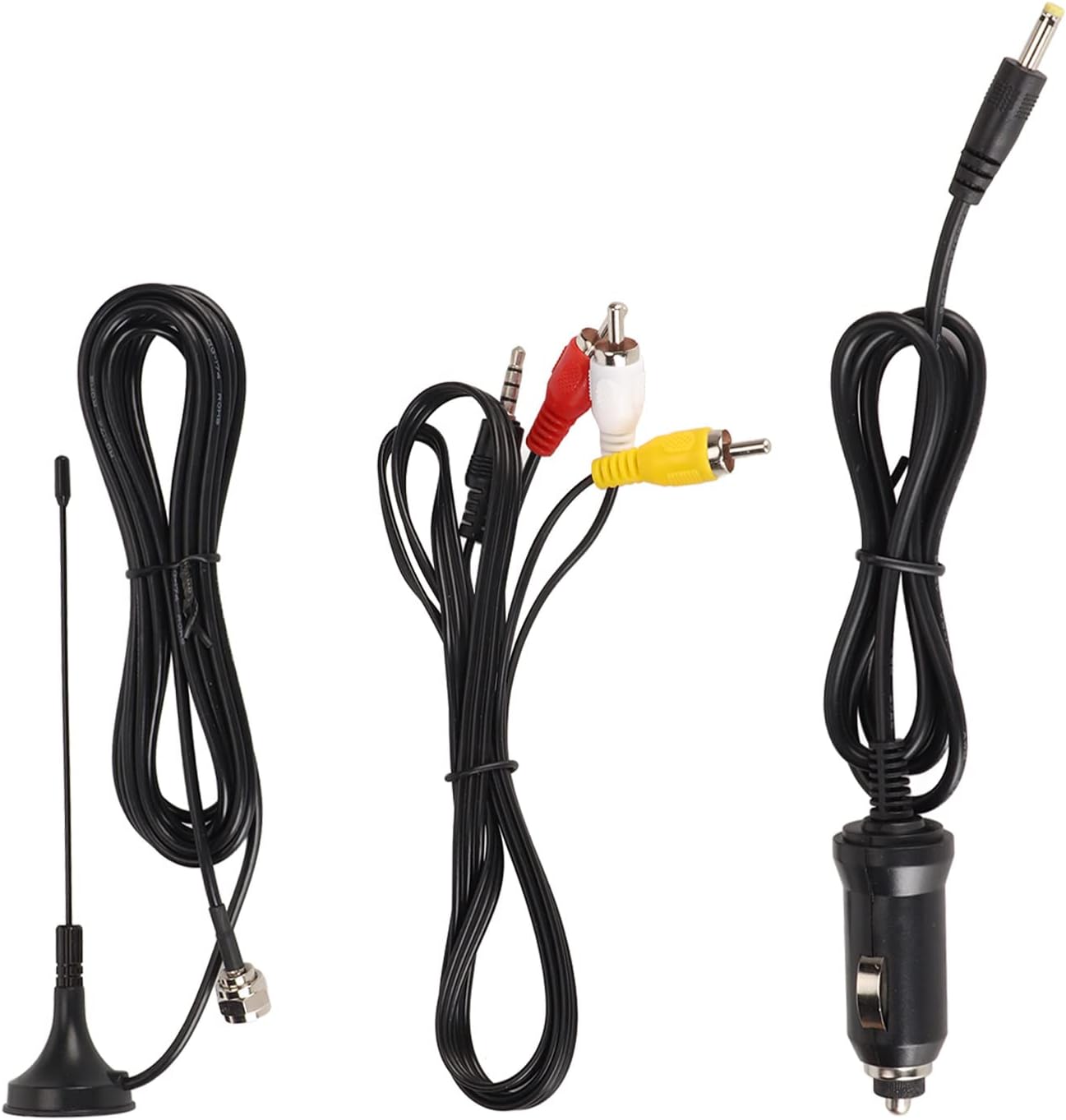
Image: The back panel of the TV, featuring DC IN, TF card slot, AV IN, headphone jack, OFF/ON switch, USB port, and antenna input.
5. Eto
5.1 Gbigba agbara akọkọ
- Connect the provided power adapter to the "DC IN" port on the TV.
- Pulọọgi ohun ti nmu badọgba agbara sinu iṣan ogiri boṣewa kan.
- Charge the TV fully before first use. The charging indicator will typically change color or turn off when charging is complete.
5.2 Eriali Asopọ
- Locate the antenna input port on the side or back of the TV.
- Connect the included antenna to this port.
- Extend the antenna fully and position it for optimal signal reception.
5.3 Titan / Pa a
- To power on, slide the "OFF/ON" switch to the "ON" position.
- Láti pa iná, gbé ìyípadà "PA/TÁN" sí ipò "PA".
6. Awọn ilana Iṣiṣẹ
6.1 Initial Channel Scan
- After powering on, navigate to the "Channel" menu using the remote control or the buttons on the TV.
- Select "Auto Scan" or "Auto Tuning" to search for available digital and analog channels.
- Wait for the scan to complete. This may take several minutes.
- Once complete, the TV will save the found channels.

Image: The TV is ATSC compliant, allowing reception of analog, digital, and ATV signals, easily controlled with the included remote.
6.2 Ipilẹ TV Awọn iṣẹ
- Ikanni Soke/Isalẹ: Use the CH+/CH- buttons on the TV or remote to change channels.
- Iwọn didun Soke/Isalẹ: Use the VOL+/VOL- buttons on the TV or remote to adjust volume.
- Akojọ: Press the MENU button to access settings such as Picture, Sound, Time, Option, Lock, and Channel.
- Orisun: Press the SOURCE/ENTER button to switch between TV, AV, USB, and Card inputs.

Image: The TV's menu system allows adjustment of picture mode, contrast, brightness, color, sharpness, tint, color temperature, aspect ratio, and noise reduction.
7. Media Playback (USB/SD Card)
- Insert a USB drive into the USB port or a memory card into the TF card slot.
- Press the "SOURCE" button on the remote or TV until "USB" or "Card" is selected.
- The TV will display the media browser. Navigate through your files using the directional buttons on the remote.
- Select the desired video, audio, or image file lati mu ṣiṣẹ.
- Supported video formats include MKV, MOV, AVI, WMV, MP4, FLV, MPEG1-4. Supported audio format is MP3.

Image: The portable TV can be easily set up in various environments, such as a car, providing entertainment for passengers.
8. Itọju
- Ninu: Use a soft, dry cloth to clean the screen and exterior of the TV. Do not use liquid cleaners or abrasive materials.
- Itọju Batiri: To prolong battery life, avoid fully discharging the battery frequently. Recharge the TV regularly, even if not in use for extended periods.
- Ibi ipamọ: Store the TV in a cool, dry place away from direct sunlight and extreme temperatures.
9. Laasigbotitusita
| Isoro | Owun to le Fa | Ojutu |
|---|---|---|
| Ko si agbara | Batiri ti lọ; Agbára ti pa; Agbára adaptà kò sopọ̀ mọ́. | Charge the battery; Ensure power switch is ON; Connect power adapter securely. |
| No signal/Poor picture quality | Antenna not connected; Poor antenna position; No channels scanned. | Connect antenna; Adjust antenna position; Perform an auto channel scan. |
| Isakoṣo latọna jijin ko ṣiṣẹ | Àwọn bátìrì ti kú tàbí tí a fi sínú rẹ̀ lọ́nà tí kò tọ́; Ìdènà láàárín latọna jijin àti TV. | Replace batteries; Ensure correct polarity; Remove obstructions. |
| USB/SD card not recognized | Card/drive not inserted correctly; Unsupported file system; Corrupted files. | Reinsert card/drive; Ensure FAT32 format; Check files fun ibaje. |
10. Awọn pato
| Ẹya ara ẹrọ | Ẹ̀kúnrẹ́rẹ́ |
|---|---|
| Nọmba awoṣe | Diyeenizht6cr5f0q |
| Iwọn Ifihan | 7 inches |
| Ifihan Iru | LCD |
| Apakan Ipin | 16:9 |
| Atilẹyin ipinnu ipinnu fidio | 1080P |
| TV System | ATSC (Analog TV, Digital TV, ATV) |
| Asopọmọra | USB, Memory Card Slot (TF card), AV Input |
| Batiri | Batiri Litiọmu 1500mAh (A le gba agbara pada) |
| Iwọn Nkan | 1.79 iwon |
| Package Mefa | 9.84 x 6.3 x 3.94 inches |
11. atilẹyin ọja Information
Diyeeni products are manufactured to the highest quality standards. This product is covered by a limited warranty from the date of purchase. Please refer to the specific warranty terms provided with your purchase documentation or contact customer support for details. The warranty typically covers defects in materials and workmanship under normal use.
12. Onibara Support
If you encounter any issues or have questions regarding your Diyeeni 7-Inch Portable Digital TV, please contact our customer support team. For the most up-to-date support information, including contact methods and FAQs, please visit the official Diyeeni website or refer to your purchase platform for seller contact details.
Atilẹyin Ayelujara: Visit the Diyeeni Store on Amazon