Ọrọ Iṣaaju
Thank you for choosing the SEDETA 63" Computer Desk. This manual provides detailed instructions for the assembly, operation, maintenance, and troubleshooting of your new desk. Please read this manual thoroughly before assembly and use to ensure proper function and longevity of the product.
Alaye Aabo
Fun aabo rẹ ati lati ṣe idiwọ ibajẹ si ọja naa, jọwọ ṣakiyesi atẹle naa:
- A ko gba awọn ọmọde laaye lati gun tabi ṣere lori ọja naa.
- Ensure all connections for the power outlet and LED lights are secure before use.
- Do not exceed the maximum weight recommendation of 352 pounds on the desk surface.
- Jeki awọn olomi kuro lati awọn paati itanna.
Eto ati Apejọ
The SEDETA 63" Computer Desk is designed for straightforward assembly. All necessary tools are included, and parts are numbered for easy identification.
Igbaradi
- Yọọ gbogbo awọn paati ati rii daju lodi si atokọ awọn ẹya ti a pese ninu awọn ilana apejọ.
- Ko agbegbe ti o tobi pupọ silẹ fun apejọ.
- A ṣe iṣeduro lati ni eniyan meji fun apejọ.
Awọn Igbesẹ Apejọ
Follow the clear and detailed instructions provided in the included assembly manual. Each step is illustrated, and parts are numbered to guide you through the process.

Figure 1: Fully assembled SEDETA 63" Computer Desk, showcasing apẹrẹ titobi rẹ ati ina LED ti a ṣe sinu rẹ.

Figure 2: Detailed dimensions of the desk, including monitor stand height, keyboard tray depth, and drawer sizes.
Ibi Ibẹrẹ
- Place the desk on a flat, stable surface.
- Ensure adequate space around the desk for comfortable use and access to drawers.
Awọn ilana Iṣiṣẹ
Integrated Power Outlet and USB Ports
The desk is equipped with a convenient power outlet featuring 4 AC outlets and 2 PowerIQ-enabled USB charging ports. To use, simply plug the desk's power cord into a wall outlet. Use the integrated switch to control power to the outlets and USB ports.

Figure 3: The built-in power strip allows for simultaneous charging and powering of up to 6 devices.
Awọn ila Imọlẹ LED
The RGB LED light strip can be controlled via a remote control or a dedicated app. It offers multiple colors and 29 flashing modes. The music sync function allows the light color to change with the rhythm of sound and music, thanks to a built-in sensitivity adjustable microphone. A timer function is also available for smart control.

Figure 4: The LED lights enhance the ambiance of your workspace or gaming setup.
Ibi Awọn ẹya ara ẹrọ
Iduro pẹlu kan file drawer, a small lockable drawer, a printer cabinet, and 2-tier storage shelves.
- File Apẹrẹ: Designed to hold Letter, Legal, or A4 size files.
- Lockable Drawer: Provides secure storage for personal items or valuables. Use the provided key to lock and unlock.
- Printer Cabinet: A dedicated space for your printer or other office machines, keeping them within easy reach.
- Awọn ibi ipamọ: Two tiers of open shelving for books, decor, or other office supplies.

Figure 5: The versatile drawers offer organized storage for various items and documents.
Keyboard Tray and Monitor Stand
- Keyboard Tray: The 21.7" extra-large keyboard tray is suitable for 108-key or 87-key keyboards plus a mouse, freeing up desktop space.
- Iduro Iduro: The extra-long monitor stand can accommodate up to three monitors, raising them to an ergonomic height to reduce neck and back strain.
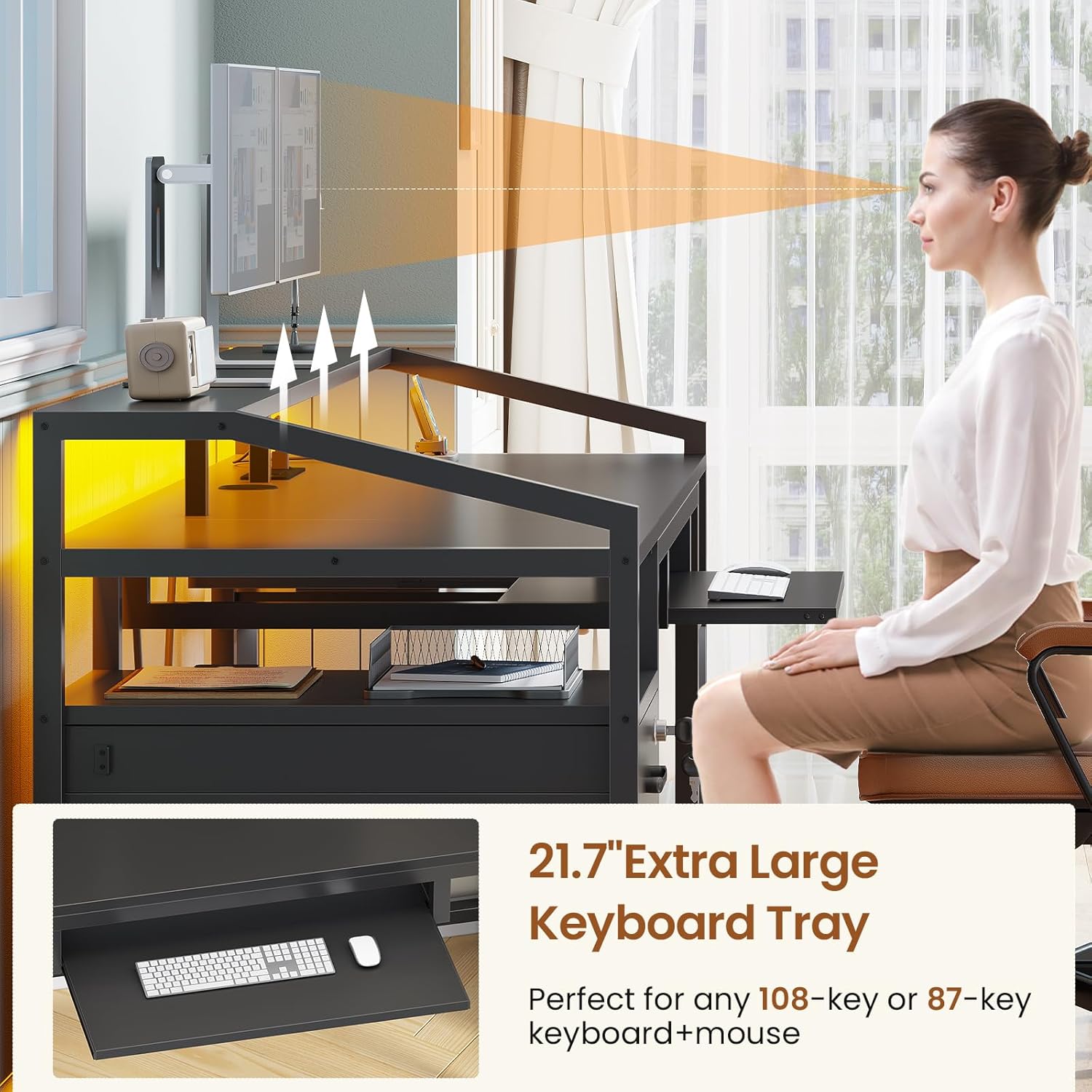
Figure 6: The keyboard tray and monitor stand contribute to an ergonomic and organized workspace.
Itoju
Regular maintenance will help preserve the appearance and functionality of your SEDETA Computer Desk.
Ninu
- Mu awọn oju ilẹ pẹlu asọ, damp asọ. Yẹra fun awọn kẹmika lile tabi awọn olutọpa abrasive.
- Fún ìtújáde, nu lẹ́sẹ̀kẹsẹ̀ láti dènà àbàwọ́n.
Care for Components
- Lokọọkan ṣayẹwo ati Mu gbogbo awọn skru ati awọn fasteners mu lati rii daju iduroṣinṣin.
- Keep the desk away from direct sunlight and extreme temperature changes to prevent material warping or fading.
- Ensure the CPU stand protects the host from moisture and dust by keeping it elevated.
Laasigbotitusita
If you encounter any issues with your SEDETA Computer Desk, please refer to the following common solutions:
| Isoro | Owun to le Fa | Ojutu |
|---|---|---|
| Awọn imọlẹ LED ko ṣiṣẹ | Power not connected; remote/app issue; light strip damage. | Ensure desk is plugged in and power switch is on. Check remote/app connection. Inspect light strip for visible damage. |
| Power outlets/USB ports not functioning | Desk not plugged in; power switch off; circuit overload. | Verify power cord connection and power switch. Reduce number of connected devices if overloaded. |
| Drawers are stiff or not closing properly | Misalignment during assembly; debris in glides; overloaded drawer. | Check assembly instructions for proper drawer slide installation. Clear any obstructions from glides. Do not overload drawers. |
| Tabili naa dabi wiwu | Awọn fasteners alaimuṣinṣin; aiṣedeede pakà. | Tighten all assembly screws. Adjust desk levelers if present, or place shims under legs on uneven surfaces. |
If the problem persists after attempting these solutions, please contact SEDETA customer service for further assistance.
Awọn pato
| Ẹya ara ẹrọ | Ẹ̀kúnrẹ́rẹ́ |
|---|---|
| Brand | SEDETA |
| Nọmba awoṣe | 1.6m |
| Awọn iwọn Ọja (D x W x H) | 19.7"D x 63"W x 35.4"H |
| Iwọn Nkan | 77 iwon |
| Iṣeduro iwuwo ti o pọju | 352 iwon |
| Ohun elo | Engineered Wood (Base, Top, Hutch), Alloy Steel (Furniture Leg, Drawer Glide) |
| Àwọ̀ | Dudu |
| Ile-iṣẹ Agbara | 4 AC iÿë (120V/12A), 2 USB Ports (5V/2A) |
| Awọn imọlẹ LED | RGB, APP/Remote Control, Music Sync, Timer Function |
| Awọn iyaworan | 1 File Drawer (Legal/Letter/A4), 1 Small Lockable Drawer |
| Keyboard Atẹ | 21.7" Extra Large |
| Atẹle Iduro | Extra Long, accommodates up to 3 monitors |
| Apejọ ti a beere | Bẹ́ẹ̀ni (Pẹ̀lú gbogbo àwọn irinṣẹ́ ìṣètò) |
Atilẹyin ọja ati Support
SEDETA offers a limited warranty on this product. For specific warranty details, please refer to the documentation included with your purchase.
Lẹhin-tita Service
If your item arrives damaged, scratched, or with missing parts, or if you require any assistance with assembly or operation, please do not hesitate to contact SEDETA customer service. We are committed to providing free replacements or partial refunds for eligible issues.
For customer support, please visit the official SEDETA store on Amazon or use the contact information provided in your purchase documentation.
Visit the SEDETA Store: SEDETA Amazon Store


