1. Ifihan
The Trevi DAB 7F80 R is a portable digital radio offering DAB, DAB+, and FM reception, along with Bluetooth connectivity. It features a high-readability Dot Matrix display, a programmable alarm clock, and a headphone jack. This manual provides instructions for the proper setup, operation, and maintenance of your device.
2. Alaye Aabo
- Ka gbogbo awọn ilana ni pẹkipẹki ṣaaju lilo ẹrọ naa.
- Ma ṣe fi ẹrọ naa han si omi, ọrinrin, tabi awọn iwọn otutu to gaju.
- Use only the specified power source (4 x AAA batteries or a compatible 5V DC adapter, not included).
- Má ṣe gbìyànjú láti tú ohun èlò náà ká, tún un ṣe, tàbí ṣe àtúnṣe rẹ̀. Tọ́ka gbogbo iṣẹ́ ìtọ́jú náà sí àwọn òṣìṣẹ́ tó mọ̀ nípa rẹ̀.
- Sọ awọn batiri sọnu ni ifojusọna ni ibamu si awọn ilana agbegbe.
- Jeki ẹrọ naa kuro ni awọn aaye oofa ti o lagbara.
3. Package Awọn akoonu
Jọwọ ṣayẹwo pe awọn nkan wọnyi wa ninu package rẹ:
- Trevi DAB 7F80 R Main Unit
- Afowoyi Olumulo (iwe-ipamọ yii)
- Iwe-ẹri atilẹyin ọja
4. Ọja Ipariview
Familiarize yourself with the components and controls of your Trevi DAB 7F80 R radio.
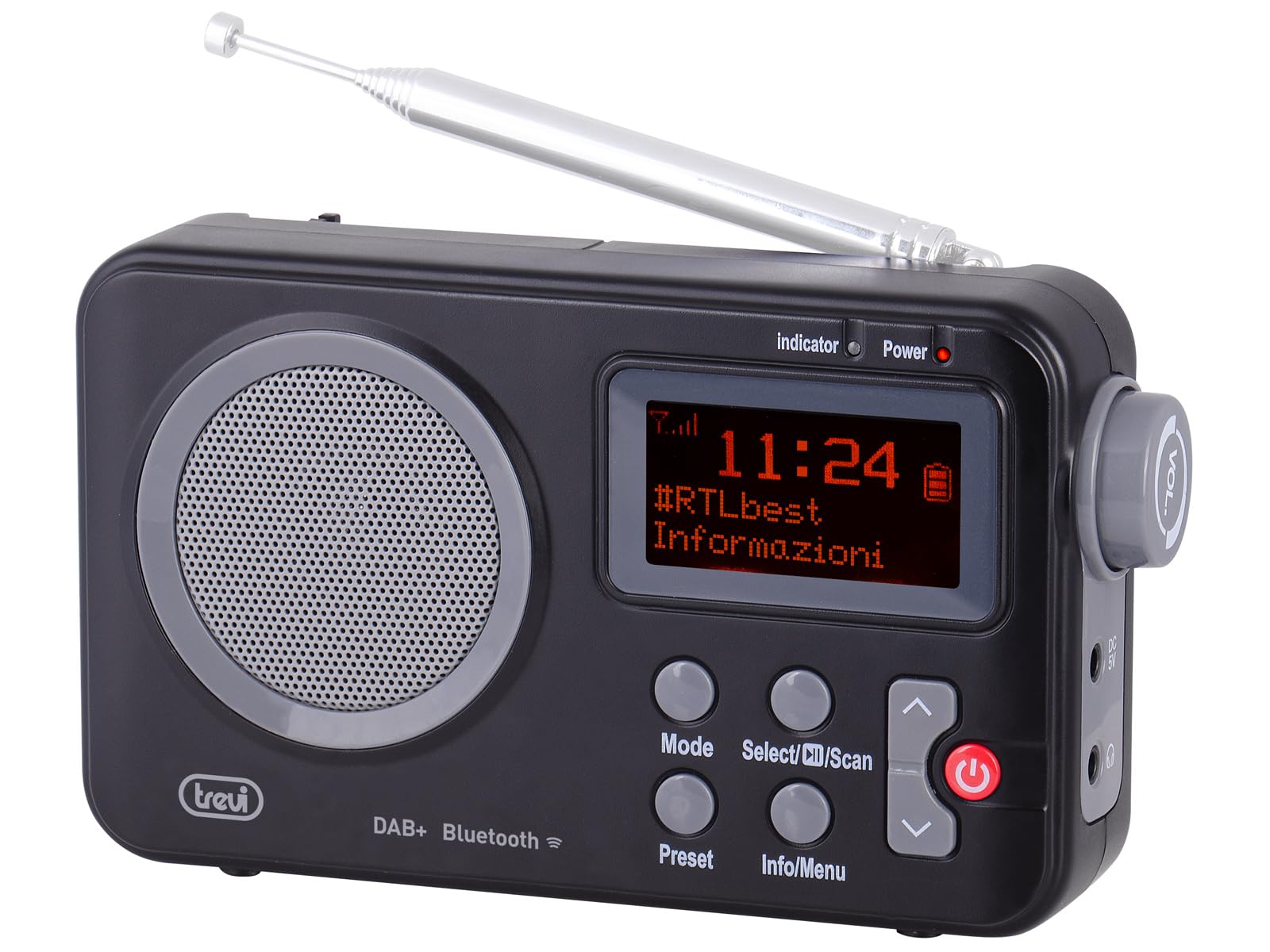
Nọmba 1: Iwaju view of the Trevi DAB 7F80 R radio. This image displays the Dot Matrix screen, the main speaker grille, and the primary control buttons including Mode, Select/Scan, Preset, Info/Menu, and Power. The extendable telescopic antenna is visible at the top.
Awọn iṣakoso ati Awọn ẹya:
- Ifihan: High-readability Dot Matrix screen for station information, time, and menu navigation.
- Agbọrọsọ: Agbọrọsọ ti a ṣepọ fun iṣẹjade ohun.
- Bọtini agbara: Yi redio si tan/pa.
- Bọtini Ipo: Switches between DAB/DAB+, FM, and Bluetooth modes.
- Select/Scan Button: Confirms selections in menus, initiates station scans.
- Bọtini tito tẹlẹ: Accesses and stores favorite radio stations.
- Alaye/Bọtini Akojọ: Displays station information and accesses system settings.
- Àwọn bọ́tìnì ọfà òkè/ìsàlẹ̀: Navigates through menus, adjusts volume, changes stations.
- Jack agbekari: 3.5mm o wu fun ikọkọ tẹtí.
- Eriali: Extendable telescopic antenna for improved radio reception.
5. Eto
5.1 Agbara ẹrọ naa
The Trevi DAB 7F80 R can be powered by batteries or an external AC adapter.
- Fifi sori batiri: Open the battery compartment cover on the back of the unit. Insert 4 x AAA batteries (not included), ensuring correct polarity (+/-). Close the cover securely.
- Adapta AC (Àṣàyàn): For continuous power, connect a compatible 5V DC, 1A AC adapter (not included) to the DC IN port on the side of the radio.
Ikilọ pataki: Do not use batteries in the device when it is connected to an AC adapter for extended periods. This may lead to battery leakage or damage to the unit. If using the AC adapter, remove the batteries. If using batteries, disconnect the AC adapter.
5.2 Initial Power On and Station Scan
- Fa eriali telescopic ni kikun fun gbigba ti o dara julọ.
- Tẹ awọn Agbara bọtini lati tan redio.
- Upon first use, the radio may prompt you to select a language. Use the Ọfà oke/isalẹ buttons to navigate and Select/Scan lati jẹrisi.
- The radio will automatically perform a full scan for DAB/DAB+ stations. This process may take a few minutes. Once complete, the first available station will begin playing.
6. Awọn ilana Iṣiṣẹ
6.1 Radio Mode (DAB/DAB+, FM)
- Awọn ọna Yipada: Tẹ awọn Ipo button repeatedly to cycle between DAB, FM, and Bluetooth modes.
- Scanning for Stations:
- In DAB mode, a full scan is usually performed on first use. To perform a new scan, press and hold Select/Scan.
- Ni ipo FM, tẹ Select/Scan lati ṣe ọlọjẹ aifọwọyi fun ibudo ti o wa atẹle.
- Selecting Stations: Lo awọn Ọfà oke/isalẹ buttons to browse through available stations.
- Titoju Awọn tito tẹlẹ: The radio can store up to 20 DAB/DAB+ and 20 FM stations.
- Tune si ibudo ti o fẹ.
- Tẹ mọlẹ Tito tẹlẹ bọtini titi 'Tọto itaja' han lori ifihan.
- Lo awọn Ọfà oke/isalẹ awọn bọtini lati yan nọmba tito tẹlẹ (1-20).
- Tẹ Select/Scan láti jẹ́rìísí àti láti fi ibùdó náà pamọ́.
- ÌRallNT Pres Awọn tito tẹlẹ: Tẹ awọn Tito tẹlẹ button briefly. Use the Ọfà oke/isalẹ buttons to select the desired preset number, then press Select/Scan.
- RDS/DLS Information: In FM or DAB mode, press the Alaye / Akojọ aṣyn button repeatedly to cycle through available information such as station name, program type, time, and song title (if broadcast).
6.2 Ipo Bluetooth
- Tẹ awọn Ipo button until 'Bluetooth' appears on the display. The radio will enter pairing mode, indicated by a flashing Bluetooth icon.
- Lori foonuiyara, tabulẹti, tabi kọǹpútà alágbèéká, mu Bluetooth ṣiṣẹ ki o wa awọn ẹrọ to wa.
- Select 'Trevi DAB 7F80 R' from the list of devices to pair. Once connected, the Bluetooth icon will stop flashing.
- You can now play audio from your connected device through the radio. Use your device's controls for playback and the radio's volume controls for audio level.
6.3 Awọn iṣẹ Aago ati Itaniji
The radio features an integrated clock and two programmable alarms.
- Ṣiṣeto akoko naa:
- Tẹ mọlẹ Alaye / Akojọ aṣyn bọtini lati tẹ akojọ aṣayan akọkọ sii.
- Lo Ọfà oke/isalẹ buttons to navigate to 'Time/Date' and press Select/Scan.
- Select 'Set Time/Date' and adjust the hour, minute, day, month, and year using the Ọfà oke/isalẹ buttons and confirming each step with Select/Scan.
- Setting Alarms (Alarm 1 / Alarm 2):
- From the main menu, navigate to 'Alarm' and press Select/Scan.
- Select 'Alarm 1 Setup' or 'Alarm 2 Setup'.
- Configure the alarm settings: 'On Time' (hour/minute), 'Duration', 'Source' (Buzzer or last used radio station), 'Volume', and 'Frequency' (Daily, Weekdays, Weekends, Once). Use Ọfà oke/isalẹ awọn bọtini lati ṣatunṣe iye ati Select/Scan lati jẹrisi eto kọọkan.
- Ensure the alarm is set to 'On' in the alarm setup menu.
- Deactivating a sounding alarm: Tẹ awọn Agbara bọtini lati pa itaniji.
6.4 Agbekọri Lilo
To listen privately, insert standard 3.5mm headphones into the headphone jack located on the side of the radio. The internal speaker will automatically mute.
7. Itọju
- Ninu: Wipe the radio with a soft, dry, lint-free cloth. Do not use abrasive cleaners, waxes, or solvents.
- Rirọpo Batiri: When the low battery indicator appears on the display, replace all four AAA batteries with new ones.
- Ibi ipamọ: If the radio will not be used for an extended period, remove the batteries to prevent leakage and potential damage. Store the device in a cool, dry place.
8. Laasigbotitusita
If you encounter issues with your Trevi DAB 7F80 R, please refer to the following common problems and solutions:
- Rédíò kò ṣiṣẹ́:
- Ṣàyẹ̀wò bóyá àwọn bátìrì wà nínú rẹ̀ dáadáa tí wọn kò sì ti bàjẹ́. Rọ́pò rẹ̀ tí ó bá pọndandan.
- If using an AC adapter, ensure it is properly connected and the power outlet is functional.
- Ko si ohun tabi didara ohun ti ko dara:
- Ṣatunṣe iwọn didun.
- Ensure headphones are not connected if you want sound from the speaker.
- Check radio reception. Extend and adjust the antenna. Try moving the radio to a different location.
- For Bluetooth, ensure the device is paired and audio is playing from the source.
- Clock resets after power loss or battery change:
- This model does not feature a backup battery for the clock. It is normal for the time to reset when power is completely removed (e.g., batteries removed or AC adapter unplugged). You will need to re-set the time manually as described in section 6.3.
- Igbesi aye batiri kukuru:
- Battery life can vary depending on usage and battery quality. Use high-quality alkaline batteries for best performance.
- For prolonged use, consider using a compatible 5V DC AC adapter (not included).
- Difficulty with setup or navigation (e.g., station search, alarm setup):
- The radio uses a limited number of buttons for various functions. Refer to the specific operating instructions in section 6 for detailed, step-by-step guidance. Some functions may require pressing buttons multiple times or holding them down.
- Radio turns off when switching between battery and AC power:
- This is expected behavior. The radio will power cycle when changing its primary power source. Ensure you have saved any settings or presets before switching.
9. Awọn pato
| Brand | Trevi |
| Awoṣe | DAB 7F80 R |
| Àwọ̀ | Dudu |
| Ìmọ̀-ẹ̀rọ Àtúnṣe | DAB / DAB +, FM |
| Awọn ẹgbẹ Redio ti o ṣe atilẹyin | DAB, DAB+, FM (3 bands) |
| Bluetooth | Bẹẹni |
| Ifihan | High-readability Dot Matrix |
| Awọn itaniji | Awọn itaniji eto 2 |
| Awọn tito tẹlẹ | 20 DAB/DAB+, 20 FM |
| Orisun agbara | 4 x AAA batteries (not included) or 5V DC adapter (not included) |
| Awọn ẹrọ ibaramu | Foonuiyara, tabulẹti, kọǹpútà alágbèéká |
| Awọn iwọn Ọja (L x W x H) | 14 x 3.5 x 8.5 cm |
| Awọn irinše to wa | Main unit, user manual, warranty certificate |
10. Atilẹyin ọja ati Support
This product is supplied with a warranty certificate. For detailed information regarding warranty terms and conditions, please refer to the certificate included in your package.
For technical support, troubleshooting beyond this manual, or warranty claims, please contact your retailer or the manufacturer's customer service using the contact information provided with your purchase.