1. Ifihan
Thank you for choosing the boAt Wave Flex Connect Smart Watch. This manual provides essential information for setting up, operating, and maintaining your device. Please read it carefully to ensure optimal performance and longevity of your smartwatch.
2. Ohun ti o wa ninu Apoti
- boAt Wave Flex Connect Smart Watch
- Ngba agbara USB
- Itọsọna olumulo
- Kaadi atilẹyin ọja
3. Eto
3.1 Gbigba agbara akọkọ
Before first use, fully charge your boAt Wave Flex Connect Smart Watch. Connect the charging cable to the watch's charging port and plug the USB end into a compatible power adapter (not included) or a computer's USB port. The watch display will indicate charging status.

Image: The smartwatch screen showing 100% battery, indicating a full charge. This image highlights the impressive battery life of up to 10 days on normal use and 30 days on standby.
3.2 Sisopọ pọ pẹlu Foonuiyara Foonuiyara rẹ
- Download the "boAt Crest" app from your smartphone's app store (Google Play Store for Android or Apple App Store for iOS).
- Rii daju pe Bluetooth ti ṣiṣẹ lori foonuiyara rẹ.
- Ṣí àpù boAt Crest kí o sì tẹ̀lé àwọn ìtọ́ni tó wà lójú ìbòjú láti ṣẹ̀dá àkọọ́lẹ̀ tàbí wọlé.
- Select "Add Device" within the app and choose "Wave Flex Connect" from the list of available devices.
- Jẹrisi ibeere sisopọ lori mejeeji foonuiyara rẹ ati smartwatch naa.
4. Ṣiṣẹ rẹ Smart Watch
4.1 Ipilẹ Lilọ kiri
The boAt Wave Flex Connect features a responsive touch display and a physical button for navigation.
- Ra soke/isalẹ: Scroll through notifications, menus, or quick settings.
- Ra osi/Ọtun: Access different widgets like activity tracking, heart rate, weather, or music control.
- Fọwọ ba: Yan ohun kan tabi ṣii ohun elo kan.
- Tẹ Bọtini: Pada si iboju ile tabi ji ifihan naa.
4.2 Bluetooth Npe
The Wave Flex Connect supports Bluetooth calling, allowing you to make and receive calls directly from your wrist when connected to your smartphone.

Image: The smartwatch screen showing an incoming call notification, demonstrating the Bluetooth calling feature. Users can accept or decline calls directly from the watch.
4.3 Ifihan Awọn ẹya ara ẹrọ
Experience clear visuals on the 1.83" HD Display with a resolution of 240 x 280. The 2.5D Curve Display and 550 Nits Brightness ensure excellent readability even in bright conditions. The Wake Gesture feature allows you to simply raise your wrist to activate the screen.

Image: A close-up of the smartwatch display, emphasizing its 1.83" HD screen, 240x280 resolution, 2.5D curve, and 550 Nits brightness for clear visibility.
4.4 Health & Wellness Monitoring
The boAt Wave Flex Connect helps you keep track of your health with various monitoring features:
- Abojuto Oṣuwọn Ọkàn: Tẹsiwaju tẹle oṣuwọn ọkan rẹ jakejado ọjọ naa.
- Atẹgun ẹjẹ (SpO2) Abojuto: Ṣe iwọn awọn ipele atẹgun ẹjẹ rẹ.
- Abojuto oorun: Analyze your sleep patterns (deep sleep, light sleep, awake time).
- Sedentary Alerts: Receive reminders to move after periods of inactivity.
4.5 Àwọn Ẹ̀yà Ìlò
Your smartwatch comes equipped with several convenient utility functions:
- Itaniji: Ṣeto awọn itaniji taara lati aago rẹ.
- Weather Update: Gba alaye oju ojo gidi-akoko.
- Iṣakoso Orin: Ṣakoso ṣiṣiṣẹsẹhin orin lori foonu ti o sopọ mọ rẹ.
- Iṣakoso kamẹra: Lo aago rẹ bi isakoṣo latọna jijin fun kamẹra foonu rẹ.
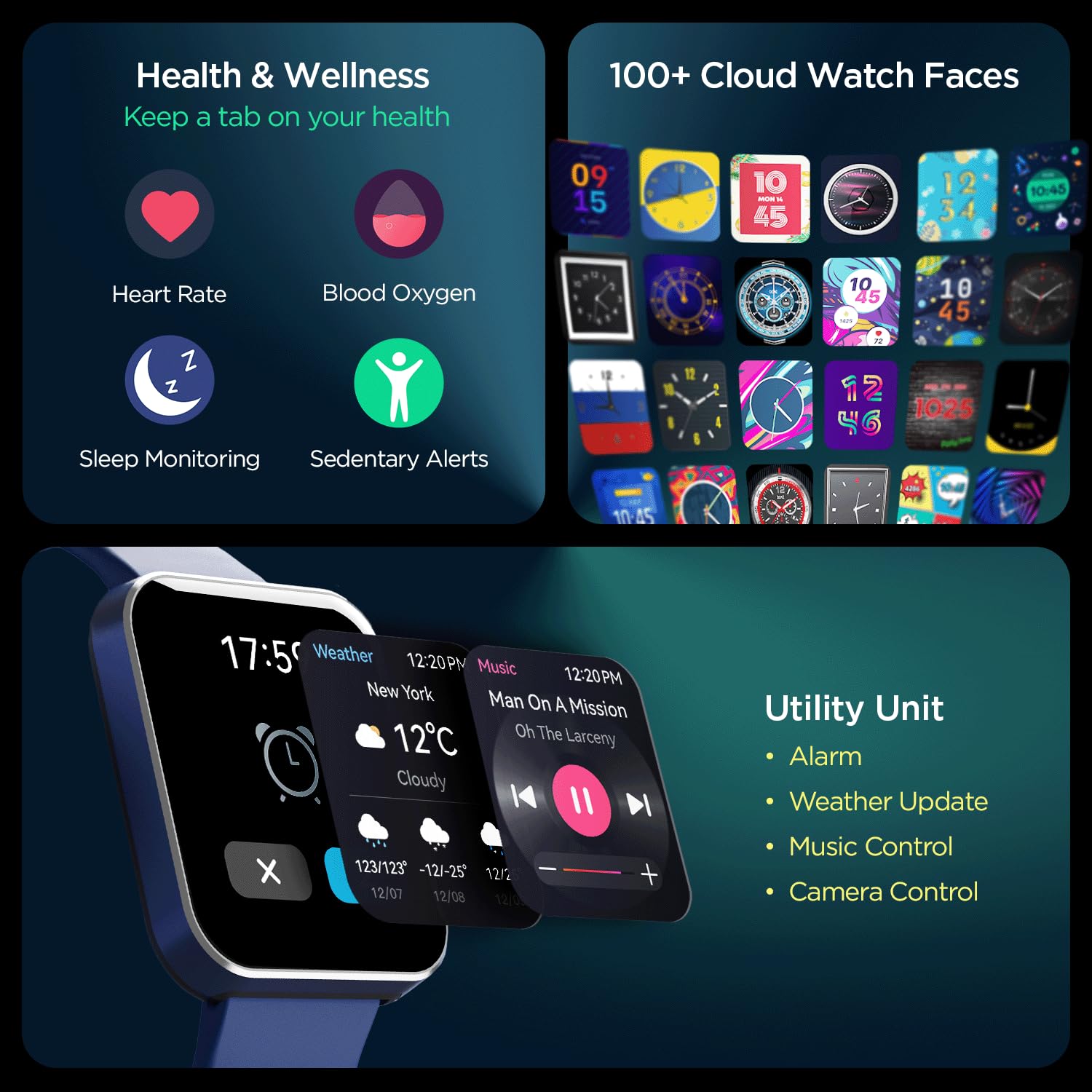
Aworan: A okeerẹ view of the smartwatch's capabilities, including health tracking (heart rate, SpO2, sleep, sedentary alerts), a wide selection of watch faces, and practical utilities like weather, music, and camera control.
4.6 boAt Coins Integration
Earn rewards via boAt Coins on the boAt Crest App by engaging with your smartwatch and the ecosystem.

Image: The smartwatch paired with a smartphone showing the boAt Crest app interface, highlighting the boAt Coins reward system and available vouchers.
5. Itọju
- Ninu: Fi aṣọ rírọrùn àti gbígbẹ nu aago náà kí o sì fi okùn dì í déédéé. Fún eruku líle, lo aṣọ dídì díẹ̀.amp asọ ati ki o gbẹ daradara.
- Omi Resistance: Refer to the product specifications for water resistance ratings. Avoid exposing the watch to hot water, steam, or high-pressure water jets.
- Gbigba agbara: Lo okùn gbigba agbara ti a pese nikan. Yẹra fun lilo awọn okùn tabi awọn ṣaja ti o bajẹ.
- Ibi ipamọ: Tọju aago naa ni itura, aye gbigbẹ kuro lati orun taara ati awọn iwọn otutu to gaju.
6. Laasigbotitusita
6.1 Wo Ko Titan
- Rii daju pe aago naa ti gba agbara ni kikun. Sopọ mọ ṣaja fun o kere 30 iṣẹju.
- Tẹ ki o si di bọtini ẹgbẹ mu fun awọn aaya 10-15 lati gbiyanju atunbere ti a fi agbara mu.
6.2 Sisọ ọrọ
- Rii daju pe Bluetooth ti ṣiṣẹ lori foonuiyara rẹ ati aago naa.
- Make sure the watch is within the Bluetooth range of your phone (typically 10 meters).
- Tun bẹrẹ mejeeji foonuiyara rẹ ati smartwatch.
- Forget the device in your phone's Bluetooth settings and try pairing again through the boAt Crest app.
6.3 Alaye ilera ti ko pe
- Rii daju pe aago naa ti wọ daradara lori ọwọ ọwọ rẹ, nipa iwọn ika kan loke egungun ọwọ.
- Keep the sensor clean and free from dirt or sweat.
- Note that environmental factors and individual physiology can affect sensor accuracy.
7. Awọn pato
| Ẹya ara ẹrọ | Ẹ̀kúnrẹ́rẹ́ |
|---|---|
| Brand | boAt |
| Orukọ awoṣe | Wave Flex Connect |
| Iwọn Ifihan | 1.83 inches |
| Ipinnu | 240 x 240 awọn piksẹli |
| Ifihan Iru | LCD oni -nọmba |
| Imọlẹ | Títí dé 550 Nit |
| Igbesi aye batiri | Up to 10 days (normal use), 30 days (standby), 3 days (with Bluetooth Calling) |
| Batiri Iru | Litiumu polima |
| Asopọmọra | Bluetooth |
| Awọn ẹrọ ibaramu | Foonuiyara |
| Eto isesise | Smartwatch OS |
| Iwọn Nkan | 51 g |
| Olupese | Imagine Marketing Limited. |
8. Atilẹyin ọja ati Support
8.1 atilẹyin ọja Alaye
Your boAt Wave Flex Connect Smart Watch comes with a 1 Odun atilẹyin ọja from the date of purchase. Please retain your purchase receipt and the warranty card for any warranty claims. The warranty covers manufacturing defects and does not cover damage caused by misuse, accidents, unauthorized repairs, or normal wear and tear.
8.2 Onibara Support
For any queries, technical assistance, or warranty claims, please contact boAt customer support. You can find contact details on the official boAt webaaye ayelujara tabi tọka si kaadi atilẹyin ọja ti o wa ninu package ọja rẹ.
Manufacturer: Imagine Marketing Limited., info@imaginemarketingindia.com


