Ọrọ Iṣaaju
The Audibax Onyx 200 is a versatile and robust stand designed to support a wide range of musical and electronic equipment. Its adjustable height and stable construction make it suitable for keyboards, MIDI controllers, DJ mixers, laptops, and rack synthesizers. This manual provides essential information for safe assembly, operation, and maintenance of your stand.

Apejuwe aworan: A iwaju view of the Audibax Onyx 200 multifunction equipment stand, showcasing its black finish and X-frame design, ready for use.
Alaye Aabo
- Ensure all components are securely fastened before placing any equipment on the stand.
- Maṣe kọja agbara fifuye ti o pọju ti 20 kg (44 lbs).
- Gbe iduro naa si ori ilẹ ti o rọgbọkú, ti o si duro ṣinṣin lati dena fifi sita.
- Jẹ́ kí ọwọ́ rẹ jìnnà sí àwọn ẹ̀yà ara tí ń gbéra nígbà tí o bá ń ṣe àtúnṣe gíga rẹ.
- Ṣayẹwo iduro nigbagbogbo fun eyikeyi ami ti wọ tabi ibajẹ. Maṣe lo ti o ba bajẹ.
Package Awọn akoonu
Jọwọ rii daju pe gbogbo awọn paati wọnyi wa ninu package rẹ:
- Audibax Onyx 200 Stand Frame (X-shaped base)
- Equipment Platform (top surface with ventilation slots)
- Adjustment Lever and Locking Clutch Mechanism
- Rubber Sleeves/Feet for stability
Eto ati Apejọ
- Unfold the Stand Frame: Carefully unfold the X-shaped base of the stand until it forms a stable structure.
- Attach the Equipment Platform: Place the equipment platform onto the upper arms of the stand frame. Ensure it is centered and securely seated. The platform features pre-drilled holes for ventilation and potential mounting, though specific mounting hardware is not included.
- Ṣatunṣe Giga: Refer to the "Height Adjustment" section for detailed instructions on setting the desired height.
- Rii daju Iduroṣinṣin: Verify that the stand is stable and all rubber sleeves/feet are making full contact with the floor. The adjustable rubber sleeves help compensate for uneven surfaces.

Apejuwe aworan: A diagram illustrating the Audibax Onyx 200 stand. It highlights key dimensions such as adjustable height (330mm-980mm), upper arms depth (325mm), lower arms depth (450mm), and tube diameter (25mm). The diagram also indicates the material as steel and the maximum load capacity as 20 kg.
Atunṣe Giga
The Audibax Onyx 200 stand offers multiple height settings for ergonomic use. Follow these steps to adjust the stand's height:
- Locate the Adjustment Mechanism: Find the spring-loaded lever and locking clutch at the center joint of the X-frame.
- Release the Lock: Gently pull the lever to disengage the locking pin from its current position.
- Ṣatunṣe Giga: While holding the lever, carefully raise or lower the stand to your desired height. The stand has predefined positions (e.g., 95.5 cm, 90.5 cm, 82 cm, 71.5 cm).
- Ṣíṣe ààbò sí Títì: Once the desired height is reached, release the lever, ensuring the locking pin fully engages into one of the adjustment holes. A click sound confirms engagement.
- Jẹrisi Iduroṣinṣin: Before placing equipment, gently shake the stand to confirm it is locked securely at the chosen height.

Apejuwe aworan: A sunmọ-soke view of the central pivot point of the Audibax Onyx 200 stand, showing the height adjustment mechanism. Numbered positions (1 through 7) are visible around the locking clutch, indicating the various height settings.
Awọn ilana Iṣiṣẹ
The Audibax Onyx 200 is designed for versatile use with various equipment. Follow these guidelines for optimal performance:
- Placement of Equipment: Carefully place your keyboard, MIDI controller, DJ mixer, laptop, or other compatible equipment onto the stand's platform. Ensure the weight is evenly distributed.
- Afẹfẹ: The platform features integrated slots to facilitate airflow, helping to maintain adequate temperature for your equipment during extended use. Position your devices to benefit from these ventilation openings.
- Iṣakoso USB: While the stand does not include dedicated cable management, consider using external cable ties or clips to keep cables tidy and prevent tripping hazards.

Apejuwe aworan: The Audibax Onyx 200 multifunction stand shown with a black electronic keyboard placed securely on its platform, demonstrating its use as a keyboard stand.
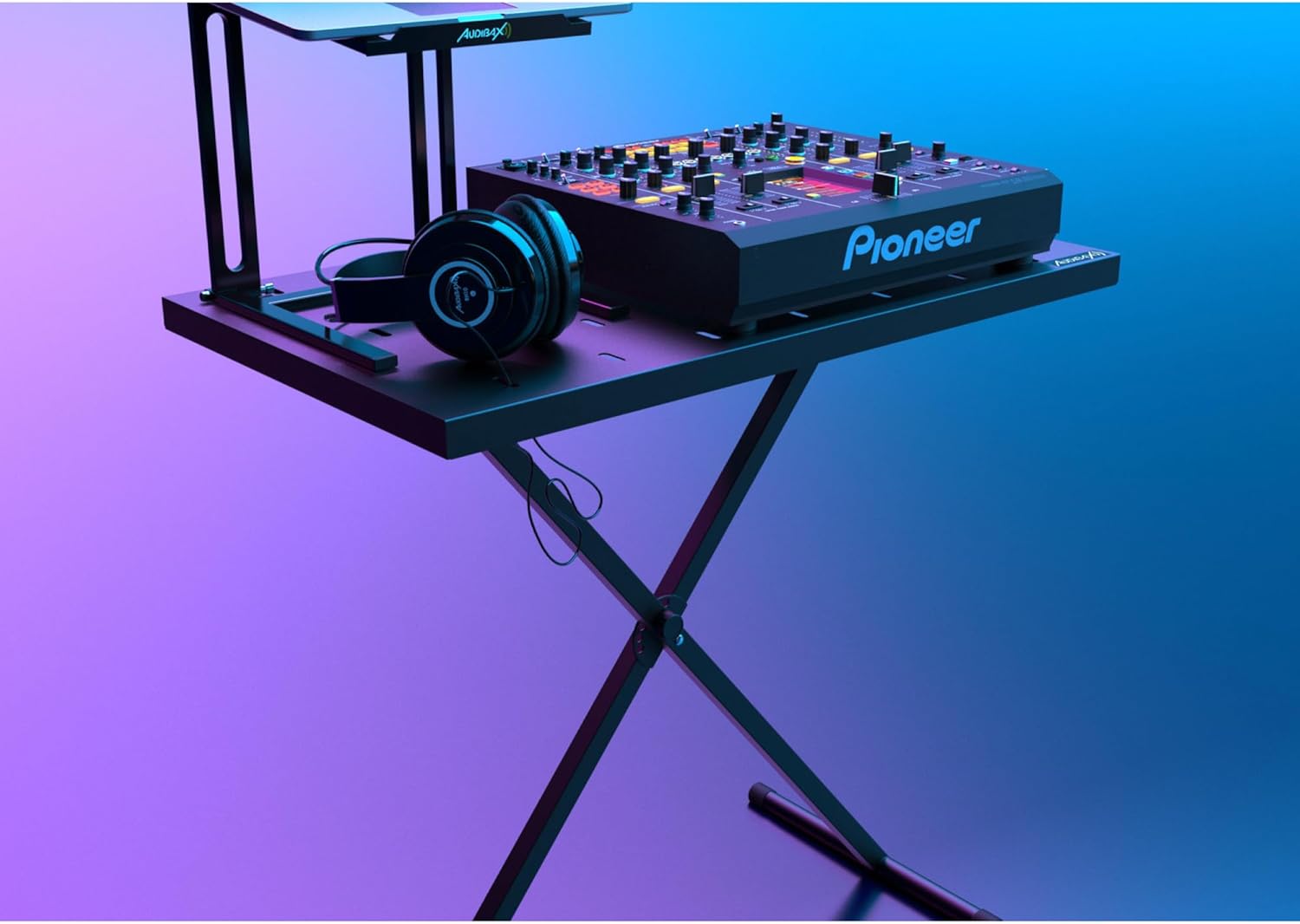
Apejuwe aworan: The Audibax Onyx 200 stand in a studio setting, supporting a DJ mixer and a pair of headphones. The image highlights the stand's versatility for various audio equipment.

Apejuwe aworan: A sunmọ-soke view of a DJ mixer and headphones placed on the Audibax Onyx 200 stand's platform, clearly showing the integrated ventilation slots designed to prevent overheating.
Itoju
- Ninu: Nu imurasilẹ nu pẹlu asọ, damp asọ lati yọ eruku ati idoti. Yago fun abrasive ose tabi olomi ti o le ba awọn ipari.
- Ayewo: Periodically check all joints, bolts, and the adjustment mechanism for tightness and proper function. Ensure the rubber feet are intact and provide adequate grip.
- Ibi ipamọ: When not in use, the stand can be folded for compact storage. Store in a dry environment away from extreme temperatures.
Laasigbotitusita
- Ìṣòro: Dúró dúró níbìkan tàbí ó ń mì tìtì.
- Ojutu:
- Rí i dájú pé a gbé àpótí náà sí orí ilẹ̀ tí ó tẹ́jú pátápátá tí ó sì tẹ́jú.
- Check that the height adjustment locking pin is fully engaged in one of the designated holes.
- Verify that all rubber feet are making firm contact with the floor. Adjust the feet if necessary to compensate for minor unevenness.
- Confirm that the equipment placed on the platform is centered and its weight does not exceed the 20 kg load capacity.
- Oro: Iṣoro ti n ṣatunṣe giga.
- Ojutu:
- Ensure the spring-loaded lever is fully pulled to disengage the locking pin.
- Check for any obstructions or debris in the adjustment holes or around the locking mechanism.
- Apply a small amount of silicone lubricant to the moving parts of the adjustment mechanism if it feels stiff.
Awọn pato
| Ẹya ara ẹrọ | Ẹ̀kúnrẹ́rẹ́ |
|---|---|
| Nọmba awoṣe | 10268542 |
| Ohun elo | Irin (Irin) |
| Àwọ̀ | Dudu |
| O pọju fifuye Agbara | 20 kg (44 lbs) |
| Adijositabulu Giga Ibiti | 71.5 cm to 95.5 cm (approx. 330mm to 980mm as per diagram) |
| Platform Mefa | 82 x 46.5 cm (isunmọ 32.3 x 18.3 inches) |
| Upper Arms Depth | 325 mm |
| Lower Arms Depth | 450 mm |
| Opin Tube | 25 mm |
| Iwọn Nkan | 6.1 kg (13.4 lbs) |
| Pari Iru | Didan |
| Apejọ ti a beere | No (referring to complex assembly, basic setup is needed) |
Atilẹyin ọja ati Support
For warranty information, technical support, or service inquiries, please contact Audibax customer service through their official website or the retailer where the product was purchased. Please have your model number (Onyx 200 / 10268542) and purchase date available when contacting support.


