1. Ọja Ipariview
The Silverlit 4SPEED Stunt Drift is a high-performance remote-controlled car designed for dynamic driving experiences. Part of the new 4SPEED range, this vehicle features an aggressive white and black design, built to conquer various terrains and deliver thrilling sensations.
Experience speeds ranging from 15 to 25 km/h, providing an immersive driving experience. The 2.4GHz technology ensures reliable wireless connectivity, extended range, and stable communication between the remote control and the car, allowing multiple users to play simultaneously without interference, both indoors and outdoors.

Image 1.1: The Silverlit 4SPEED Stunt Drift remote control car and its accompanying controller.
2. Alaye Aabo
IKILO: Not suitable for children under 36 months. Contains small parts that may be swallowed.
- Máa ṣe àbójútó àwọn ọmọ nígbà gbogbo nígbà iṣẹ́ abẹ.
- Do not operate near roads, water, or in crowded areas.
- Avoid operating in adverse weather conditions (rain, snow, strong winds).
- Ma ṣe yipada ọja tabi awọn paati rẹ.
- Jeki awọn ika ọwọ, irun, ati aṣọ alaimuṣinṣin kuro ni awọn ẹya gbigbe.
3. Package Awọn akoonu
Jọwọ ṣe àyẹ̀wò àwọn ohun tó wà nínú àpótí náà láti rí i dájú pé gbogbo ohun tó wà níbẹ̀ wà:
- 1 x Silverlit 4SPEED Stunt Drift Remote Control Car
- 1 x 2.4GHz Remote Controller
- 1 x Set of Drift Tires (pre-installed or separate)
- 1 x Set of Classic Tires
- Required Batteries (for car and controller)
- Ilana Afowoyi (iwe yii)

Image 3.1: The Silverlit 4SPEED Stunt Drift remote control car as packaged in its retail box.
4. Eto
4.1 Fifi sori batiri
The Stunt Drift car and its remote controller require batteries for operation. Ensure you use the correct type and quantity of batteries as specified in the product specifications.
- Adarí Latọna jijin: Locate the battery compartment on the back of the remote control. Open the cover, insert the batteries according to the polarity indicators (+/-), and close the cover securely.
- Stunt Drift Car: Locate the battery compartment on the underside of the car. Open the cover, insert the batteries according to the polarity indicators (+/-), and close the cover securely.
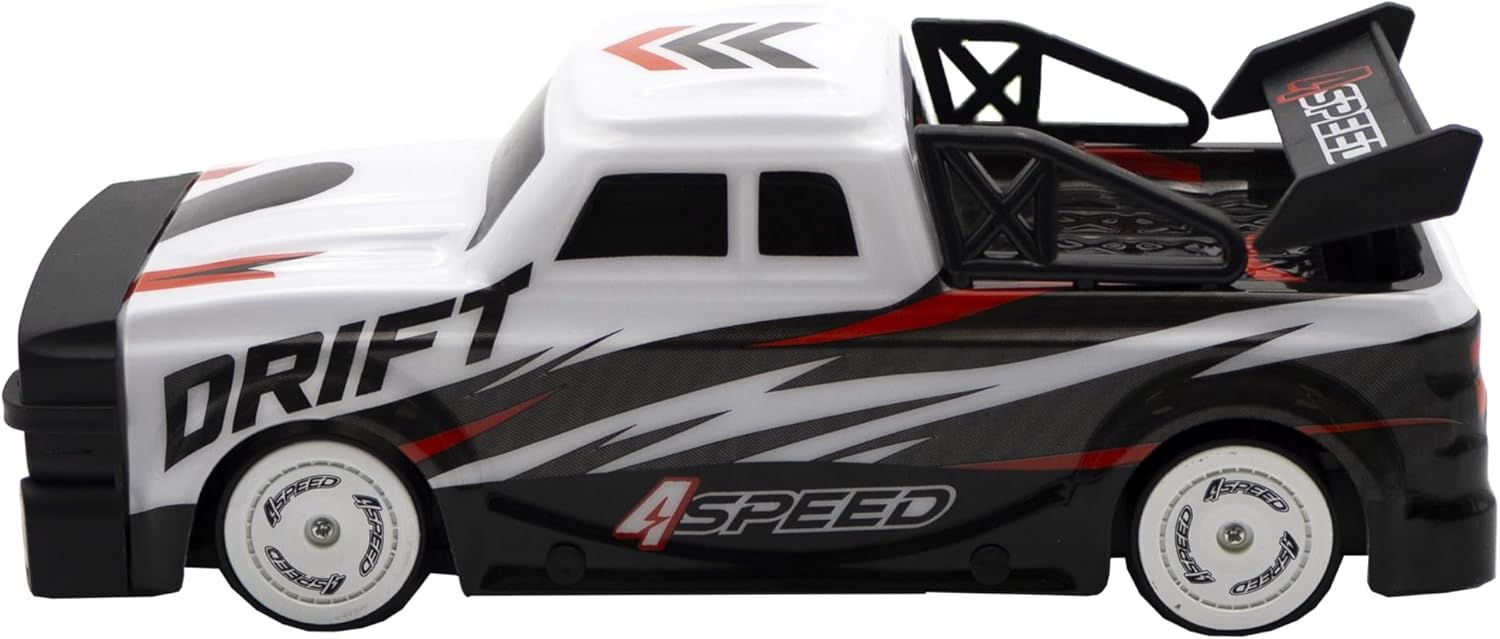
Image 4.1: The remote control for the Silverlit 4SPEED Stunt Drift car, highlighting the battery compartment location (on the back, not visible in this view) and control buttons.
4.2 Agbara Lori ati Sisopọ
- Ensure fresh batteries are installed in both the car and the remote controller.
- Turn on the power switch on the Stunt Drift car.
- Tan agbara yipada lori isakoṣo latọna jijin.
- The car and controller should automatically pair via 2.4GHz technology. A successful connection is usually indicated by a solid light on both devices. If pairing fails, turn both devices off and on again.
5. Awọn ilana Iṣiṣẹ
5.1 Ipilẹ idari
The remote controller features intuitive controls for easy operation:
- Kẹkẹ irin-ajo: Turn left or right to steer the car.
- Nfa: Pull the trigger to move the car forward. Push the trigger to move the car backward.
- Bọtini agbara: Ó ń tan/pa iṣakoso latọna jijin.
- Bọtini Imọlẹ: Activates or deactivates the car's lights.
- Bọtini Ririnkiri: Initiates a pre-programmed demonstration sequence.
- Bọtini Iyara: Cycles through different speed modes (if applicable).

Aworan 5.1: Apa view of the Silverlit 4SPEED Stunt Drift remote control car in action.
5.2 Italolobo awakọ
- Drift Mode: Use the smooth drift tires for controlled slides and turns. Practice steering into and out of drifts for optimal performance.
- Ipo Alailẹgbẹ: Switch to the textured classic tires for better grip and traditional racing.
- Start with slower speeds to get accustomed to the controls before attempting high-speed maneuvers.
- Ensure a clear, open area for driving to prevent collisions and maximize enjoyment.

Image 5.2: The two types of tires included with the Stunt Drift car: smooth for drifting and textured for classic driving.
6. Itọju
6.1 Ninu
- Wipe the car and remote control with a soft, dry cloth after each use to remove dust and dirt.
- Do not use water or chemical cleaners, as they may damage the electronic components.
- Clean the wheels and axles regularly to prevent debris buildup that could affect performance.
6.2 Itọju Batiri ati Ibi ipamọ
- Always remove batteries from both the car and the remote control when not in use for extended periods to prevent leakage and damage.
- Tọ́jú ọkọ̀ ayọ́kẹ́lẹ́ àti ẹ̀rọ ìṣàkóso láti ọ̀nà jíjìn sí ibi tí ó tutù tí ó sì gbẹ, tí kò sí ìmọ́lẹ̀ oòrùn tààrà àti ooru líle.
- Do not dispose of batteries in fire; they may explode.
7. Laasigbotitusita
| Isoro | Owun to le Fa | Ojutu |
|---|---|---|
| Car does not turn on. | Awọn batiri ti ku tabi ti fi sori ẹrọ ti ko tọ. | Ṣayẹwo polarity batiri ki o rọpo pẹlu awọn batiri titun. |
| Ọkọ ayọkẹlẹ ko dahun si latọna jijin. | Not paired, out of range, or low batteries. | Ensure both devices are on and paired. Move closer to the car. Replace batteries in both car and remote. |
| Poor performance or erratic movement. | Low battery power, interference, or debris in wheels. | Replace batteries. Move away from other electronic devices. Clean wheels and axles. |
8. Awọn pato
| Ẹya ara ẹrọ | Ẹ̀kúnrẹ́rẹ́ |
|---|---|
| Awọn iwọn Ọja (L x W x H) | 10.5 x 24 x 8.5 cm |
| Iwọn | 695 giramu |
| Olupese niyanju ori | 8 ọdun ati si oke |
| Olupese Reference | 70013 |
| Self-assembly Product | Rara |
| Iwọn | Iwọn-aye |
| Battery(ies) / Cell(s) Required | Bẹẹni |
| Battery(ies) / Cell(s) Included | Bẹẹni |
| Ohun elo akọkọ | Ṣiṣu |
| Àwọ̀ | Funfun ati Black |
| Orisun agbara | Agbara Batiri |
| Pataki Ẹya | Isakoṣo latọna jijin |
| Ipo Iṣiṣẹ | Afowoyi |
| Iyara ti o pọju | 15-25 km / h |
| Alailowaya Technology | 2.4GHz |
9. Atilẹyin ọja ati Support
For warranty information and customer support, please refer to the contact details provided on the product packaging or visit the official Silverlit webojula. Tọju iwe-ẹri rira rẹ bi ẹri rira.


