1. Ifihan
Thank you for choosing the SHIDU Voice Amplifier Model 2023-308. This portable PA system is designed to amplify your voice clearly, making it ideal for teachers, tour guides, trainers, and public speakers. It supports various audio playback options including Bluetooth, TF card, and U-Disk. Please read this manual carefully to ensure proper use and optimal performance of your device.
2. Package Awọn akoonu
Jọwọ ṣayẹwo package fun awọn nkan wọnyi:
- SHIDU Voice Amplifier Unit
- Agbekọri Gbohungbohun ti firanṣẹ
- Okun Ngba agbara USB
- Adjustable Waist/Shoulder Strap
3. Ọja Ipariview
The SHIDU 2023-308 Voice Amplifier is a compact and lightweight device designed for clear voice amplification and versatile audio playback.
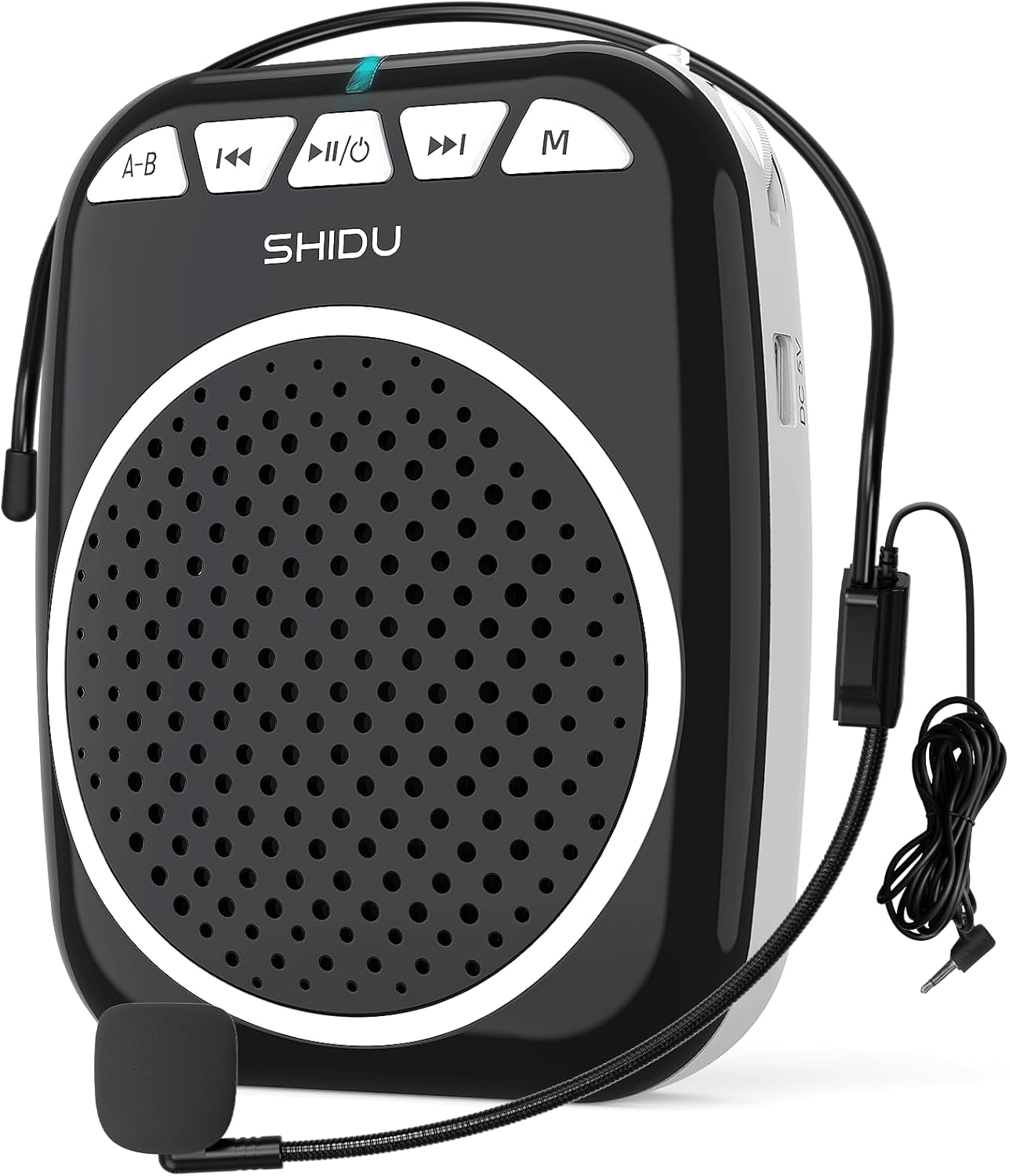
Figure 1: SHIDU Voice Amplifier Model 2023-308 with wired microphone headset.
Awọn ẹya pataki:
- Ko Ohùn kuro Ampimuduro: Projects voice clearly to audiences of up to 120 people.
- Fúyẹ́ àti Agbégbé: Weighs approximately 0.3 pounds (10.5 ounces) for easy transport.
- Multi-functional Playback: Supports Bluetooth, TF card, and U-Disk for music playback.
- Igbesi aye batiri gigun: Built-in rechargeable battery provides up to 7.5 hours of amplification.
- Ikole ti o tọ: Made from Acrylonitrile Butadiene Styrene (ABS).

Figure 2: Illustration of the voice amplifier's coverage area and audience capacity.
4. Idanimọ paati

Nọmba 3: Iwaju ati ẹgbẹ views ti awọn amplifier with labeled ports and buttons.
- A-B / Repeat Key: Used for repeating sections in audio playback.
- Bọtini orin ti tẹlẹ: Navigates to the previous audio track.
- Power On/Off & Play/Pause Button: Controls power and audio playback.
- Bọtini Orin atẹle: Navigates to the next audio track.
- Bọtini Ipo (M): Switches between Bluetooth, TF Card, U-Disk, and AUX modes.
- Imọlẹ Atọka: Displays device status (e.g., charging, power on, Bluetooth pairing).
- Iho Kaadi TF: Insert a TF (Micro SD) card for audio playback.
- Iho USB: Insert a U-Disk (USB flash drive) for audio playback.
- Mic Slot: Connect the wired microphone headset.
- Ibudo Ngba agbara DC 5V: So okun USB gbigba agbara pọ.
- Iṣakoso iwọn didun: Rotary knob for adjusting ampiwọn didun lification.
- Agekuru Pada: Fun fifi sori ampìdènà sí bẹ́líìtì tàbí àpò.
5. Awọn ilana iṣeto
5.1. Ngba agbara ẹrọ
- Connect the small end of the USB charging cable to the DC 5V Charging Port on the amplifier.
- So opin keji okun USB pọ mọ adapter agbara USB deede (ko si ninu rẹ) tabi ibudo USB kọmputa kan.
- The indicator light will illuminate during charging. It typically takes 2-4 hours for a full charge.
- A full charge provides approximately 7.5 hours of amplification time.
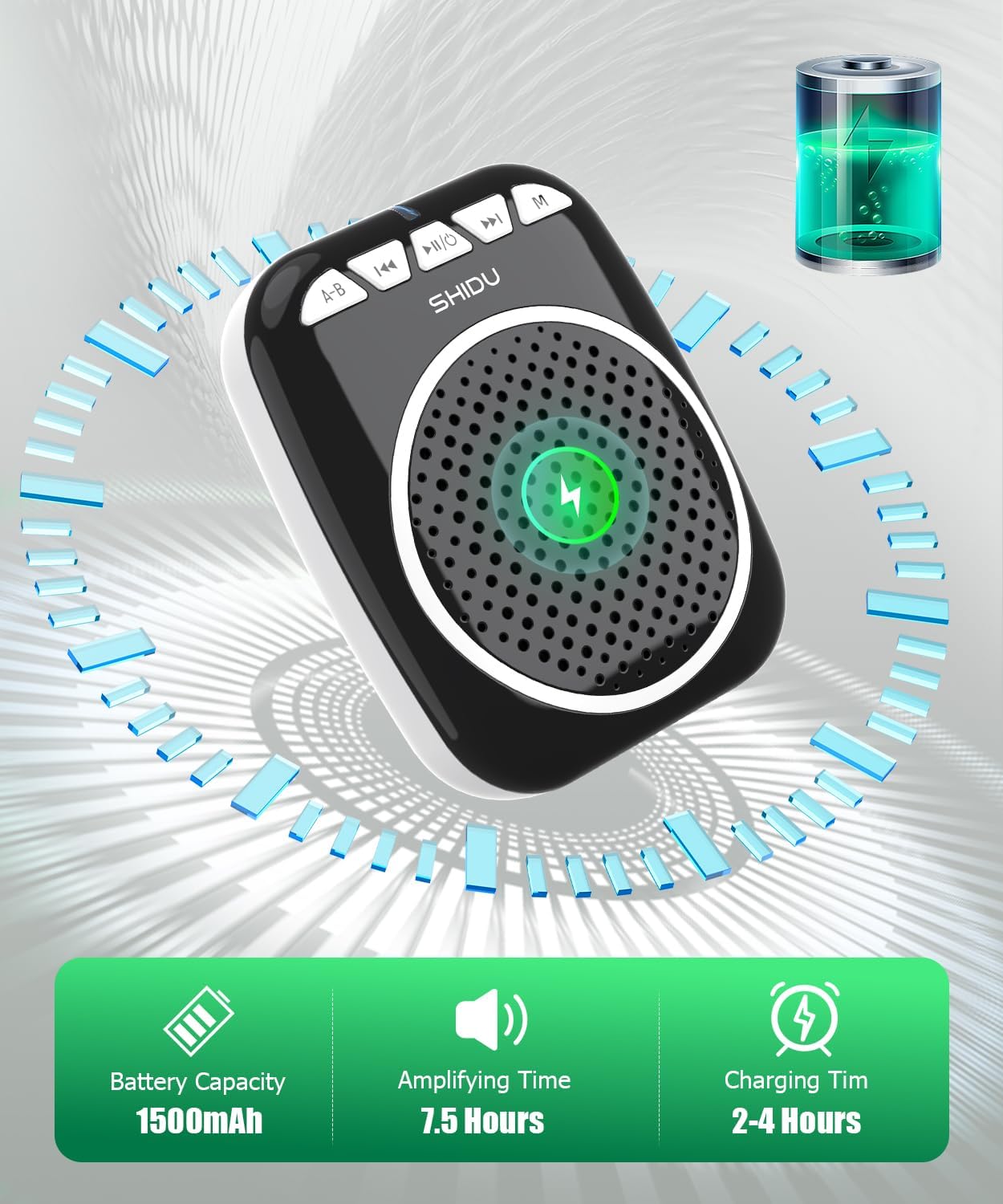
Figure 4: Battery capacity, amplifying time, and charging time information.
5.2. Nsopọ Gbohungbohun
- Insert the 3.5mm jack of the wired microphone headset into the Mic Slot on the amplifier.
- Position the microphone headset comfortably on your head, ensuring the microphone is close to your mouth for optimal voice pickup.
5.3. Wọ awọn Ampitanna
Awọn amplifier can be carried in multiple ways:
- Agekuru Pada: So awọn amplifier to your belt or pocket using the integrated back clip.
- Waist Strap: Use the adjustable strap to wear the amplifier around your waist.
- Shoulder/Neck Strap: Use the adjustable strap to hang the amplifier over your shoulder or neck.

Figure 5: Demonstrates various carrying options for the voice amplifier.
6. Awọn ilana Iṣiṣẹ
6.1. Agbara Tan / Paa
- Lati Fi agbara: Tẹ mọlẹ Power On/Off & Play/Pause button for a few seconds until the indicator light illuminates.
- Lati Paarẹ: Tẹ mọlẹ Power On/Off & Play/Pause button again for a few seconds until the indicator light turns off.
6.2. Ohùn Amplification
- Ensure the microphone headset is securely connected to the Mic Slot.
- Agbara lori awọn amplifier.
- Laiyara n yi awọn Iṣakoso iwọn didun knob to increase the volume to your desired level.
- Sọ kedere sinu gbohungbohun.
- Akiyesi: To avoid feedback, keep the microphone away from the speaker and avoid pointing the microphone directly at the speaker.
6.3. Ipo Bluetooth
- Agbara lori awọn amplifier.
- Tẹ awọn Ipo (M) button until you hear a voice prompt indicating "Bluetooth Mode" or see the indicator light flashing blue.
- On your device (smartphone, tablet, computer), enable Bluetooth and search for "SHIDU" or "2023-308".
- Yan awọn amplifier from the list to pair. Once paired, you will hear a confirmation sound, and the indicator light will turn solid blue.
- O le mu ohun orin lati ẹrọ rẹ ṣiṣẹ bayi nipasẹ amplifier. Lo awọn Ti tẹlẹ Track, Ṣiṣẹ / Sinmi, ati Next Track awọn bọtini lati ṣakoso ṣiṣiṣẹsẹhin.

Figure 6: Seamless Bluetooth connectivity with various devices.
6.4. TF Card / U-Disk Playback
- Agbara lori awọn amplifier.
- Insert a TF (Micro SD) card into the Iho TF Kaadi or a U-Disk into the Iho USB.
- Awọn amplifier will automatically detect the storage device and begin playing audio files. Tí kò bá rí bẹ́ẹ̀, tẹ Ipo (M) button to switch to the correct mode.
- Lo awọn Ti tẹlẹ Track, Ṣiṣẹ / Sinmi, ati Next Track awọn bọtini lati ṣakoso ṣiṣiṣẹsẹhin.
- Tẹ awọn A-B / Repeat Key to repeat the current track or a specific section.
7. Itọju
- Ninu: Mu ẹrọ naa nu pẹlu asọ ti o gbẹ. Ma ṣe lo abrasive ose tabi epo.
- Ibi ipamọ: Tọju awọn amplifier ni itura, aye gbigbẹ kuro lati orun taara ati awọn iwọn otutu to gaju.
- Itọju Batiri: Láti mú kí batiri pẹ́ sí i, gba agbára lórí ẹ̀rọ náà déédéé, kódà bí kò bá tiẹ̀ jẹ́ pé a ń lò ó déédéé. Má ṣe jẹ́ kí batiri náà máa jáde pátápátá fún ìgbà pípẹ́.
- Itọju Gbohungbohun: Handle the wired microphone headset gently. Avoid bending the cable sharply or exposing it to excessive moisture.
8. Laasigbotitusita
| Isoro | Owun to le Fa | Ojutu |
|---|---|---|
| Ko si ohun lati amplifier. | Device is off; volume is too low; microphone not connected properly; battery is low. | Ensure device is powered on. Increase volume. Check microphone connection. Charge the battery. |
| Ìdáhùn (ìró ìkérora). | Microphone too close to speaker; volume too high; microphone pointed at speaker. | Move microphone further from speaker. Reduce volume. Adjust microphone position. |
| Awọn oran asopọ Bluetooth. | Amplifier not in Bluetooth mode; device not discoverable; interference. | Press 'M' button to enter Bluetooth mode. Ensure Bluetooth is enabled on your device. Move closer to the amplifier. Try re-pairing. |
| TF card/U-Disk not playing. | Ti ko tọ file format; card/disk not inserted correctly; amplifier in wrong mode. | Ṣe idaniloju ohun afetigbọ files are in a compatible format (e.g., MP3). Reinsert card/disk. Press 'M' button to switch to TF/USB mode. |
| Aye batiri kukuru. | Kò gba agbára tán pátápátá; bátìrì tó ti ń gbó. | Ensure full charge (2-4 hours). If battery life significantly degrades over time, contact support. |
9. Awọn pato
| Ẹya ara ẹrọ | Ẹ̀kúnrẹ́rẹ́ |
|---|---|
| Nọmba awoṣe | 2023-308 |
| Brand | SHIDU |
| Iṣagbesori Iru | Gbigbe |
| Orisun agbara | Agbara Batiri |
| Asopọmọra Iru | Aux, USB |
| Ohun elo | Acrylonitrile Butadiene Styrene (ABS) |
| Iwọn Nkan | 0.3 kilogram (10.5 iwon) |
| Nọmba ti awọn ikanni | 1 |
| Input Audio | Gbohungbohun |
| Awọn iwọn Ọja (L x W x H) | 1 x 12 x 4.3 inches |
| Asopọmọra Technology | AUX, Bluetooth, USB |
| Àwọ̀ | Dudu |
| Awọn ẹrọ ibaramu | Headset, Smartphone |
| Agbara Batiri | 1500mAh |
| Amplifying Time | Titi di awọn wakati 7.5 |
| Akoko gbigba agbara | Awọn wakati 2-4 |
10. Atilẹyin ọja ati Support
SHIDU is committed to providing high-quality products. For any questions or issues regarding your SHIDU Voice Amplifier Model 2023-308, please contact SHIDU customer support. Refer to your purchase documentation for specific warranty details.
You can often find support information on the official SHIDU webaaye tabi nipasẹ alagbata ti o ti ra ọja naa.


