1. Ifihan
This manual provides essential information for the safe and efficient operation of your Growatt ARK-2.5H-A1 BMS HVC 60050-A1 High Voltage Battery Management System. Please read this manual thoroughly before installation and operation, and keep it for future reference.
The Growatt High Voltage Battery Management System (BMS) HVC 60050-A1 is designed for ARK 2.5 high voltage batteries. It is compatible with Growatt SPH and SPA series hybrid inverters, enabling optimized energy storage solutions. This system features intelligent battery management, flexible capacity options ranging from 5.12 kWh up to 25.6 kWh, and a modular design for easy expansion and installation. It ensures maximum protection for your home energy system through integrated safety functions including overvoltage, undervoltage, overload, short circuit, and overheating protection. Designed for indoor use, this reliable and durable BMS seamlessly integrates into both existing and newly installed PV systems within the Growatt Home ecosystem and supports remote firmware upgrades.
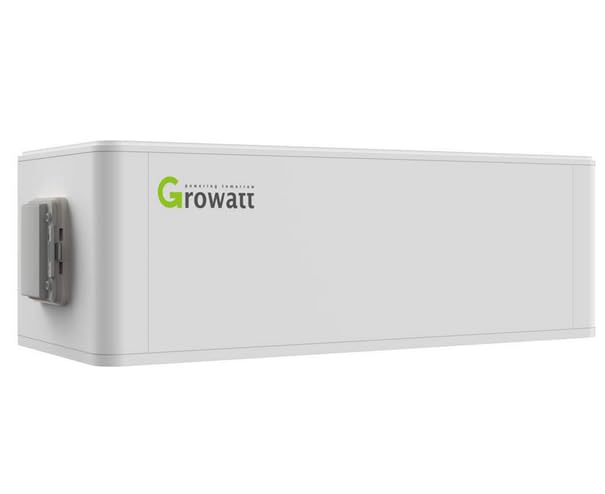
Figure 1: Growatt ARK-2.5H-A1 BMS HVC 60050-A1 High Voltage Battery Management System, front view.
2. Awọn ilana aabo
Maa tẹle awọn iṣọra aabo wọnyi nigbagbogbo lati yago fun ipalara tabi ibajẹ si ọja naa:
- Fifi sori ẹrọ ati itọju gbọdọ jẹ nipasẹ oṣiṣẹ ti o peye nikan.
- Do not attempt to open, disassemble, or modify the BMS unit.
- Ensure proper grounding and electrical connections according to local codes and standards.
- Keep the unit away from water, moisture, and flammable materials.
- Do not expose the unit to extreme temperatures or direct sunlight.
- Verify all connections are secure before powering on the system.
- In case of malfunction, disconnect power immediately and contact technical support.
Ikilo: High voltage present. Risk of electric shock. Follow all safety guidelines strictly.
3. Package Awọn akoonu
The Growatt ARK-2.5H-A1 BMS HVC 60050-A1 package typically includes:
- Growatt ARK-2.5H-A1 BMS HVC 60050-A1 Unit
- Awọn ẹya ẹrọ iṣagbesori (ti o ba wulo)
- Communication cables (if applicable)
- Afowoyi Olumulo (iwe-ipamọ yii)
Please check all items upon unboxing. If any components are missing or damaged, contact your supplier immediately.
4. Itọsọna fifi sori ẹrọ
The Growatt ARK-2.5H-A1 BMS features a modular design for easy installation and expansion. Follow these general steps for installation:
- Aṣayan Aaye: Choose a suitable indoor location that is dry, well-ventilated, and within the specified operating temperature range. Ensure sufficient space for air circulation and future maintenance.
- Iṣagbesori: Securely mount the BMS unit and associated battery modules according to the provided mounting instructions. Ensure the structure can support the total weight of the system.
- Awọn Isopọ Itanna: Connect the BMS to the ARK 2.5 high voltage battery modules and the compatible Growatt hybrid inverter (SPH/SPA series). Pay close attention to polarity and ensure all connections are tight and secure. Refer to the wiring diagram in the full installation manual for detailed instructions.
- Awọn isopọ ibaraẹnisọrọ: Connect the necessary communication cables between the BMS and the inverter for proper system monitoring and control.
- Ilẹ: Ensure the system is properly grounded to prevent electrical hazards.
- Agbara Ibẹrẹ: Before powering on, double-check all connections. Follow the specific power-up sequence outlined in the detailed installation manual.
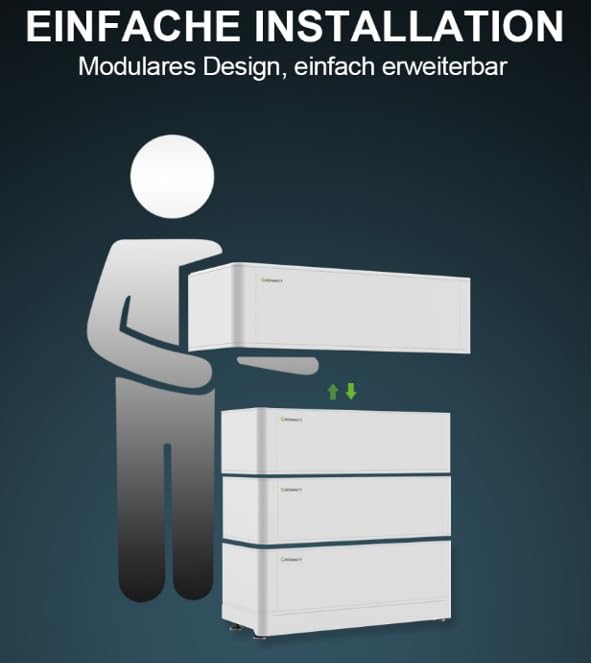
Figure 2: Illustration demonstrating the modular design and easy installation of the Growatt ARK battery system.
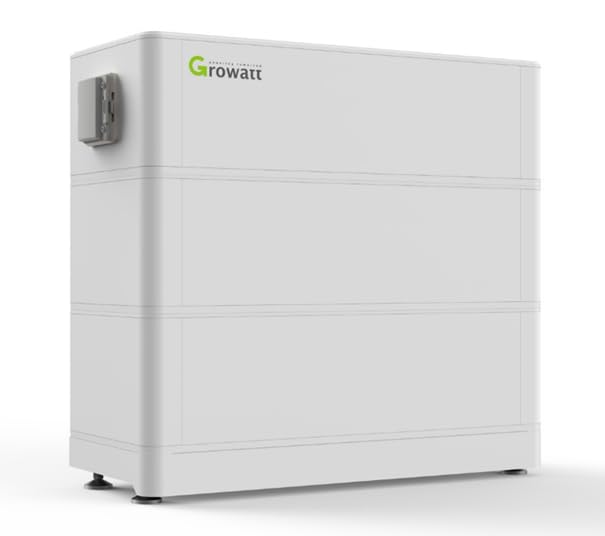
Figure 3: Assembled Growatt ARK-2.5H-A1 BMS with multiple battery modules, showcasing the stackable design.
5. Isẹ
The Growatt ARK-2.5H-A1 BMS operates in conjunction with compatible Growatt inverters to manage the charging and discharging of the battery system. Once installed and connected, the system will typically operate automatically, optimizing energy flow based on your inverter's settings and grid conditions.
5.1. System Abojuto
Monitor the system status, battery charge level, and energy flow through the Growatt inverter's display or via the Growatt monitoring platform (e.g., ShinePhone app or ShineWeb portal). The BMS provides real-time data to the inverter for intelligent power management.
5.2. Intelligent Battery Management
The integrated BMS intelligently manages battery charging and discharging cycles, ensuring optimal performance and extending battery lifespan. It includes dynamic charge power control and protection against grid overload.
6. Itọju
Regular maintenance helps ensure the longevity and optimal performance of your Growatt BMS and battery system. Always disconnect power before performing any maintenance.
- Ayewo wiwo: Periodically inspect the unit and cables for any signs of damage, corrosion, or loose connections.
- Ninu: Jeki ẹyọ naa di mimọ ati ofe kuro ninu eruku ati idoti. Lo asọ ti o gbẹ, asọ fun mimọ. Maṣe lo awọn olutọpa olomi.
- Afẹfẹ: Rí i dájú pé a kò dí àwọn ihò afẹ́fẹ́ láti dènà ìgbóná jù.
- Awọn imudojuiwọn famuwia: The BMS supports remote firmware upgrades. Ensure your system's firmware is kept up-to-date for improved performance and new features. Consult the Growatt support portal or your installer for update procedures.
- Ayẹwo Ọjọgbọn: It is recommended to have a qualified technician perform a comprehensive system check-up annually.
7. Laasigbotitusita
This section provides solutions to common issues. For problems not listed here, or if issues persist, contact Growatt technical support.
| Isoro | Owun to le Fa | Ojutu |
|---|---|---|
| Eto ko ṣiṣẹ | Loose connections, no input power, BMS fault | Check all cable connections. Verify power supply. Consult detailed manual for fault codes. |
| Battery not charging/discharging | Communication error, inverter settings, battery fault | Check communication cables. Verify inverter settings. Check battery module status indicators. |
| Error code displayed on inverter | Aṣiṣe eto pato | Refer to the inverter's user manual for error code definitions and troubleshooting steps. |
8. Imọ ni pato
| Ẹya ara ẹrọ | Sipesifikesonu |
|---|---|
| Awoṣe | ARK-2.5H-A1 BMS HVC 60050-A1 |
| Awọn batiri ibaramu | Growatt ARK 2.5 High Voltage Awọn batiri |
| Ibaramu Inverters | Growatt SPH and SPA series hybrid inverters |
| Awọn aṣayan Agbara | 5.12 kWh up to 25.6 kWh (with multiple modules) |
| Apẹrẹ | Modular, Easy Installation |
| Awọn iṣẹ Idaabobo | Apọjutage, Undervoltage, Overload, Short Circuit, Overheating |
| Ayika ti nṣiṣẹ | Lilo inu ile |
| Awọn iwọn (Apapọ) | 80 x 35 x 30 cm |
| Ìwúwo (Apapọ) | 12 kg |
| Olupese Apá Number | AA-BAT-SYS-0001 |
9. atilẹyin ọja Information
Growatt products are covered by a limited warranty. The specific terms and duration of the warranty may vary by region and product model. Please retain your proof of purchase for warranty claims.
For detailed warranty terms and conditions, please refer to the official Growatt website or contact your authorized Growatt dealer. The warranty typically covers defects in materials and workmanship under normal use and service conditions.
Note: Unauthorized disassembly, modification, or improper installation will void the product warranty.
10. Onibara Support
If you encounter any issues or have questions regarding your Growatt ARK-2.5H-A1 BMS, please contact Growatt technical support or your local authorized dealer.
- Atilẹyin Ayelujara: Visit the official Growatt website for FAQs, documentation, and online support forms.
- Iṣẹ Imọ-ẹrọ: Contact Growatt's technical service hotline (if available in your region) for direct assistance.
- Awọn oniṣowo ti a fun ni aṣẹ: Your installer or local Growatt dealer can provide immediate support and service.
When contacting support, please have your product model (ARK-2.5H-A1) and serial number ready.


