1. Ọja Ipariview
This manual provides essential information for the operation and maintenance of your GHUST MR23GA Replacement Magic Voice Remote Control. This remote is designed as a replacement for various LG Smart TV models, offering convenient control without complex setup.

Image 1.1: The GHUST MR23GA Replacement Magic Voice Remote Control.
Awọn ẹya pataki:
- Rirọpo Taara: Functions as a direct replacement for original LG Magic Remote models.
- Ko si siseto ti a beere: Ready to use out of the box after battery insertion.
- Ikole ti o tọ: Made of high-quality ABS material for enhanced durability.
- Apẹrẹ Iwapọ: Small and ergonomic for comfortable grip.
- Voice Search Capability: Supports voice commands for easier navigation (functionality may vary based on TV model and original remote features).
- Awọn bọtini Ọna abuja igbẹhin: Quick access to popular streaming services like Netflix and Prime Video.
2. Eto ati fifi sori
The MR23GA remote control is designed for immediate use with compatible LG Smart TVs. No complex programming or pairing procedures are required.
2.1. Fifi sori batiri
- Wa ideri iyẹwu batiri ni ẹhin isakoṣo latọna jijin.
- Gbe ideri si isalẹ tabi tẹ latch lati ṣii yara naa.
- Insert two (2) AAA batteries (not included) into the compartment, ensuring the positive (+) and negative (-) terminals align correctly with the indicators inside.
- Pa ideri iyẹwu batiri naa nipa gbigbe pada si aaye titi yoo fi tẹ ni aabo.

Image 2.1: The remote control is designed for ease of use with no setup or programming required after battery installation.
Once batteries are installed, the remote is ready to operate your compatible LG Smart TV.
3. Awọn ilana Iṣiṣẹ
This section details the basic functions and operation of your MR23GA remote control.
3.1. Awọn iṣẹ ipilẹ
- Bọtini agbara (●): Tẹ lati tan TV tabi pa.
- Awọn bọtini nọmba (0-9): Use to directly input channel numbers.
- Iwọn didun Soke/Isalẹ (+/-): Adjust the TV's volume level.
- Ìkànnì Gíga/Sísàlẹ̀ (▲/▼): Yi TV awọn ikanni.
- Bọ́tìnì Ìdákẹ́jẹ́ (🔇): Mute or unmute the TV's audio.
- Paadi lilọ kiri (Soke, Isalẹ, Osi, Ọtun, O DARA): Lilọ kiri nipasẹ awọn akojọ aṣayan ko si yan awọn aṣayan.
- Back Button (↶): Pada si iboju ti tẹlẹ tabi akojọ aṣayan.
- Home Button (🏠): Access the TV's Smart Home dashboard.

Image 3.1: The compact size and ergonomic design make the remote easy to hold and operate.
3.2. Iṣakoso ohun
Tẹ mọlẹ Bọtini gbohungbohun to activate voice control. Speak clearly into the remote to issue commands or search for content. Release the button when finished speaking. Note that voice control functionality may depend on your specific LG TV model and its original features.
3.3. Dedicated Shortcut Buttons
The remote features dedicated buttons for quick access to popular streaming applications:
- Bọtini Netflix: Ṣe ifilọlẹ ohun elo Netflix taara.
- Bọtini Fidio akọkọ: Ṣe ifilọlẹ ohun elo Amazon Prime Video taara.
- Bọtini Disney+: Ṣe ifilọlẹ ohun elo Disney+ taara.
- LG Channels Button: Directly launch the LG Channels application.
- Sling Button: Directly launch the Sling TV application.
- Bọtini Alexa: Activate Alexa voice assistant (functionality depends on TV model).

Image 3.2: Dedicated shortcut buttons provide quick access to your favorite applications.
3.4. Ibamu
This replacement remote control is compatible with a wide range of LG Smart TV models, including but not limited to:
- LG OLED Series: OLED42C3AUA, OLED42C3PUA, OLED48C3PUA, OLED55C3PUA, OLED65C3AUA, OLED77C3PUA, OLED83C3PUA, OLED55G3PUA, OLED65G3PUA, OLED77G3PUA, OLED83G3PUA, OLED55B3PUA, OLED65B3PUA, OLED77B3PUA
- LG QNED Series: 43QNED75URA, 50QNED75URA, 55QNED75URA, 65QNED75URA, 75QNED75URA, 50QNED80URA, 55QNED80URA, 65QNED80URA, 75QNED80URA, 86QNED80URA
- LG UR9000 Series: 43UR9000PUA, 50UR9000PUA, 55UR9000PUA, 65UR9000PUA, 75UR9000PUA
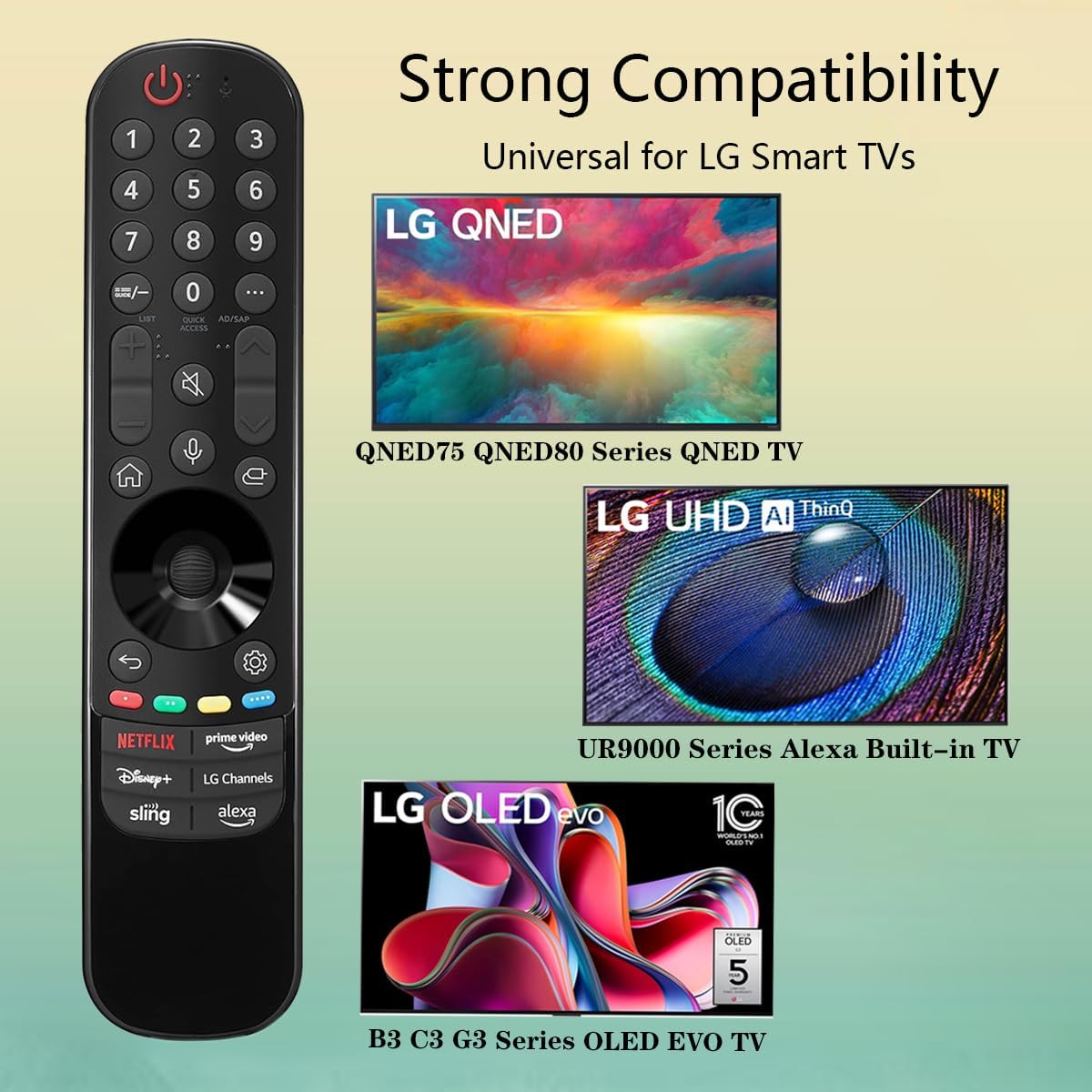
Image 3.3: The remote offers strong compatibility with various LG Smart TV series.
4. Itọju
Proper care and maintenance will extend the lifespan of your remote control.
4.1. Ninu
- Use a soft, dry cloth to wipe the surface of the remote control.
- Fun idoti alagidi, die-die dampen asọ pẹlu omi tabi a ìwọnba, ti kii-abrasive regede. Maṣe fun sokiri regede taara si isakoṣo latọna jijin.
- Yẹra fun lilo awọn kẹmika lile, awọn nkanmimu, tabi awọn ohun elo mimọ abrasive, nitori iwọnyi le ba ipari latọna jijin tabi awọn paati inu.
4.2. Itọju batiri
- Replace batteries when the remote's responsiveness decreases or it stops functioning.
- Nigbagbogbo rọpo awọn batiri mejeeji ni akoko kanna pẹlu awọn tuntun ti iru kanna (AAA).
- If the remote will not be used for an extended period (e.g., one month or more), remove the batteries to prevent leakage and potential damage to the remote.
- Sọ awọn batiri ti a lo ni ibamu si awọn ilana agbegbe.
5. Laasigbotitusita
Ti o ba pade awọn ọran pẹlu isakoṣo latọna jijin rẹ, tọka si awọn iṣoro ti o wọpọ ati awọn ojutu wọnyi:
| Isoro | Owun to le Fa | Ojutu |
|---|---|---|
| Latọna jijin ko dahun. | Awọn batiri ti o ku tabi ti ko tọ fi sii. | Rọpo awọn batiri pẹlu awọn batiri AAA tuntun, ki o rii daju pe polarity ti o tọ (+/-). |
| Latọna jijin n ṣiṣẹ lẹẹkọọkan. | Low battery power; obstruction between remote and TV; infrared sensor blocked on TV. | Rọpo awọn batiri. Rii daju laini oju ti o han gbangba si sensọ infurarẹẹdi ti TV. Yọ awọn idena eyikeyi kuro. |
| Voice control or pointer not working. | This replacement remote may not support all advanced features of the original LG Magic Remote, or your TV model does not fully support these features with a replacement remote. | Verify your TV model's compatibility with replacement remotes for advanced features. Basic functions should still operate. |
| Dedicated app buttons (e.g., Alexa, LG Channels) not working. | Functionality depends on TV model and specific app integration. | Some app buttons may not be universally compatible or require specific TV software versions. Verify if other buttons work. |
Ti iṣoro naa ba wa lẹhin igbiyanju awọn solusan wọnyi, jọwọ kan si atilẹyin alabara.
6. Awọn pato
- Nọmba awoṣe: MR23GA
- Brand: GHUST
- Awọn iwọn ọja: 7.3 x 1.6 x 1.2 inches
- Ìwọ̀n Nkan: 2.29 iwon
- Orisun Agbara: Awọn batiri 2 x AAA (kii ṣe pẹlu)
- Àwọ̀: Dudu
- Ohun elo: ABS ti o ga julọ
- Awọn ẹrọ ibaramu: LG Smart Televisions (specific models listed in Section 3.4)
- Ẹya Pataki: Voice Search (functionality may vary)
7. Atilẹyin ọja ati Support
GHUST is committed to providing high-quality products and excellent customer service.
7.1. Lẹhin-Tita Service
If you have any questions regarding the quality or functionality of your GHUST MR23GA remote control, please do not hesitate to contact our customer support team. We are dedicated to resolving any issues promptly and ensuring your satisfaction.
For support, please refer to the contact information provided with your purchase or on the official GHUST product page.


