1. Ifihan
This manual provides detailed instructions for the GHUST MR23GA Replacement Magic Voice Remote Control. This remote is designed as a direct replacement for select LG C3, B3, G3, UR9000, QNED75, and QNED80 Series OLED and QNED EVO Smart TVs, offering seamless functionality without the need for complex programming.

Figure 1: GHUST MR23GA Remote Control - Front View
This image displays the front of the black remote control, showcasing its full array of buttons including the power button, number pad, navigation controls, volume and channel buttons, voice command button, and dedicated shortcut buttons for streaming services like Netflix and Prime Video.
2. Alaye Aabo
- Jeki awọn batiri kuro ni arọwọto awọn ọmọde.
- Maṣe dapọ atijọ ati awọn batiri titun, tabi awọn oriṣiriṣi awọn batiri.
- Yọ awọn batiri kuro ti iṣakoso latọna jijin ko ba lo fun igba pipẹ.
- Do not expose the remote control to direct sunlight, heat, or moisture.
- Yẹra fún jíjá sílẹ̀ tàbí fífi agbára mú kí ìṣàkóṣo latọna jijin náà gbóná sí àwọn ipa líle.
3. Package Awọn akoonu
Apoti naa gbọdọ ni awọn nkan wọnyi:
- 1 x GHUST MR23GA Replacement Magic Voice Remote Control
Àkíyèsí: Àwọn bátírì AAA kò sí nínú wọn, wọ́n sì gbọ́dọ̀ ra wọ́n lọ́tọ̀ọ̀tọ̀.
4. Ọja Ipariview
The GHUST MR23GA remote control is designed for ease of use and durability, featuring a compact size and precise control. It is made of high-quality ABS materials.

Figure 2: Key Features of the Remote Control
This image illustrates the remote control alongside text indicating its key features: "Key sensitive" for responsive button presses, "Made of ABS materials" for durability, and "Advanced chip for precise control" ensuring reliable performance.

Figure 3: Ease of Use and Durability
This image emphasizes the remote's user-friendly design and robust construction, with icons and text indicating "more durable," "Signal stabilization," and "multiple functions." It also highlights that "No setup or programming required" for immediate use.
4.1. Awọn bọtini ọna abuja
The remote control includes dedicated shortcut buttons for quick access to popular streaming applications and services:
- Netflix
- Fidio akọkọ
- Disney +
- Awọn ikanni LG
- Sling
- Alexa (Voice Search)

Figure 4: Dedicated Shortcut Buttons
This image shows the lower section of the remote control, clearly displaying the dedicated shortcut buttons for Netflix, Prime Video, Disney+, LG Channels, Sling, and Alexa, allowing for quick access to these applications.
5. Eto
5.1. Fifi awọn batiri
The GHUST MR23GA remote control requires two (2) AAA batteries (not included) for operation. Follow these steps to install them:
- Wa ideri iyẹwu batiri ni ẹhin isakoṣo latọna jijin.
- Gbe ideri si isalẹ tabi tẹ latch lati ṣii.
- Fi awọn batiri AAA meji sii, ni idaniloju awọn ebute rere (+) ati odi (-) ni ibamu pẹlu awọn ami ti o wa ninu yara naa.
- Pa ideri iyẹwu batiri naa nipa gbigbe pada si aaye titi yoo fi tẹ ni aabo.
No programming or additional setup is required. Once batteries are installed, the remote is ready for use with compatible LG Smart TVs.
6. Ṣiṣẹ Iṣakoso Latọna jijin
6.1. Ibamu
This replacement remote control is compatible with the following LG Smart TV models:
- OLED42C3AUA, OLED42C3PUA, OLED48C3PUA, OLED55C3PUA, OLED65C3AUA, OLED77C3PUA, OLED83C3PUA (LG C3 Series)
- OLED55B3PUA, OLED65B3PUA, OLED77B3PUA (LG B3 Series)
- OLED55G3PUA, OLED65G3PUA, OLED77G3PUA, OLED83G3PUA (LG G3 Series)
- 43UR9000PUA, 50UR9000PUA, 55UR9000PUA, 65UR9000PUA, 75UR9000PUA (LG UR9000 Series)
- 43QNED75URA, 50QNED75URA, 55QNED75URA, 65QNED75URA, 75QNED75URA (LG QNED75 Series)
- 50QNED80URA, 55QNED80URA, 65QNED80URA, 75QNED80URA, 86QNED80URA (LG QNED80 Series)
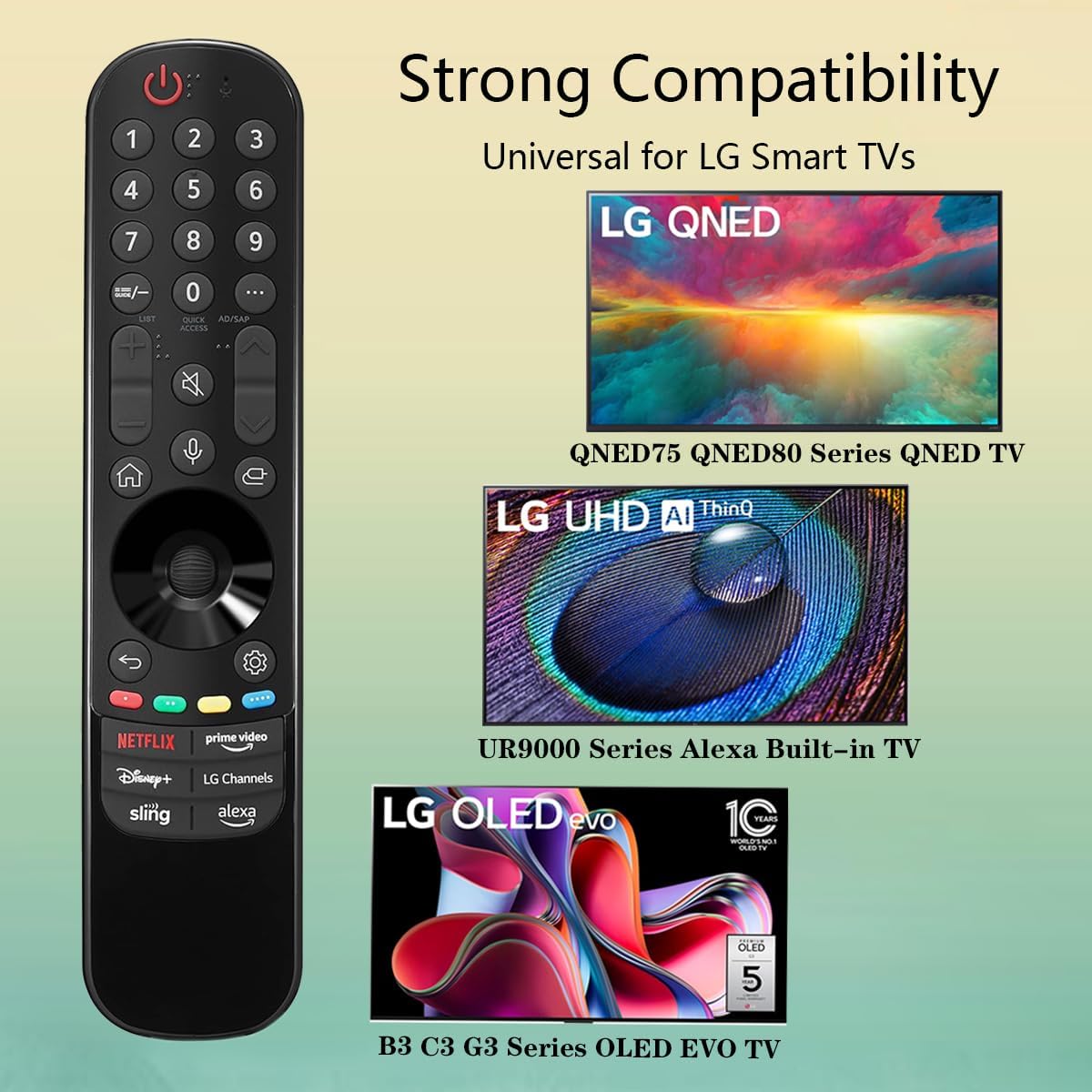
Figure 5: Strong Compatibility with LG Smart TVs
This image visually represents the broad compatibility of the remote control, showing it works with LG QNED (QNED75, QNED80 Series), LG UHD AI ThinQ (UR9000 Series Alexa Built-in TV), and LG OLED evo (B3, C3, G3 Series OLED EVO TV).
6.2. Awọn iṣẹ ipilẹ
Point the remote control directly at your LG Smart TV. Press the desired buttons to control your television. Functions include:
- Bọtini agbara: Tan TV si tan tabi paa.
- Paadi Nọmba: Fun titẹ sii ikanni taara.
- Iwọn didun Soke/Isalẹ: Ṣe atunṣe iwọn didun TV.
- Ikanni Soke/Isalẹ: Ayipada TV awọn ikanni.
- Awọn bọtini lilọ kiri (Soke, Isalẹ, Osi, Ọtun, O DARA): Fun lilọ kiri akojọ aṣayan ati yiyan.
- Bọtini Pada: Pada si iboju iṣaaju tabi akojọ aṣayan.
- Bọtini Ile: Accesses the TV's home screen or smart hub.
- Bọ́tìnì Àṣẹ Ohùn: Activates voice control for compatible TVs (requires TV to support voice features).
- Awọn bọtini Ọna abuja: Directly launch Netflix, Prime Video, Disney+, LG Channels, Sling, and Alexa.
7. Itọju
7.1. Nu Iṣakoso Latọna jijin mọ
To clean the remote control, use a soft, dry cloth. Do not use liquid cleaners, sprays, or abrasive materials, as these may damage the remote's surface or internal components.
7.2. Batiri Rirọpo
If the remote control's response becomes sluggish or it stops functioning, the batteries may need to be replaced. Refer to Section 5.1 for instructions on installing new batteries.
8. Laasigbotitusita
- Latọna jijin ko dahun:
- Ensure batteries are inserted correctly with correct polarity (+/-).
- Rọpo awọn batiri atijọ pẹlu awọn batiri AAA tuntun.
- Make sure there are no obstructions between the remote and the TV's IR receiver.
- Rii daju pe isakoṣo latọna jijin ti tọka taara ni TV.
- Àṣẹ ohùn kò ṣiṣẹ́:
- Verify that your LG Smart TV model supports voice control features.
- Ensure the TV's internet connection is stable, as voice commands often require online processing.
- Awọn bọtini kan pato ko ṣiṣẹ:
- Check for any physical damage or debris under the button.
- If only certain shortcut buttons are not working, ensure your TV's software is up to date and the corresponding apps are installed and functional.
9. Awọn pato
| Iwa | Ẹ̀kúnrẹ́rẹ́ |
|---|---|
| Nọmba awoṣe | MR23GA |
| Brand | GHUST |
| Ọja Mefa | 7.3 x 1.6 x 1.2 inches |
| Iwọn Nkan | 2.29 iwon |
| Awọn batiri ti a beere | 2 x AAA (ko si) |
| Àwọ̀ | Dudu |
| Pataki Ẹya | Wiwa ohun |
| Awọn ẹrọ ibaramu | Television (Specific LG Smart TV models) |

olusin 6: Latọna Iṣakoso Mefa
This image provides a visual representation of the remote control's dimensions, showing its length as 7.3 inches, width as 1.6 inches, and thickness as 1.2 inches.
10. Atilẹyin ọja ati Support
For any questions regarding the quality of our products or for technical assistance, please contact GHUST customer service. We are committed to resolving any issues promptly to ensure your satisfaction.
Jọwọ tọka si iwe rira rẹ fun awọn ofin atilẹyin ọja kan pato ati alaye olubasọrọ.


